Web App: When copying a route, all detail is lost.
-

A suggested improvement for thr MRA Routeplanner App.
When copying a route the name of the imported point loses the street/village-name which is replaced by "Routepoint". Also other data from the original routepoints are missing.On importing/copying a route do the following:
- Insert the source-point at the GPS location in the new route.
- Call the functionality which gets te street/village-name from te gps location (Already available when moving a point).
- If the imported name of the source-point (which could be changed in the source route into f.i. "Sinderellas Castle view") is different from the found street/village-name, then overwrite the street/village-name with the imported text "Sinderellas Castle view".
- Also copy alle the other detailed data (which is in the points submenu) like the text , the notes, pause time, ferry etc etc. to the new route.
Now you have a full copy instead of a new 'empty route'.
I am enjoying this, it's nice to contribute to MRA. Happy customer!
-
 Corjan Meijerink moved this topic from [App-Beta] Suggestions and Discussions on
-
A suggested improvement for thr MRA Routeplanner App.
When copying a route the name of the imported point loses the street/village-name which is replaced by "Routepoint". Also other data from the original routepoints are missing.On importing/copying a route do the following:
- Insert the source-point at the GPS location in the new route.
- Call the functionality which gets te street/village-name from te gps location (Already available when moving a point).
- If the imported name of the source-point (which could be changed in the source route into f.i. "Sinderellas Castle view") is different from the found street/village-name, then overwrite the street/village-name with the imported text "Sinderellas Castle view".
- Also copy alle the other detailed data (which is in the points submenu) like the text , the notes, pause time, ferry etc etc. to the new route.
Now you have a full copy instead of a new 'empty route'.
I am enjoying this, it's nice to contribute to MRA. Happy customer!

@Gerard-Wullink
I cannot reproduce this.
When I copy a route, the original information is included in the copy.
Maybe I misunderstand.
do you want to indicate how you copy a route? -
@Gerard-Wullink
I cannot reproduce this.
When I copy a route, the original information is included in the copy.
Maybe I misunderstand.
do you want to indicate how you copy a route?
@Jack-van-Tilburg hallo Jack. Sorry for the late response.
Good news! It is fixed. Mentioned it earlier in an app issue. I think it was handled that way. Nice!
Thanks, Gerard. -
@Gerard-Wullink
I cannot reproduce this.
When I copy a route, the original information is included in the copy.
Maybe I misunderstand.
do you want to indicate how you copy a route?
@Jack-van-Tilburg Hello Jack, I have to come back on my earlier post. I did not discribe the problem in an exact way. Indeed when COPYING a ROUTE everything is fine.
This improvement is for the WebApplication Routeplanner.
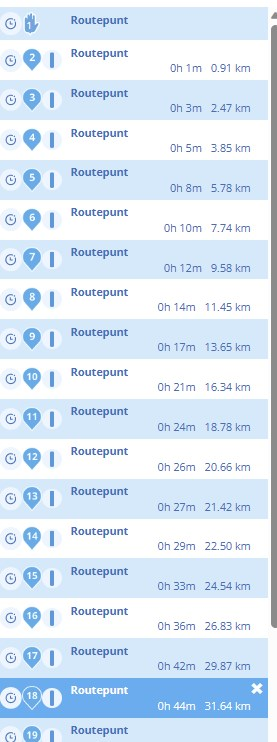
After IMPORTING a gpx (ROUTE-TRACK) and using the button "Edit Route-Track" al the points which are placed on the route are called ROUTEPOINT. Now you would have to shift every single routepoint a bit to get the street and village names.
This seems unnecessary, because after placing the point on the route one could call the code which is already available behind the trigger "After-shifting-routepoint".
-
@Jack-van-Tilburg Hello Jack, I have to come back on my earlier post. I did not discribe the problem in an exact way. Indeed when COPYING a ROUTE everything is fine.
This improvement is for the WebApplication Routeplanner.
After IMPORTING a gpx (ROUTE-TRACK) and using the button "Edit Route-Track" al the points which are placed on the route are called ROUTEPOINT. Now you would have to shift every single routepoint a bit to get the street and village names.
This seems unnecessary, because after placing the point on the route one could call the code which is already available behind the trigger "After-shifting-routepoint".
@Gerard-Wullink said in Web App: When copying a route, all detail is lost.:
This seems unnecessary, because after placing the point on the route one could call the code which is already available behind the trigger "After-shifting-routepoint".
The data of a route track only contains coördinates.
So if you copy that track you don't get any information of the waypoint until you link that point to the map by shifting the position. -
@Gerard-Wullink said in Web App: When copying a route, all detail is lost.:
This seems unnecessary, because after placing the point on the route one could call the code which is already available behind the trigger "After-shifting-routepoint".
The data of a route track only contains coördinates.
So if you copy that track you don't get any information of the waypoint until you link that point to the map by shifting the position.
@Jack-van-Tilburg interestingly. This appears to be exactly what the BMW connected app DOES do. If you look to my recent post you’ll see it takes the Way/Via points of the MRA gpx output and applies those coordinates to its map data (TomTom) and lifts the ‘default’ name for those coordinates. Of course it means you have to use the same maps (TomTom in this case) and I guess the map versions could be out of sync but most should match. It’s a great feature between MRA and BMW Connected for sure as you at least have some visible waypoints on the vehicles TFT to work with
-
@Gerard-Wullink said in Web App: When copying a route, all detail is lost.:
This seems unnecessary, because after placing the point on the route one could call the code which is already available behind the trigger "After-shifting-routepoint".
The data of a route track only contains coördinates.
So if you copy that track you don't get any information of the waypoint until you link that point to the map by shifting the position.
@Jack-van-Tilburg I am not clear enough.
Lets put it in another way: Importing a gpx wil give you nothing but the coordinates, that is correct, that is a track (assuming the gpx is track only...). In most cases a gpx is the start of creating a route.
We see this: A start (1st GPS point), a line and the end (the last gps point in the gpx).Now we press the Edit/use as route button:

What MRA now does is convert the track to a route by placing shaping-points on the track. These are nor the same gps-points as in the track nor are this the same number of points.From thios moment on we are in a Route, so we have routepoints. These are all calle Routepunt, as shown in the previous post.
My point is this: why do these inserted points have no street and cityname instead of only "Routepunt".
If MRA places them, then MRA could find the street and city name by the GPS-coordinates this point has, just like when you place them by hand.This is how this Routepoints all look; empty!
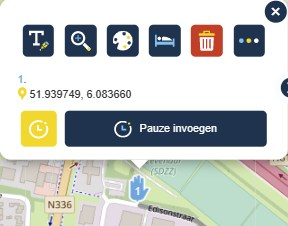
I would have expected this (the result after moving the point a bit):
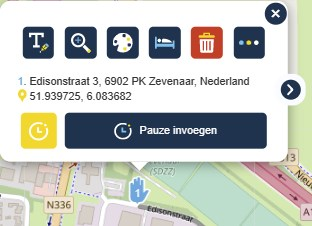
Could this be automated instead of schifting each and ervery point by hand?
Greetz! Gerard
-
@Gerard-Wullink and @Nick-Hodge
I really do read what you mean.
I understand the technique and the reason why the waypoints are not renamed.
This also works so in BaseCamp.
However, I don't have enough technical knowledge to explain it. I dare not venture into that
Could this be automated instead of sifting each and ervery point by hand?
So that's a good question for example @Corjan-Meijerink
-
@Gerard-Wullink and @Nick-Hodge
I really do read what you mean.
I understand the technique and the reason why the waypoints are not renamed.
This also works so in BaseCamp.
However, I don't have enough technical knowledge to explain it. I dare not venture into thatCould this be automated instead of sifting each and ervery point by hand?
So that's a good question for example @Corjan-Meijerink
@Jack-van-Tilburg Thanks Jack, I oncorrectly assumed you had the knowledge. Excuse me for that. I will wait for a response. Thank you!
-
@Jack-van-Tilburg Thanks Jack, I oncorrectly assumed you had the knowledge. Excuse me for that. I will wait for a response. Thank you!
@Gerard-Wullink
Your assumption was correct. I know how it works. But I also know I can't explain it. I'm not technical enough for that.
(I was an IT Manager not a techie
 )
) -
@Gerard-Wullink
Your assumption was correct. I know how it works. But I also know I can't explain it. I'm not technical enough for that.
(I was an IT Manager not a techie )
@Jack-van-Tilburg I am in between, software consultant with analitical skillset. Thanks again.
-
@Jack-van-Tilburg I am in between, software consultant with analitical skillset. Thanks again.
@Corjan-Meijerink: Hello Corjan, Could you have a look at this issue with no-streetname-routepoints when importing a gpx-file in the MRA-routeplanner web application?
-
@Corjan-Meijerink: Hello Corjan, Could you have a look at this issue with no-streetname-routepoints when importing a gpx-file in the MRA-routeplanner web application?
@Corjan-Meijerink Hetzelfde probleem zit ook bij het maken van een scenic rondrit/route.
Hello! It looks like you're interested in this conversation, but you don't have an account yet.
Getting fed up of having to scroll through the same posts each visit? When you register for an account, you'll always come back to exactly where you were before, and choose to be notified of new replies (either via email, or push notification). You'll also be able to save bookmarks and upvote posts to show your appreciation to other community members.
With your input, this post could be even better 💗
Register Login-
 01465
01465
-
01339
-
013109
-
112103
-
 0920
0920
-
0841
-
 0988
0988
-
 0718
0718