Skip to content
  • Categories
  • Recent
  • Popular
  • Support
  • MyRoute-app
Collapse
Brand Logo

MRA Community Forum

  1. Home
  2. General Discussion
  3. Adding offroad sections to a road map route

Adding offroad sections to a road map route

Scheduled Pinned Locked Moved General Discussion
3 Posts 2 Posters 872 Views 1 Watching
  • Oldest to Newest
  • Newest to Oldest
  • Most Votes
Reply
  • Reply as topic
Log in to reply
This topic has been deleted. Only users with topic management privileges can see it.
  • Michael Doherty 0
    Michael Doherty 0
    Michael Doherty 0
    wrote on last edited by
    #1

    Is it possible to ad an offroad section on a road map planned route? I am trying to plan a route through a State Forest. I know for a fact that the road i want is open for motorcycle travel, however MRA planner is trying to route me around. Also there is a bridge that was closed for a year, but is now re-opened. MRA is still trying to route me around. If the offroad feature could be used between waypoints it would make dealing with these situations much easier. Am i just not using the offroad feature correctly? Thanks, MD

    HABVEN aka MrMRA 1 Reply Last reply
    0
    • Michael Doherty 0 Michael Doherty 0

      Is it possible to ad an offroad section on a road map planned route? I am trying to plan a route through a State Forest. I know for a fact that the road i want is open for motorcycle travel, however MRA planner is trying to route me around. Also there is a bridge that was closed for a year, but is now re-opened. MRA is still trying to route me around. If the offroad feature could be used between waypoints it would make dealing with these situations much easier. Am i just not using the offroad feature correctly? Thanks, MD

      HABVEN aka MrMRA
      HABVEN aka MrMRA
      HABVEN aka MrMRA
      Valued contributor
      wrote on last edited by
      #2

      @Michael-Doherty-0

      Hello Michael,

      Yes, that is possible, place 2 waypoints, at the beginning and at the end of the road, click on the waypoint you want to drive to and click on the 3 points to expand the waypoint menu. Then click on the "skip" icon (This is not possible with the last route point, so make sure that there is another point after the point you want to skip.)
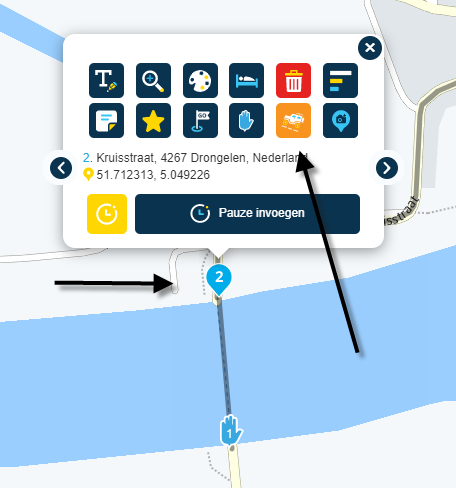
      6e3c0b23-8231-419e-b0bd-d6b08edff590-image.png

      BMW BMW Connected Ride Navigator/Garmin Zumo XT3/XT2/XT//Tourstart/ MyRouteapp (The App)/...
      Een dag niet gelachen is een dag niet geleefd / Een route is net zo goed als deze uitgezet is.

      Michael Doherty 0 1 Reply Last reply
      0
      • HABVEN aka MrMRA HABVEN aka MrMRA

        @Michael-Doherty-0

        Hello Michael,

        Yes, that is possible, place 2 waypoints, at the beginning and at the end of the road, click on the waypoint you want to drive to and click on the 3 points to expand the waypoint menu. Then click on the "skip" icon (This is not possible with the last route point, so make sure that there is another point after the point you want to skip.)

        6e3c0b23-8231-419e-b0bd-d6b08edff590-image.png

        Michael Doherty 0
        Michael Doherty 0
        Michael Doherty 0
        wrote on last edited by
        #3

        @Hans-van-de-Ven-MRA-Master Thank you for your reply. I will try this out.

        1 Reply Last reply
        0

        Hello! It looks like you're interested in this conversation, but you don't have an account yet.

        Getting fed up of having to scroll through the same posts each visit? When you register for an account, you'll always come back to exactly where you were before, and choose to be notified of new replies (either via email, or push notification). You'll also be able to save bookmarks and upvote posts to show your appreciation to other community members.

        With your input, this post could be even better 💗

        Register Login
        Reply
        • Reply as topic
        Log in to reply
        • Oldest to Newest
        • Newest to Oldest
        • Most Votes


        ACTIVE USERS
        HABVEN aka MrMRA
        HABVEN aka MrMRA
        Michael Doherty 0
        Michael Doherty 0
        POPULAR TOPICS
        • Voice commands cut off or become very quiet halfway through
          Kevin Bird
          Kevin Bird
          0
          12
          121

        • Updated beta! 6.0.0 (526) - An absolute masterpiece
          Corjan Meijerink
          Corjan Meijerink
          13
          20
          186

        • Statement on map spinning
          LennyO
          LennyO
          17
          36
          3.5k

        • F02 MRA 6.0.0 (526) Selection - back to the app
          Hubert Thoring
          Hubert Thoring
          0
          6
          29

        • Change route color
          Lluis Arasanz
          Lluis Arasanz
          0
          6
          40

        • wat is het verschil tussen het initial scherm en Free Ride in Android Auto
          Corjan Meijerink
          Corjan Meijerink
          0
          5
          52

        • MRA 6.0.0 (526) - Remotek One Functions and Big Buttons on iPhone with CarPlay
          Hubert Thoring
          Hubert Thoring
          0
          5
          20

        • First time version 6 and AA
          Marinus van Deudekom
          Marinus van Deudekom
          0
          5
          136

        MY GROUPS
        • Login

        • Login or register to search.
        • First post
          Last post
        0
        • Categories
        • Recent
        • Popular
        • Support
        • MyRoute-app