Skip to content
  • Categories
  • Recent
  • Popular
  • Support
  • MyRoute-app
Collapse
Brand Logo

MRA Community Forum

  1. Home
  2. Routes & Tracks
  3. How to?: See multiple "Route-Tracks" in a single "Route-Track" overview

How to?: See multiple "Route-Tracks" in a single "Route-Track" overview

Scheduled Pinned Locked Moved Routes & Tracks
11 Posts 7 Posters 3.0k Views 3 Watching
  • Oldest to Newest
  • Newest to Oldest
  • Most Votes
Reply
  • Reply as topic
Log in to reply
This topic has been deleted. Only users with topic management privileges can see it.
  • KME Offline
    KME Offline
    KME
    wrote on last edited by
    #1

    Hi MRA forum,

    Enjoying MRA Gold for quite some time now and this is my first post out here.

    My question:
    How can I create an overview in MRA that contains multiple Tracks?

    Context:
    Through time i'm creating and collecting all kinds of Tracks. These Tracks only contain the absolute highlights I want to drive (mostly offroad sections). When planning for the trip, I'm trying to figure out a nice yet efficient itinerary to visit those seperate Tracks. Therefore, It would be great to have all Tracks available in one map overview.
    I know I can show all those seperate Tracks on my Garmin Zumo but that's a clumsy device to play around in for trip planning... it is slow and lacks a lot of the handy MRA Gold features (e.g. Streetview and the various map layers etc.)

    Any tips are welcome.
    Regards, Korneel

    Steve Jarrell PAD 0 Hans van de Ven MR.MRA 3 Replies Last reply
    1
    • KME KME deleted this topic on
    • KME KME restored this topic on
    • KME KME

      Hi MRA forum,

      Enjoying MRA Gold for quite some time now and this is my first post out here.

      My question:
      How can I create an overview in MRA that contains multiple Tracks?

      Context:
      Through time i'm creating and collecting all kinds of Tracks. These Tracks only contain the absolute highlights I want to drive (mostly offroad sections). When planning for the trip, I'm trying to figure out a nice yet efficient itinerary to visit those seperate Tracks. Therefore, It would be great to have all Tracks available in one map overview.
      I know I can show all those seperate Tracks on my Garmin Zumo but that's a clumsy device to play around in for trip planning... it is slow and lacks a lot of the handy MRA Gold features (e.g. Streetview and the various map layers etc.)

      Any tips are welcome.
      Regards, Korneel

      Steve Jarrell Offline
      Steve Jarrell Offline
      Steve Jarrell
      Valued contributor
      wrote on last edited by
      #2

      @kme Take a look at this thread for a few ideas.

      Steve

      Steve Jarrell
      Western North Carolina US

      Lifetime Routeplanner Gold & Navigation Next
      2025 BMW R1300GS
      2025 Can-Am Spyder
      DMD T865-X 8" Tablet
      Garmin XT3

      1 Reply Last reply
      1
      • KME KME

        Hi MRA forum,

        Enjoying MRA Gold for quite some time now and this is my first post out here.

        My question:
        How can I create an overview in MRA that contains multiple Tracks?

        Context:
        Through time i'm creating and collecting all kinds of Tracks. These Tracks only contain the absolute highlights I want to drive (mostly offroad sections). When planning for the trip, I'm trying to figure out a nice yet efficient itinerary to visit those seperate Tracks. Therefore, It would be great to have all Tracks available in one map overview.
        I know I can show all those seperate Tracks on my Garmin Zumo but that's a clumsy device to play around in for trip planning... it is slow and lacks a lot of the handy MRA Gold features (e.g. Streetview and the various map layers etc.)

        Any tips are welcome.
        Regards, Korneel

        PAD 0 Offline
        PAD 0 Offline
        PAD 0
        wrote on last edited by PAD 0
        #3

        @kme As it’s currently not possible to view multiple routes and tracks in Routeplanner, how about using the strengths of different platforms?

        Assuming you have access to a PC or laptop and have/can install Garmin BaseCamp, you could use the PC/laptop to transfer the tracks from Routeplanner to a folder in BaseCamp, or install your tracks from Routeplanner onto your Garmin using Connector and view them in Basecamp - they could also be copied to BaseCamp from there, or you could save them in Routeplanner and email them to yourself for installation in BaseCamp.

        With all viewed in BaseCamp, you could then plan an efficient itinerary linking your tracks and export the result back into Routeplanner, refine it using the inbuilt street view feature etc and enjoy the great convenience of being able do this while viewing on your mobile devices.

        1 Reply Last reply
        0
        • Con Hennekens Offline
          Con Hennekens Offline
          Con Hennekens
          Alpha tester
          wrote on last edited by
          #4

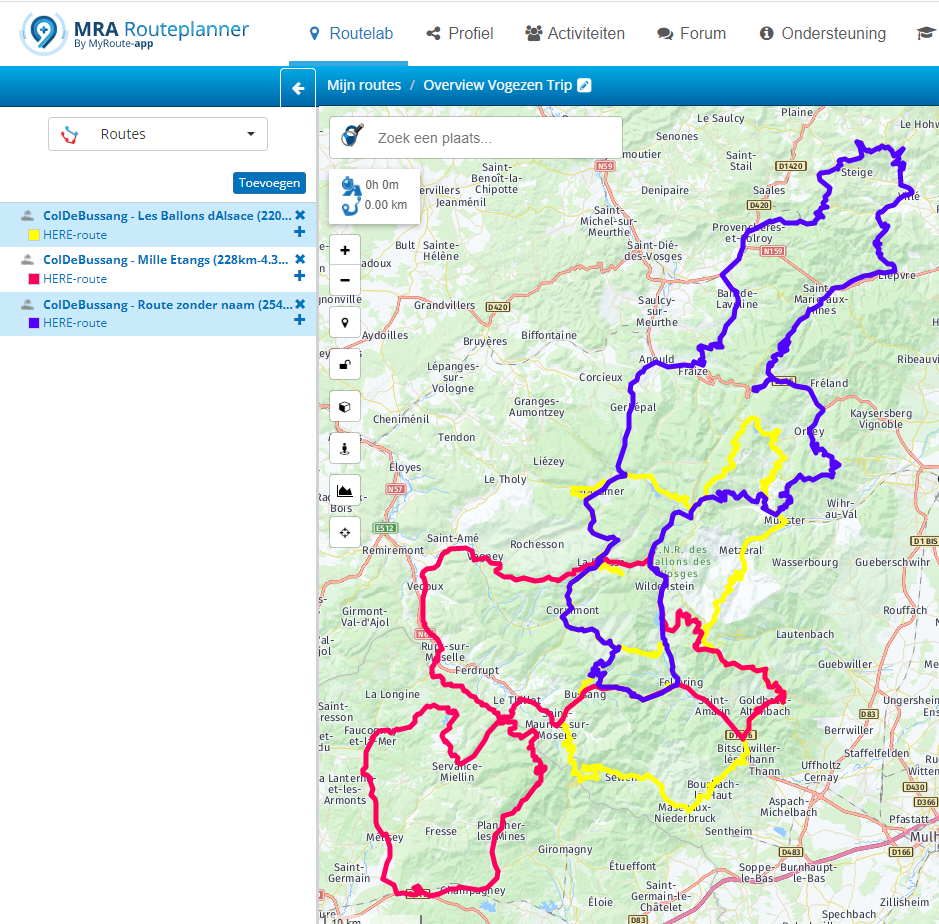
          I usually open a new route and add the segments I want into it like this:
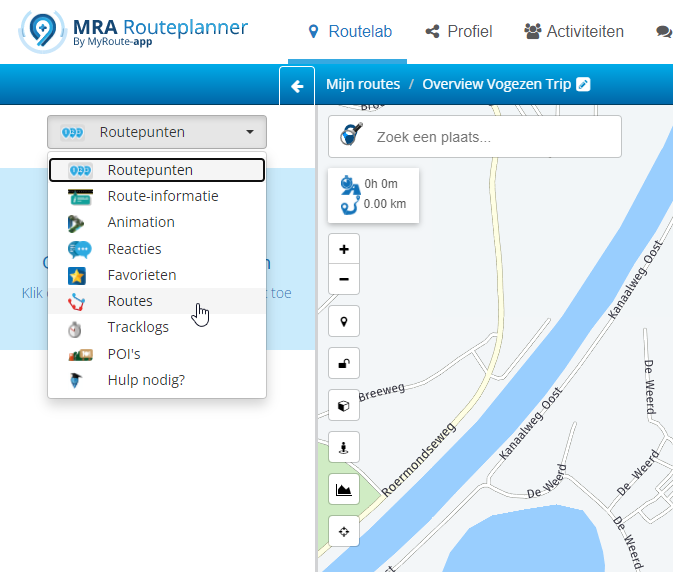
          5e252473-0e11-45c3-9552-95ca0976f1ac-image.png

          60a3723e-810b-41e8-8800-26ed0aea9c94-image.png

          Then screenshot it and print it on paper or to a PDF writer. Only restriction is that added routes do not get saved to the new route. But I use these only to have some visualization of our trip.

          I am just an enthusiastic MRA user, and hope you will be one too!

          Most motorcycle problems are caused by the nut that connects the handlebar to the saddle.

          Check out RideSleepRepeat.eu, a biker community for sharing stays across Europe

          Nick Carthew 1 Reply Last reply
          1
          • Con Hennekens Con Hennekens

            I usually open a new route and add the segments I want into it like this:
            5e252473-0e11-45c3-9552-95ca0976f1ac-image.png

            60a3723e-810b-41e8-8800-26ed0aea9c94-image.png

            Then screenshot it and print it on paper or to a PDF writer. Only restriction is that added routes do not get saved to the new route. But I use these only to have some visualization of our trip.

            Nick Carthew Offline
            Nick Carthew Offline
            Nick Carthew
            RouteXpert
            wrote on last edited by
            #5

            @con-hennekens Clicking on the + button after choosing a route will add that route to the existing route.

            Always willing to help if I can.
            Triumph Tiger 1200 XRT called Tina.
            MRA Navigation Next and SilverFox BJ8

            Con Hennekens 1 Reply Last reply
            0
            • Nick Carthew Nick Carthew

              @con-hennekens Clicking on the + button after choosing a route will add that route to the existing route.

              Con Hennekens Offline
              Con Hennekens Offline
              Con Hennekens
              Alpha tester
              wrote on last edited by
              #6

              @nick-carthew, Yes, but that makes one route of all the segments, and that is not what TS wants. It would ruin the overwiew of the daytrips.

              I am just an enthusiastic MRA user, and hope you will be one too!

              Most motorcycle problems are caused by the nut that connects the handlebar to the saddle.

              Check out RideSleepRepeat.eu, a biker community for sharing stays across Europe

              Nick Carthew 1 Reply Last reply
              0
              • Con Hennekens Con Hennekens

                @nick-carthew, Yes, but that makes one route of all the segments, and that is not what TS wants. It would ruin the overwiew of the daytrips.

                Nick Carthew Offline
                Nick Carthew Offline
                Nick Carthew
                RouteXpert
                wrote on last edited by
                #7

                @con-hennekens I was referring to this sentence in your post above: " Only restriction is that added routes do not get saved to the new route."

                Always willing to help if I can.
                Triumph Tiger 1200 XRT called Tina.
                MRA Navigation Next and SilverFox BJ8

                Con Hennekens 1 Reply Last reply
                0
                • Nick Carthew Nick Carthew

                  @con-hennekens I was referring to this sentence in your post above: " Only restriction is that added routes do not get saved to the new route."

                  Con Hennekens Offline
                  Con Hennekens Offline
                  Con Hennekens
                  Alpha tester
                  wrote on last edited by
                  #8

                  @nick-carthew, I understand, but the benefit of having them NOT integrated in an actual route, is that you can give them separate colors to show an overview of a multi-day trip. However saving the (pseudo)route does not save the settings of the added routes. No problem for me, but could be a nice feature for some.

                  I am just an enthusiastic MRA user, and hope you will be one too!

                  Most motorcycle problems are caused by the nut that connects the handlebar to the saddle.

                  Check out RideSleepRepeat.eu, a biker community for sharing stays across Europe

                  1 Reply Last reply
                  1
                  • KME Offline
                    KME Offline
                    KME
                    wrote on last edited by
                    #9

                    Thank for the feedback y'all. Will work my way around it.

                    1 Reply Last reply
                    0
                    • Oscar Perez Lopez Offline
                      Oscar Perez Lopez Offline
                      Oscar Perez Lopez
                      wrote on last edited by
                      #10

                      Great info, i also was looking for it, good

                      1 Reply Last reply
                      0
                      • KME KME

                        Hi MRA forum,

                        Enjoying MRA Gold for quite some time now and this is my first post out here.

                        My question:
                        How can I create an overview in MRA that contains multiple Tracks?

                        Context:
                        Through time i'm creating and collecting all kinds of Tracks. These Tracks only contain the absolute highlights I want to drive (mostly offroad sections). When planning for the trip, I'm trying to figure out a nice yet efficient itinerary to visit those seperate Tracks. Therefore, It would be great to have all Tracks available in one map overview.
                        I know I can show all those seperate Tracks on my Garmin Zumo but that's a clumsy device to play around in for trip planning... it is slow and lacks a lot of the handy MRA Gold features (e.g. Streetview and the various map layers etc.)

                        Any tips are welcome.
                        Regards, Korneel

                        Hans van de Ven MR.MRA Offline
                        Hans van de Ven MR.MRA Offline
                        Hans van de Ven MR.MRA
                        Valued contributor
                        wrote on last edited by
                        #11

                        @kme

                        I use it all the time for holiday routesA21F0418-A412-4958-BC7D-523266DE1BA2.jpeg

                        Garmin Zumo XT3/XT2/XT/BMW Connected Ride Navigator/Tourstart/ MyRouteapp (The App)/...
                        Een dag niet gelachen is een dag niet geleefd / Een route is net zo goed als deze uitgezet is.

                        1 Reply Last reply
                        0

                        Hello! It looks like you're interested in this conversation, but you don't have an account yet.

                        Getting fed up of having to scroll through the same posts each visit? When you register for an account, you'll always come back to exactly where you were before, and choose to be notified of new replies (either via email, or push notification). You'll also be able to save bookmarks and upvote posts to show your appreciation to other community members.

                        With your input, this post could be even better 💗

                        Register Login
                        Reply
                        • Reply as topic
                        Log in to reply
                        • Oldest to Newest
                        • Newest to Oldest
                        • Most Votes


                        ACTIVE USERS
                        Con Hennekens
                        Con Hennekens
                        Nick Carthew
                        Nick Carthew
                        Hans van de Ven MR.MRA
                        Hans van de Ven MR.MRA
                        Steve Jarrell
                        Steve Jarrell
                        Oscar Perez Lopez
                        Oscar Perez Lopez
                        PAD 0
                        PAD 0
                        KME
                        KME
                        POPULAR TOPICS
                        • Vormingspunt, viapunt en Eindpunt op Carplay
                          Marinus van Deudekom
                          Marinus van Deudekom
                          0
                          22
                          406

                        • Upgrading from Zumo XT to XT2
                          Guzzist
                          Guzzist
                          0
                          11
                          101

                        • routepunten overslaan gebeurd niet zoals verwacht
                          Herman Veldhuizen
                          Herman Veldhuizen
                          1
                          12
                          149

                        • Routes en verblijf Zwitserland
                          Huibertus
                          Huibertus
                          0
                          6
                          111

                        • Traffic Aware setting toggle greyed out
                          Stevedo 6 0
                          Stevedo 6 0
                          0
                          8
                          99

                        • Carpuride BMW unit stalling or restarting
                          Sytze van der Laan
                          Sytze van der Laan
                          0
                          11
                          142

                        • Can others follow my progress using MY Route App?
                          Guzzist
                          Guzzist
                          0
                          3
                          29

                        • Audio van Navigatie scheiden van muziek in Android Auto
                          M. Schrijver
                          M. Schrijver
                          1
                          16
                          819

                        MY GROUPS
                        • Login

                        • Login or register to search.
                        • First post
                          Last post
                        0
                        • Categories
                        • Recent
                        • Popular
                        • Support
                        • MyRoute-app