Skip to content
  • Categories
  • Recent
  • Popular
  • Support
  • MyRoute-app
Collapse
Brand Logo

MRA Community Forum

  1. Home
  2. The MyRoute-app
  3. [App] Problems, Bugs and other Issues
  4. No navigation instructions

No navigation instructions
Scheduled Pinned Locked Moved [App] Problems, Bugs and other Issues
6 Posts 4 Posters 129 Views 2 Watching
  • Oldest to Newest
  • Newest to Oldest
  • Most Votes
Reply
  • Reply as topic
Log in to reply
This topic has been deleted. Only users with topic management privileges can see it.
  • Hans-Udo Erdmenger Offline
    Hans-Udo Erdmenger Offline
    Hans-Udo Erdmenger
    wrote last edited by Hans-Udo Erdmenger
    #1

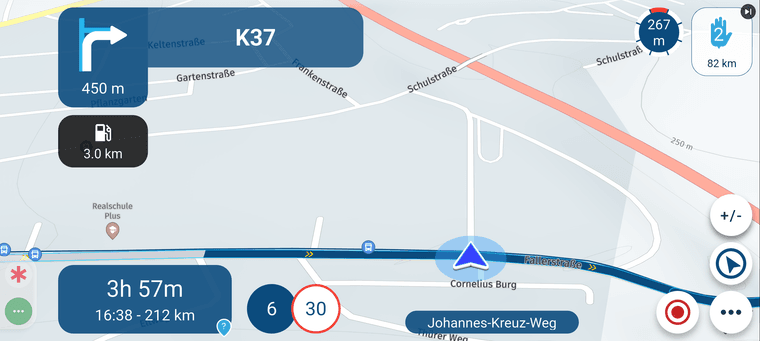
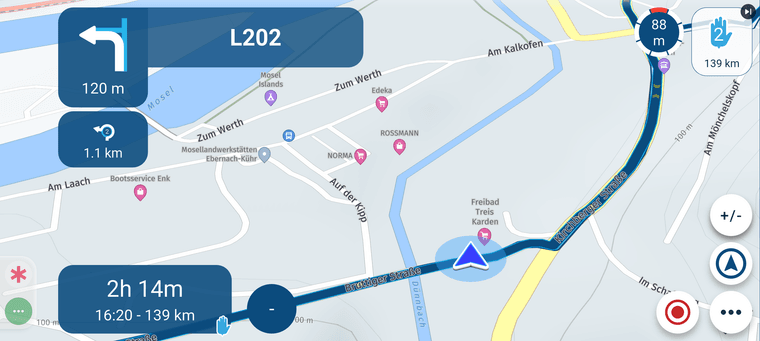
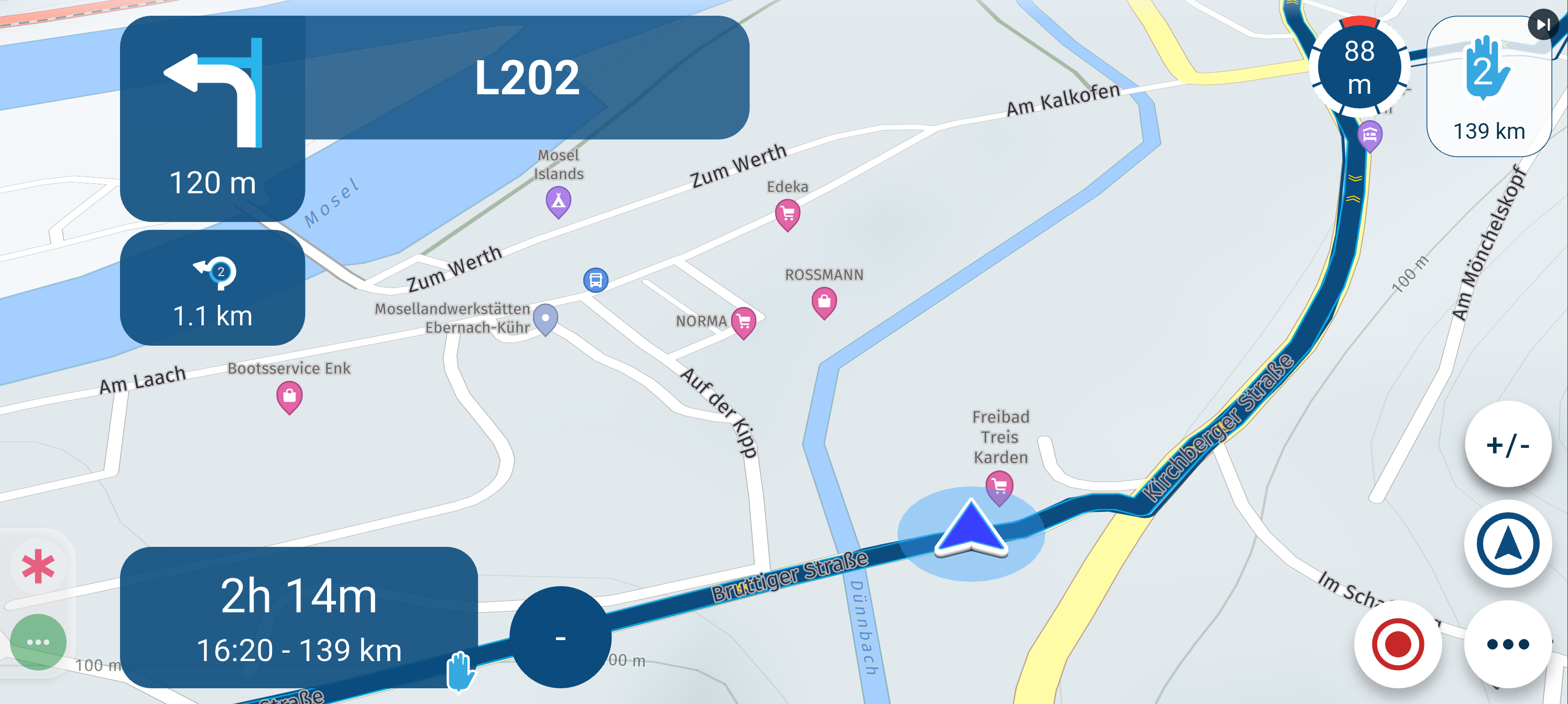
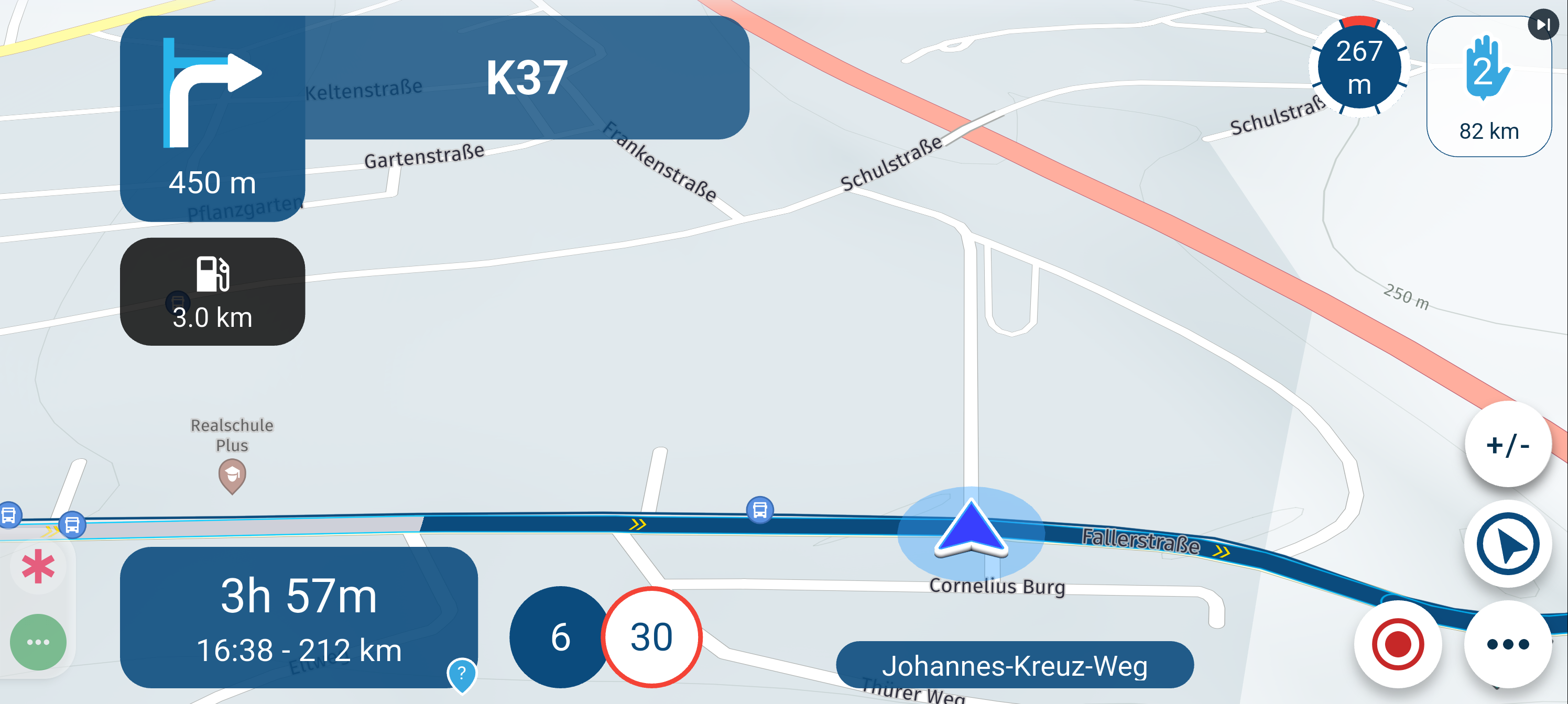
    Screenshot_20260823-133150.png Yesterday, I followed a route I had planned on my PC using MyRouteApp. While driving (using the route as a track), I received no new navigation instructions; the display remained stuck on the initial instruction. After 10 minutes, I stopped and restarted the navigation. I then received a new instruction, but that one also remained fixed on the screen. Later, I closed and restarted the entire app, but that didn't help either; it continued to show only the first instruction. Throughout this, the arrow moved normally along the route.
    After about two hours—three kilometers before my first waypoint—the system recovered, and everything returned to normal.![Screenshot_20260823-133150.png](/assets/uploads/files/17876582Screenshot_20260823-140445.png Screenshot_20260823-140659.png Screenshot_20260825-133923.png Screenshot_20260825-133953.png 75194-screenshot_20260823-133150-resized.png)

    Brian McG 1 Reply Last reply
    0
    • superg Offline
      superg Offline
      superg
      wrote last edited by
      #2

      It's look like ( the location arrow isn't pointing the good direction) there is no good GPS-signal.

      1 Reply Last reply
      0
      • Hans-Udo Erdmenger Hans-Udo Erdmenger

        Screenshot_20260823-133150.png Yesterday, I followed a route I had planned on my PC using MyRouteApp. While driving (using the route as a track), I received no new navigation instructions; the display remained stuck on the initial instruction. After 10 minutes, I stopped and restarted the navigation. I then received a new instruction, but that one also remained fixed on the screen. Later, I closed and restarted the entire app, but that didn't help either; it continued to show only the first instruction. Throughout this, the arrow moved normally along the route.
        After about two hours—three kilometers before my first waypoint—the system recovered, and everything returned to normal.![Screenshot_20260823-133150.png](/assets/uploads/files/17876582Screenshot_20260823-140445.png Screenshot_20260823-140659.png Screenshot_20260825-133923.png Screenshot_20260825-133953.png 75194-screenshot_20260823-133150-resized.png)

        Brian McG Offline
        Brian McG Offline
        Brian McG
        wrote last edited by
        #3

        @Hans-Udo-Erdmenger it almost sounds as if the system is driving this route in the opposite direction - "after 2 hours - 3km before my first waypoint" !
        & the distance shown to point 2 seems to have increased from 82km to 139km

        normally when I ride a route the distance to the next points comes down

        BlackView BV7100, Android 12
        Navigate "Routes as Tracks" in Offline mode with Offline Maps
        No Wifi, no internet, no interruptions, works well

        1 Reply Last reply
        0
        • Hans-Udo Erdmenger Offline
          Hans-Udo Erdmenger Offline
          Hans-Udo Erdmenger
          wrote last edited by
          #4

          @superg but the arrow on the track shows every time correctly the point where i was,

          @brian-mcg MRA increased the distance after I closed and restard the app.

          1 Reply Last reply
          0
          • Travellexxie Offline
            Travellexxie Offline
            Travellexxie
            Valued contributor
            wrote last edited by
            #5

            I am with Brian, you probably missed the first waypoint and MRA is sending you back, but that is the opposite direction. Therefore you see the arrow (that is your actual position coming from GPS) and has nothing to do with the driving direction.

            Met andere apps maak je een route, met MRA componeer je een route!

            Ducati Monster 1200 met Garmin Zümo XT
            Fiat 124 Spider/Camper Dethleffs met Navigation-App op Samsung Tab Active4 Pro
            MRA Lifetime Gold

            1 Reply Last reply
            0
            • Hans-Udo Erdmenger Offline
              Hans-Udo Erdmenger Offline
              Hans-Udo Erdmenger
              wrote last edited by
              #6

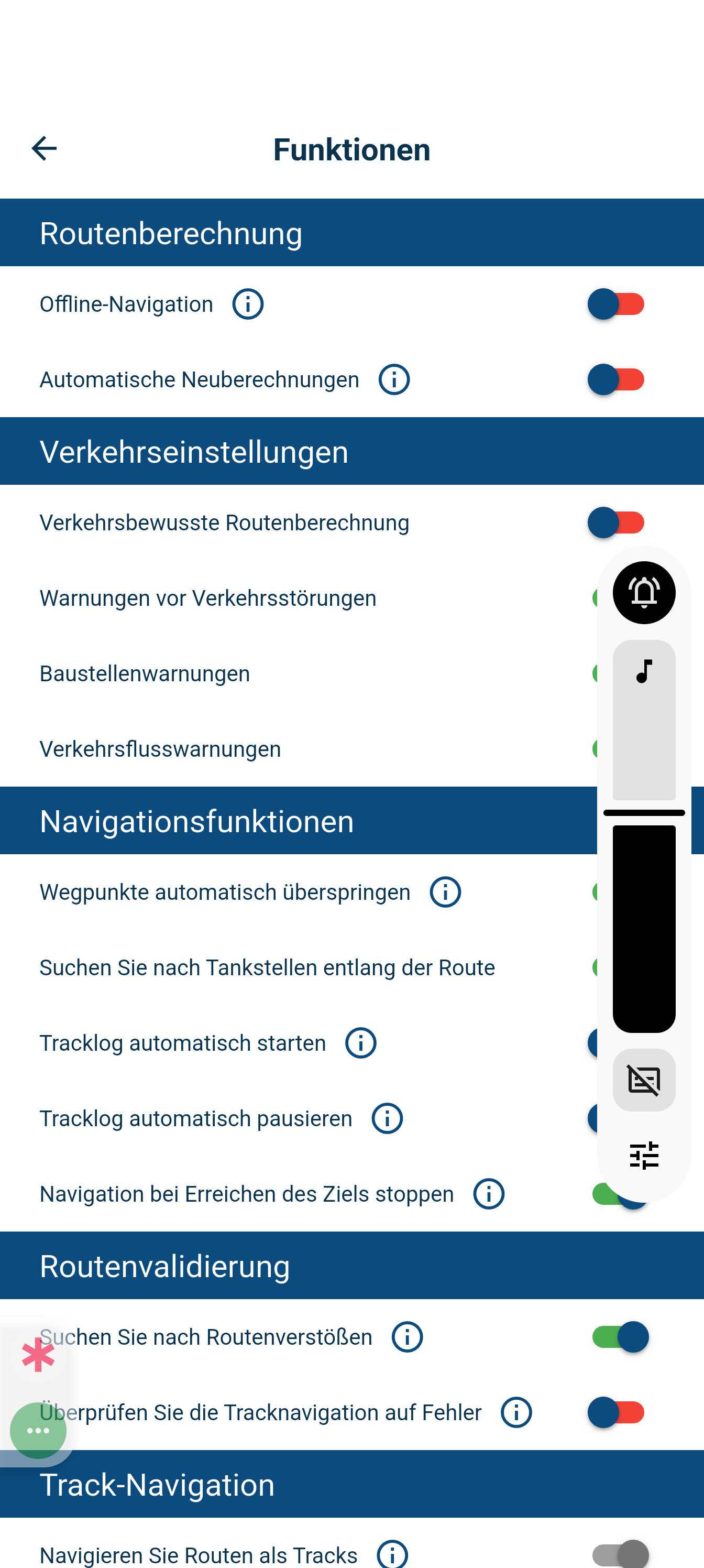
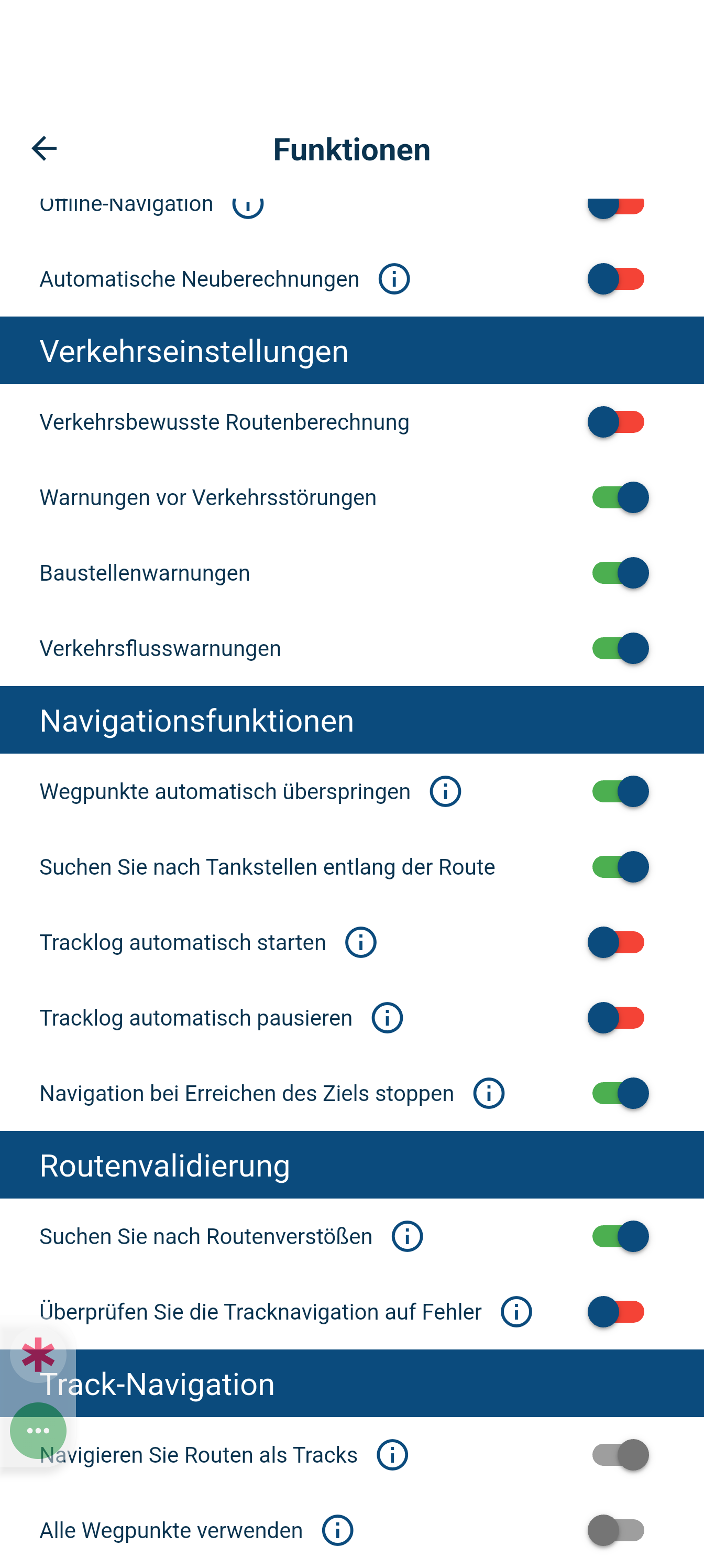
              @travellexxie I switched of automatic recalculation and switched on Automatically skip waypoints

              1 Reply Last reply
              0

              Hello! It looks like you're interested in this conversation, but you don't have an account yet.

              Getting fed up of having to scroll through the same posts each visit? When you register for an account, you'll always come back to exactly where you were before, and choose to be notified of new replies (either via email, or push notification). You'll also be able to save bookmarks and upvote posts to show your appreciation to other community members.

              With your input, this post could be even better 💗

              Register Login
              Reply
              • Reply as topic
              Log in to reply
              • Oldest to Newest
              • Newest to Oldest
              • Most Votes


              ACTIVE USERS
              Hans-Udo Erdmenger
              Hans-Udo Erdmenger
              Travellexxie
              Travellexxie
              Brian McG
              Brian McG
              superg
              superg
              POPULAR TOPICS
              • Offline navigeren
                Marinus van Deudekom
                Marinus van Deudekom
                0
                5
                70

              • No navigation instructions
                Hans-Udo Erdmenger
                Hans-Udo Erdmenger
                0
                6
                129

              • Verkeersinfo uitleg gevraagd
                M. Schrijver
                M. Schrijver
                0
                11
                2.4k

              • Beeld loopt achter
                Marinus van Deudekom
                Marinus van Deudekom
                0
                4
                51

              • How to share route with another member.
                Guzzist
                Guzzist
                0
                10
                179

              • Skipping waypoints for no reason
                Brian McG
                Brian McG
                0
                10
                552

              • Route doesn’t recalculate to my destination
                Peter Zehentreiter
                Peter Zehentreiter
                0
                5
                124

              • One time glitch after lost gps signal
                Herman Veldhuizen
                Herman Veldhuizen
                0
                10
                268

              MY GROUPS
              • Login

              • Login or register to search.
              • First post
                Last post
              0
              • Categories
              • Recent
              • Popular
              • Support
              • MyRoute-app