OSM off-road segment does not work/draw straight line
-

The title already gives away the issue.
Yes, it can be bypassed another way. No, it is not expected behaviour.
With OSM planning we have the option for different segments, these segments allow for somewhat curvy, curvy, very curvy, fastest, off-road and custom. The off-road segment does not work, it should draw a straight line towards the route-point selected and speed up your work by doing it in the left hand menu, but it only calculates the quickest on-road route. Using the (universal) skip function on the route-point itself does work, but it's a lot more work when trying to create an off-road track and needing to go to each individual point to enable the skip function there. It also does not create any harmony and overview.
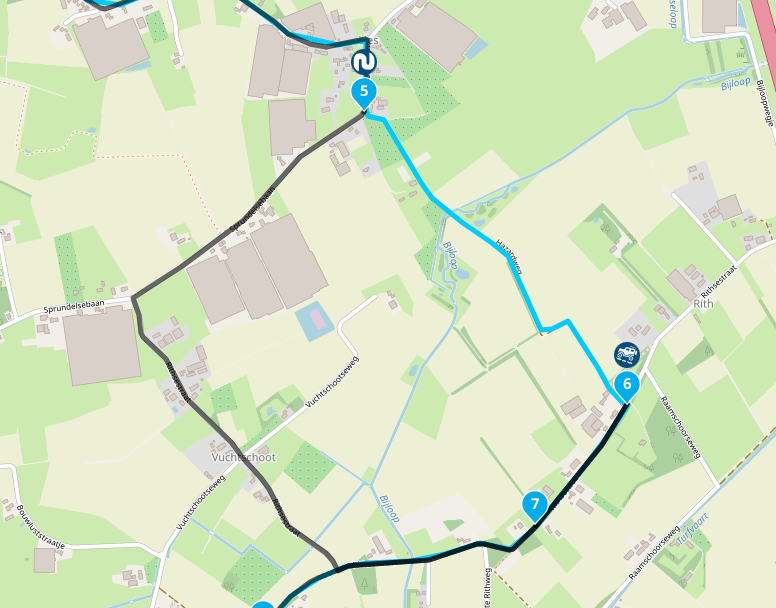
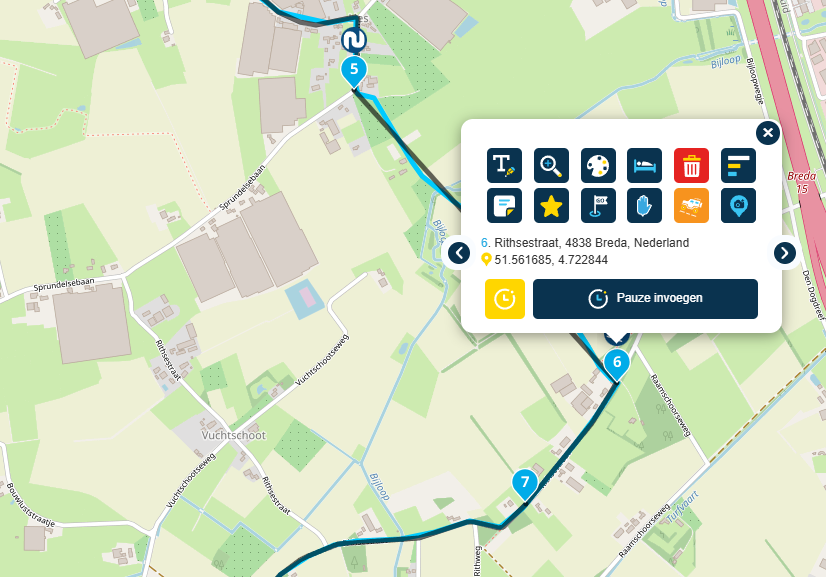
📷: YannickvanVugt | 🏍️: DutchTransalp
-
The title already gives away the issue.
Yes, it can be bypassed another way. No, it is not expected behaviour.
With OSM planning we have the option for different segments, these segments allow for somewhat curvy, curvy, very curvy, fastest, off-road and custom. The off-road segment does not work, it should draw a straight line towards the route-point selected and speed up your work by doing it in the left hand menu, but it only calculates the quickest on-road route. Using the (universal) skip function on the route-point itself does work, but it's a lot more work when trying to create an off-road track and needing to go to each individual point to enable the skip function there. It also does not create any harmony and overview.

@Yannick_van_Vugt ...yes, I can reproduce it: in the segment setup it's not working. Only in the waypoint setup it works.
I was not aware before, because if I plan for offroad, verry often route line is following pathes through the forest. Only sometimes, if the route line will not follow a path, I use the "offroad function" for a waypoint...
Hello! It looks like you're interested in this conversation, but you don't have an account yet.
Getting fed up of having to scroll through the same posts each visit? When you register for an account, you'll always come back to exactly where you were before, and choose to be notified of new replies (either via email, or push notification). You'll also be able to save bookmarks and upvote posts to show your appreciation to other community members.
With your input, this post could be even better 💗
Register Login-
 11289
11289
-
 01144
01144
-
0832
-
 0830
0830
-
 11084
11084
-
21160
-
0828
-
 0739
0739