Mac to Garmin Zumo XT* GPX Transfer
-
Hello Steve, Thank you for this very interesting information and your explanations. I'm also considering buying a Garmin XT2 or XT3 . Currently I use the NAVIGATOR V and a Carpuride W502 BS. But I'm going to change motorcycles (Honda Transalp - no CarPlay like on the Africa Twin). Thanks for the information. I will follow your future updates with interest. Thank you.

@Van-Hammée-Luc You're very welcome. I'm glad that I could help!
-

Very thanks for you reply.
Luc Van Hammée
Belgium -
@steve-jarrell Thank you for this topic. Coincidently, I just bought an XT3 that should arrive today. I'm coming off of the original XT, where I perform manual GPX 1.1 transfers much the same as you describe. I was dreading having to deal with anything Tread/Explore, but your explanations will make the whole setup manageable.
BTW, on Mac, I've been using MacDroid for GPX file transfer to my XT. OpenMTP looks appealing, and I will download it for comparison. Thanks!
-
You're very welcome. I agree about Tread/Explore 100%!! I tried MacDroid and while it does work, I found OpenMTP to be much more straightforward and simple to use for my application, and it's 100% free (although I did send the developer a contribution as it's WELL worth it!).
Please report back and let us know your experience both with the XT3, 1.2 .gpx and OpenMTP!
-

I use Garmin Drive App to wirelessly transfer the routes from MRA to my XT. Never failed yet.
-
There are many differences between the XT,XT2 and XT3. For the XT the Garmin Drive app works flawlessly for transferring routes wirelessly from your phone to the XT. It also works as a hub to connect your phone to weather information, traffic information and "Smart Notifications". But for the love of all that is holy do not connect it or the XT unit to Garmin Explore and sync your routes and tracks as you are in for a world of pain. I've done it a few times to see if its improved.....it hasn't. The XT is also capable of transferring routes via bluetooth to another XT device, a BMW NAV5 and 6 all of the 3XX Zumo's and the Zumo 590 and 595. This was/is handy if transferring routes others basically using any Garmin Zumo that has bluetooth sharing capability. I believe this is more complicated now and files cannot be shared directly from the XT2 or 3 to older Zumo's.
That said if you use MRA for route planning you can share files with old zumo devices using this arrangement (at least in Android I don't know about IOs)
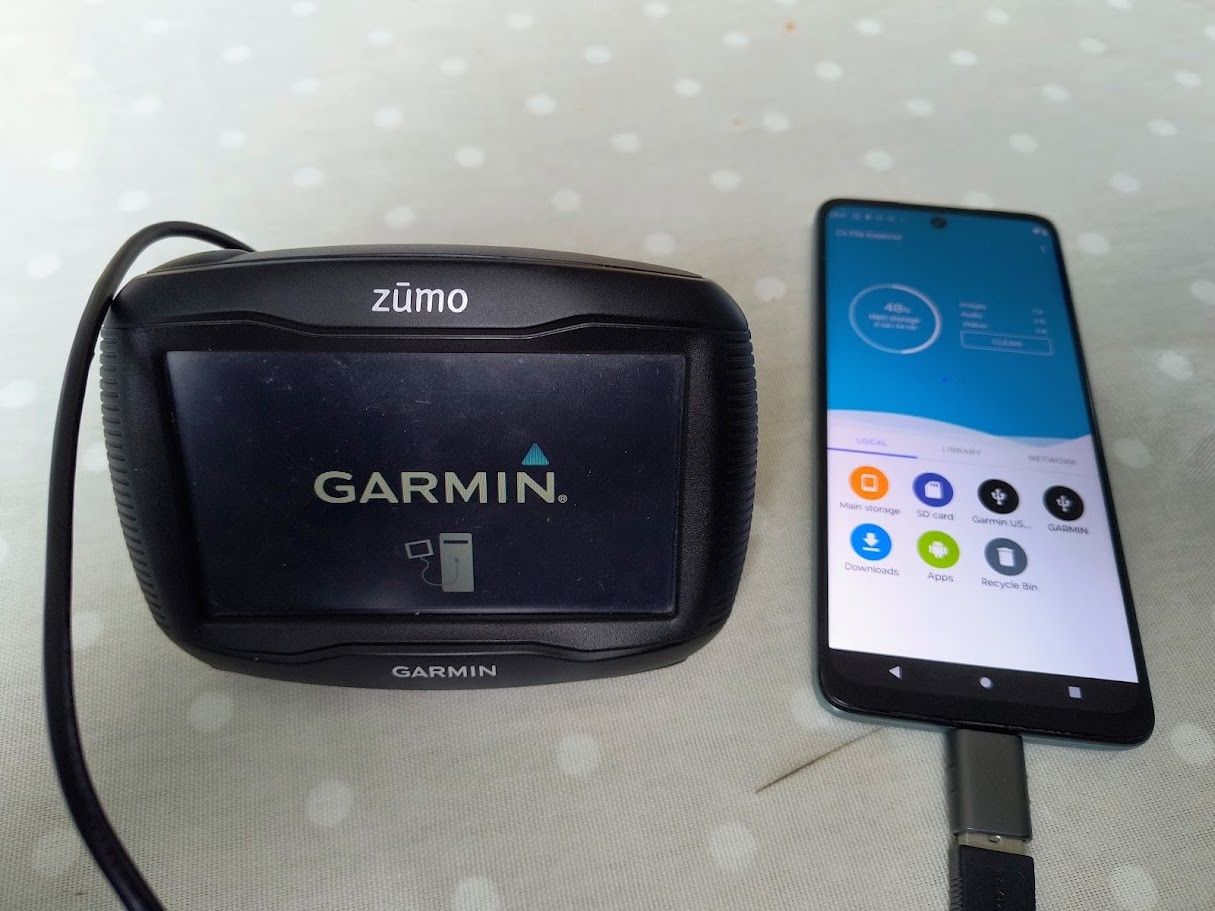
Older Zumo's and any sd card contained therein are seen as a mass storage devices by Android phones you can cable connect the phone to the Zumo (make sure you use a Garmin lead!) and GPX files you download from MRA can be installed directly into the device or SD card.
-
Very good information. I don't have my XT anymore to test with as I gave it to my brother when I got the XT3. I also don't have an Android based phone so those are two major variables.
You have to give it to Garmin though.... they have a way of convoluting things that should be rock solid simple into a frustrating experience in many cases. They also should be applauded for creating one of the world's worst user interfaces with Basecamp IMO :).
-
You're very welcome. I agree about Tread/Explore 100%!! I tried MacDroid and while it does work, I found OpenMTP to be much more straightforward and simple to use for my application, and it's 100% free (although I did send the developer a contribution as it's WELL worth it!).
Please report back and let us know your experience both with the XT3, 1.2 .gpx and OpenMTP!
@Steve-Jarrell Step one compete. I followed your Tread setup instructions, completely avoiding Explore (no bueno on external Storage). I did enable the BT connection from the app to the XT3 for Weather and Traffic. So far, so good.
From my Windows PC, I copied a GPX to the GPX folder on my XT3 SD Card. The XT3 recognized it, and I saved it. I'll do a test run later today.
This XT3 is a different animal from the XT. It's going to take some getting used to, but my feeling is that it's going to be a nice upgrade.
-
@Steve-Jarrell Step one compete. I followed your Tread setup instructions, completely avoiding Explore (no bueno on external Storage). I did enable the BT connection from the app to the XT3 for Weather and Traffic. So far, so good.
From my Windows PC, I copied a GPX to the GPX folder on my XT3 SD Card. The XT3 recognized it, and I saved it. I'll do a test run later today.
This XT3 is a different animal from the XT. It's going to take some getting used to, but my feeling is that it's going to be a nice upgrade.
@John-S-Parry Excellent. Yes, the XT3 is different, but once I got used to it I do like it more than the XT.
Let us know how it goes!
-
If you currently use MRB with PC and transfer your .gpx files to your Garmin XT, XT2 or XT3 via a USB connection, this post probably isn't for you.
The PC and Garmin XTs play nicely together. You just plug the XT into the PC's USB port and the XT is automatically seen as another drive in File Explorer. You can then easily the XT's file structure from File Explorer. I have a PC that I can use if I want to, but I prefer to use my Macbook Pro whenever I possibly can.
Also, if you're happy with whatever method that you use to transfer your .gpx files to your XT (the Drive or Tread app, the MRA connector, Basecamp, osmosis
 or whatever), by all means keep doing what you're doing!
However, for me, I'm old school and I like the speed, reliability and simplicity of manually placing my .gpx files into the XT's /gpx folder, then letting the XT import them when I start it up. I despise Basecamp, Garmin Express is outdated and I keep getting messages that a couple of it's components are not going to be supported in future Mac operating system releases, and I've found the Drive and Tread apps to be very cumbersome.
I also do NOT want my to sync my content back and forth to Garmin's servers. My new XT3 uses the new Tread app instead of the older Drive app. It does have cool features (provides weather and traffic info, makes connecting your headset really easy, etc.), however I found it's file synching with explore.garmin.com to be terribly unreliable, slow and frustrating, even on a very fast WiFi connection.
The issue in connecting the Mac to the XT, according to Garmin's own information (the XTs are on the list that is mentioned), is that, and I quote,
"The following MTP Mode devices are able to connect to Garmin Express
 software on a Mac computer; however, they will not appear as a separate drive and the device's internal files cannot be accessed.
A Windows computer must be used to view the internal contents of these devices. This includes any log files needed for troubleshooting."
This is partially true. If you plug your XT into your Mac the XT will be able go into file transfer mode, however you can't see it from your Mac's Finder screen. There is a very easy, simple, fast, bulletproof and FREE solution though!
There is an app called OpenMTP that can be downloaded here. If you want to make a donation to the developer (which I did) that's totally up to you, however it's not mandatory and there are no nag screens or limited features if you decide not to.
The interface is "simply elegant" with your computer's folders on the left side, and your XT's folders on the right, and you drag files back and forth in either directly. It looks like this:
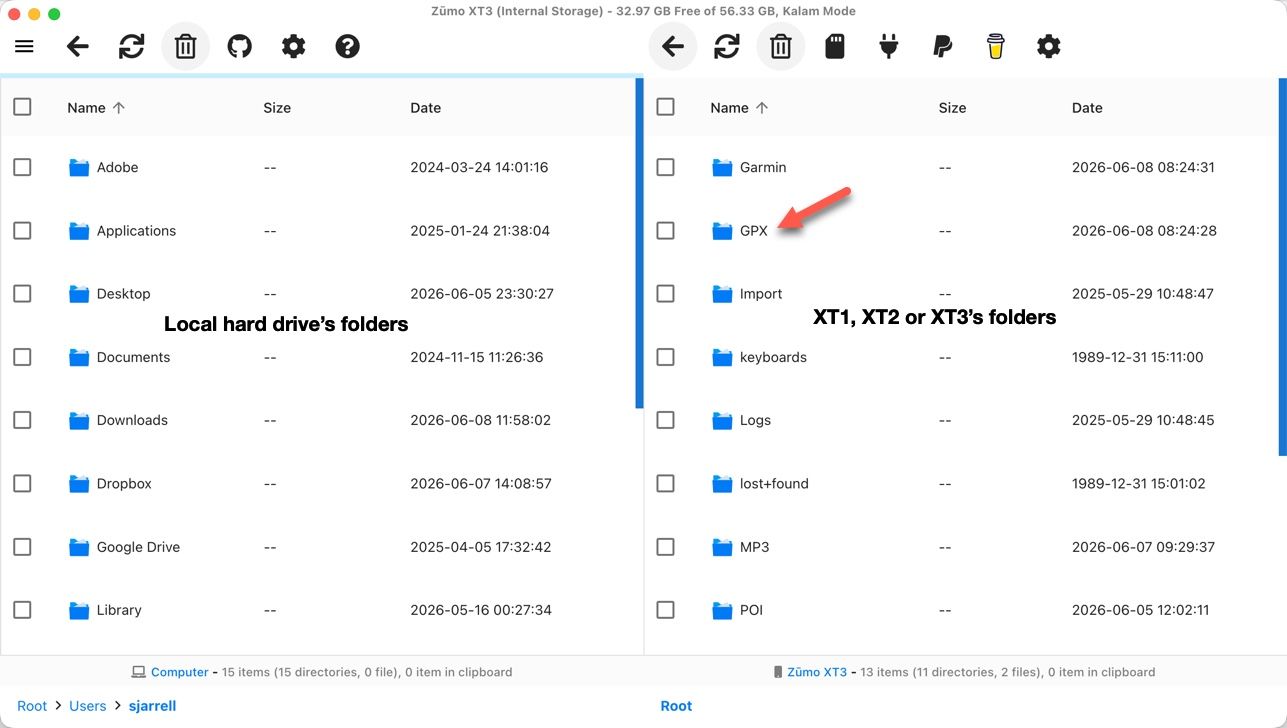
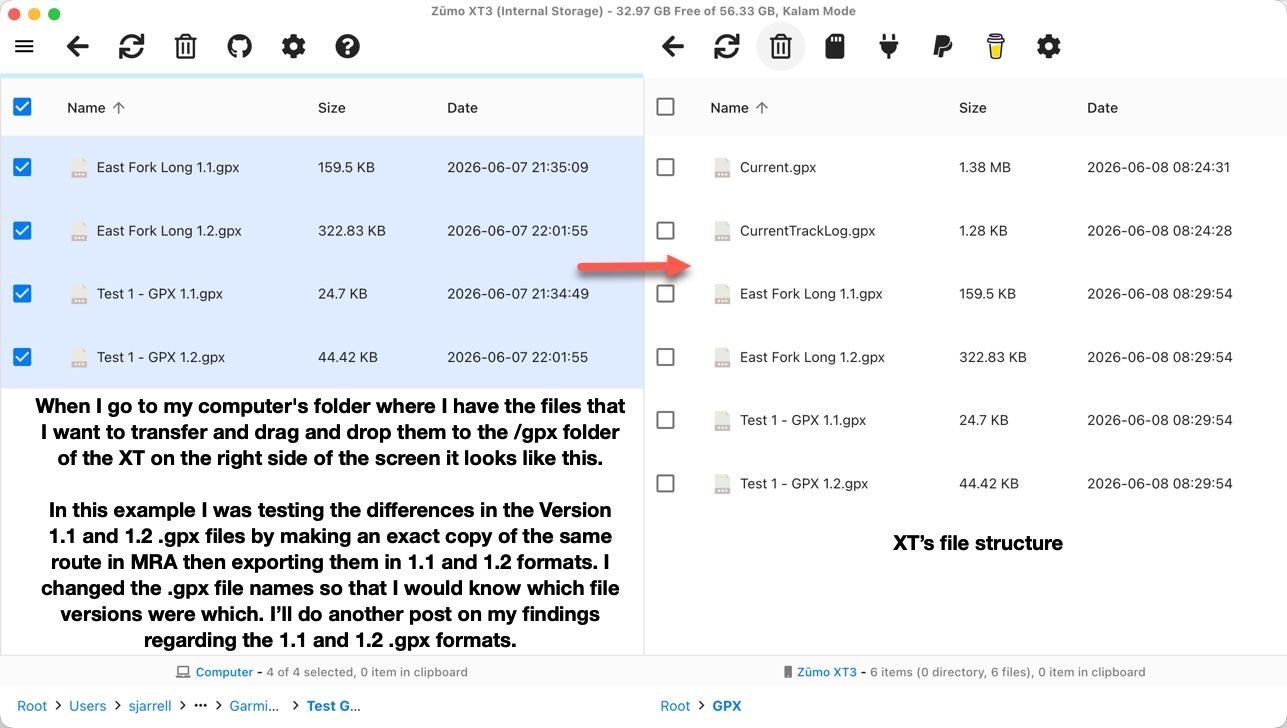
The transfer is instantaneous, and you KNOW that it has successfully completed because you can physically see that the files have been transferred! When you're finished with the transfer you simply close the OpenMTP app, unplug your XT and it will turn off, then turn it back on and you'll be prompted to import the .gpx files that you just put into the /gpx folder.
This methodology works flawlessly 100% of the time.
Not that it matters to this discussion, but once your XT has imported the .gpx files from the /gpx folder to its "hidden" internal memory, you can then delete the .gpx files from the /gpx folder the next time you connect to it if you want to keep it cleaned out.
I have been doing a lot of testing regarding the .gpx 1.1 and 1.2 file formats and their pros and cons, and I'll create another post in the near future on that subject and link it here if you're interested.
Steve
@Steve-Jarrell Great post; however, I cannot see my Garmin DriveSmart 76 in the right window of openmtp. I"m searching for a solution and wondering if you have an easy solution ? Many thanks, Eric
-
What type of computer are you using?
Hello! It looks like you're interested in this conversation, but you don't have an account yet.
Getting fed up of having to scroll through the same posts each visit? When you register for an account, you'll always come back to exactly where you were before, and choose to be notified of new replies (either via email, or push notification). You'll also be able to save bookmarks and upvote posts to show your appreciation to other community members.
With your input, this post could be even better 💗
Register Login
-
012178
-
17363.5k
-
 05121
05121
-
 0526
0526
-
 0415
0415
-
0415
-
 0429
0429
-
 0936
0936