Update 5.1 - CarPlay / Android Auto improvements and more!
-

Hi everyone!

First of all, thank you all for being part of the MyRoute-app community.
Your contributions are fundamental to our development process.
I know we aren't perfect but we try our hardest to communicate with all of you, implement new features and further improve the stability of the app.
This is all is quite hard to achieve with the small team we are but with a shared passion I am confident that we can keep up with your expectations
This update is timed accordingly!
Just in time for the summer season we want to deliver the best version of MyRoute-app possible.
After an extensive period of Alpha and Beta testing, we truly believe we succeeded
We have some amazing new features for you all

As promised the focus has been on CarPlay / Android Auto but we have definitely not forgotten about the base app itself.
Grab a drink, sit down and fasten your seatbelts because these changelogs are definitely going to be a ride.Mandatory data migration
Let's start off with the sad part. Immediately after updating the app you are required to login again. We will inform you in the app that this is not because of an issue but simply linked to the update. This was a mandatory change to comply with new Android guidelines and eventually this will contribute to stability as well (for both iOS and Android).
Please check your settings local app settings again. No MyRoute-app data is lost. All routes will be synced again automatically (when enabled).
CarPlay & Android Auto stability
We have been focussing a lot on stability. Crushed quite some nasty little issues and we hope this will reflect in the general stability of the app

CarPlay & Android Auto settings
We've revamped the structuring of settings to make everything just a bit more intuitive!

Besides that we added features such as:- Managing your tracklog
- Changing travelmode
- Viewing waypoints
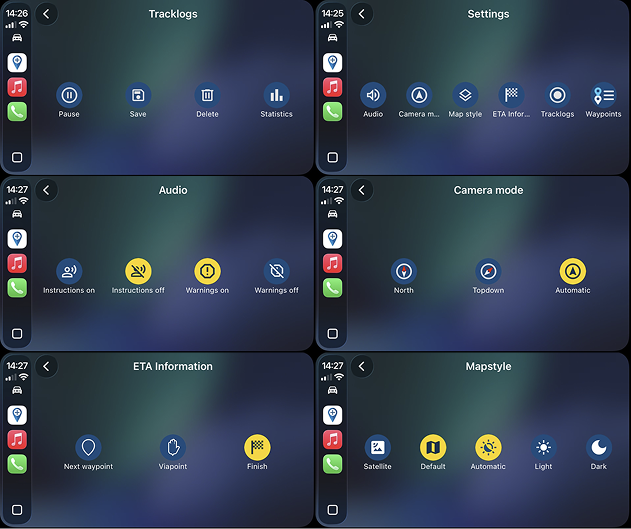
Note: the order of some items have changed in the final version but I was too lazy to get new screenshots
CarPlay & Android Auto waypoints
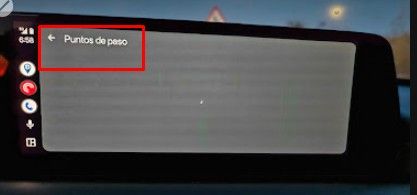
Finally it's here. The long requested waypoint list in CarPlay & Android Auto
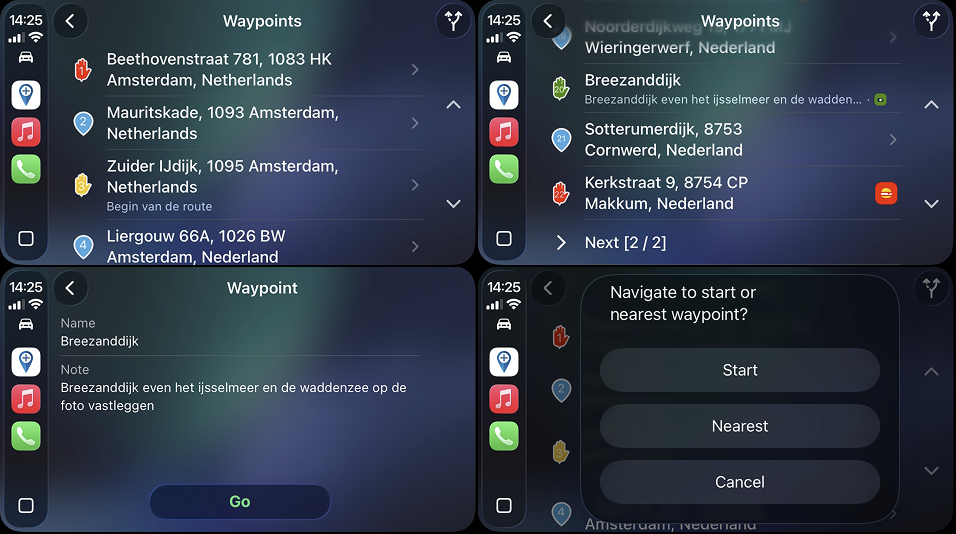
View all your upcoming waypoints including waypoint icon / color and pause icon

You can view the details for waypoints when available and obviously are able to navigate directly to that waypoint with the touch of a button.To make everything more intuitive only the upcoming waypoints are displayed in the car. Therefore we've added a nice little convenience button to quickly navigate to the start of the route or the nearest waypoint. How nice is that?!
CarPlay & Android Auto sorting routes
Yes, there you go. You can now even sort your routes by last change / name in ascending or descending order

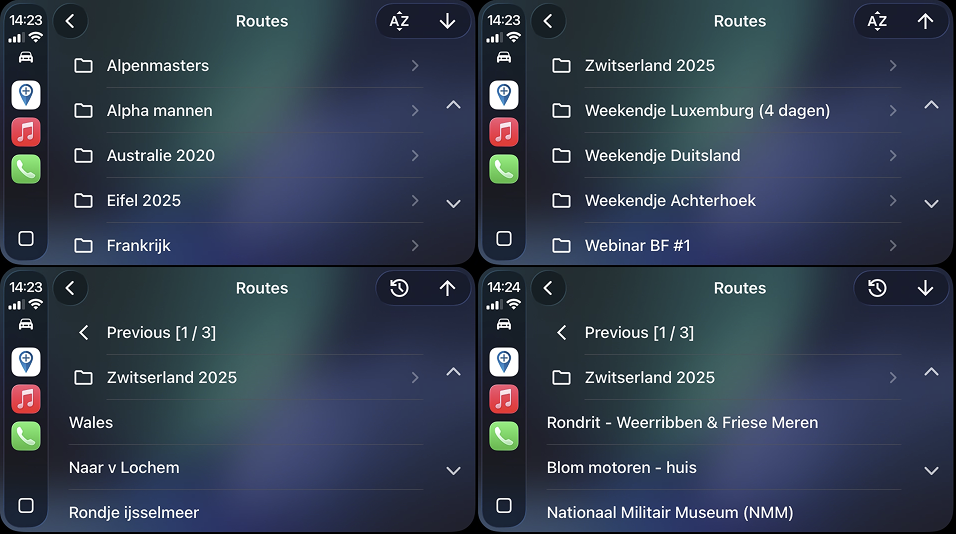
CarPlay & Android Auto improved details
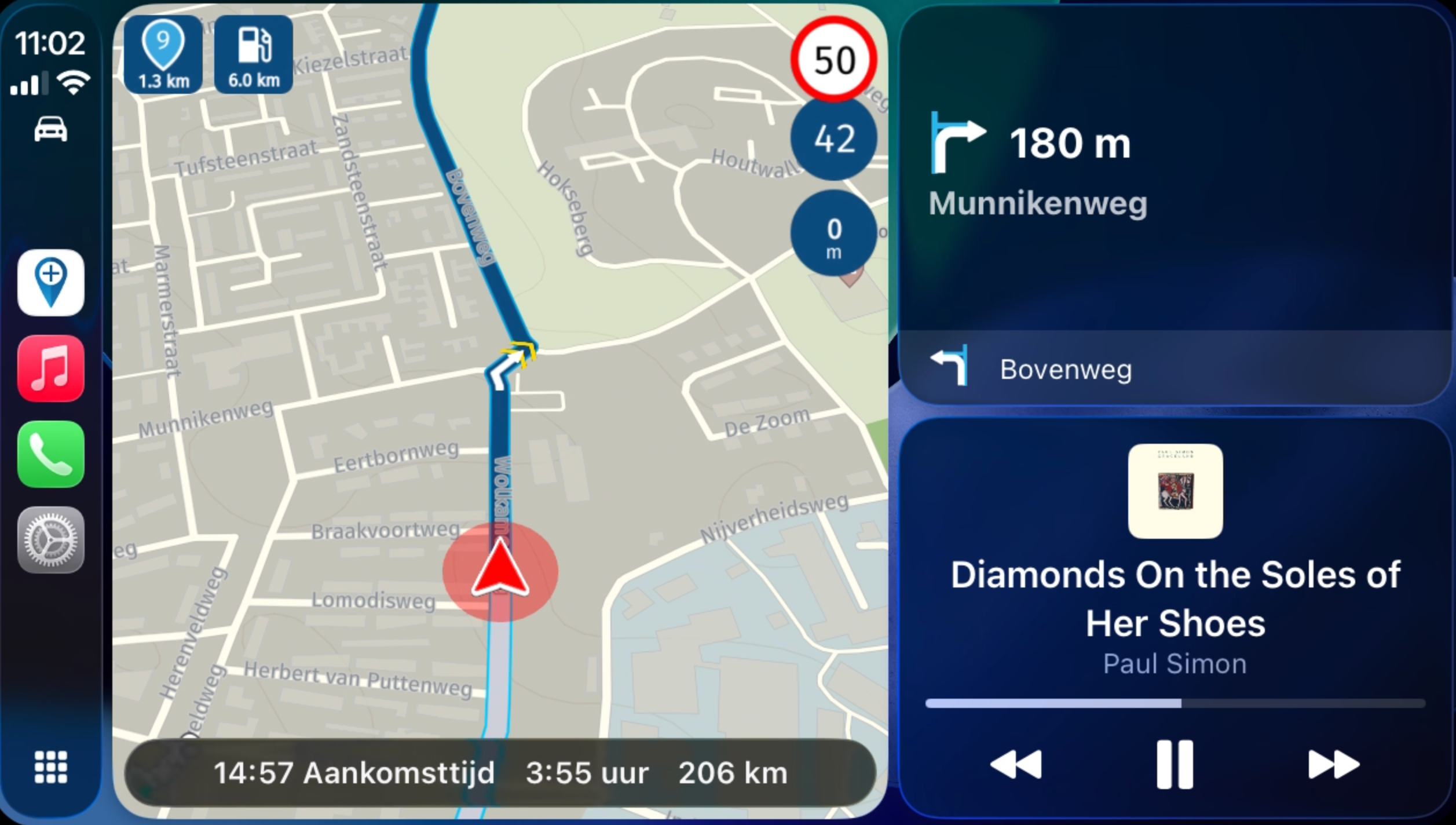
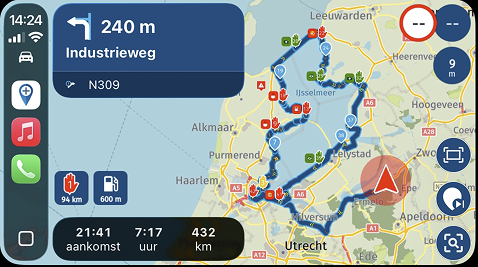
Now when you are navigating we present even more information to you!
- Altitude
- Distance to nearest fuel station
- The upcoming waypoint
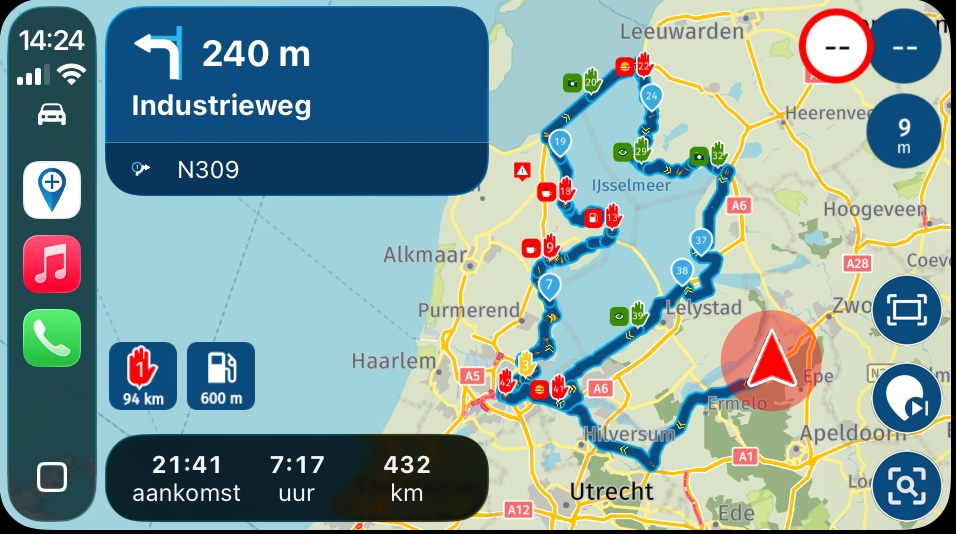
Isn't that amazing?

And that's also improved in split screen mode!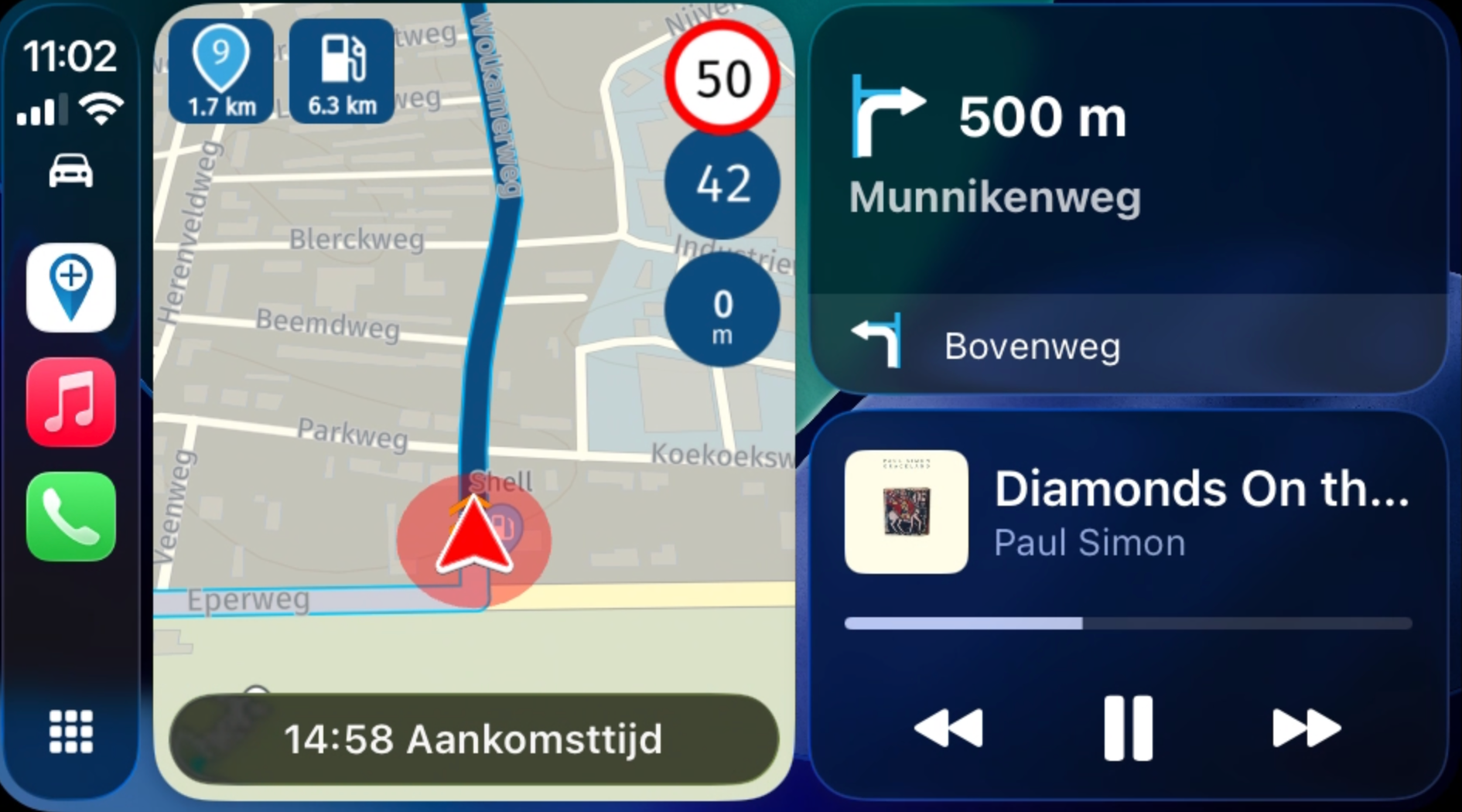
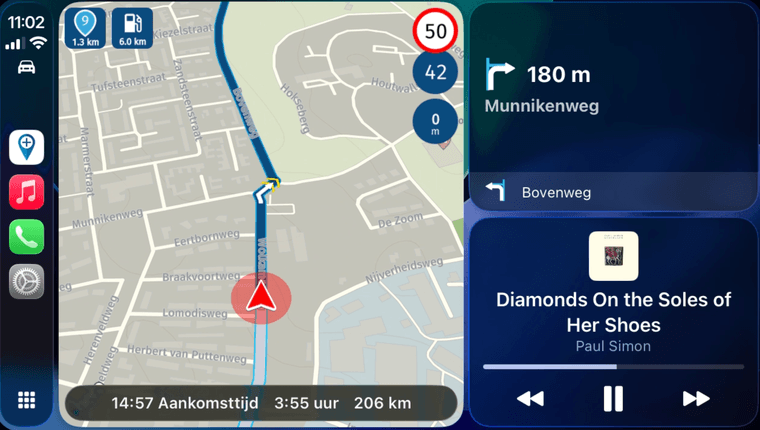
Note: you cannot tap these indicators as that is not allowed by CarPlay / Android Auto. When searching for fuel using the existing methods, the suggested fuel station will be the first in the list providing convenient access to this.
Altitude
Yes, you heard correctly.
After three years we've added an altitude indicator to the app.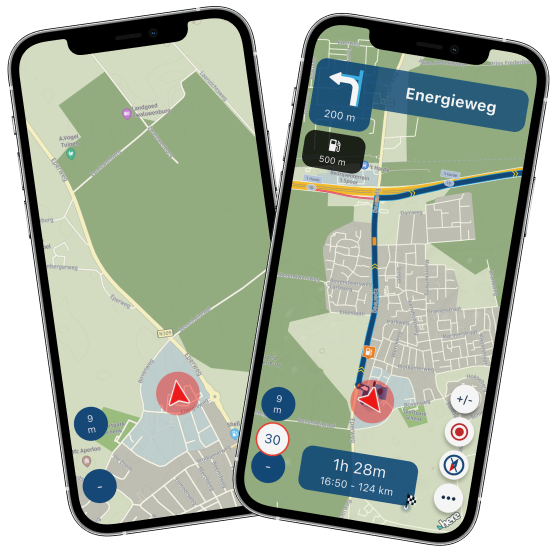
Obviously, this can be turned off for all Dutchies who aren't bothered by the fact they are always driving around sealevel
Note: after Beta feedback we adjusted the altitude indicator to also include a subtle compass direction. That is missing these screenshots but I am sure you will like it
Directionality
Even though it's subtle it has been added to make it more clear what direction you are driving.
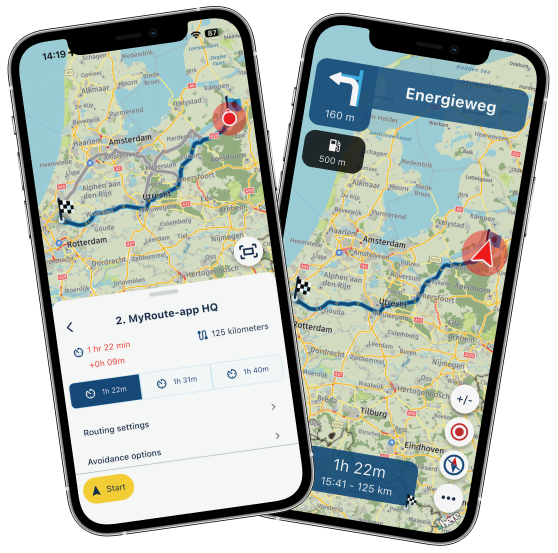
This cannot be turned off because we like it so much.
Roundtour direction
Yes, that's correct! We needed a good reason to show the direction.
Because you can now choose the direction of your roundtrips
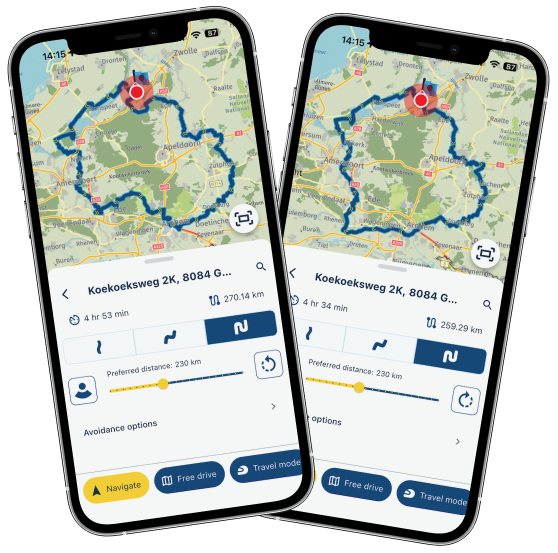
This isn't just reversing the direction, it is a complete new route!
Select different start point for roundtrips
On the subject of roundtrips, did you ever want to create one at a different location than your own?
Now you can!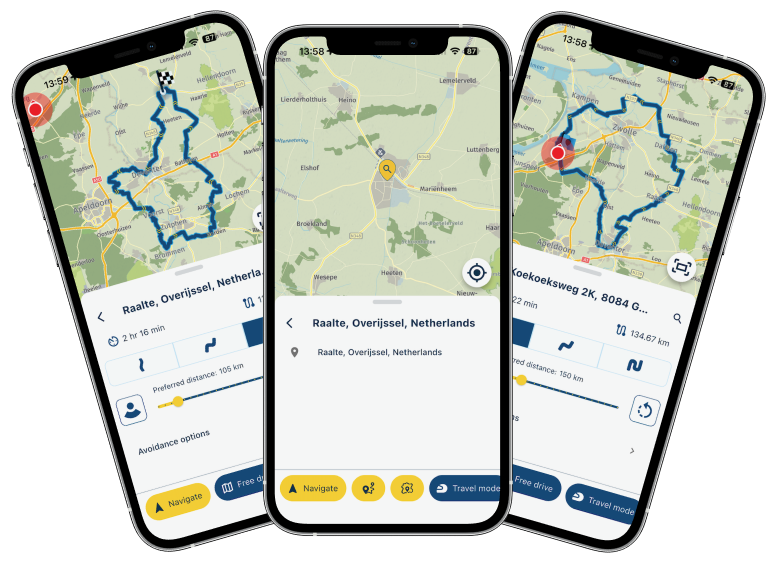
Simply search for a location and tap the new and improved roundtrip icon.
There you go! From MyRoute-app with loveAutomatic rearranging
Do you also sometimes drive your own roundtrips but they start somewhere else?
Do you ever receive a roundtrip from someone made to start somewhere else but passes your location?
Have you ever used our RouteXpert library and found a nice roundtrip starting somewhere else?We've got your back
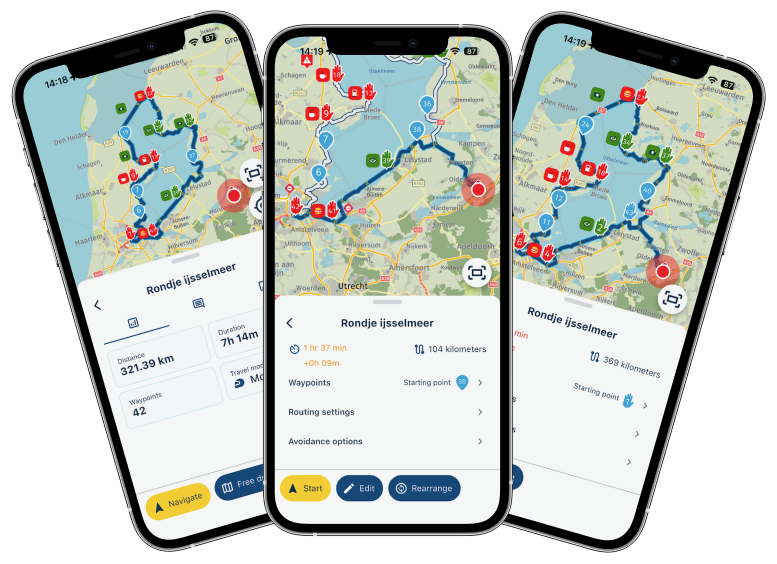
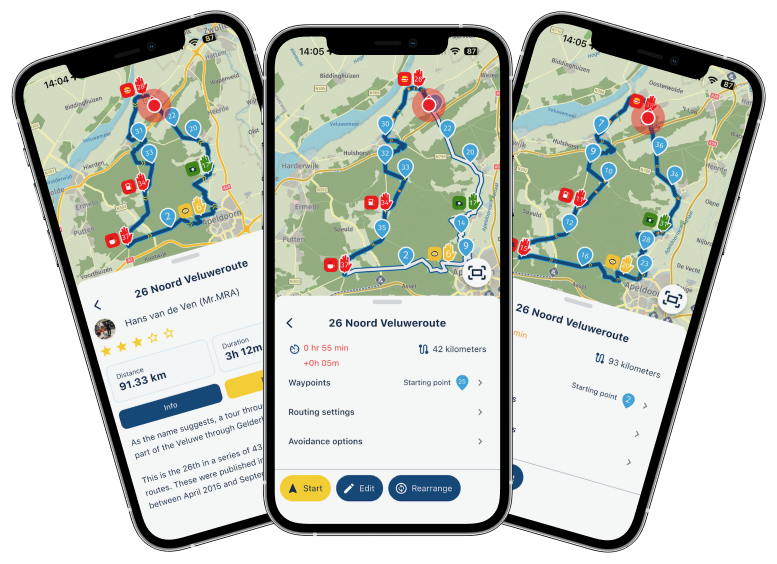
When a route appears to be circular and the nearest waypoint to your location is not the first, we present a nice little button to automatically rearrange the route!
You can then simply head off and drive the roundtrip with any adjustments. How nice is that?Stability related improvements
- Upgraded to a whole new internal database for local app storage
- Fixed many cross isolate serialisation issues
- Fixed some rare issues with loading the core HERE SDK causing critical errors
- Internal updates
Fixed issues
- Some EV routes not being calculated
- Vehicle specifications not updating correctly
- Traffic alerts in CP / AA
- Changing travelmode not updating the calculated route when viewing route details
- iOS < 18 SSML audio issue
Minor improvements
- Logout requires confirmation
- Show signed out devices that still count for the device limit
- Decreased some alert durations
- Updated some icons and their sizes
Well, there you go.
Feel free to unbuckle your seatbelt and get on your bike or in your car
Given the immense amount of changes, we are really looking forward to all your feedback.
Many features have been added and the stability should be better across all devices.What's next?
I am delighted that I can for sure announce that the next update will include:- A feature to avoid road closures
- Improve POI management
- Persistent displayed items on the map (such as routes, favorites and POI's)
And further:
- Processing your feedback
- Rework some internal algorithms such as searching for fuel stations and skipping waypoints
- Generic track navigation improvements
It has been an adventure and every day still is at MyRoute-app.
We are a small company and work extremely hard to satisfy all customer needs / desires / requests.
Keep up with providing feedback and we will deliver! That is my promise to youCheers,
Corjan -

Hi @corjan-meijerink ,
your post look realy great and adressses a lot of my concerns regarding the AA usage,
is there a Schedule available, when this will be available in the playstore?
The new vwesion needs some pracie before using on a long holiday trip,,
best regards -
Hi @corjan-meijerink ,
your post look realy great and adressses a lot of my concerns regarding the AA usage,
is there a Schedule available, when this will be available in the playstore?
The new vwesion needs some pracie before using on a long holiday trip,,
best regards
@Fridjof I'd say a week maximum

Mostly it's a few days tops but the last beta version took 9 days for Google to approve.
I definitely hope they don't need that long this time.If we're lucky everyone has the update before the weekend
-
Hi everyone!
First of all, thank you all for being part of the MyRoute-app community.
Your contributions are fundamental to our development process.
I know we aren't perfect but we try our hardest to communicate with all of you, implement new features and further improve the stability of the app.
This is all is quite hard to achieve with the small team we are but with a shared passion I am confident that we can keep up with your expectationsThis update is timed accordingly!
Just in time for the summer season we want to deliver the best version of MyRoute-app possible.
After an extensive period of Alpha and Beta testing, we truly believe we succeededWe have some amazing new features for you all
As promised the focus has been on CarPlay / Android Auto but we have definitely not forgotten about the base app itself.
Grab a drink, sit down and fasten your seatbelts because these changelogs are definitely going to be a ride.Mandatory data migration
Let's start off with the sad part. Immediately after updating the app you are required to login again. We will inform you in the app that this is not because of an issue but simply linked to the update. This was a mandatory change to comply with new Android guidelines and eventually this will contribute to stability as well (for both iOS and Android).
Please check your settings local app settings again. No MyRoute-app data is lost. All routes will be synced again automatically (when enabled).
CarPlay & Android Auto stability
We have been focussing a lot on stability. Crushed quite some nasty little issues and we hope this will reflect in the general stability of the app
CarPlay & Android Auto settings
We've revamped the structuring of settings to make everything just a bit more intuitive!
Besides that we added features such as:- Managing your tracklog
- Changing travelmode
- Viewing waypoints
Note: the order of some items have changed in the final version but I was too lazy to get new screenshots
CarPlay & Android Auto waypoints
Finally it's here. The long requested waypoint list in CarPlay & Android Auto
View all your upcoming waypoints including waypoint icon / color and pause icon
You can view the details for waypoints when available and obviously are able to navigate directly to that waypoint with the touch of a button.To make everything more intuitive only the upcoming waypoints are displayed in the car. Therefore we've added a nice little convenience button to quickly navigate to the start of the route or the nearest waypoint. How nice is that?!
CarPlay & Android Auto sorting routes
Yes, there you go. You can now even sort your routes by last change / name in ascending or descending order
CarPlay & Android Auto improved details
Now when you are navigating we present even more information to you!
- Altitude
- Distance to nearest fuel station
- The upcoming waypoint
Isn't that amazing?
And that's also improved in split screen mode!Note: you cannot tap these indicators as that is not allowed by CarPlay / Android Auto. When searching for fuel using the existing methods, the suggested fuel station will be the first in the list providing convenient access to this.
Altitude
Yes, you heard correctly.
After three years we've added an altitude indicator to the app.Obviously, this can be turned off for all Dutchies who aren't bothered by the fact they are always driving around sealevel
Note: after Beta feedback we adjusted the altitude indicator to also include a subtle compass direction. That is missing these screenshots but I am sure you will like it
Directionality
Even though it's subtle it has been added to make it more clear what direction you are driving.
This cannot be turned off because we like it so much.
Roundtour direction
Yes, that's correct! We needed a good reason to show the direction.
Because you can now choose the direction of your roundtripsThis isn't just reversing the direction, it is a complete new route!
Select different start point for roundtrips
On the subject of roundtrips, did you ever want to create one at a different location than your own?
Now you can!Simply search for a location and tap the new and improved roundtrip icon.
There you go! From MyRoute-app with loveAutomatic rearranging
Do you also sometimes drive your own roundtrips but they start somewhere else?
Do you ever receive a roundtrip from someone made to start somewhere else but passes your location?
Have you ever used our RouteXpert library and found a nice roundtrip starting somewhere else?We've got your back
When a route appears to be circular and the nearest waypoint to your location is not the first, we present a nice little button to automatically rearrange the route!
You can then simply head off and drive the roundtrip with any adjustments. How nice is that?Stability related improvements
- Upgraded to a whole new internal database for local app storage
- Fixed many cross isolate serialisation issues
- Fixed some rare issues with loading the core HERE SDK causing critical errors
- Internal updates
Fixed issues
- Some EV routes not being calculated
- Vehicle specifications not updating correctly
- Traffic alerts in CP / AA
- Changing travelmode not updating the calculated route when viewing route details
- iOS < 18 SSML audio issue
Minor improvements
- Logout requires confirmation
- Show signed out devices that still count for the device limit
- Decreased some alert durations
- Updated some icons and their sizes
Well, there you go.
Feel free to unbuckle your seatbelt and get on your bike or in your carGiven the immense amount of changes, we are really looking forward to all your feedback.
Many features have been added and the stability should be better across all devices.What's next?
I am delighted that I can for sure announce that the next update will include:- A feature to avoid road closures
- Improve POI management
- Persistent displayed items on the map (such as routes, favorites and POI's)
And further:
- Processing your feedback
- Rework some internal algorithms such as searching for fuel stations and skipping waypoints
- Generic track navigation improvements
It has been an adventure and every day still is at MyRoute-app.
We are a small company and work extremely hard to satisfy all customer needs / desires / requests.
Keep up with providing feedback and we will deliver! That is my promise to youCheers,
Corjan
@Corjan-Meijerink Incredible work. Thank you so much for your effort and dedication over the years. It's a pleasure and an honor to be part of this community.
-

Thanks for that Update. This is a great job!!!!
-

Thanks for the update

-

How can I tell if I have the "final" version or if I'm still using the "beta"?
met een R1250RT met TFT
en BMW Connected Ride App(die dus nog steeds niet voldoet!) ; M.R.A. in combinatie met de Carpuride W702 (voor Android op de Motor!), de Garmin Zumo XT als backup en een Samsung Galaxy S24 -
How can I tell if I have the "final" version or if I'm still using the "beta"?
@white.mouse as beta tester you will always have the beta
Final version which is released has build number 462 -
Very, very nice work


 . Looking forward. Hope the issue with volume setting in AA, e.g. difference between voice and music is also adressed, preferably like the way as it is working in Flitsmeister.
 -

Soind really good. I keep my fingers crossed, that Apple and Google will make the new version available ASAP.
@maky-7-0 Corjan always uploads the iOS and Android version to the APP-stores for review and approval, but the final realease (available in the app-stores) is always with Apple or Google. -
@corjan-meijerink Great job! I'd like to offer a suggestion, if I don't know if it's been read in the suggestions section. It could be a more incisive sound for speed cameras, even better if you can choose it, and maybe a double warning, the first at 400 m like now, and another at 150 m... Basically, like Garmin does... I got two tickets because I heard the first one, but I got distracted and, not having the second warning, I got the speed camera ticket... I hope this is a useful idea...thank you!!
-
@corjan-meijerink Great job! I'd like to offer a suggestion, if I don't know if it's been read in the suggestions section. It could be a more incisive sound for speed cameras, even better if you can choose it, and maybe a double warning, the first at 400 m like now, and another at 150 m... Basically, like Garmin does... I got two tickets because I heard the first one, but I got distracted and, not having the second warning, I got the speed camera ticket... I hope this is a useful idea...thank you!!

@corjan-meijerink.
I got two tickets because I heard the first one, but I got distracted and, not having the second warning, I got the speed camera ticket...I think you got the tickets, because you were speeding
-

Great work, thank you very much.
-
@corjan-meijerink.
I got two tickets because I heard the first one, but I got distracted and, not having the second warning, I got the speed camera ticket...I think you got the tickets, because you were speeding
@guenniguenzelsen I know this very well… But in my opinion the speed camera warning is very weak, compared for example to the Garmin one, which even warns twice, the first time at 400 m and the second at 150 m.
-
@guenniguenzelsen I know this very well… But in my opinion the speed camera warning is very weak, compared for example to the Garmin one, which even warns twice, the first time at 400 m and the second at 150 m.
@Aiello-antonino The speed cameras are the ones listed in Here. I'd recommend any dedicated app to run alongside them. They work better than any other navigation system (for example, in Spain, Radarbot is fantastic).
-
Thanks for the advice, but why do I have to use additional software if I already have everything I need? Just improve it in terms of sounds and number of alerts, maybe with the option to activate them...
-
Thanks for the advice, but why do I have to use additional software if I already have everything I need? Just improve it in terms of sounds and number of alerts, maybe with the option to activate them...
@Aiello-antonino Because you can't add alerts. The ones you have are what they are. You can't invent them. That's why the best option is to use reliable software or make do with what's available...
Creator and administrator of the largest MRA groups.
- https://t.me/MRa_by_b0hd1
- https://www.myrouteapp.com/group/messages/7007
- YouTube: @demco17
- Ex-routexpert, current beta tester and MRA expert. Creator of tutorials, manuals, and MRA user trainer.
-
@Aiello-antonino Because you can't add alerts. The ones you have are what they are. You can't invent them. That's why the best option is to use reliable software or make do with what's available...
@B0hd1 Maybe I explained myself badly... MRA is a software, right?! So developers, I don't know if you are, can decide what to add and what not... I suggested to modify/add what I wrote... it doesn't seem so incomprehensible to me... I didn't say anything about what you wrote... and the message was addressed to @corjan-meijerink...
-
@B0hd1 Maybe I explained myself badly... MRA is a software, right?! So developers, I don't know if you are, can decide what to add and what not... I suggested to modify/add what I wrote... it doesn't seem so incomprehensible to me... I didn't say anything about what you wrote... and the message was addressed to @corjan-meijerink...

I also suggested a year ago that the speed camera sound be customizable. Since it took three years to display the altitude, perhaps in two years it will be possible to customize the speed camera sound.
Hello! It looks like you're interested in this conversation, but you don't have an account yet.
Getting fed up of having to scroll through the same posts each visit? When you register for an account, you'll always come back to exactly where you were before, and choose to be notified of new replies (either via email, or push notification). You'll also be able to save bookmarks and upvote posts to show your appreciation to other community members.
With your input, this post could be even better 💗
Register Login







-
416157
-
 120984
-
0818
-
 011543
-
06115
-
 05113
05113
-
05152
-
0316