Does waypoint have to be on Route Line?
-

I now know it is best practice to have a waypoint actually touching the route line, but didn't always check this. I'm reviewing my routes and notice many waypoints that are just a bit off the route line. If the waypoint is on a divided highway or more congested area, or pretty far away from the route, I'm moving them to put the point on the route line.
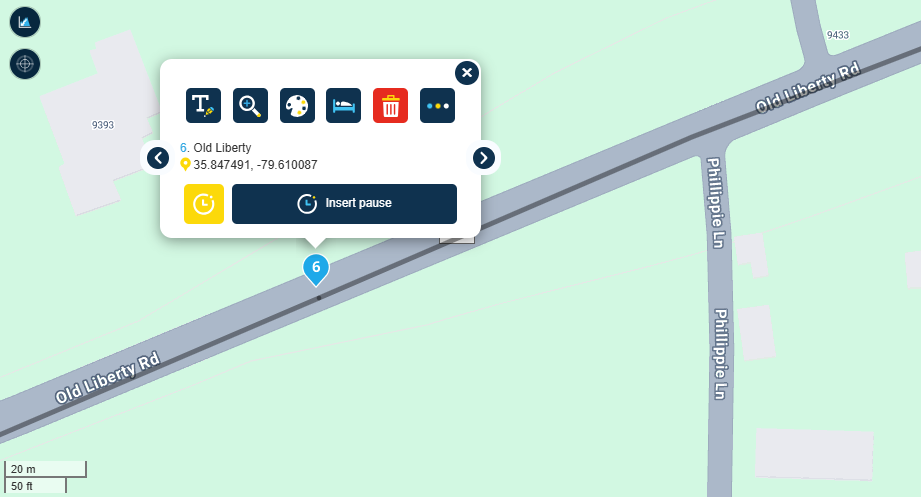
But I mostly travel 2 lane backroads and highways. If a waypoint isn't touching the line but is close, and the waypoint is far enough away from other roads, overpasses, etc. to not cause confusion -- is ok to leave the waypoint as is or should it be moved to the route line? Is the waypoint in this image "close enough" to work as expected?
P.S. I'm a Gold member, create my routes with HERE map, and will be navigating using MyRoute-app directly on an Android phone (offline without simm). Thanks.
-
I now know it is best practice to have a waypoint actually touching the route line, but didn't always check this. I'm reviewing my routes and notice many waypoints that are just a bit off the route line. If the waypoint is on a divided highway or more congested area, or pretty far away from the route, I'm moving them to put the point on the route line.
But I mostly travel 2 lane backroads and highways. If a waypoint isn't touching the line but is close, and the waypoint is far enough away from other roads, overpasses, etc. to not cause confusion -- is ok to leave the waypoint as is or should it be moved to the route line? Is the waypoint in this image "close enough" to work as expected?
P.S. I'm a Gold member, create my routes with HERE map, and will be navigating using MyRoute-app directly on an Android phone (offline without simm). Thanks.

@Al-Cohen Generally speaking you do not need to be that accurate, but consider a route point that isn’t on your intended road in the middle of a big town or city. The route point could then be on a side road which would cause one of those annoying ’Turn left’ instructions closely followed by a ‘turn around when possible’.
So where there is a higher concentration of roads you need to be more accurate. -

I always put my waypoints or any other what so ever on the route. Saves a lot of hassle if you are not using the same map on your 'gps' device.
e.g.. you put a shaping point in France just after you exit the roundabout. HERE does not give you any error but most of the time there are 2 specific traffic lanes. Oops, routing problem if you are on the wrong side on the traffic lane... -
I now know it is best practice to have a waypoint actually touching the route line, but didn't always check this. I'm reviewing my routes and notice many waypoints that are just a bit off the route line. If the waypoint is on a divided highway or more congested area, or pretty far away from the route, I'm moving them to put the point on the route line.
But I mostly travel 2 lane backroads and highways. If a waypoint isn't touching the line but is close, and the waypoint is far enough away from other roads, overpasses, etc. to not cause confusion -- is ok to leave the waypoint as is or should it be moved to the route line? Is the waypoint in this image "close enough" to work as expected?
P.S. I'm a Gold member, create my routes with HERE map, and will be navigating using MyRoute-app directly on an Android phone (offline without simm). Thanks.

@Al-Cohen there is some discussion on point placement in this old thread
Hello! It looks like you're interested in this conversation, but you don't have an account yet.
Getting fed up of having to scroll through the same posts each visit? When you register for an account, you'll always come back to exactly where you were before, and choose to be notified of new replies (either via email, or push notification). You'll also be able to save bookmarks and upvote posts to show your appreciation to other community members.
With your input, this post could be even better 💗
Register Login-
 1426569
-
 0836
0836
-
0623
-
 0583
0583
-
0590
-
 116290
-
 08500
08500
-
0420