Skip to content
  • Categories
  • Recent
  • Popular
  • Support
  • MyRoute-app
Collapse
Brand Logo

MRA Community Forum

  1. Home
  2. The MyRoute-app
  3. [App] Problems, Bugs and other Issues
  4. Can't edit favorite in portrait mode

Can't edit favorite in portrait mode

Scheduled Pinned Locked Moved [App] Problems, Bugs and other Issues
6 Posts 3 Posters 1.0k Views 3 Watching
  • Oldest to Newest
  • Newest to Oldest
  • Most Votes
Reply
  • Reply as topic
Log in to reply
This topic has been deleted. Only users with topic management privileges can see it.
  • martin-phogel.deundefined Offline
    martin-phogel.deundefined Offline
    martin-phogel.de
    wrote on last edited by
    #1

    With version 5, I cannot edit a favourite (change name) on my iPhone 12 mini in portrait mode. The input field for the new name appears briefly, but then disappears immediately. But it works fine on an iPhone 11 – the problem is probably related to the display size.

    (It also works on an iPhone 12 mini in landscape mode, but the keyboard covers the input field, so entering the new name is a shot in the dark.)

    Rob Verhoeffundefined 1 Reply Last reply
    0
    • martin-phogel.deundefined martin-phogel.de

      With version 5, I cannot edit a favourite (change name) on my iPhone 12 mini in portrait mode. The input field for the new name appears briefly, but then disappears immediately. But it works fine on an iPhone 11 – the problem is probably related to the display size.

      (It also works on an iPhone 12 mini in landscape mode, but the keyboard covers the input field, so entering the new name is a shot in the dark.)

      Rob Verhoeffundefined Offline
      Rob Verhoeffundefined Offline
      Rob Verhoeff
      Alpha tester
      wrote on last edited by Rob Verhoeff
      #2

      @Martin-Wilcke Have you set your iOS settings to be zoomed in by default? Wich build do you use? I can reproduce this only when zoomed in and then only in landscape mode:
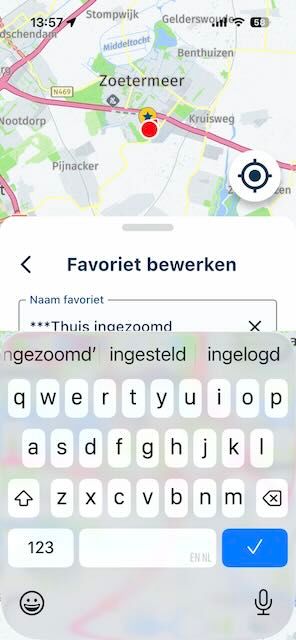
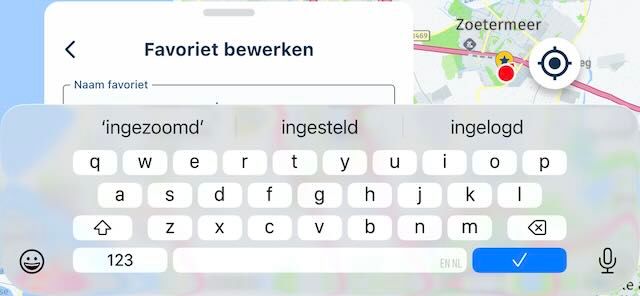
      IMG_1355.jpeg

      IMG_1354.jpeg

      BMW K1600GT-P (2013) | Nolan N100-5 with Sena 30K
      iOS on iPhone 13 & 16 (mounted on Quadlock or AliExpress extention on BMW-cradle)
      Apple CarPlay in VW T-Roc
      Routelab on MacBook Air & iMac (Tahoe & Ventura)

      martin-phogel.deundefined 1 Reply Last reply
      0
      • Corjan Meijerinkundefined Offline
        Corjan Meijerinkundefined Offline
        Corjan Meijerink
        Developer
        wrote on last edited by
        #3

        This will be fixed in 5.0.1 update coming this week!

        1 Reply Last reply
        0
        • Rob Verhoeffundefined Rob Verhoeff

          @Martin-Wilcke Have you set your iOS settings to be zoomed in by default? Wich build do you use? I can reproduce this only when zoomed in and then only in landscape mode:

          IMG_1355.jpeg

          IMG_1354.jpeg

          martin-phogel.deundefined Offline
          martin-phogel.deundefined Offline
          martin-phogel.de
          wrote on last edited by
          #4

          @Rob-Verhoeff
          IOS 18.7.2
          MRA 5.0.0 - 426
          Standard zoom

          But I don't care about landscape mode, as this is my CP device and I use it in portrait mode only. If this works with 5.0.1, it's all good.

          Rob Verhoeffundefined 1 Reply Last reply
          0
          • martin-phogel.deundefined martin-phogel.de

            @Rob-Verhoeff
            IOS 18.7.2
            MRA 5.0.0 - 426
            Standard zoom

            But I don't care about landscape mode, as this is my CP device and I use it in portrait mode only. If this works with 5.0.1, it's all good.

            Rob Verhoeffundefined Offline
            Rob Verhoeffundefined Offline
            Rob Verhoeff
            Alpha tester
            wrote on last edited by
            #5

            @Martin-Wilcke It's fixed as anounced!

            BMW K1600GT-P (2013) | Nolan N100-5 with Sena 30K
            iOS on iPhone 13 & 16 (mounted on Quadlock or AliExpress extention on BMW-cradle)
            Apple CarPlay in VW T-Roc
            Routelab on MacBook Air & iMac (Tahoe & Ventura)

            1 Reply Last reply
            1
            • martin-phogel.deundefined Offline
              martin-phogel.deundefined Offline
              martin-phogel.de
              wrote on last edited by
              #6

              Yep - can confirm, it’s working now in portrait mode!
              Landscape is still an issue, but that’s caused by the keyboard that covers far too much space. However, as mentioned, I don’t care.

              1 Reply Last reply
              0

              Hello! It looks like you're interested in this conversation, but you don't have an account yet.

              Getting fed up of having to scroll through the same posts each visit? When you register for an account, you'll always come back to exactly where you were before, and choose to be notified of new replies (either via email, or push notification). You'll also be able to save bookmarks and upvote posts to show your appreciation to other community members.

              With your input, this post could be even better 💗

              Register Login
              Reply
              • Reply as topic
              Log in to reply
              • Oldest to Newest
              • Newest to Oldest
              • Most Votes


              ACTIVE USERS
              Corjan Meijerinkundefined
              Corjan Meijerink
              Rob Verhoeffundefined
              Rob Verhoeff
              martin-phogel.deundefined
              martin-phogel.de
              POPULAR TOPICS
              • V5.1.0 - 462 New altitude/heading shows incorrect Data
                Mzokkundefined
                Mzokk
                0
                12
                132

              • Best way to set my Garmin Zumo XT to play well with the MRA?
                Mzokkundefined
                Mzokk
                0
                9
                93

              • Navigation arrow still not stable
                Corjan Meijerinkundefined
                Corjan Meijerink
                1
                8
                163

              • Seasonal closures affect not only seasonal road closures (mountain passes and the like) but also closures due to roadworks. This is why the route takes you through the closure even during planning, even though Here is actually aware of it.
                Herman Veldhuizenundefined
                Herman Veldhuizen
                3
                8
                180

              • Live Map Updates
                Guzzistundefined
                Guzzist
                0
                6
                98

              • Being instructed to turn off at each next Junction
                John B 1undefined
                John B 1
                0
                6
                99

              • My route app
                Hub 1undefined
                Hub 1
                0
                5
                45

              • Jack from Netherlands
                Leike Lodiersundefined
                Leike Lodiers
                1
                4
                67

              MY GROUPS
              • Login

              • Login or register to search.
              • First post
                Last post
              0
              • Categories
              • Recent
              • Popular
              • Support
              • MyRoute-app