Skip to content
  • Categories
  • Recent
  • Popular
  • Support
  • MyRoute-app
Collapse
Brand Logo

MRA Community Forum

  1. Home
  2. The MyRoute-app
  3. [App] Problems, Bugs and other Issues
  4. Inconsistent terminology to get to the same screen

Inconsistent terminology to get to the same screen

Scheduled Pinned Locked Moved [App] Problems, Bugs and other Issues
4 Posts 2 Posters 940 Views 2 Watching
  • Oldest to Newest
  • Newest to Oldest
  • Most Votes
Reply
  • Reply as topic
Log in to reply
This topic has been deleted. Only users with topic management privileges can see it.
  • Andy W Offline
    Andy W Offline
    Andy W
    wrote on last edited by
    #1

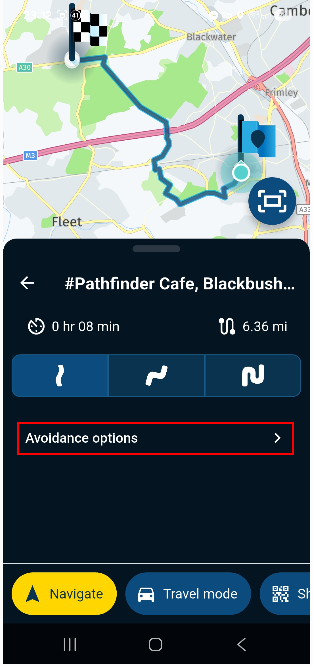
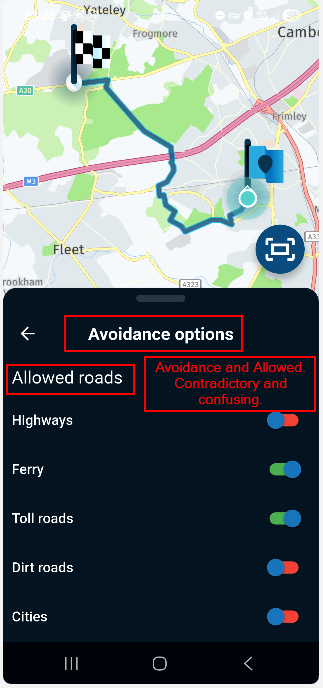
    When I use a saved route I see the term 'Route Options'. However, if I pick a destination from my Favourites and create a route to that, I see the term 'Avoidance Options'. Both of these terms lead to the same set of options so I think the terminology should be the same. I think it should be 'Route Options' in both cases otherwise you get a screen that is titled 'Avoidance options' followed by an 'Allowed roads' list.
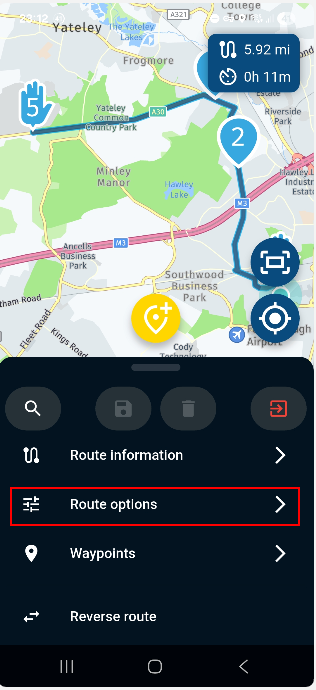
    8af0f5d2-ef66-455f-83f8-e38b8d66a14b-image.png

    ee664132-744c-470a-a347-9211c6727e83-image.png

    705760dc-5193-4583-b159-b4baa54cb98b-image.png

    Regards
    Andy

    Andy W 2 Replies Last reply
    2
    • Andy W Andy W

      When I use a saved route I see the term 'Route Options'. However, if I pick a destination from my Favourites and create a route to that, I see the term 'Avoidance Options'. Both of these terms lead to the same set of options so I think the terminology should be the same. I think it should be 'Route Options' in both cases otherwise you get a screen that is titled 'Avoidance options' followed by an 'Allowed roads' list.
      8af0f5d2-ef66-455f-83f8-e38b8d66a14b-image.png

      ee664132-744c-470a-a347-9211c6727e83-image.png

      705760dc-5193-4583-b159-b4baa54cb98b-image.png

      Regards
      Andy

      Andy W Offline
      Andy W Offline
      Andy W
      wrote on last edited by
      #2

      I should add that all the Toolkit menus on the website use 'Avoid' with a list of items to select (turn on). Perhaps the app should use 'Route options' and then 'Avoid' instead of 'Allowed roads'. This would mean reversing the meaning of the red/green selectors in this case but the overall use would be the same between the website and app.
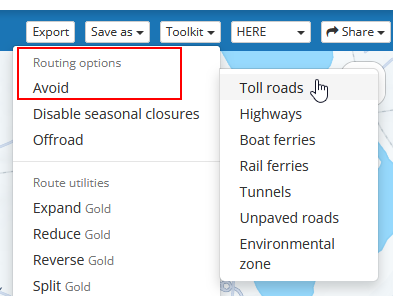
      image.png

      Regards
      Andy

      1 Reply Last reply
      1
      • Andy W Andy W

        When I use a saved route I see the term 'Route Options'. However, if I pick a destination from my Favourites and create a route to that, I see the term 'Avoidance Options'. Both of these terms lead to the same set of options so I think the terminology should be the same. I think it should be 'Route Options' in both cases otherwise you get a screen that is titled 'Avoidance options' followed by an 'Allowed roads' list.

        8af0f5d2-ef66-455f-83f8-e38b8d66a14b-image.png

        ee664132-744c-470a-a347-9211c6727e83-image.png

        705760dc-5193-4583-b159-b4baa54cb98b-image.png

        Regards
        Andy

        Andy W Offline
        Andy W Offline
        Andy W
        wrote on last edited by
        #3

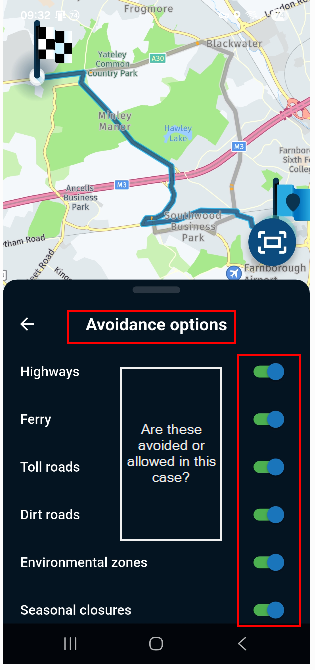
        I found yet another variation in the app! Steps to reproduce are:

        • Open the app
        • Search for and select a favourite location
        • Select Navigate
        • Select 'Avoidance options'

        The next screen is titled 'Avoidance options' but there is no 'Allowed roads' sub-heading like the example above making it seem as through the different road type selectors work the opposite way.
        6c435806-9c23-453f-a5e2-e982ecc56387-image.png

        Regards
        Andy

        1 Reply Last reply
        0
        • Corjan Meijerink Offline
          Corjan Meijerink Offline
          Corjan Meijerink
          Developer
          wrote on last edited by
          #4

          I've made some adjustment in the next update (as no critical issues discovered yet, no expected release date):

          • Planner aligned with rest of the app regarding avoidance settings
          • Moved planner route optimisation to main menu (that's why it was called "Route options" in the first place as it could contain one other setting that isn't an avoid options)
          • Added the "Allowed roads" header to all places to indicate you select what is allowed
          • Kept the menu item to be called "avoidance options" as that's clear to all

          That said: green is always the allowed option and red is forbidden (hence avoided)

          1 Reply Last reply
          5

          Hello! It looks like you're interested in this conversation, but you don't have an account yet.

          Getting fed up of having to scroll through the same posts each visit? When you register for an account, you'll always come back to exactly where you were before, and choose to be notified of new replies (either via email, or push notification). You'll also be able to save bookmarks and upvote posts to show your appreciation to other community members.

          With your input, this post could be even better đź’—

          Register Login
          Reply
          • Reply as topic
          Log in to reply
          • Oldest to Newest
          • Newest to Oldest
          • Most Votes


          ACTIVE USERS
          Corjan Meijerink
          Corjan Meijerink
          Andy W
          Andy W
          POPULAR TOPICS
          • Carpuride scherm vast
            De Ploey Georges
            De Ploey Georges
            3
            28
            1.2k

          • GPX Versions 1.1 vs 1.2 for Garmin Visually Explained
            Mzokk
            Mzokk
            7
            176
            14.1k

          • How can I change the verbal navigation directions from male to female?
            Brian McG
            Brian McG
            0
            5
            34

          • Linker in MRA kleurt blauw (alles geselecteerd)
            Travellexxie
            Travellexxie
            0
            13
            343

          • Apple Carplay - navigatie instructies zichtbaar, maar kaart niet??
            Nick Carthew
            Nick Carthew
            0
            3
            26

          • Camperroutes
            De Ploey Georges
            De Ploey Georges
            0
            4
            170

          • Not a great route choice
            Marinus van Deudekom
            Marinus van Deudekom
            0
            2
            40

          • (Android Auto) Zoom/Steuerung blendet aus und lässt sich nicht per Lenkerschalter reaktivieren.
            0
            1
            10

          MY GROUPS
          • Login

          • Login or register to search.
          • First post
            Last post
          0
          • Categories
          • Recent
          • Popular
          • Support
          • MyRoute-app