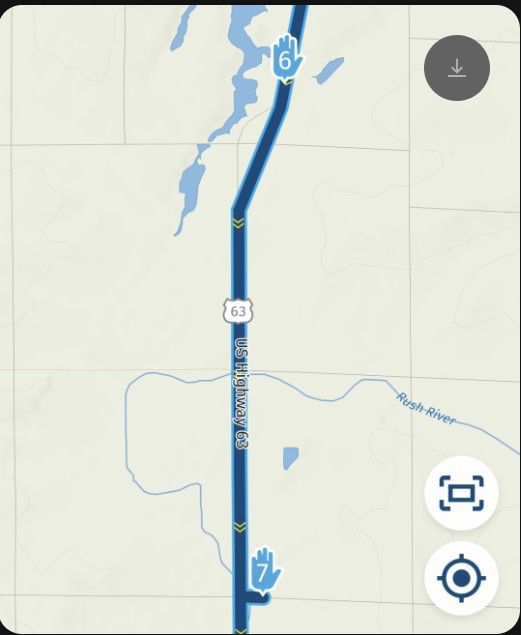
6.0 Via Point announced as reached even though I did not reach it
-

this also happens with shaping points in release 5. I reported it a long time ago, but the issue was closed without any info.
-
This is a typical scenario where this happens. Driving from bottom to top. Where I placed the red cross, the app thinks that the distance to point 2 is 0 and jumps to point 3. The good thing in this case is that it still sends me to point 2. The navigation skips point 2 first after I have ignored the instruction to turn right and crossed the round aboud.
The logic is based on straight line distance I think but it doesnt explain why the distance falls down to 0. I hope one day it will take the route into consideration first of all.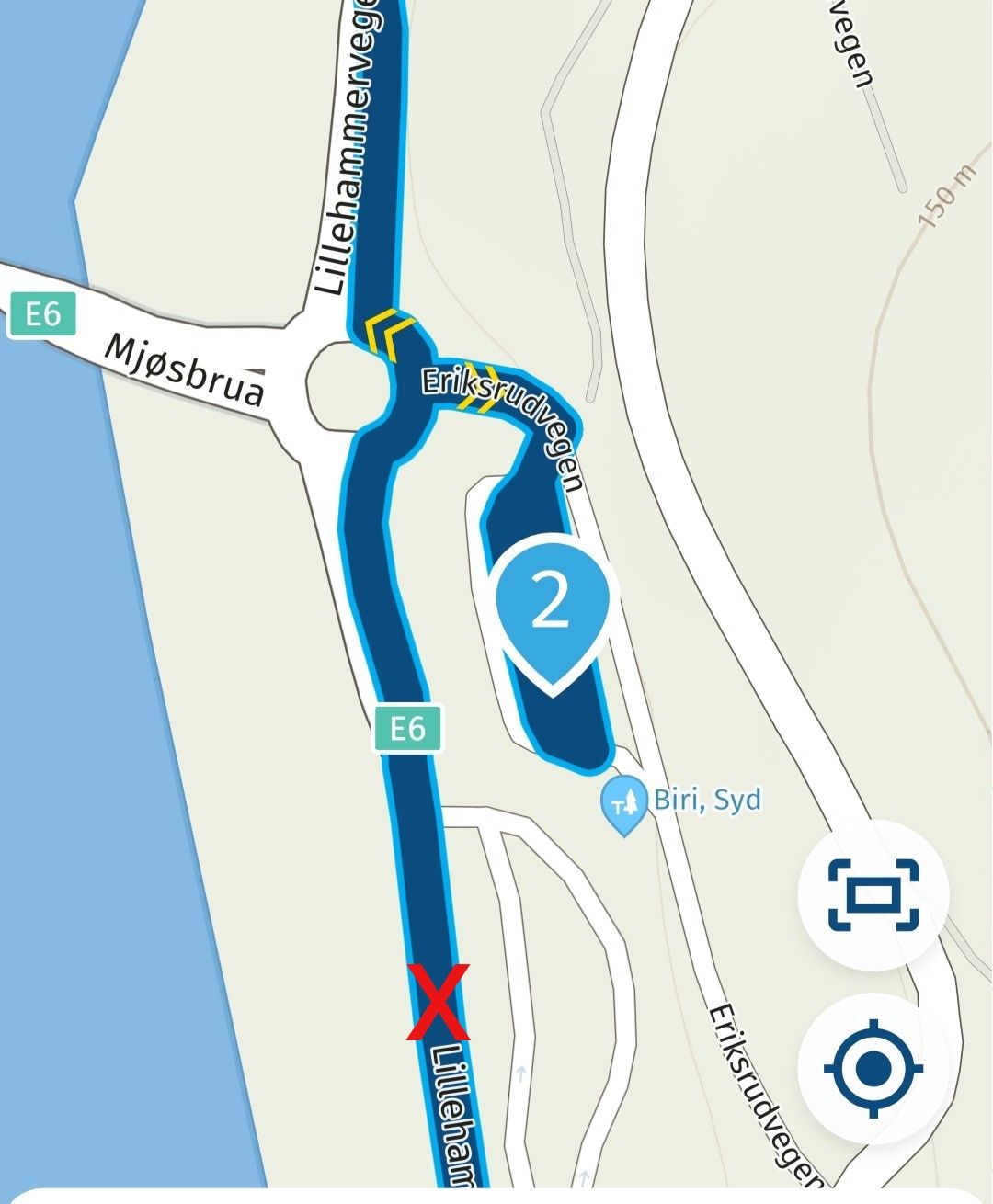
-
This is a typical scenario where this happens. Driving from bottom to top. Where I placed the red cross, the app thinks that the distance to point 2 is 0 and jumps to point 3. The good thing in this case is that it still sends me to point 2. The navigation skips point 2 first after I have ignored the instruction to turn right and crossed the round aboud.
The logic is based on straight line distance I think but it doesnt explain why the distance falls down to 0. I hope one day it will take the route into consideration first of all.
@Herman-Veldhuizen what is the distance between nr 2 and the route towards the roundabout.
-

Hi,
I also have another screnario I use to "check" automatically miss Shape points:
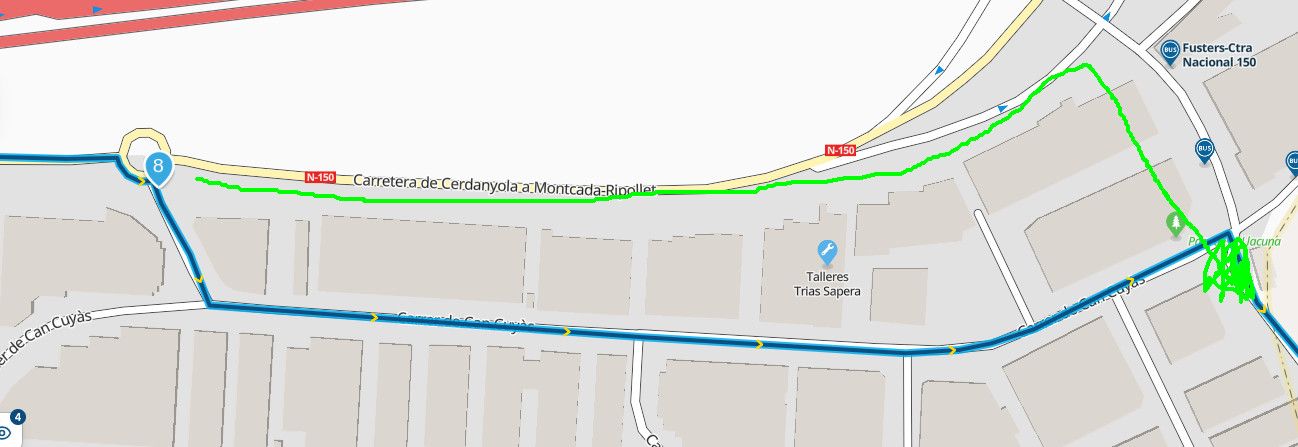
Normally, I miss waypoint 8, but even it is near road I use (green line) Next always send me back to go througt it. Only wheh I pass road cross where the arrow is, it follows to waypoint 9.
I tried to put wp 8 nearest to roundabout, but although Next announces it as "reached", the recalculation send me back again.
Is like Next want to follow path line, even if it is not necessary.
I know I'm a little curios, so, perhaps a tech doc explaining how waypoints logic for detect them (minimal distance to reach) anf how recalculation to get missed WP works...
Regards
Lluis Arasanz
- BMW F750GS
MotoMediaLink HW Interface for BMW's WonderWheel device - Samsung A14 with Beta MyRoute-App (primary bike use)
Tasker and MMLink SW for Android App Control - iPhone 14 with Beta MyRoute-App (personal and primary CP use)
- BMW F750GS
-
Hi,
I also have another screnario I use to "check" automatically miss Shape points:
Normally, I miss waypoint 8, but even it is near road I use (green line) Next always send me back to go througt it. Only wheh I pass road cross where the arrow is, it follows to waypoint 9.
I tried to put wp 8 nearest to roundabout, but although Next announces it as "reached", the recalculation send me back again.
Is like Next want to follow path line, even if it is not necessary.
I know I'm a little curios, so, perhaps a tech doc explaining how waypoints logic for detect them (minimal distance to reach) anf how recalculation to get missed WP works...
Regards
@Lluis-Arasanz what happens if you put that point on the parallel road instead of just lost the roundabout
-
-
@Herman-Veldhuizen what is the distance between nr 2 and the route towards the roundabout.
@Marinus-van-Deudekom roughly 50m (and the distance measured along the route from the red cross to point 2 is roughly 150m). But even if the distance from the roundabout to point 2 would be 1km the app would still think that I had reached point 2 there where I placed the red cross.
Ideally the app would use distances along the route from your current position to the virtual on the route projected point.
That the distance drops from 100 to 0 a little early is probably related to the fact that the app appears to use 100m as the accuracy for shaping points. Would be nice to get 10m accuracy when approaching a shaping point, just like for the destination (via point). -
@Marinus-van-Deudekom roughly 50m (and the distance measured along the route from the red cross to point 2 is roughly 150m). But even if the distance from the roundabout to point 2 would be 1km the app would still think that I had reached point 2 there where I placed the red cross.
Ideally the app would use distances along the route from your current position to the virtual on the route projected point.
That the distance drops from 100 to 0 a little early is probably related to the fact that the app appears to use 100m as the accuracy for shaping points. Would be nice to get 10m accuracy when approaching a shaping point, just like for the destination (via point).
@Herman-Veldhuizen if you would draw a circle round that shapingpoint and you would be inside that circle MRA would asume you’ ve reached that viapoint. I believe that distance is 60 meters. So if the road parallel to that shapingpoint is about 50 meters from that point, it would be within the marge.
Honda Goldwing GL1500,
Honda Silverwing GL 650
DMD2 T865X 8 inch Android tablet using MRA next for navigation
Garmin XT sold
Samsung S24FE mounted on a Quadlock and using Android Auto in my car -
@Herman-Veldhuizen if you would draw a circle round that shapingpoint and you would be inside that circle MRA would asume you’ ve reached that viapoint. I believe that distance is 60 meters. So if the road parallel to that shapingpoint is about 50 meters from that point, it would be within the marge.
@Marinus-van-Deudekom Yes I understand. But I hope the app can do better in the future to avoid cases like these where the target point and ETA jump at unexpected moments. What I am seeing is that there are independent algorithms at work inside and that a better integration with the mapping sdk is probably needed. I am not critisizing, just observing.
-
@Marinus-van-Deudekom Yes I understand. But I hope the app can do better in the future to avoid cases like these where the target point and ETA jump at unexpected moments. What I am seeing is that there are independent algorithms at work inside and that a better integration with the mapping sdk is probably needed. I am not critisizing, just observing.
@Herman-Veldhuizen I Understand but I think its a compromize
Hello! It looks like you're interested in this conversation, but you don't have an account yet.
Getting fed up of having to scroll through the same posts each visit? When you register for an account, you'll always come back to exactly where you were before, and choose to be notified of new replies (either via email, or push notification). You'll also be able to save bookmarks and upvote posts to show your appreciation to other community members.
With your input, this post could be even better 💗
Register Login-
 1416125
-
 0641
-
012244
-
0526
-
 1241.9k
-
 07138
-
0416
-
012372