Bought subscription on PC, but MRA on my phone still shows BASIC subscription :(
-

Bought subscription on PC, but MRA on my phone still shows BASIC subscription

So frustrating.
I used to use TYRE, which was great and intuitive - this version seems unusable.
I'm just trying to access Turn by tun navigation, which I paid for in the PC version.
Please tll me I don't have to buy it for my phone AND my PC !!!!!! ???Going to resort to a paper map and writing the waypoints in pen.
-
Bought subscription on PC, but MRA on my phone still shows BASIC subscription
So frustrating.
I used to use TYRE, which was great and intuitive - this version seems unusable.
I'm just trying to access Turn by tun navigation, which I paid for in the PC version.
Please tll me I don't have to buy it for my phone AND my PC !!!!!! ???Going to resort to a paper map and writing the waypoints in pen.

@Rob-Wiltshire MyRoute-app has two products, the website route planner and mobile phone navigation app. Each product has a separate subscription.
-
Cheers - It eventually updated to Navigation Next.
Infuriatingly difficult to use interface.
THIS IS HOW I GOT A GROUP RIDE TO GIVE ME TURN BY TURN NAVIGATION (Note: you must have bought the 'Navigation NExt' version to do this.
If anyone else is having the same inabiliyy as me trying to just go to a gtoup , get a route, and then justnhave the app give youu turn-by-turn instructions (in the same way as a SatNav would........
Go to Route lab,
then Routes
then groups
then click on the named group (with your groups rides in it)
go to the blue 'page menu' - (right hand side of screen near top)
A blue sub-menu then opens up
then click routes (AGAIN !!!, but in this sub menu)
Go to your group, and it should have a list of rides.
Click on the ride name, and a map of the route should come up
then go to the blue 'page menu' (AGAIN!), but this time it has changed , and one of the options is 'USE'
Click on '+ use route'
THIS WILL PUT THE ROUTE FROM YOUR GROUP INTO YOUR ROUTES TAB-TO FIND YOUR ROUTES NOW -
Go to the 1st menu, or just restart your app where it comes up with 'Good Afternoon'
Go to 'Route lab'
click on 'routes' button(3rd one down on the left)
You will now see all of your routes !!!!!!, and be able to go into them-TO ACTUALLY ACTIVATE THE TURN BY TURN DIRECTIONS FOR THAT ROUTE, and actually seee tuen by turn navigation (the same as a SatNav):
Go to the 1st menu, or just restart your app where it comes up with 'Good Afternoon'
but this time click on the 'last route' button.This has been a very exasperating afternoon to work this out ! , and not a great customer experience. Great app , confusing , very time confusing to work out interface'
If anyone has an easier way to do this, please let me know.
-

Just choose destination
In the bottom you'll find the group and events button. Click on groups and the choose the route
It does 't get any easier
Have fun -
Cheers - It eventually updated to Navigation Next.
Infuriatingly difficult to use interface.
THIS IS HOW I GOT A GROUP RIDE TO GIVE ME TURN BY TURN NAVIGATION (Note: you must have bought the 'Navigation NExt' version to do this.
If anyone else is having the same inabiliyy as me trying to just go to a gtoup , get a route, and then justnhave the app give youu turn-by-turn instructions (in the same way as a SatNav would........
Go to Route lab,
then Routes
then groups
then click on the named group (with your groups rides in it)
go to the blue 'page menu' - (right hand side of screen near top)
A blue sub-menu then opens up
then click routes (AGAIN !!!, but in this sub menu)
Go to your group, and it should have a list of rides.
Click on the ride name, and a map of the route should come up
then go to the blue 'page menu' (AGAIN!), but this time it has changed , and one of the options is 'USE'
Click on '+ use route'
THIS WILL PUT THE ROUTE FROM YOUR GROUP INTO YOUR ROUTES TAB-TO FIND YOUR ROUTES NOW -
Go to the 1st menu, or just restart your app where it comes up with 'Good Afternoon'
Go to 'Route lab'
click on 'routes' button(3rd one down on the left)
You will now see all of your routes !!!!!!, and be able to go into them-TO ACTUALLY ACTIVATE THE TURN BY TURN DIRECTIONS FOR THAT ROUTE, and actually seee tuen by turn navigation (the same as a SatNav):
Go to the 1st menu, or just restart your app where it comes up with 'Good Afternoon'
but this time click on the 'last route' button.This has been a very exasperating afternoon to work this out ! , and not a great customer experience. Great app , confusing , very time confusing to work out interface'
If anyone has an easier way to do this, please let me know.

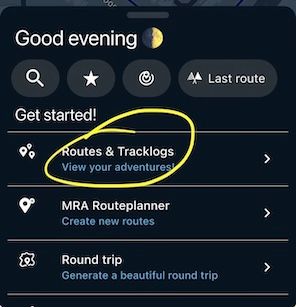
@Rob-Wiltshire On the main screen choose 'Routes & Tracklogs'
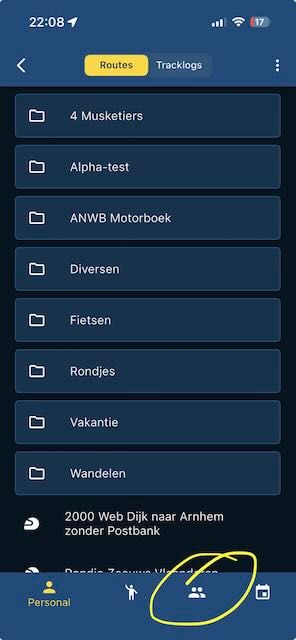
Tap on the group symbol on the bottom:
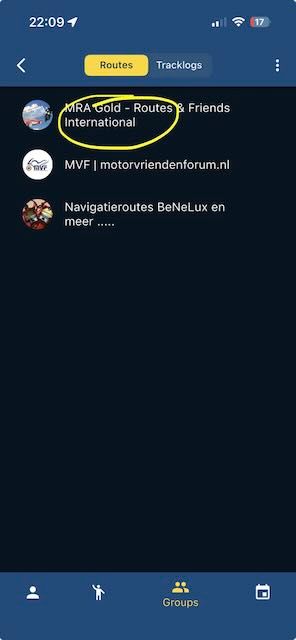
Choose a group you're part of:
Select a route:
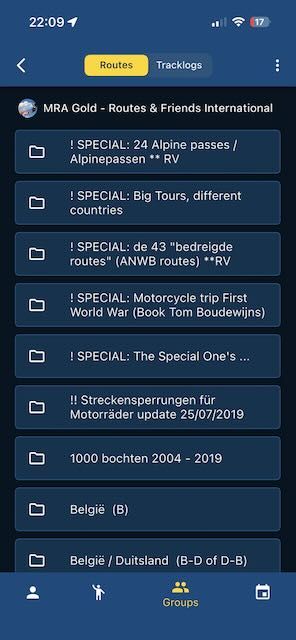
Select 'Navigate' and have fun...
-
Cheers - It eventually updated to Navigation Next.
Infuriatingly difficult to use interface.
THIS IS HOW I GOT A GROUP RIDE TO GIVE ME TURN BY TURN NAVIGATION (Note: you must have bought the 'Navigation NExt' version to do this.
If anyone else is having the same inabiliyy as me trying to just go to a gtoup , get a route, and then justnhave the app give youu turn-by-turn instructions (in the same way as a SatNav would........
Go to Route lab,
then Routes
then groups
then click on the named group (with your groups rides in it)
go to the blue 'page menu' - (right hand side of screen near top)
A blue sub-menu then opens up
then click routes (AGAIN !!!, but in this sub menu)
Go to your group, and it should have a list of rides.
Click on the ride name, and a map of the route should come up
then go to the blue 'page menu' (AGAIN!), but this time it has changed , and one of the options is 'USE'
Click on '+ use route'
THIS WILL PUT THE ROUTE FROM YOUR GROUP INTO YOUR ROUTES TAB-TO FIND YOUR ROUTES NOW -
Go to the 1st menu, or just restart your app where it comes up with 'Good Afternoon'
Go to 'Route lab'
click on 'routes' button(3rd one down on the left)
You will now see all of your routes !!!!!!, and be able to go into them-TO ACTUALLY ACTIVATE THE TURN BY TURN DIRECTIONS FOR THAT ROUTE, and actually seee tuen by turn navigation (the same as a SatNav):
Go to the 1st menu, or just restart your app where it comes up with 'Good Afternoon'
but this time click on the 'last route' button.This has been a very exasperating afternoon to work this out ! , and not a great customer experience. Great app , confusing , very time confusing to work out interface'
If anyone has an easier way to do this, please let me know.

This has been a very exasperating afternoon to work this out ! , and not a great customer experience. Great app , confusing , very time confusing to work out interface'
Your time would have been better spent by reading a manual.
Or maybe follow the in-app introduction after having installed the app.
Hello! It looks like you're interested in this conversation, but you don't have an account yet.
Getting fed up of having to scroll through the same posts each visit? When you register for an account, you'll always come back to exactly where you were before, and choose to be notified of new replies (either via email, or push notification). You'll also be able to save bookmarks and upvote posts to show your appreciation to other community members.
With your input, this post could be even better 💗
Register Login-
06109
-
 0598
0598
-
 057
057
-
 110404
-
06134
-
0366
-
03127
-