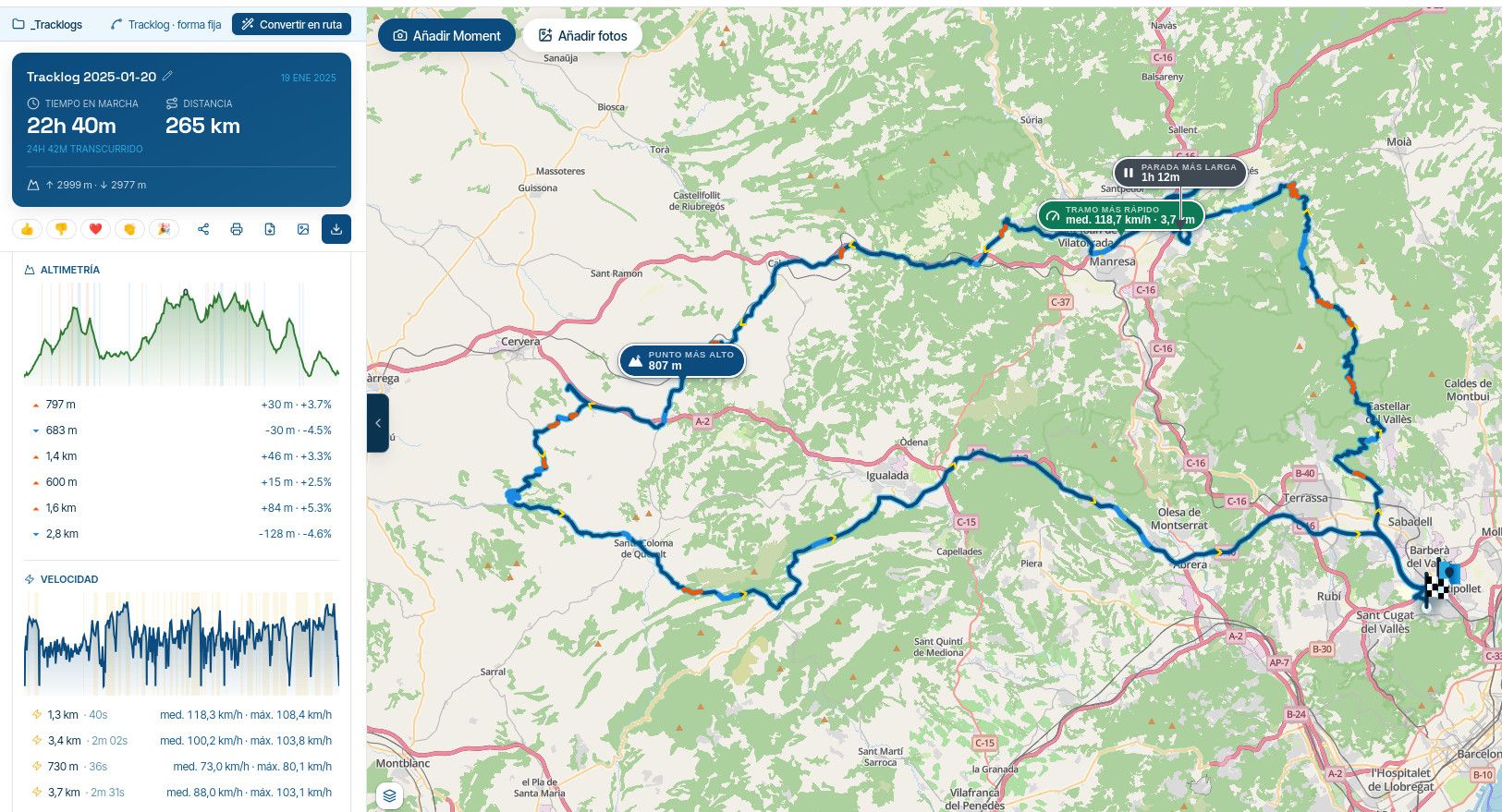
Starting a ride from Waypoint or Exact location
-

I've been using the MyRoute app for a few months but have a question regarding starting from a nearest waypoint versu exact location. I've run into a few situations when the app wants me to "double back" to start the ride. Can someone please enlighten me and apologies for the MyRoute 101 question.
-

It's simple (if this is what you mean and asked for:
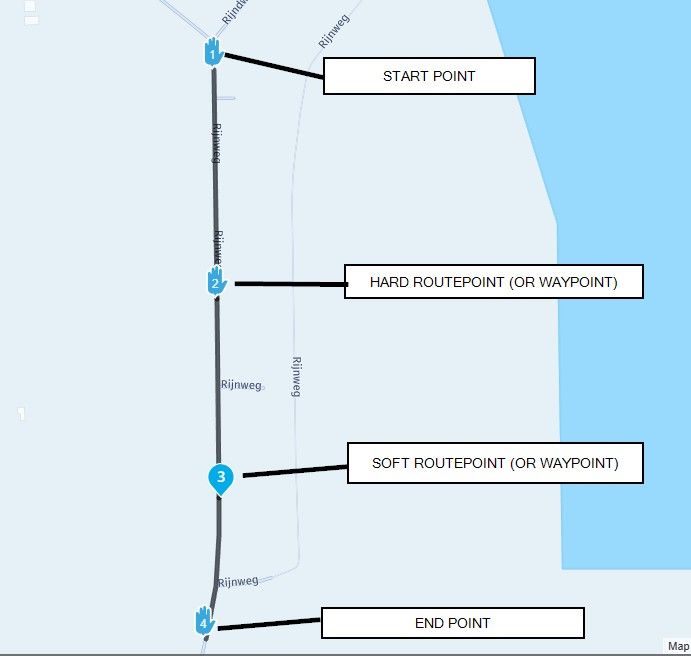
In my example:
Waypoint 2 is a hard waypoint (routepoint) meaning you MUST pass this point to cintineu your journey.Waypoint 3 is a soft waypoint you can pass but you can also skip this point to continue your journey
If you pass waypoint 2 and continue your journey, you will be rturned to wyapoint 2 although you might be very close to your endpoint (finish).
-
Hi, thank you for your reply. I'm adding the picture to explain better. Now, in the attached picture, the start/finish is where the checker flag is. But my accommodation is where I red circled the map, so ideally would like to start/finish the route there as opposed to riding all the way up to the start/finish checker flag.
Some other vendors have a way to join the ride at the fastest possible route to it.
Is there a simple way in myRoute navigation app to simply load the original GPX, but change start/finish on the fly, where I red circled?thank you
joe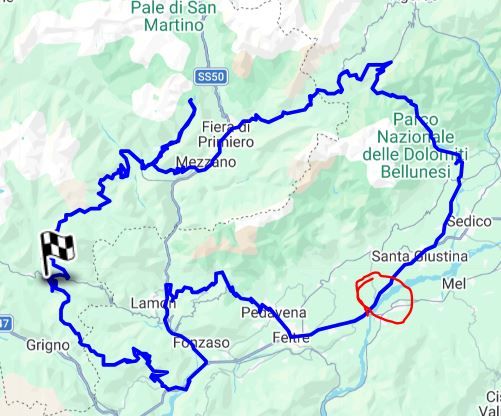
-
I've been using the MyRoute app for a few months but have a question regarding starting from a nearest waypoint versu exact location. I've run into a few situations when the app wants me to "double back" to start the ride. Can someone please enlighten me and apologies for the MyRoute 101 question.

@Eric-Colón-3-0 simply skip waypoint 1 and you're good to go.
-

In MRA terminology, we’re talking about viapoints and shapingpoints.
-
I've been using the MyRoute app for a few months but have a question regarding starting from a nearest waypoint versu exact location. I've run into a few situations when the app wants me to "double back" to start the ride. Can someone please enlighten me and apologies for the MyRoute 101 question.

@Eric-Colón-3-0 all you need to do is zoom out the map so you can see the next point ahead of you on your route,
press on this next point & it will become the start point for your navigation
MRA will calculate the route from your exact location to this next piont after you have pressed it -
Hi, thank you for your reply. I'm adding the picture to explain better. Now, in the attached picture, the start/finish is where the checker flag is. But my accommodation is where I red circled the map, so ideally would like to start/finish the route there as opposed to riding all the way up to the start/finish checker flag.
Some other vendors have a way to join the ride at the fastest possible route to it.
Is there a simple way in myRoute navigation app to simply load the original GPX, but change start/finish on the fly, where I red circled?thank you
joe
@Jozef-Malik-0, I all honesty, the previous comments are not going to help you... What I see is a track. You cannot change a track (at least not without completely redrawing it as a route). Assuming you will be navigating with the MRA app, what you CAN do is this:
- just start the navigating the track as usual. You will be directed to the start point
- long-press a point on the track, a bit ahead in the direction away from the start
- Navigation will guide you to the end of the track just fine
- From the end of the track, restart the track from the beginning until you are where you started
Succes!
-
@Jozef-Malik-0, I all honesty, the previous comments are not going to help you... What I see is a track. You cannot change a track (at least not without completely redrawing it as a route). Assuming you will be navigating with the MRA app, what you CAN do is this:
- just start the navigating the track as usual. You will be directed to the start point
- long-press a point on the track, a bit ahead in the direction away from the start
- Navigation will guide you to the end of the track just fine
- From the end of the track, restart the track from the beginning until you are where you started
Succes!

@Con-Hennekens
Hi!
Would you please clarify what you mean here "From the end of the track, restart the track from the beginning until you are where you started".
Also, navigating the Track will still give you voice guidance as oppose to say Garmin that only gives you that for Routes, correct?
Thank you!Positive emotions are worth every penny ;)
-
@Con-Hennekens
Hi!
Would you please clarify what you mean here "From the end of the track, restart the track from the beginning until you are where you started".
Also, navigating the Track will still give you voice guidance as oppose to say Garmin that only gives you that for Routes, correct?
Thank you!
@Lenny-O. What I mean is, if you reach the end of the track, you can simply restart the track from the beginning, to complete your journey to the point where you started. And yes, navigating a track will still give you voice guidance

I am just an enthusiastic MRA user, and hope you will be one too!
Most motorcycle problems are caused by the nut that connects the handlebar to the saddle.
Check out RideSleepRepeat.eu, a biker community for sharing stays across Europe
-
@Lenny-O. What I mean is, if you reach the end of the track, you can simply restart the track from the beginning, to complete your journey to the point where you started. And yes, navigating a track will still give you voice guidance
@Con-Hennekens Oh, I see...
 You mean to get back to the accommodations point where the route ACTUALLY started! Clever!
 -
@Jozef-Malik-0, I all honesty, the previous comments are not going to help you... What I see is a track. You cannot change a track (at least not without completely redrawing it as a route). Assuming you will be navigating with the MRA app, what you CAN do is this:
- just start the navigating the track as usual. You will be directed to the start point
- long-press a point on the track, a bit ahead in the direction away from the start
- Navigation will guide you to the end of the track just fine
- From the end of the track, restart the track from the beginning until you are where you started
Succes!
Con-Hennekens, thank you for the explanation in both threads, i am not sure how on earth I reply to completely different post. Maybe the moderator can move it to the thread i have started on this topic yesterday. Thank you
-

The correct start of navigation if you are already on the route depends on how you start the navigation, if you start the navigation from Android Auto (regarding Carplay I don't know) the app will take you back to the starting point, it doesn't matter if you are almost at the end of the route of many kilometers and many waypoints, it will always take you back to the starting point, if instead you start it from the app outside of Android Auto by activating the options "Start from the nearest waypoint" and "Use the current location" the navigation starts correctly from the nearest waypoint which is located in the direction of the end of the route, once started you can go back to using Android Auto.
-
The correct start of navigation if you are already on the route depends on how you start the navigation, if you start the navigation from Android Auto (regarding Carplay I don't know) the app will take you back to the starting point, it doesn't matter if you are almost at the end of the route of many kilometers and many waypoints, it will always take you back to the starting point, if instead you start it from the app outside of Android Auto by activating the options "Start from the nearest waypoint" and "Use the current location" the navigation starts correctly from the nearest waypoint which is located in the direction of the end of the route, once started you can go back to using Android Auto.
@ginogino ((If, instead, you start it from the app outside of Android Auto by activating the "Start from nearest waypoint" and "Use current location" options, navigation will correctly start from the nearest waypoint, which is in the direction of the route's end.)) I'm sorry, I disagree with my opinion about this part of your answer. Last week we were discussing this point in another post on this forum... and it was concluded after much discussion that in both iOS and Android, if you activate the boxes you mention, you will indeed go to the nearest point on your route (but the nearest point isn't always in the direction of the route's end). Sometimes the nearest point is very close to you (but behind you), and therefore you will go backward on your route and not towards its end... (I suggested this as an idea if it might be of interest for future updates of the navigation app)... but the only solution offered to me was that I had to manually navigate through the previous waypoints or zoom out and go directly to the next point towards the end of the route) Both solutions don't convince me. Normally, a browser should redirect only from your position to the next point (not to a previous one you've already passed) simply because it's closer.
Hello! It looks like you're interested in this conversation, but you don't have an account yet.
Getting fed up of having to scroll through the same posts each visit? When you register for an account, you'll always come back to exactly where you were before, and choose to be notified of new replies (either via email, or push notification). You'll also be able to save bookmarks and upvote posts to show your appreciation to other community members.
With your input, this post could be even better 💗
Register Login-
0520
-
 0521
0521
-
1370
-
 0311
0311
-
0312
-
0746
-
0311
-
036