Embedded Routes
-

Hi,
I have been trying other embed my route library onto my profile and have followed the instructions detailed in the support file.
I have followed the same process for all my routes,
a) Made the file public
b) Published the routesMost of my files show on my profile, however some do not, why is this? What am I doing wrong?
Thanks in advance for your help
Tony
-

Share one of the routes, that isn't properly published. Hard to say what the problem is, without seeing the route
-
Hi,
I have been trying other embed my route library onto my profile and have followed the instructions detailed in the support file.
I have followed the same process for all my routes,
a) Made the file public
b) Published the routesMost of my files show on my profile, however some do not, why is this? What am I doing wrong?
Thanks in advance for your help
Tony

@Tony-Edwards-0, is the folder you shared route is in also shared publicly?
-
Share one of the routes, that isn't properly published. Hard to say what the problem is, without seeing the route
@Lex.Kloet.RX
Hi,
If you could share your e mail with me I will send one of my routes to look at. If you are able to help that would be fantastic.
-
@Tony-Edwards-0, That will not help. Being able to share a route is not about the route itself. A route as well as the folder it is in must be set to public. You can do that from your routes library. click the three dots at the far right of the route, and set privacy to public Do the same for the folders it is in.
I am just an enthusiastic MRA user, and hope you will be one too!
Most motorcycle problems are caused by the nut that connects the handlebar to the saddle.
Check out RideSleepRepeat.eu, a biker community for sharing stays across Europe
-
@Tony-Edwards-0, That will not help. Being able to share a route is not about the route itself. A route as well as the folder it is in must be set to public. You can do that from your routes library. click the three dots at the far right of the route, and set privacy to public Do the same for the folders it is in.
Hello Con,
Thanks for the advice. I had made the route public and they published the route (orange tick) and the majority of my routes are embedded on my profile. I had not made the file public, so amend this, but unfortunately it has not worked.
On all the settings for the route that has embed in my profile is the same as those that have not. So I am not sure what to dip from here?
-
Hi,
I have been trying other embed my route library onto my profile and have followed the instructions detailed in the support file.
I have followed the same process for all my routes,
a) Made the file public
b) Published the routesMost of my files show on my profile, however some do not, why is this? What am I doing wrong?
Thanks in advance for your help
Tony

@Tony-Edwards-0 ...not sure if your issues about your routes, not able to share (made it public) are based at your MRA membership. Because you are basic membership; by this, you are only allowed to store 25 routes...
How many routes do you have stored in your profile at all?
How many do you intend to share (make public)?
Do you have more than 1 profile?Nothing is impossible ;-)
In past: GARMIN Zumo 210->GARMIN Zumo 395->GARMIN XT=> now: DMD T865-X + MyRoute-App, LocusMaps, OsmAnd.
In past: GARMIN MapSource ->GARMIN BaseCamp->Tyre->Kurviger->Calimoto=> now: MRA-Routplanner. -
@Tony-Edwards-0 ...not sure if your issues about your routes, not able to share (made it public) are based at your MRA membership. Because you are basic membership; by this, you are only allowed to store 25 routes...
How many routes do you have stored in your profile at all?
How many do you intend to share (make public)?
Do you have more than 1 profile?
Hi,
Is being a Gold member a basic member ship? I ma obvioulsy doing something incorrectly as I have published 61 routes and have another 10-15 that I would like to publish and that's before any adventures in 2026 that I would like to share as well.
I only have the one profile.
Any further suggestions would be gratefully received.
-
Hi,
Is being a Gold member a basic member ship? I ma obvioulsy doing something incorrectly as I have published 61 routes and have another 10-15 that I would like to publish and that's before any adventures in 2026 that I would like to share as well.
I only have the one profile.
Any further suggestions would be gratefully received.
@Tony-Edwards-0, No, Basic is the free membership (OSM only and some other limitations). With your Gold licence you should most definitely be able to share and embed routes. Can you place an URL to one of the routes missing when you embed them? So we can see if they are shared correctly.
I am just an enthusiastic MRA user, and hope you will be one too!
Most motorcycle problems are caused by the nut that connects the handlebar to the saddle.
Check out RideSleepRepeat.eu, a biker community for sharing stays across Europe
-
@Tony-Edwards-0, No, Basic is the free membership (OSM only and some other limitations). With your Gold licence you should most definitely be able to share and embed routes. Can you place an URL to one of the routes missing when you embed them? So we can see if they are shared correctly.
Here you go, hopefully I have done this correctly.
https://www.myrouteapp.com/en/social/route/12657772?mode=shareAny help to get me on track is greatly appreciated.
-
Here you go, hopefully I have done this correctly.
https://www.myrouteapp.com/en/social/route/12657772?mode=shareAny help to get me on track is greatly appreciated.
@Tony-Edwards-0 ...that's a bit strange to me: I can open your link and can see the route. I also can step up to the folder above. So, I can see 7 folders (Denmark to Sweden), each with several routes in. Everything is set as "public". In the main folder "Routes" there I can see only the seven sub folders, but no route; may there is non - or not public.
Next strange thing: If I search in MRA-Routeplanner your profile, I can find it (Tony Edwards from Southafrica). But if I select your main folder "Routes" it's empty! No routes, no sub folders!
Related to your "Basic" membership, I still believe there are too much routes. I wonder, if you created all the routes by yourself in MRA-Routeplanner? Which should not be possible. Or did you upload some routes (by gpx file), received from someone else?
An indicator for upload my are some routes, I checked - which did not show in the list of waypoints (route points) the distance in time and miles from one point to next point. That's not typically!Nothing is impossible ;-)
In past: GARMIN Zumo 210->GARMIN Zumo 395->GARMIN XT=> now: DMD T865-X + MyRoute-App, LocusMaps, OsmAnd.
In past: GARMIN MapSource ->GARMIN BaseCamp->Tyre->Kurviger->Calimoto=> now: MRA-Routplanner. -
@Tony-Edwards-0 ...that's a bit strange to me: I can open your link and can see the route. I also can step up to the folder above. So, I can see 7 folders (Denmark to Sweden), each with several routes in. Everything is set as "public". In the main folder "Routes" there I can see only the seven sub folders, but no route; may there is non - or not public.
Next strange thing: If I search in MRA-Routeplanner your profile, I can find it (Tony Edwards from Southafrica). But if I select your main folder "Routes" it's empty! No routes, no sub folders!
Related to your "Basic" membership, I still believe there are too much routes. I wonder, if you created all the routes by yourself in MRA-Routeplanner? Which should not be possible. Or did you upload some routes (by gpx file), received from someone else?
An indicator for upload my are some routes, I checked - which did not show in the list of waypoints (route points) the distance in time and miles from one point to next point. That's not typically!
@Guzzist said in Embedded Routes:
Related to your "Basic" membership, I still believe there are too much routes.
Trough the route and Tony his library I can find his profile, and, like he said above, he is Gold member:
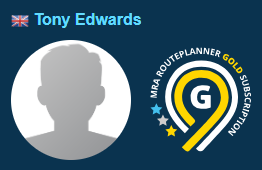
So we can rule out any basic-limitation. In his profile we can see all routes that are set to public and in all folders that are set to public. For these routes for example:
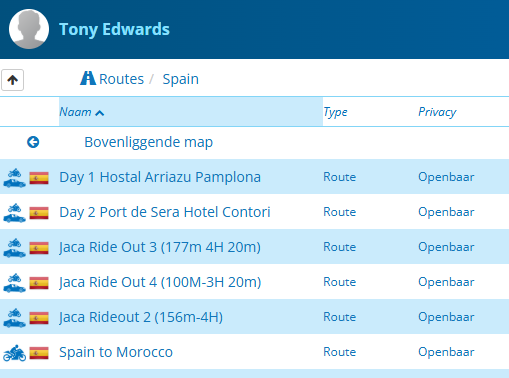
I see no reason why they should not show up if you embed them.
@Tony-Edwards-0, can you show us the link where you have embedded them?
-
Hi Con,
Sorry I am not sure quite what you mean, I used the embed the routes I used the link on my file. I tried embedding the routes individually and collectively, the result is the same.
I can see another user has asked if I have uploaded or created the routes myself. 95% of the routes I have created and used myself.
If this is puzzling for us all I guess I will be unable to share my adventures on line, which is such a shame.
Thanks for your help.
-

@Tony-Edwards-0 Probeer eens bij route-informatie je transportmodus naar auto te zetten voor al je routes, waarschijnlijk is dan je probleem opgelost.
-
Hi Con,
Sorry I am not sure quite what you mean, I used the embed the routes I used the link on my file. I tried embedding the routes individually and collectively, the result is the same.
I can see another user has asked if I have uploaded or created the routes myself. 95% of the routes I have created and used myself.
If this is puzzling for us all I guess I will be unable to share my adventures on line, which is such a shame.
Thanks for your help.
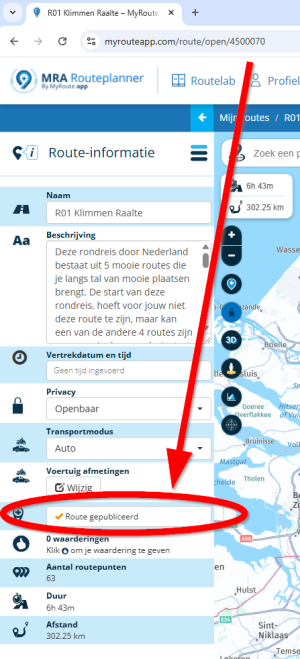
@Tony-Edwards-0, Check the routes that don't appear in your embedded library for this parameter!
-
Hi Con,
Yes I have checked this and they are all ticked orange as displayed. I did try adding an addition route this afternoon and that did not show.???? I then embedded routes from my Library for Norway and Sweden which I do not normally do until I have completed them (June 2026 adventure).
When doing this I noticed that some routes I have set the mode of travel for motorbike (which did not show) and other the mode was set to car (which do show) I then amended all the routes mode to car, and TA-DAH they now appear
 I am hoping this is now fixed
-
Yeah, exactly as Koen wrote.
-
@Guzzist said in Embedded Routes:
Related to your "Basic" membership, I still believe there are too much routes.
Trough the route and Tony his library I can find his profile, and, like he said above, he is Gold member:
So we can rule out any basic-limitation. In his profile we can see all routes that are set to public and in all folders that are set to public. For these routes for example:
I see no reason why they should not show up if you embed them.
@Tony-Edwards-0, can you show us the link where you have embedded them?
@Con-Hennekens said in Embedded Routes:
@Guzzist said in Embedded Routes:
Related to your "Basic" membership, I still believe there are too much routes.
Trough the route and Tony his library I can find his profile, and, like he said above, he is Gold member:
So we can rule out any basic-limitation. In his profile we can see all routes that are set to public and in all folders that are set to public. For these routes for example:
Oh, I'm so sorry

I accidentally checked the profile of the wrong "Tony Edwards", who is a basic member and is from South Africa.
The right Tony is a gold member and is from Britain. -
Hi Con,
Yes I have checked this and they are all ticked orange as displayed. I did try adding an addition route this afternoon and that did not show.???? I then embedded routes from my Library for Norway and Sweden which I do not normally do until I have completed them (June 2026 adventure).
When doing this I noticed that some routes I have set the mode of travel for motorbike (which did not show) and other the mode was set to car (which do show) I then amended all the routes mode to car, and TA-DAH they now appear
I am hoping this is now fixed
@Tony-Edwards-0, Ues, I can indeed confirm that Motorcycle routes are not published correctly.
I am just an enthusiastic MRA user, and hope you will be one too!
Most motorcycle problems are caused by the nut that connects the handlebar to the saddle.
Check out RideSleepRepeat.eu, a biker community for sharing stays across Europe
-
@Tony-Edwards-0, Ues, I can indeed confirm that Motorcycle routes are not published correctly.
@Con-Hennekens said in Embedded Routes:
@Tony-Edwards-0, Ues, I can indeed confirm that Motorcycle routes are not published correctly.
It a bug already logged last year and known by the MRA team: routes with motorcycle profile are not visible when setting to public.
https://forum.myrouteapp.com/topic/8518/route-kan-niet-worden-omgezet
Hello! It looks like you're interested in this conversation, but you don't have an account yet.
Getting fed up of having to scroll through the same posts each visit? When you register for an account, you'll always come back to exactly where you were before, and choose to be notified of new replies (either via email, or push notification). You'll also be able to save bookmarks and upvote posts to show your appreciation to other community members.
With your input, this post could be even better 💗
Register Login-
 1214188
-
01469
-
 11280
11280
-
 013209
-
0640
-
16128
-
1340613
-
 15159
15159