Unable to login using Apple creds
-

Hello all,
I recently reinstalled MRA on my phone after doing a bit too much cleaning during the colder weather. I click the Apple logo and get the iOS sign-in page and Face-ID confirms it.
I receive a message that says "You have been logged in". Upon returning to the app, I'm still not logged in. I have tried the following:
- Restart phone
- Uninstall / reinstall app
- Try cellular network and WiFi
I opened a support case too - I'm not certain if it's preferred to try the forum first or a support case, so I did both.
Anyone else seeing this?
-

Support ticket is always a good idea for account related issues. I’m sure they’ll come back to you, probably suggesting temporarily not using that authentication method.
We will definitely investigate it
-
Support ticket is always a good idea for account related issues. I’m sure they’ll come back to you, probably suggesting temporarily not using that authentication method.
We will definitely investigate it
@Corjan-Meijerink said in Unable to login using Apple creds:
Support ticket is always a good idea for account related issues. I’m sure they’ll come back to you, probably suggesting temporarily not using that authentication method.
Thanks for the reply. We'll see what they say.
If I forego that authentication method, I lose access to my data, which means I might as well delete the app.

-
Hello all,
I recently reinstalled MRA on my phone after doing a bit too much cleaning during the colder weather. I click the Apple logo and get the iOS sign-in page and Face-ID confirms it.
I receive a message that says "You have been logged in". Upon returning to the app, I'm still not logged in. I have tried the following:
- Restart phone
- Uninstall / reinstall app
- Try cellular network and WiFi
I opened a support case too - I'm not certain if it's preferred to try the forum first or a support case, so I did both.
Anyone else seeing this?

@TobFrommepm.me said in Unable to login using Apple creds:
I click the Apple logo and get the iOS sign-in page and Face-ID confirms it.
I receive a message that says "You have been logged in". Upon returning to the app, I'm still not logged in.
Same happens with Google sign-in unfortunately !
Now the app is unusable on my iPhone ...
https://drive.google.com/file/d/1obKhG8iiOk9e18VZmjV9FMTsDsVFVtWe/view?usp=drive_linkBest regards,
Adrian📱Samsung S24 Ultra with MyRoute-APP (GOLD Lifetime)
🏍️Honda NC750X (2021) with AA/CarPlay by CHIGEE Aio-5
🚙Renault Duster with onboard AA/CarPlay Unit -
@TobFrommepm.me said in Unable to login using Apple creds:
I click the Apple logo and get the iOS sign-in page and Face-ID confirms it.
I receive a message that says "You have been logged in". Upon returning to the app, I'm still not logged in.
Same happens with Google sign-in unfortunately !
Now the app is unusable on my iPhone ...
https://drive.google.com/file/d/1obKhG8iiOk9e18VZmjV9FMTsDsVFVtWe/view?usp=drive_link
@Adrian-Avram, As far as I know you can still login with a regular password. If you do not know the password, you can ask for a reset at the login page.
I am just an enthusiastic MRA user, and hope you will be one too!
Most motorcycle problems are caused by the nut that connects the handlebar to the saddle.
Check out RideSleepRepeat.eu, a biker community for sharing stays across Europe
-
@Adrian-Avram, As far as I know you can still login with a regular password. If you do not know the password, you can ask for a reset at the login page.
@Con-Hennekens said in Unable to login using Apple creds:
@Adrian-Avram, As far as I know you can still login with a regular password. If you do not know the password, you can ask for a reset at the login page.
Thanks ! Found it in the account menu. I am guessing its the same for Apple also.
"SSO configuration
This account is managed by Google. To undo this and enable logging in with email and password, choose a new password."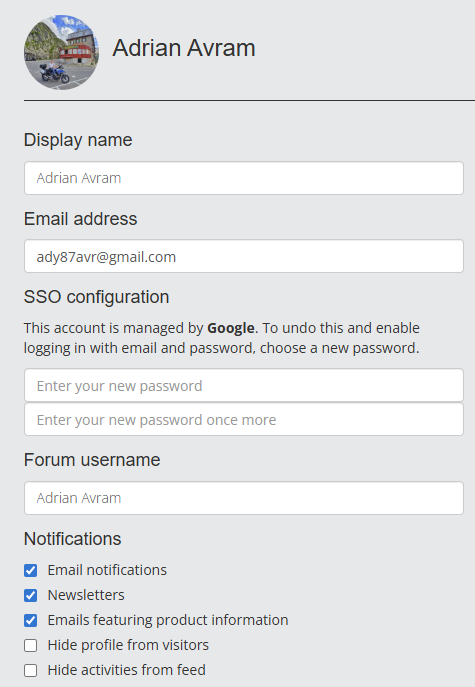
-
Hello all,
I recently reinstalled MRA on my phone after doing a bit too much cleaning during the colder weather. I click the Apple logo and get the iOS sign-in page and Face-ID confirms it.
I receive a message that says "You have been logged in". Upon returning to the app, I'm still not logged in. I have tried the following:
- Restart phone
- Uninstall / reinstall app
- Try cellular network and WiFi
I opened a support case too - I'm not certain if it's preferred to try the forum first or a support case, so I did both.
Anyone else seeing this?
@TobFrommepm.me
I have the same issue.
-
Can confirm the SSO issue is fixed in the upcoming update
-
Confirmed it is fixed on my side. I converted my account back to Apple SSO yesterday. Only one hiccup was a 502 bad gateway on a URL with /migration/ in it. A simple browser refresh and it went through.
Thanks everyone!
@Tom.Fox great!
Hello! It looks like you're interested in this conversation, but you don't have an account yet.
Getting fed up of having to scroll through the same posts each visit? When you register for an account, you'll always come back to exactly where you were before, and choose to be notified of new replies (either via email, or push notification). You'll also be able to save bookmarks and upvote posts to show your appreciation to other community members.
With your input, this post could be even better 💗
Register Login-
925213
-
 523161
-
 18251.7k
-
1226213
-
57488
-
0639
-
 07122
07122
-
 0630
0630