Skip to content
  • Categories
  • Recent
  • Popular
  • Support
  • MyRoute-app
Collapse
Brand Logo

MRA Community Forum

  1. Home
  2. The MyRoute-app
  3. [App] Problems, Bugs and other Issues
  4. Prendre l'itinéraire au plus près ou au début

Prendre l'itinéraire au plus près ou au début

Scheduled Pinned Locked Moved [App] Problems, Bugs and other Issues
11 Posts 3 Posters 81 Views 3 Watching
  • Oldest to Newest
  • Newest to Oldest
  • Most Votes
Reply
  • Reply as topic
Log in to reply
This topic has been deleted. Only users with topic management privileges can see it.
  • LE DIZES Freddyundefined Offline
    LE DIZES Freddyundefined Offline
    LE DIZES Freddy
    wrote last edited by
    #1

    Bonjour à tous
    Je ne retrouve plus sur le version 5, ou l'on peut faire le choix de reprendre un itinéraire au début de l'itinéraire au plus près d'où l'on est ou au début de celui-ci.
    Merci pour votre aide

    Traduction Google en anglais

    Hello everyone. I can't find the option in version 5 to choose whether to resume a route from the beginning or from the closest point to my current location.

    Thank you for your help.

    Rob Verhoeffundefined 1 Reply Last reply
    0
    • LE DIZES Freddyundefined LE DIZES Freddy

      Bonjour à tous
      Je ne retrouve plus sur le version 5, ou l'on peut faire le choix de reprendre un itinéraire au début de l'itinéraire au plus près d'où l'on est ou au début de celui-ci.
      Merci pour votre aide

      Traduction Google en anglais

      Hello everyone. I can't find the option in version 5 to choose whether to resume a route from the beginning or from the closest point to my current location.

      Thank you for your help.

      Rob Verhoeffundefined Offline
      Rob Verhoeffundefined Offline
      Rob Verhoeff
      Alpha tester
      wrote last edited by
      #2

      @LE-DIZES-Freddy Click on Routes & Tracklogs > select a route > Navigate > Route settings > toggle Use current location to green.
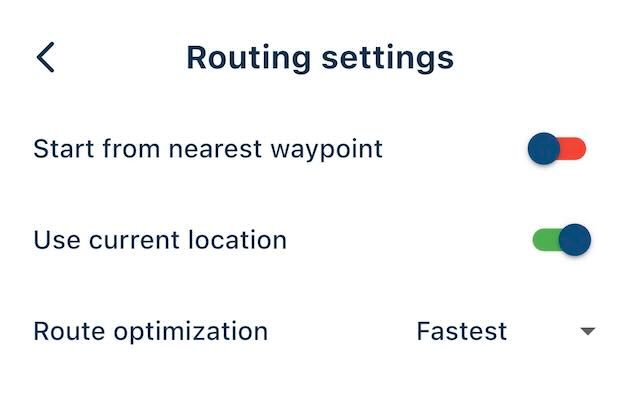
      IMG_1806.jpeg

      BMW K1600GT-P (2013) with BMW Navigator | Nolan N100-5 with Sena 30K
      iOS on iPhone 13 & 16 (mounted on Quadlock)
      Apple CarPlay in VW T-Roc (wired)
      Routelab on MacBook Air & iMac (Tahoe & Ventura)

      LE DIZES Freddyundefined 1 Reply Last reply
      0
      • LE DIZES Freddyundefined Offline
        LE DIZES Freddyundefined Offline
        LE DIZES Freddy
        wrote last edited by
        #3

        Thanks where is "routing setting" after the 3 points on the right ?

        1 Reply Last reply
        0
        • Rob Verhoeffundefined Rob Verhoeff

          @LE-DIZES-Freddy Click on Routes & Tracklogs > select a route > Navigate > Route settings > toggle Use current location to green.

          IMG_1806.jpeg

          LE DIZES Freddyundefined Offline
          LE DIZES Freddyundefined Offline
          LE DIZES Freddy
          wrote last edited by
          #4

          @Rob-Verhoeff Thanks where is "routing setting" after the 3 points on the right ?

          Rob Verhoeffundefined 1 Reply Last reply
          0
          • LE DIZES Freddyundefined LE DIZES Freddy

            @Rob-Verhoeff Thanks where is "routing setting" after the 3 points on the right ?

            Rob Verhoeffundefined Offline
            Rob Verhoeffundefined Offline
            Rob Verhoeff
            Alpha tester
            wrote last edited by Rob Verhoeff
            #5

            @LE-DIZES-Freddy Just follow the steps: Click on Routes & Tracklogs > select a route > Navigate > Route settings > toggle Use current location to green. It's in the menu after you opened a route!
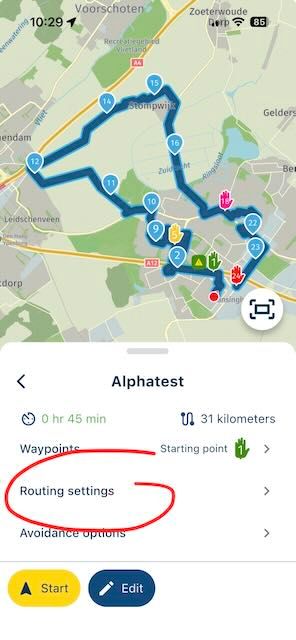
            IMG_1808.jpeg

            BMW K1600GT-P (2013) with BMW Navigator | Nolan N100-5 with Sena 30K
            iOS on iPhone 13 & 16 (mounted on Quadlock)
            Apple CarPlay in VW T-Roc (wired)
            Routelab on MacBook Air & iMac (Tahoe & Ventura)

            LE DIZES Freddyundefined 1 Reply Last reply
            1
            • Rob Verhoeffundefined Rob Verhoeff

              @LE-DIZES-Freddy Just follow the steps: Click on Routes & Tracklogs > select a route > Navigate > Route settings > toggle Use current location to green. It's in the menu after you opened a route!

              IMG_1808.jpeg

              LE DIZES Freddyundefined Offline
              LE DIZES Freddyundefined Offline
              LE DIZES Freddy
              wrote last edited by
              #6

              @Rob-Verhoeff it is not the same on Android
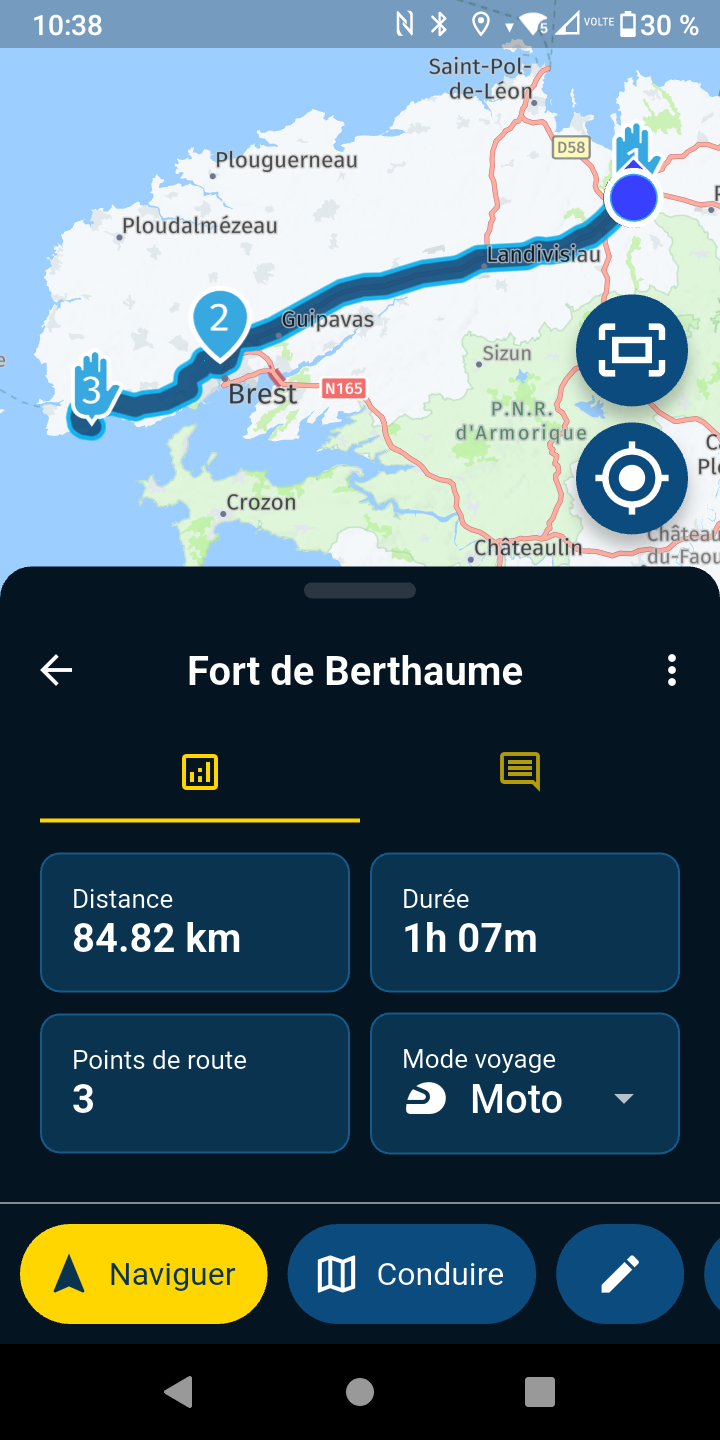
              Screenshot_20251218-103836.png

              Rob Verhoeffundefined 1 Reply Last reply
              0
              • LE DIZES Freddyundefined LE DIZES Freddy

                @Rob-Verhoeff it is not the same on Android
                Screenshot_20251218-103836.png

                Rob Verhoeffundefined Offline
                Rob Verhoeffundefined Offline
                Rob Verhoeff
                Alpha tester
                wrote last edited by
                #7

                @LE-DIZES-Freddy Yes it is! First click NAVIGUER. You didn't follow all the steps!

                BMW K1600GT-P (2013) with BMW Navigator | Nolan N100-5 with Sena 30K
                iOS on iPhone 13 & 16 (mounted on Quadlock)
                Apple CarPlay in VW T-Roc (wired)
                Routelab on MacBook Air & iMac (Tahoe & Ventura)

                LE DIZES Freddyundefined 1 Reply Last reply
                0
                • Rob Verhoeffundefined Rob Verhoeff

                  @LE-DIZES-Freddy Yes it is! First click NAVIGUER. You didn't follow all the steps!

                  LE DIZES Freddyundefined Offline
                  LE DIZES Freddyundefined Offline
                  LE DIZES Freddy
                  wrote last edited by
                  #8

                  @Rob-Verhoeff merci pour votre aide
                  si je clique sur "naviguer" voici ce que j'ai
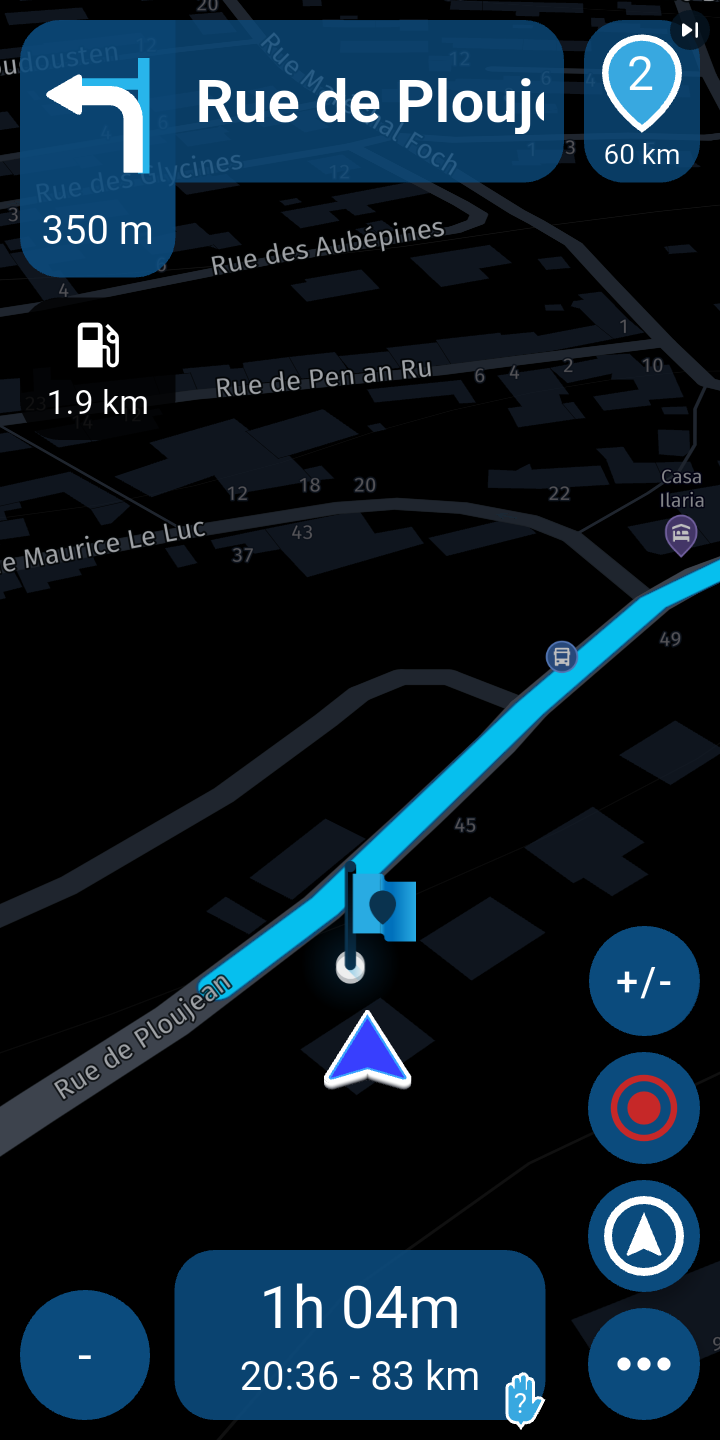
                  Screenshot_20251218-193218.png

                  1 Reply Last reply
                  0
                  • Hubert Thoringundefined Offline
                    Hubert Thoringundefined Offline
                    Hubert Thoring
                    Valued contributor
                    wrote last edited by Hubert Thoring
                    #9

                    Then the route is navigated as a track, this can also be changed under the settings 👋

                    IMG_5298.jpeg

                    Please change so, in the account under navigation settings / functions then at the bottom ...

                    IMG_5299.jpeg

                    VG Hubert
                    Info Beta Test "Next App" dazu die Hardware .
                    iPad 9. Gen iOS 26.2 / iPhone 16e iOS 26.2 / iPhone Xr iOS 18.7.3 / PC mit MS Win11 /❗️MyRoute-App im Cradel und Remotek-One❗️ Info zu MRA & Remotek One

                    LE DIZES Freddyundefined 1 Reply Last reply
                    0
                    • Hubert Thoringundefined Hubert Thoring

                      Then the route is navigated as a track, this can also be changed under the settings 👋
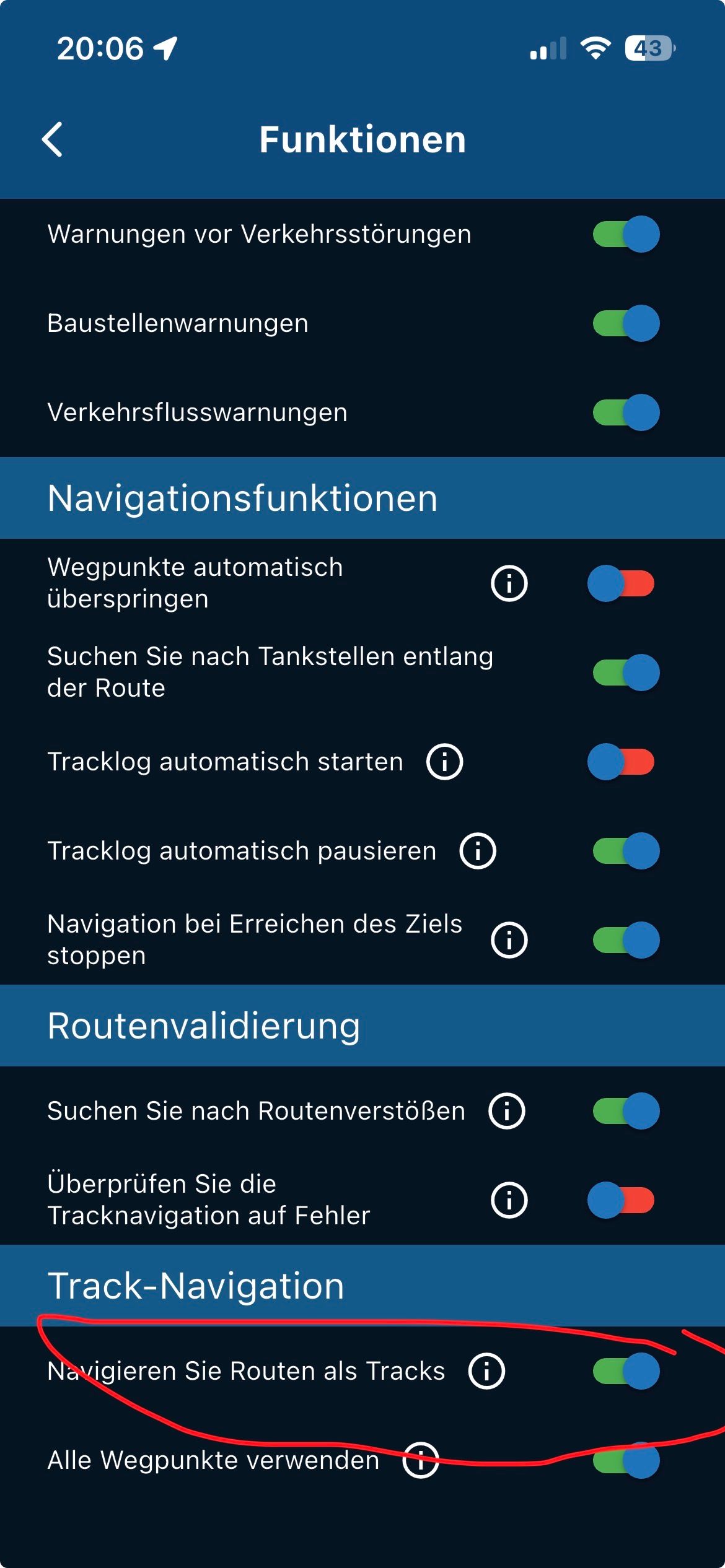
                      IMG_5298.jpeg

                      Please change so, in the account under navigation settings / functions then at the bottom ...
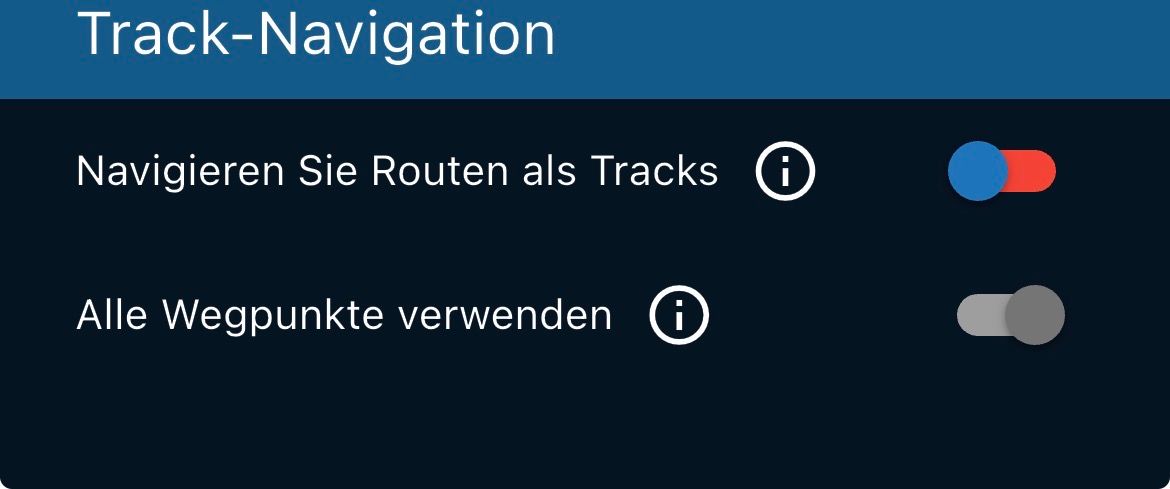
                      IMG_5299.jpeg

                      LE DIZES Freddyundefined Offline
                      LE DIZES Freddyundefined Offline
                      LE DIZES Freddy
                      wrote last edited by
                      #10

                      @Hubert-Thoring merci ça fonctionne

                      passez de bonnes fêtes de fin d'année

                      1 Reply Last reply
                      0
                      • Hubert Thoringundefined Offline
                        Hubert Thoringundefined Offline
                        Hubert Thoring
                        Valued contributor
                        wrote last edited by
                        #11

                        You're welcome, have fun and have a nice party everyone 👋

                        VG Hubert
                        Info Beta Test "Next App" dazu die Hardware .
                        iPad 9. Gen iOS 26.2 / iPhone 16e iOS 26.2 / iPhone Xr iOS 18.7.3 / PC mit MS Win11 /❗️MyRoute-App im Cradel und Remotek-One❗️ Info zu MRA & Remotek One

                        1 Reply Last reply
                        0
                        Reply
                        • Reply as topic
                        Log in to reply
                        • Oldest to Newest
                        • Newest to Oldest
                        • Most Votes


                        ACTIVE USERS
                        Hubert Thoringundefined
                        Hubert Thoring
                        LE DIZES Freddyundefined
                        LE DIZES Freddy
                        Rob Verhoeffundefined
                        Rob Verhoeff
                        POPULAR TOPICS
                        • Prendre l'itinéraire au plus près ou au début
                          Hubert Thoringundefined
                          Hubert Thoring
                          0
                          11
                          81

                        • GBD files into MyRoute
                          Con Hennekensundefined
                          Con Hennekens
                          0
                          7
                          217
                        MY GROUPS
                        • Login

                        • Login or register to search.
                        • First post
                          Last post
                        0
                        • Categories
                        • Recent
                        • Popular
                        • Support
                        • MyRoute-app