Problem with Apple CarPlay iOS 26.1
-

Hi guys, I'm testing MRA 5.0.1 -430 with iOS 26.1 on iPhone 15 and Apple CarPlay on a Honda Africa Twin display. The navigation settings don't work, only the back arrow works, and the other settings only work with touch, not with the handlebar keyboard. The other icons turn black when active. I suggest displaying the speedometer and speed limit on the map even without loading a route. Thanks.
Davide
-
Hi guys, I'm testing MRA 5.0.1 -430 with iOS 26.1 on iPhone 15 and Apple CarPlay on a Honda Africa Twin display. The navigation settings don't work, only the back arrow works, and the other settings only work with touch, not with the handlebar keyboard. The other icons turn black when active. I suggest displaying the speedometer and speed limit on the map even without loading a route. Thanks.
Davide

@Davide-Meloncelli said in Problem with Apple CarPlay iOS 26.1:
Hi guys, I'm testing MRA 5.0.1 -430 with iOS 26.1 on iPhone 15 and Apple CarPlay on a Honda Africa Twin display. The navigation settings don't work, only the back arrow works, and the other settings only work with touch, not with the handlebar keyboard. The other icons turn black when active.
We’ve now reached version 5.01 build 433. Maybe another test.
I suggest displaying the speedometer and speed limit on the map even without loading a route. Thanks.
This feature request is already on the development table. However, it’s not certain when it will be implemented or even if it’s possible at all, since Google and Apple sometimes place restrictions on what can be displayed on their systems.
🏍️ BMW K1600GT-P (2013) | Nolan N100-5 with Sena 30K
📱 iOS on iPhone 13 & 16 (mounted on Quadlock or AliExpress extention on BMW-cradle)
🚙 Apple CarPlay in VW T-Roc
💻 Routelab on MacBook Air & iMac (Golden Gate & Ventura) -
@Davide-Meloncelli said in Problem with Apple CarPlay iOS 26.1:
Hi guys, I'm testing MRA 5.0.1 -430 with iOS 26.1 on iPhone 15 and Apple CarPlay on a Honda Africa Twin display. The navigation settings don't work, only the back arrow works, and the other settings only work with touch, not with the handlebar keyboard. The other icons turn black when active.
We’ve now reached version 5.01 build 433. Maybe another test.
I suggest displaying the speedometer and speed limit on the map even without loading a route. Thanks.
This feature request is already on the development table. However, it’s not certain when it will be implemented or even if it’s possible at all, since Google and Apple sometimes place restrictions on what can be displayed on their systems.

@Rob-Verhoeff said in Problem with Apple CarPlay iOS 26.1:
Google and Apple sometimes place restrictions on what can be displayed on their systems
Stop saying that ! A lot of things can be displayed but it all depends on the deveopers !
For exemple, Sygic is displaying traffic delay time, next gas stations, current height and even progress bar for the current route ...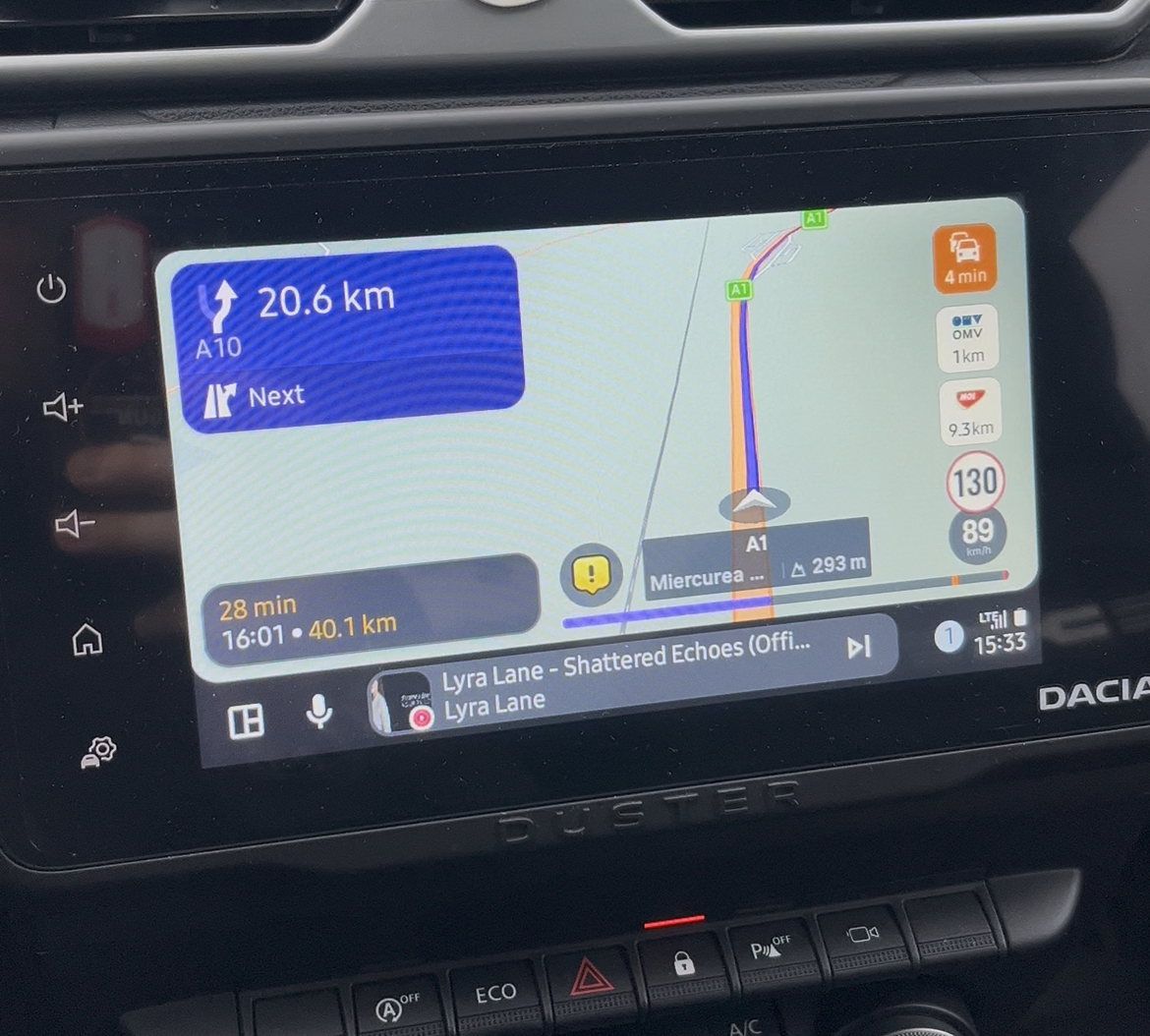
Best regards,
Adrian📱Samsung S24 Ultra with MyRoute-APP (GOLD Lifetime)
🏍️Honda NC750X (2021) with AA/CarPlay by CHIGEE Aio-5
🚙Renault Duster with onboard AA/CarPlay Unit -
@Rob-Verhoeff said in Problem with Apple CarPlay iOS 26.1:
Google and Apple sometimes place restrictions on what can be displayed on their systems
Stop saying that ! A lot of things can be displayed but it all depends on the deveopers !
For exemple, Sygic is displaying traffic delay time, next gas stations, current height and even progress bar for the current route ...
@Adrian-Avram He can say that because it's true. His statement does not mean specifically that this cannot be implemented.
We are working on the free drive mode for CarPlay / Android Auto but it's all about priorities
Most people use our app to navigate a route because that's what we do well.
The restrictions are definitely there. A great example is "people want to tap a waypoint in CarPlay" => won't ever happen because this is completely restricted and not allowed. On the phone that's very much possible and completely unrestricted.Showing speed? That's not a restriction but us simply not having it implemented when you are not driving a route.
-
@Adrian-Avram He can say that because it's true. His statement does not mean specifically that this cannot be implemented.
We are working on the free drive mode for CarPlay / Android Auto but it's all about prioritiesMost people use our app to navigate a route because that's what we do well.
The restrictions are definitely there. A great example is "people want to tap a waypoint in CarPlay" => won't ever happen because this is completely restricted and not allowed. On the phone that's very much possible and completely unrestricted.Showing speed? That's not a restriction but us simply not having it implemented when you are not driving a route.
@Corjan-Meijerink said in Problem with Apple CarPlay iOS 26.1:
people want to tap a waypoint in CarPlay" => won't ever happen because this is completely restricted and not allowed.
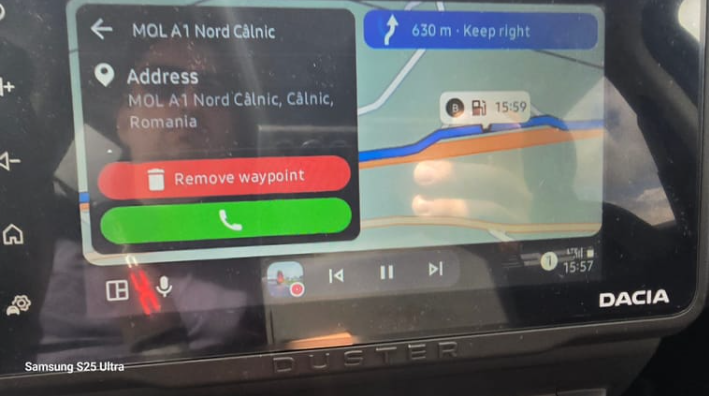
You would be amazed what others are doing ... and its posible to add/remove a waypoint from CarPlay/Android Auto
Waiting forward to test today version 5.0.1. Hope works better than 5.0.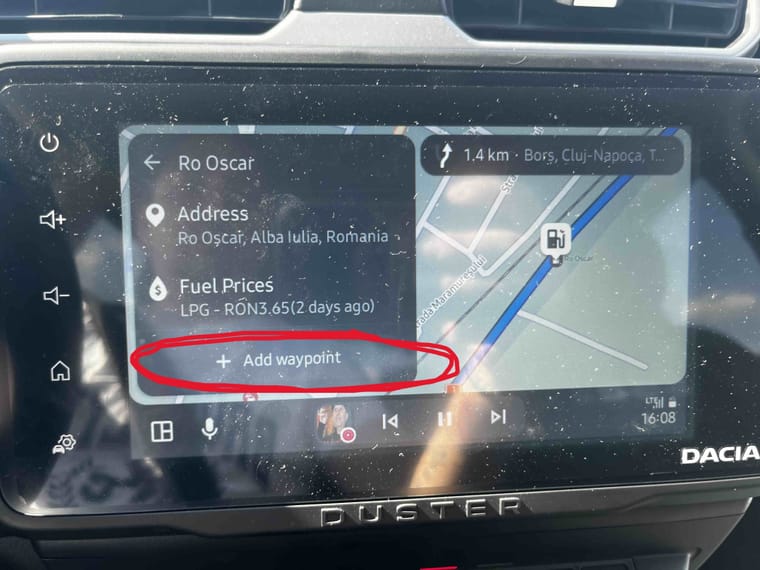
Best regards,
Adrian📱Samsung S24 Ultra with MyRoute-APP (GOLD Lifetime)
🏍️Honda NC750X (2021) with AA/CarPlay by CHIGEE Aio-5
🚙Renault Duster with onboard AA/CarPlay Unit -
@Corjan-Meijerink said in Problem with Apple CarPlay iOS 26.1:
people want to tap a waypoint in CarPlay" => won't ever happen because this is completely restricted and not allowed.
You would be amazed what others are doing ... and its posible to add/remove a waypoint from CarPlay/Android Auto
Waiting forward to test today version 5.0.1. Hope works better than 5.0.
@Adrian-Avram yeah, not exactly what I meant (tapping a waypoint on the map)
But I get your point, however my answer about priorities still stands 
MyRoute-app distinguishes itself from the ability to drive highly detailed pre-planned routes and most feature choices resolve around that.
Do I use MRA for daily navigation? Definitely not always. Are we getting better at that? Yes. Will it be our focus? No.
-
@Adrian-Avram yeah, not exactly what I meant (tapping a waypoint on the map)
But I get your point, however my answer about priorities still stands MyRoute-app distinguishes itself from the ability to drive highly detailed pre-planned routes and most feature choices resolve around that.
Do I use MRA for daily navigation? Definitely not always. Are we getting better at that? Yes. Will it be our focus? No.
@Corjan-Meijerink said in Problem with Apple CarPlay iOS 26.1:
detailed pre-planned routes
That's why I even bought the lifetime subscription for the Web Planner, because there is nothing better out there than MRA.
@Corjan-Meijerink said in Problem with Apple CarPlay iOS 26.1:
Are we getting better at that? Yes.
That's why I also bought the lifetime subscription for Navigation, with the hope that one day there will be no need for other navigation app, just MRA !
-

When an app tries to be everything to everyone ... it becomes bloated. Eventually it can't be maintained and is so complicated with so many options that users can't figure out how to use it, get frustrated and leave to find something else.
-
Thanks @Adrian-Avram
We will make sure that won’t happen @RetiredWingMan
Hello! It looks like you're interested in this conversation, but you don't have an account yet.
Getting fed up of having to scroll through the same posts each visit? When you register for an account, you'll always come back to exactly where you were before, and choose to be notified of new replies (either via email, or push notification). You'll also be able to save bookmarks and upvote posts to show your appreciation to other community members.
With your input, this post could be even better 💗
Register Login-
0620
-
 1833
1833
-
 0578
0578
-
01086
-
 0213
0213
-
0236
-
81555.3k
-
1213