Skip to content
  • Categories
  • Recent
  • Popular
  • Support
  • MyRoute-app
Collapse
Brand Logo

MRA Community Forum

  1. Home
  2. MyRoute-app Routeplanner
  3. [Web] Announcements
  4. Route overview improvements!

Route overview improvements!

Scheduled Pinned Locked Moved [Web] Announcements
42 Posts 15 Posters 36.9k Views 7 Watching
  • Oldest to Newest
  • Newest to Oldest
  • Most Votes
Reply
  • Reply as topic
Log in to reply
This topic has been deleted. Only users with topic management privileges can see it.
  • Corjan Meijerink Offline
    Corjan Meijerink Offline
    Corjan Meijerink
    Developer
    wrote on last edited by Corjan Meijerink
    #1

    Good afternoon! 👋

    After the massive app update that included the new in-app Routeplanner, we dedicated some time to the website MRA Routeplanner 🎉

    In the latest website update we improved the POI functionality.
    This update now improves the route overview possibility.

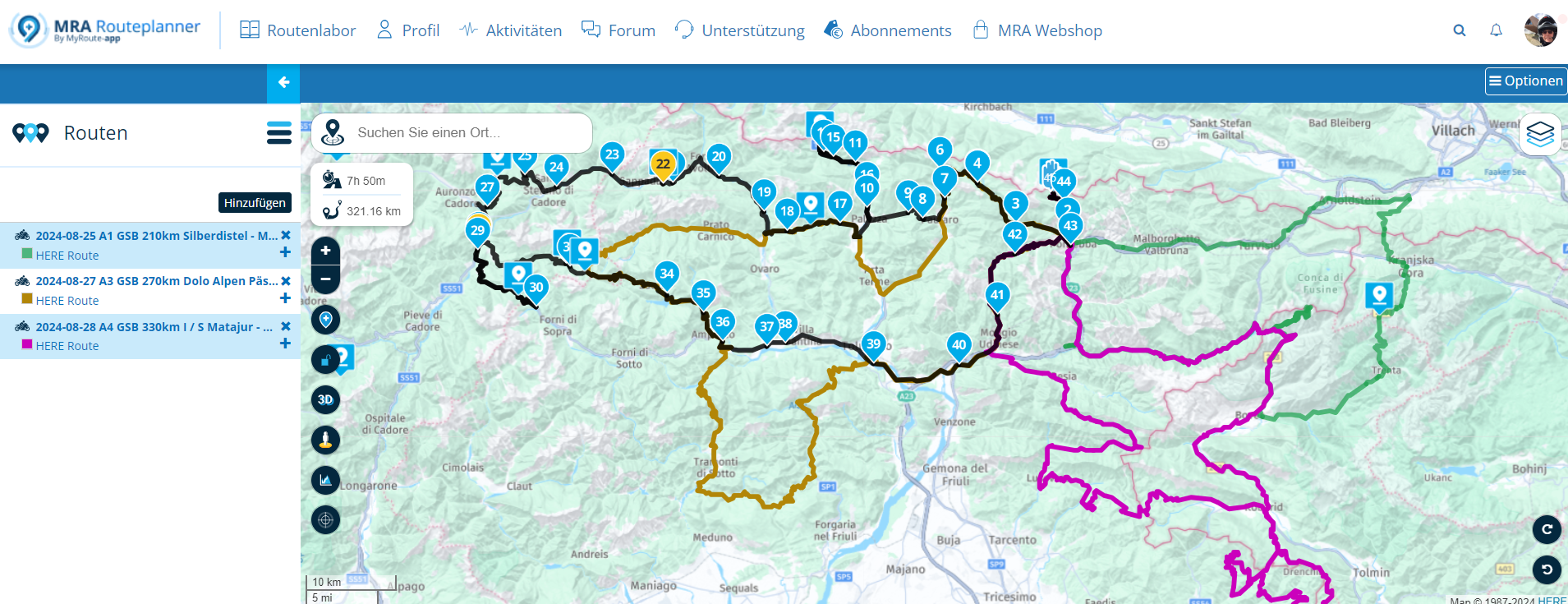
    A big frustration for a lot of users was that while adding additional routes to a route, you had to do this over every single time, the colours would be the same and you had to start searching all over again every time. These issues have all been solved 💪

    a3da5e6c-735d-471d-bbb7-5d126737209b-image.png

    In the image above, you can see I am creating a route and 2 others are shown (nothing new). If I however reload the page / use another device, these same added routes are still displayed with the selected color 💥

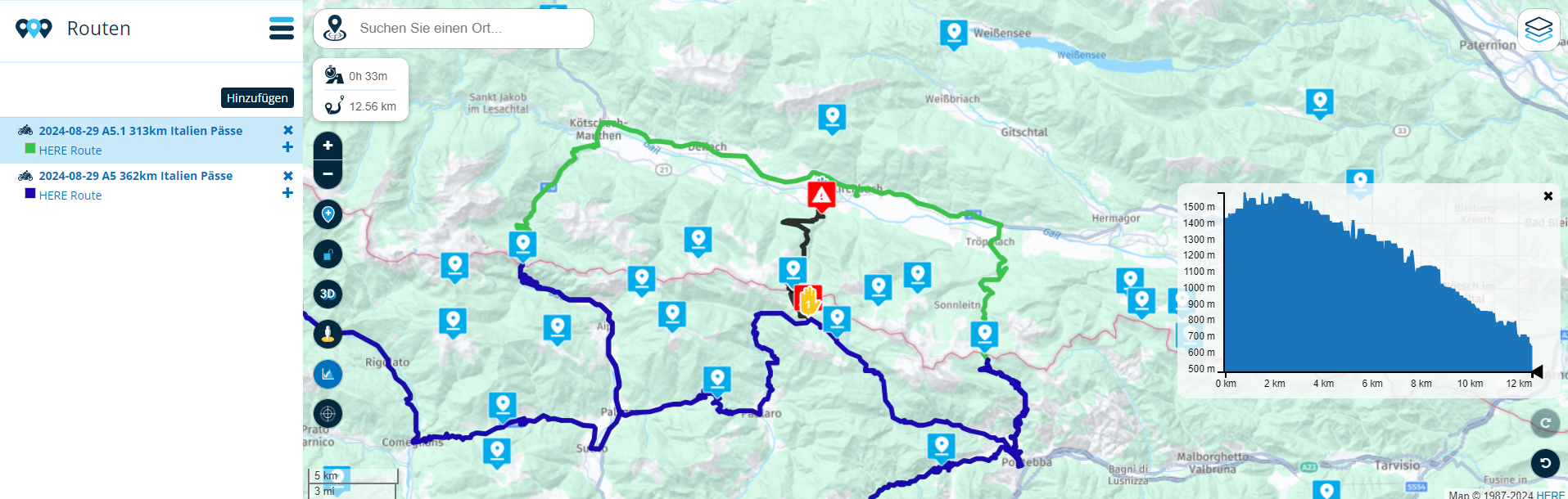
    If I add a tracklog, this will get a random color assigned and also shown on the map.

    b6e8c2be-744f-48ab-8be9-be69726347b3-image.png

    You can still add more routes / tracks and change the colours as you are used too!
    Simply use the applicable menu.

    6f0376b7-c693-47cb-8fd1-0f0e443ecade-image.png

    If you choose to add another route, the same folder as where you were before will open 😏

    This minor yet awesome improvement will make your planning life just a bit more convenient.

    Note: the app won't show additional routes

    Best,
    Corjan ❤

    Stefan Hummelink Bart De Medts Con Hennekens Hubert Thoring Brian McG 6 Replies Last reply
    13
    • Corjan Meijerink Corjan Meijerink

      Good afternoon! 👋

      After the massive app update that included the new in-app Routeplanner, we dedicated some time to the website MRA Routeplanner 🎉

      In the latest website update we improved the POI functionality.
      This update now improves the route overview possibility.

      A big frustration for a lot of users was that while adding additional routes to a route, you had to do this over every single time, the colours would be the same and you had to start searching all over again every time. These issues have all been solved 💪
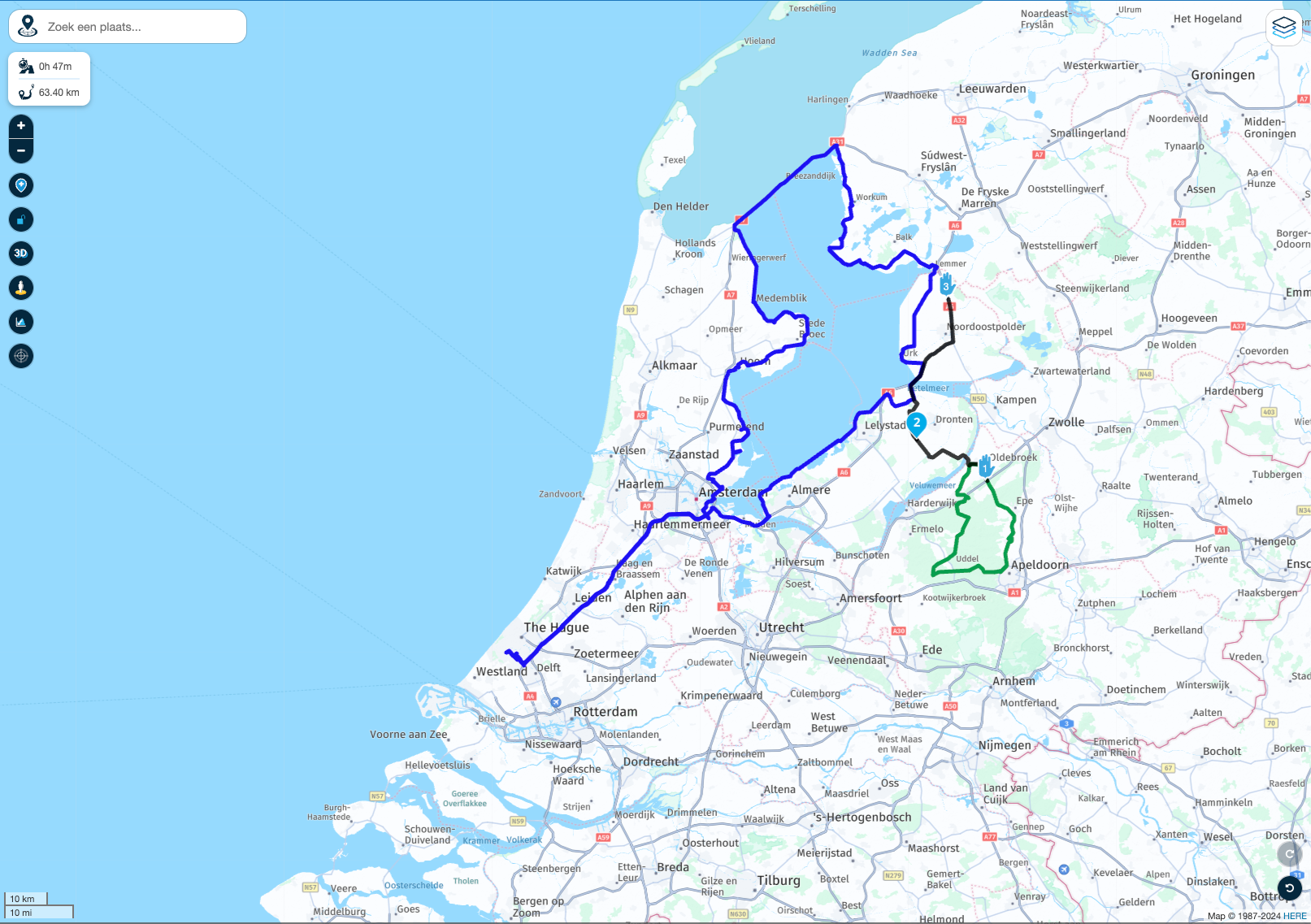
      a3da5e6c-735d-471d-bbb7-5d126737209b-image.png

      In the image above, you can see I am creating a route and 2 others are shown (nothing new). If I however reload the page / use another device, these same added routes are still displayed with the selected color 💥

      If I add a tracklog, this will get a random color assigned and also shown on the map.
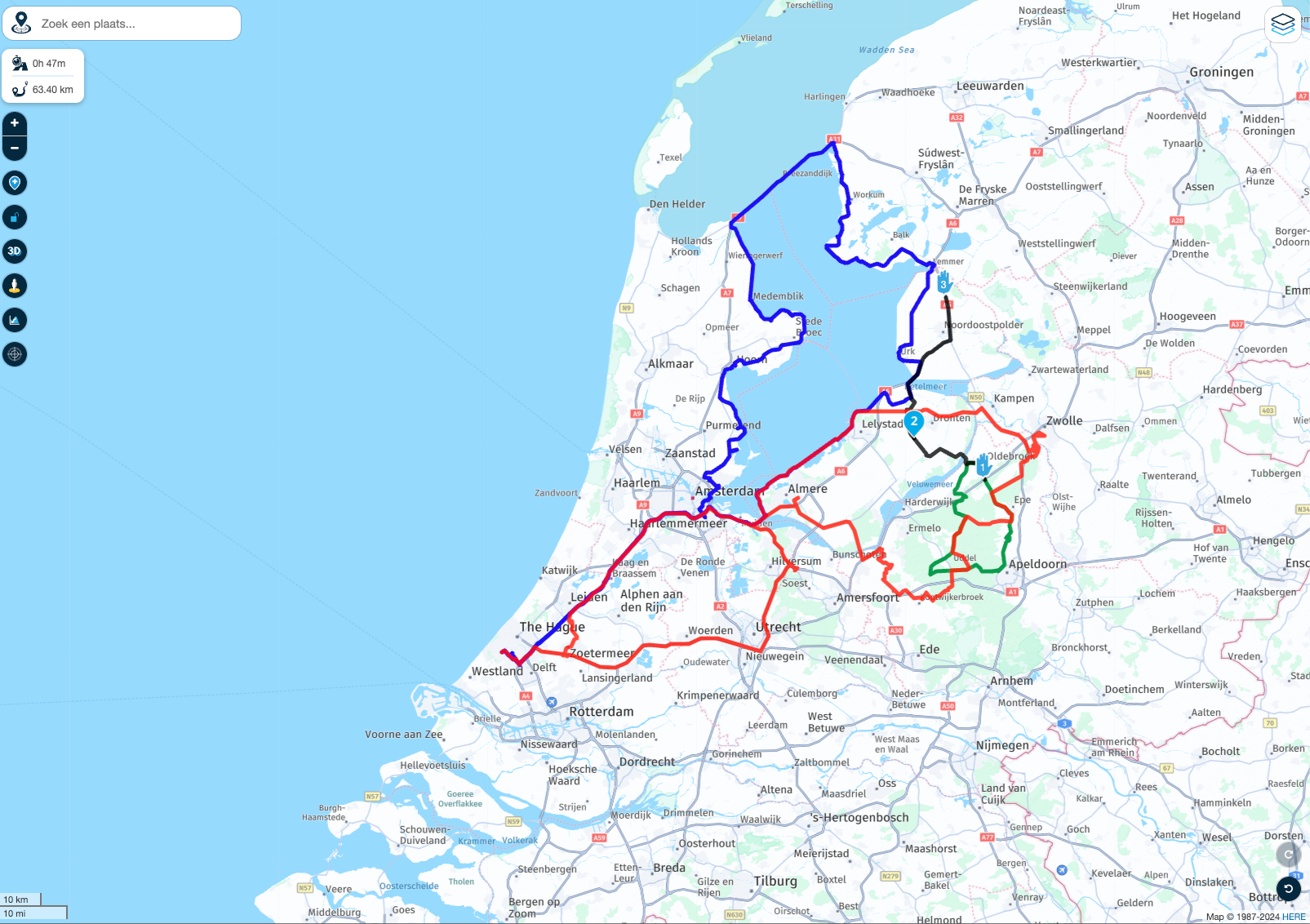
      b6e8c2be-744f-48ab-8be9-be69726347b3-image.png

      You can still add more routes / tracks and change the colours as you are used too!
      Simply use the applicable menu.
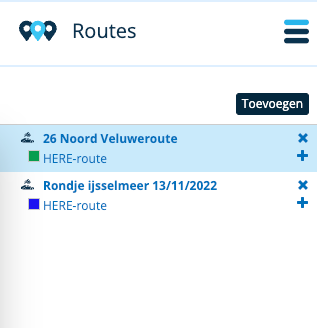
      6f0376b7-c693-47cb-8fd1-0f0e443ecade-image.png

      If you choose to add another route, the same folder as where you were before will open 😏

      This minor yet awesome improvement will make your planning life just a bit more convenient.

      Note: the app won't show additional routes

      Best,
      Corjan ❤

      Stefan Hummelink Offline
      Stefan Hummelink Offline
      Stefan Hummelink
      Alpha tester
      wrote on last edited by
      #2

      @Corjan-Meijerink this is a huge one! Woa! 😎♥️

      Manks bu'j te bange.

      1 Reply Last reply
      0
      • Corjan Meijerink Corjan Meijerink

        Good afternoon! 👋

        After the massive app update that included the new in-app Routeplanner, we dedicated some time to the website MRA Routeplanner 🎉

        In the latest website update we improved the POI functionality.
        This update now improves the route overview possibility.

        A big frustration for a lot of users was that while adding additional routes to a route, you had to do this over every single time, the colours would be the same and you had to start searching all over again every time. These issues have all been solved 💪

        a3da5e6c-735d-471d-bbb7-5d126737209b-image.png

        In the image above, you can see I am creating a route and 2 others are shown (nothing new). If I however reload the page / use another device, these same added routes are still displayed with the selected color 💥

        If I add a tracklog, this will get a random color assigned and also shown on the map.

        b6e8c2be-744f-48ab-8be9-be69726347b3-image.png

        You can still add more routes / tracks and change the colours as you are used too!
        Simply use the applicable menu.

        6f0376b7-c693-47cb-8fd1-0f0e443ecade-image.png

        If you choose to add another route, the same folder as where you were before will open 😏

        This minor yet awesome improvement will make your planning life just a bit more convenient.

        Note: the app won't show additional routes

        Best,
        Corjan ❤

        Bart De Medts Offline
        Bart De Medts Offline
        Bart De Medts
        Alpha tester
        wrote on last edited by
        #3

        @Corjan-Meijerink cool update!

        🏍️ Tiger: DMD Nor7e + SilverFox controller
        🏍️ Bobber: iPhone 15 Pro + Quad Lock mount
        🚗 Car: iPhone 15 Pro with wireless Apple CarPlay

        1 Reply Last reply
        0
        • Stanisław Offline
          Stanisław Offline
          Stanisław
          Valued contributor
          wrote on last edited by
          #4

          Wow, this is a brillant improvement, very useful, thank you!

          --
          Regards
          Staszek

          1 Reply Last reply
          0
          • Jörgen Offline
            Jörgen Offline
            Jörgen
            Valued contributor
            wrote on last edited by
            #5

            Cool, super update! Thanks

            What is the maximum of additional routes?

            Hardware
            iPhone 12 pro (iOS 26.2.1)
            iPad (7.Gen.) 18.7.3
            Oukitel RT3 Pro (Andr. 14)
            Wireless CarPlay mit (Elebest C650)
            Wired CarPlay (SEAT Arona - 2021)
            MRA Workshops in Deutsch sind hier zu finden

            Nick Carthew 1 Reply Last reply
            0
            • Jörgen Jörgen

              Cool, super update! Thanks

              What is the maximum of additional routes?

              Nick Carthew Offline
              Nick Carthew Offline
              Nick Carthew
              RouteXpert
              wrote on last edited by
              #6

              @Jörgen said in Route overview improvements!

              What is the maximum of additional routes?

              This is your challenge should you accept to take it on 😁

              Always willing to help if I can.
              Triumph Tiger 1200 XRT called Tina.
              MRA Navigation Next and SilverFox BJ8

              Jörgen 1 Reply Last reply
              1
              • Nick Carthew Nick Carthew

                @Jörgen said in Route overview improvements!

                What is the maximum of additional routes?

                This is your challenge should you accept to take it on 😁

                Jörgen Offline
                Jörgen Offline
                Jörgen
                Valued contributor
                wrote on last edited by
                #7

                @Nick-Carthew said in Route overview improvements!:

                @Jörgen said in Route overview improvements!

                What is the maximum of additional routes?

                This is your challenge should you accept to take it on 😁

                👍 Not today.

                Could be interesting to get an overview of my routes for e.g. the Eifel. 😁

                Hardware
                iPhone 12 pro (iOS 26.2.1)
                iPad (7.Gen.) 18.7.3
                Oukitel RT3 Pro (Andr. 14)
                Wireless CarPlay mit (Elebest C650)
                Wired CarPlay (SEAT Arona - 2021)
                MRA Workshops in Deutsch sind hier zu finden

                1 Reply Last reply
                0
                • Corjan Meijerink Corjan Meijerink

                  Good afternoon! 👋

                  After the massive app update that included the new in-app Routeplanner, we dedicated some time to the website MRA Routeplanner 🎉

                  In the latest website update we improved the POI functionality.
                  This update now improves the route overview possibility.

                  A big frustration for a lot of users was that while adding additional routes to a route, you had to do this over every single time, the colours would be the same and you had to start searching all over again every time. These issues have all been solved 💪

                  a3da5e6c-735d-471d-bbb7-5d126737209b-image.png

                  In the image above, you can see I am creating a route and 2 others are shown (nothing new). If I however reload the page / use another device, these same added routes are still displayed with the selected color 💥

                  If I add a tracklog, this will get a random color assigned and also shown on the map.

                  b6e8c2be-744f-48ab-8be9-be69726347b3-image.png

                  You can still add more routes / tracks and change the colours as you are used too!
                  Simply use the applicable menu.

                  6f0376b7-c693-47cb-8fd1-0f0e443ecade-image.png

                  If you choose to add another route, the same folder as where you were before will open 😏

                  This minor yet awesome improvement will make your planning life just a bit more convenient.

                  Note: the app won't show additional routes

                  Best,
                  Corjan ❤

                  Con Hennekens Offline
                  Con Hennekens Offline
                  Con Hennekens
                  Alpha tester
                  wrote on last edited by
                  #8

                  @Corjan-Meijerink, this is a nice one! Again! 😉

                  I am just an enthusiastic MRA user, and hope you will be one too!

                  Most motorcycle problems are caused by the nut that connects the handlebar to the saddle.

                  Check out RideSleepRepeat.eu, a biker community for sharing stays across Europe

                  1 Reply Last reply
                  0
                  • Corjan Meijerink Corjan Meijerink

                    Good afternoon! 👋

                    After the massive app update that included the new in-app Routeplanner, we dedicated some time to the website MRA Routeplanner 🎉

                    In the latest website update we improved the POI functionality.
                    This update now improves the route overview possibility.

                    A big frustration for a lot of users was that while adding additional routes to a route, you had to do this over every single time, the colours would be the same and you had to start searching all over again every time. These issues have all been solved 💪

                    a3da5e6c-735d-471d-bbb7-5d126737209b-image.png

                    In the image above, you can see I am creating a route and 2 others are shown (nothing new). If I however reload the page / use another device, these same added routes are still displayed with the selected color 💥

                    If I add a tracklog, this will get a random color assigned and also shown on the map.

                    b6e8c2be-744f-48ab-8be9-be69726347b3-image.png

                    You can still add more routes / tracks and change the colours as you are used too!
                    Simply use the applicable menu.

                    6f0376b7-c693-47cb-8fd1-0f0e443ecade-image.png

                    If you choose to add another route, the same folder as where you were before will open 😏

                    This minor yet awesome improvement will make your planning life just a bit more convenient.

                    Note: the app won't show additional routes

                    Best,
                    Corjan ❤

                    Hubert Thoring Offline
                    Hubert Thoring Offline
                    Hubert Thoring
                    Valued contributor
                    wrote on last edited by Hubert Thoring
                    #9

                    @Corjan-Meijerink said in Route overview improvements!:

                    You can still add more routes / tracks and change the colours as you are used too!
                    Simply use the applicable menu.

                    @Corjan-Meijerink : Herzlichen Dank, ich plane gerade Italien und Slowenien, und wurde davon bei der Arbeit überrascht. Vielen Dank dafür. Schön wenn die Routen in Sichtfeld verbleiben, also mit gespeichert werden, das hilft sehr. 😎

                    e6c9bcfc-81b9-4b59-ab7e-a01ffd2226ea-image.png

                    VG Hubert
                    Beta Test "Next App" dazu die Hardware .
                    iPad 9. Gen iOS 26.6/ iPhone 16e iOS 26.6/ Navi iPhone Xr iOS 18.7.10 / PC mit MS Win11 /❗️MyRoute-App im Cradel und Remotek-One❗️ Info zu MRA & Remotek One

                    1 Reply Last reply
                    0
                    • Dae 0 Offline
                      Dae 0 Offline
                      Dae 0
                      wrote on last edited by
                      #10

                      This is fantastic and a feature that I really missed from using Basecamp.

                      What would take it to 11 out of 10 would be a toggle to automatically show the other routes stored in the same folder as the one that the route that you are editing is stored. This was the fantastic thing about Basecamp. As my routes are stored in folders corresponding to areas, I could highlight a folder that covers the rough area I’m interested in and see all routes in that folder/area.

                      It can be done using your new functionality, but would currently require manually adding all the routes in the folder to all the other routes in the folder, so would grow exponentially as the number of routes increases.

                      Hubert Thoring CD130 3 Replies Last reply
                      2
                      • Dae 0 Dae 0

                        This is fantastic and a feature that I really missed from using Basecamp.

                        What would take it to 11 out of 10 would be a toggle to automatically show the other routes stored in the same folder as the one that the route that you are editing is stored. This was the fantastic thing about Basecamp. As my routes are stored in folders corresponding to areas, I could highlight a folder that covers the rough area I’m interested in and see all routes in that folder/area.

                        It can be done using your new functionality, but would currently require manually adding all the routes in the folder to all the other routes in the folder, so would grow exponentially as the number of routes increases.

                        Hubert Thoring Offline
                        Hubert Thoring Offline
                        Hubert Thoring
                        Valued contributor
                        wrote on last edited by
                        #11

                        @Dae-0 said in Route overview improvements!:

                        This is fantastic and a feature that I really missed from using Basecamp.
                        What would take it to 11 out of 10 would be a toggle to automatically show the other routes stored in the same folder as the one that the route that you are editing is stored. This was the fantastic thing about Basecamp. As my routes are stored in folders corresponding to areas, I could highlight a folder that covers the rough area I’m interested in and see all routes in that folder/area.
                        It can be done using your new functionality, but would currently require manually adding all the routes in the folder to all the other routes in the folder, so would grow exponentially as the number of routes increases.

                        Jetzt kann man eine Option leicht einblenden, Schotter Pass Abkürzung zum Beispiel ..

                        8a78efd0-4358-4141-ad1e-77f7e0a93826-image.png

                        VG Hubert
                        Beta Test "Next App" dazu die Hardware .
                        iPad 9. Gen iOS 26.6/ iPhone 16e iOS 26.6/ Navi iPhone Xr iOS 18.7.10 / PC mit MS Win11 /❗️MyRoute-App im Cradel und Remotek-One❗️ Info zu MRA & Remotek One

                        1 Reply Last reply
                        0
                        • Dae 0 Dae 0

                          This is fantastic and a feature that I really missed from using Basecamp.

                          What would take it to 11 out of 10 would be a toggle to automatically show the other routes stored in the same folder as the one that the route that you are editing is stored. This was the fantastic thing about Basecamp. As my routes are stored in folders corresponding to areas, I could highlight a folder that covers the rough area I’m interested in and see all routes in that folder/area.

                          It can be done using your new functionality, but would currently require manually adding all the routes in the folder to all the other routes in the folder, so would grow exponentially as the number of routes increases.

                          Hubert Thoring Offline
                          Hubert Thoring Offline
                          Hubert Thoring
                          Valued contributor
                          wrote on last edited by
                          #12

                          @Dae-0 Dein Vorschlag ist auch sehr Guter Verschlag !!

                          VG Hubert
                          Beta Test "Next App" dazu die Hardware .
                          iPad 9. Gen iOS 26.6/ iPhone 16e iOS 26.6/ Navi iPhone Xr iOS 18.7.10 / PC mit MS Win11 /❗️MyRoute-App im Cradel und Remotek-One❗️ Info zu MRA & Remotek One

                          1 Reply Last reply
                          0
                          • Dae 0 Offline
                            Dae 0 Offline
                            Dae 0
                            wrote on last edited by
                            #13

                            Sorry. I only speak English or Spanish

                            1 Reply Last reply
                            0
                            • HighPeakRider Offline
                              HighPeakRider Offline
                              HighPeakRider
                              wrote on last edited by
                              #14

                              Very good, but i’m still exporting mine into basecamp to get an overall view, I mainly ride in the peak district and it makes it easy to pick an old route to ride or plan somewhere that’s not been ridden.

                              I guess the next challenge is to be able to select a folder and have a ‘View All’ option.

                              Dae 0 1 Reply Last reply
                              2
                              • Corjan Meijerink Corjan Meijerink

                                Good afternoon! 👋

                                After the massive app update that included the new in-app Routeplanner, we dedicated some time to the website MRA Routeplanner 🎉

                                In the latest website update we improved the POI functionality.
                                This update now improves the route overview possibility.

                                A big frustration for a lot of users was that while adding additional routes to a route, you had to do this over every single time, the colours would be the same and you had to start searching all over again every time. These issues have all been solved 💪

                                a3da5e6c-735d-471d-bbb7-5d126737209b-image.png

                                In the image above, you can see I am creating a route and 2 others are shown (nothing new). If I however reload the page / use another device, these same added routes are still displayed with the selected color 💥

                                If I add a tracklog, this will get a random color assigned and also shown on the map.

                                b6e8c2be-744f-48ab-8be9-be69726347b3-image.png

                                You can still add more routes / tracks and change the colours as you are used too!
                                Simply use the applicable menu.

                                6f0376b7-c693-47cb-8fd1-0f0e443ecade-image.png

                                If you choose to add another route, the same folder as where you were before will open 😏

                                This minor yet awesome improvement will make your planning life just a bit more convenient.

                                Note: the app won't show additional routes

                                Best,
                                Corjan ❤

                                Brian McG Offline
                                Brian McG Offline
                                Brian McG
                                wrote on last edited by
                                #15

                                @Corjan-Meijerink I am super impressed .....
                                I only requested this exact feature a few days ago 😂 😂

                                @Brian-McG said on 29 July 2024 in Route-overlay switching:

                                Hi @Thomas-Schäfer I also use the overlay routes & my process is very similar to yours
                                a big frustration I have with this process is that the overlay routes I have carefully added are lost when I click away, it is a long proces to keep adding & re-adding the same routes
                                it would be nice if there was a selection like in the new POI menu where you could select the overlay to be remembered & this selection was stored with the route

                                If all features are implemented at this speed MRA is going to be truly awesome 😂 😂

                                BlackView BV7100, Android 12
                                Navigate "Routes as Tracks" in Offline mode with Offline Maps
                                No Wifi, no internet, no interruptions, works well

                                1 Reply Last reply
                                0
                                • HighPeakRider HighPeakRider

                                  Very good, but i’m still exporting mine into basecamp to get an overall view, I mainly ride in the peak district and it makes it easy to pick an old route to ride or plan somewhere that’s not been ridden.

                                  I guess the next challenge is to be able to select a folder and have a ‘View All’ option.

                                  Dae 0 Offline
                                  Dae 0 Offline
                                  Dae 0
                                  wrote on last edited by
                                  #16

                                  @HighPeakRider That’s exactly my use case and the suggestion I made above 😀

                                  Show all the roads in a particular area that are covered by existing routes, and then either choose a route that covers a road I fancy riding, or create a new route that goes on a road that none of my existing routes use.

                                  1 Reply Last reply
                                  0
                                  • Dae 0 Dae 0

                                    This is fantastic and a feature that I really missed from using Basecamp.

                                    What would take it to 11 out of 10 would be a toggle to automatically show the other routes stored in the same folder as the one that the route that you are editing is stored. This was the fantastic thing about Basecamp. As my routes are stored in folders corresponding to areas, I could highlight a folder that covers the rough area I’m interested in and see all routes in that folder/area.

                                    It can be done using your new functionality, but would currently require manually adding all the routes in the folder to all the other routes in the folder, so would grow exponentially as the number of routes increases.

                                    CD130 Offline
                                    CD130 Offline
                                    CD130
                                    Valued contributor
                                    wrote on last edited by
                                    #17

                                    @Dae-0 said in Route overview improvements!:

                                    This is fantastic and a feature that I really missed from using Basecamp.

                                    What would take it to 11 out of 10 would be a toggle to automatically show the other routes stored in the same folder as the one that the route that you are editing is stored. This was the fantastic thing about Basecamp.

                                    Totally agree. That would make the pleasant update even better 👍

                                    The adventure starts where the plans end | READY TO >> RACE 🧡

                                    1 Reply Last reply
                                    0
                                    • Corjan Meijerink Corjan Meijerink

                                      Good afternoon! 👋

                                      After the massive app update that included the new in-app Routeplanner, we dedicated some time to the website MRA Routeplanner 🎉

                                      In the latest website update we improved the POI functionality.
                                      This update now improves the route overview possibility.

                                      A big frustration for a lot of users was that while adding additional routes to a route, you had to do this over every single time, the colours would be the same and you had to start searching all over again every time. These issues have all been solved 💪

                                      a3da5e6c-735d-471d-bbb7-5d126737209b-image.png

                                      In the image above, you can see I am creating a route and 2 others are shown (nothing new). If I however reload the page / use another device, these same added routes are still displayed with the selected color 💥

                                      If I add a tracklog, this will get a random color assigned and also shown on the map.

                                      b6e8c2be-744f-48ab-8be9-be69726347b3-image.png

                                      You can still add more routes / tracks and change the colours as you are used too!
                                      Simply use the applicable menu.

                                      6f0376b7-c693-47cb-8fd1-0f0e443ecade-image.png

                                      If you choose to add another route, the same folder as where you were before will open 😏

                                      This minor yet awesome improvement will make your planning life just a bit more convenient.

                                      Note: the app won't show additional routes

                                      Best,
                                      Corjan ❤

                                      Herko ter Horst Offline
                                      Herko ter Horst Offline
                                      Herko ter Horst
                                      wrote on last edited by Herko ter Horst
                                      #18

                                      @Corjan-Meijerink this is awesome, great update!

                                      One of my primary uses of this feature will be to communicate about multi-day trips with other participants. In that light, it would be great if the added routes would also persist when adding the route to a group or event. Or even better (as others have mentioned), if that could be automated so there's an automatic overview of the routes in the group or event.

                                      But it's already great to be able to do it once for my own routes and then have it persist.

                                      Brian McG 1 Reply Last reply
                                      2
                                      • Corjan Meijerink Offline
                                        Corjan Meijerink Offline
                                        Corjan Meijerink
                                        Developer
                                        wrote on last edited by
                                        #19

                                        Your wish, is my command 😃
                                        Showing all* data in a folder** with one click coming up! 🎉

                                        *Limit of 20 items per time due to keep things working kinda smoothly
                                        **Not including contents from subfolder

                                        CD130 1 Reply Last reply
                                        1
                                        • Corjan Meijerink Offline
                                          Corjan Meijerink Offline
                                          Corjan Meijerink
                                          Developer
                                          wrote on last edited by
                                          #20

                                          There we go! 🎉

                                          https://forum.myrouteapp.com/topic/7533/further-route-overview-improvements

                                          1 Reply Last reply
                                          3

                                          Hello! It looks like you're interested in this conversation, but you don't have an account yet.

                                          Getting fed up of having to scroll through the same posts each visit? When you register for an account, you'll always come back to exactly where you were before, and choose to be notified of new replies (either via email, or push notification). You'll also be able to save bookmarks and upvote posts to show your appreciation to other community members.

                                          With your input, this post could be even better 💗

                                          Register Login

                                          Reply
                                          • Reply as topic
                                          Log in to reply
                                          • Oldest to Newest
                                          • Newest to Oldest
                                          • Most Votes


                                          • 1
                                          • 2
                                          • 3
                                          ACTIVE USERS
                                          Hubert Thoring
                                          Hubert Thoring
                                          Corjan Meijerink
                                          Corjan Meijerink
                                          Con Hennekens
                                          Con Hennekens
                                          Brian McG
                                          Brian McG
                                          CD130
                                          CD130
                                          Nick Carthew
                                          Nick Carthew
                                          paul69
                                          paul69
                                          Jörgen
                                          Jörgen
                                          Stanisław
                                          Stanisław
                                          Dae 0
                                          Dae 0
                                          Bart De Medts
                                          Bart De Medts
                                          Stefan Hummelink
                                          Stefan Hummelink
                                          Herko ter Horst
                                          Herko ter Horst
                                          HighPeakRider
                                          HighPeakRider
                                          Tim Verhaaf
                                          Tim Verhaaf
                                          POPULAR TOPICS
                                          • Upgrading from Zumo XT to XT2
                                            Travellexxie
                                            Travellexxie
                                            0
                                            31
                                            514

                                          • Routes en verblijf Zwitserland
                                            Travellexxie
                                            Travellexxie
                                            0
                                            13
                                            289

                                          • Update 5.2.2 - Quick fix
                                            Stevedo 6 0
                                            Stevedo 6 0
                                            4
                                            4
                                            114

                                          • Traffic Aware setting toggle greyed out
                                            Peter Burch 1 0
                                            Peter Burch 1 0
                                            0
                                            21
                                            372

                                          • MyRoute App installeren op Carpuride 702 Plus
                                            John
                                            John
                                            -1
                                            13
                                            1.1k

                                          • Automatically snap waypoint to road
                                            Stevedo 6 0
                                            Stevedo 6 0
                                            9
                                            4
                                            465

                                          • No location in Android Auto ! App unusable !
                                            Corjan Meijerink
                                            Corjan Meijerink
                                            0
                                            9
                                            210

                                          • DMD-T665 as a Motorcycle Navigation Device – Long-Term Review
                                            ConiKost
                                            ConiKost
                                            3
                                            36
                                            9.4k

                                          MY GROUPS
                                          • Login

                                          • Login or register to search.
                                          • First post
                                            Last post
                                          0
                                          • Categories
                                          • Recent
                                          • Popular
                                          • Support
                                          • MyRoute-app