New beta! v4.2.0 (318)
-
Ladies and Gentlemen! Today is the day that we announce a great upcoming beta update


After quite some work by me and Joost, we are proud to announce that a major update 4.2.0 is coming your way. This update contains one major feature: the in-app MRA Routeplanner

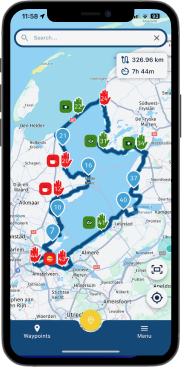
With this routeplanner you can edit your high quality MRA routes with an interface it deserves.
- Edit any existing route!

- Create a new route from scratch
- Change routes from others
- All this can even be done offline!
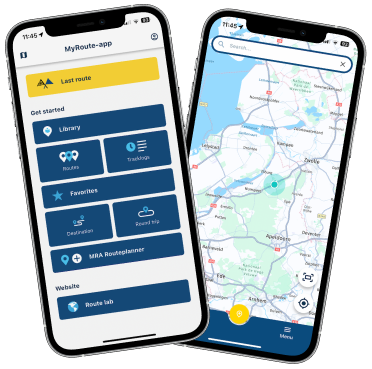
The Routeplanner offers many features to help you in building lovely routes.
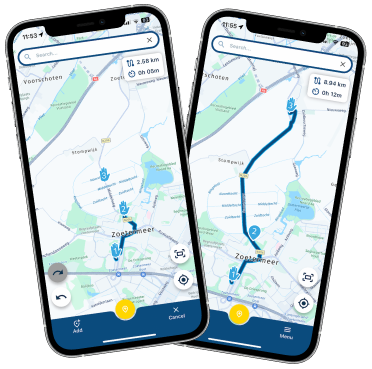
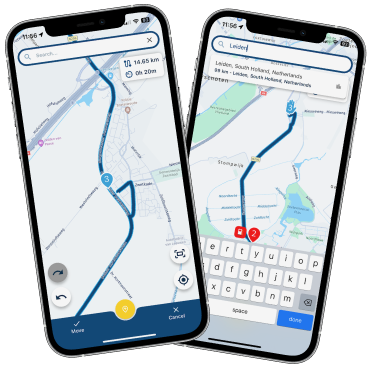
Quickly keep adding waypoints to your route to shape the route to your preference.
- Yellow button starts the adding process and keep tapping it to continuously add waypoints
- Click add to add a new waypoint and stop adding more
- Cancel, dismiss what you are doing
If you make a mistake, no problem! Simply use the undo / redo buttons like you are used to in the website

Do you want to add information to waypoints? Ofcourse you can do so!
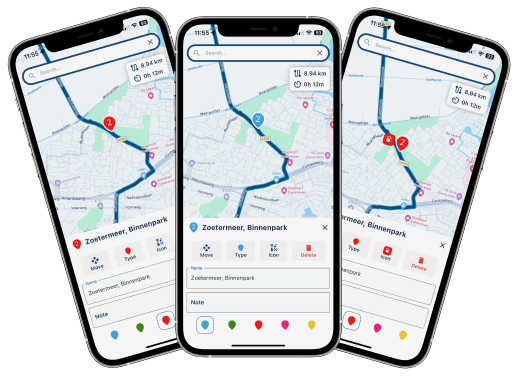
Change the colour, type, note, title or even the icon of the waypoint!

Do you want to add a waypoint somewhere along the route? Obviously that's possible too!
- Tap somewhere along the line to add a waypoint there in order of the route
- Long press and drag a line to immediately move the marker you are adding in that leg
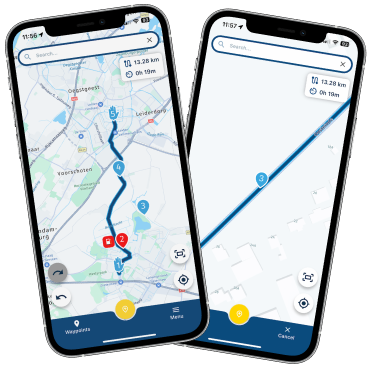
Do you need to move a waypoint precisely? Simply use the advanced move interface to place the waypoint exactly where you want. Long pressing and dragging the waypoint works too but that is less precise

Then we also allow you to change any of the other settings.
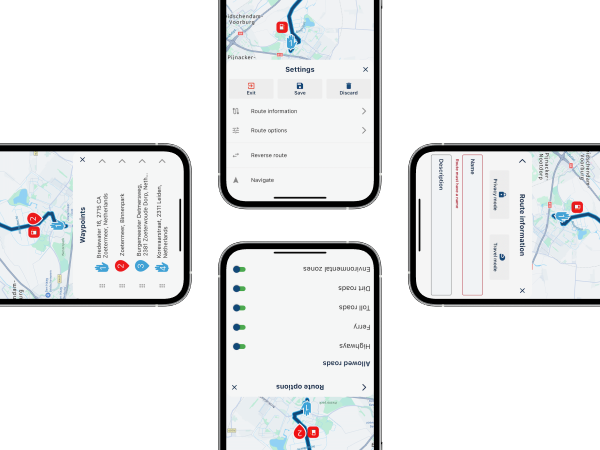
- Edit the name / description of the route.
- Alter the privacy / travel mode
- Avoid specific type of roads
- View all the waypoints
Talking about waypoints! Did you know you can drag the waypoints shown in the list to reorder them?
When you've opened a waypoint you can also swipe left / right to jump to the previous / next waypoint That's it really!
So in short:- Create new routes from scratch
- Edit any route
- Access to our unique MRA Routeplanner features in-app
- Modify waypoints
- Change route information / details / options
Isn't this an amazing update??? We have put a lot of focus in the visual appearance and user experience of this planner so we hope you are satisfied.
What to test?
Go ahead and play with the planner! Edit your creates and create new ones from scratch! Does everything work as expected? Does it feel like a well functioning, high quality route planner?
Furthermore, this update contains many changes internally. So does the rest of the app function as expected?
Are you missing any essential features?
What to know?
Your offline routes and search history will be cleared after downloading this update. No worries, just download your routes again if needed. Start searching to fill up your search historyEdited or created routes will require internet for now to save. We are working on that now! In the future advanced route downloading and synchronisation will be added.
What is next?
The beta procedure for this update will be slightly longer as we expect quite some feedback. Public release is scheduled for early July! We are aiming to add automatic offline storage of all your routes (including folders) within the eventual public release. This will also enable saving edited routes without internet.That's it really!
Enjoy testing this weekBest,
Corjan
Team MRA
- Edit any existing route!
-
@Corjan-Meijerink What a bombshell.


@Corjan-Meijerink : Dankeschön

-
Ladies and Gentlemen! Today is the day that we announce a great upcoming beta update
After quite some work by me and Joost, we are proud to announce that a major update 4.2.0 is coming your way. This update contains one major feature: the in-app MRA Routeplanner
With this routeplanner you can edit your high quality MRA routes with an interface it deserves.
- Edit any existing route!
- Create a new route from scratch
- Change routes from others
- All this can even be done offline!
The Routeplanner offers many features to help you in building lovely routes.
Quickly keep adding waypoints to your route to shape the route to your preference.
- Yellow button starts the adding process and keep tapping it to continuously add waypoints
- Click add to add a new waypoint and stop adding more
- Cancel, dismiss what you are doing
If you make a mistake, no problem! Simply use the undo / redo buttons like you are used to in the website
Do you want to add information to waypoints? Ofcourse you can do so!
Change the colour, type, note, title or even the icon of the waypoint!
Do you want to add a waypoint somewhere along the route? Obviously that's possible too!
- Tap somewhere along the line to add a waypoint there in order of the route
- Long press and drag a line to immediately move the marker you are adding in that leg
Do you need to move a waypoint precisely? Simply use the advanced move interface to place the waypoint exactly where you want. Long pressing and dragging the waypoint works too but that is less precise
Then we also allow you to change any of the other settings.
- Edit the name / description of the route.
- Alter the privacy / travel mode
- Avoid specific type of roads
- View all the waypoints
Talking about waypoints! Did you know you can drag the waypoints shown in the list to reorder them?
When you've opened a waypoint you can also swipe left / right to jump to the previous / next waypoint That's it really!
So in short:- Create new routes from scratch
- Edit any route
- Access to our unique MRA Routeplanner features in-app
- Modify waypoints
- Change route information / details / options
Isn't this an amazing update??? We have put a lot of focus in the visual appearance and user experience of this planner so we hope you are satisfied.
What to test?
Go ahead and play with the planner! Edit your creates and create new ones from scratch! Does everything work as expected? Does it feel like a well functioning, high quality route planner?Furthermore, this update contains many changes internally. So does the rest of the app function as expected?
Are you missing any essential features?
What to know?
Your offline routes and search history will be cleared after downloading this update. No worries, just download your routes again if needed. Start searching to fill up your search historyEdited or created routes will require internet for now to save. We are working on that now! In the future advanced route downloading and synchronisation will be added.
What is next?
The beta procedure for this update will be slightly longer as we expect quite some feedback. Public release is scheduled for early July! We are aiming to add automatic offline storage of all your routes (including folders) within the eventual public release. This will also enable saving edited routes without internet.That's it really!
Enjoy testing this weekBest,
Corjan
Team MRA
- Edit any existing route!
-
Ladies and Gentlemen! Today is the day that we announce a great upcoming beta update
After quite some work by me and Joost, we are proud to announce that a major update 4.2.0 is coming your way. This update contains one major feature: the in-app MRA Routeplanner
With this routeplanner you can edit your high quality MRA routes with an interface it deserves.
- Edit any existing route!
- Create a new route from scratch
- Change routes from others
- All this can even be done offline!
The Routeplanner offers many features to help you in building lovely routes.
Quickly keep adding waypoints to your route to shape the route to your preference.
- Yellow button starts the adding process and keep tapping it to continuously add waypoints
- Click add to add a new waypoint and stop adding more
- Cancel, dismiss what you are doing
If you make a mistake, no problem! Simply use the undo / redo buttons like you are used to in the website
Do you want to add information to waypoints? Ofcourse you can do so!
Change the colour, type, note, title or even the icon of the waypoint!
Do you want to add a waypoint somewhere along the route? Obviously that's possible too!
- Tap somewhere along the line to add a waypoint there in order of the route
- Long press and drag a line to immediately move the marker you are adding in that leg
Do you need to move a waypoint precisely? Simply use the advanced move interface to place the waypoint exactly where you want. Long pressing and dragging the waypoint works too but that is less precise
Then we also allow you to change any of the other settings.
- Edit the name / description of the route.
- Alter the privacy / travel mode
- Avoid specific type of roads
- View all the waypoints
Talking about waypoints! Did you know you can drag the waypoints shown in the list to reorder them?
When you've opened a waypoint you can also swipe left / right to jump to the previous / next waypoint That's it really!
So in short:- Create new routes from scratch
- Edit any route
- Access to our unique MRA Routeplanner features in-app
- Modify waypoints
- Change route information / details / options
Isn't this an amazing update??? We have put a lot of focus in the visual appearance and user experience of this planner so we hope you are satisfied.
What to test?
Go ahead and play with the planner! Edit your creates and create new ones from scratch! Does everything work as expected? Does it feel like a well functioning, high quality route planner?Furthermore, this update contains many changes internally. So does the rest of the app function as expected?
Are you missing any essential features?
What to know?
Your offline routes and search history will be cleared after downloading this update. No worries, just download your routes again if needed. Start searching to fill up your search historyEdited or created routes will require internet for now to save. We are working on that now! In the future advanced route downloading and synchronisation will be added.
What is next?
The beta procedure for this update will be slightly longer as we expect quite some feedback. Public release is scheduled for early July! We are aiming to add automatic offline storage of all your routes (including folders) within the eventual public release. This will also enable saving edited routes without internet.That's it really!
Enjoy testing this weekBest,
Corjan
Team MRA
@Corjan-Meijerink I don't like this update, screenshots are too small
Very good news, thank you, I will test it on my trip which is starting on Saturday! - Edit any existing route!
-
Ladies and Gentlemen! Today is the day that we announce a great upcoming beta update
After quite some work by me and Joost, we are proud to announce that a major update 4.2.0 is coming your way. This update contains one major feature: the in-app MRA Routeplanner
With this routeplanner you can edit your high quality MRA routes with an interface it deserves.
- Edit any existing route!
- Create a new route from scratch
- Change routes from others
- All this can even be done offline!
The Routeplanner offers many features to help you in building lovely routes.
Quickly keep adding waypoints to your route to shape the route to your preference.
- Yellow button starts the adding process and keep tapping it to continuously add waypoints
- Click add to add a new waypoint and stop adding more
- Cancel, dismiss what you are doing
If you make a mistake, no problem! Simply use the undo / redo buttons like you are used to in the website
Do you want to add information to waypoints? Ofcourse you can do so!
Change the colour, type, note, title or even the icon of the waypoint!
Do you want to add a waypoint somewhere along the route? Obviously that's possible too!
- Tap somewhere along the line to add a waypoint there in order of the route
- Long press and drag a line to immediately move the marker you are adding in that leg
Do you need to move a waypoint precisely? Simply use the advanced move interface to place the waypoint exactly where you want. Long pressing and dragging the waypoint works too but that is less precise
Then we also allow you to change any of the other settings.
- Edit the name / description of the route.
- Alter the privacy / travel mode
- Avoid specific type of roads
- View all the waypoints
Talking about waypoints! Did you know you can drag the waypoints shown in the list to reorder them?
When you've opened a waypoint you can also swipe left / right to jump to the previous / next waypoint That's it really!
So in short:- Create new routes from scratch
- Edit any route
- Access to our unique MRA Routeplanner features in-app
- Modify waypoints
- Change route information / details / options
Isn't this an amazing update??? We have put a lot of focus in the visual appearance and user experience of this planner so we hope you are satisfied.
What to test?
Go ahead and play with the planner! Edit your creates and create new ones from scratch! Does everything work as expected? Does it feel like a well functioning, high quality route planner?Furthermore, this update contains many changes internally. So does the rest of the app function as expected?
Are you missing any essential features?
What to know?
Your offline routes and search history will be cleared after downloading this update. No worries, just download your routes again if needed. Start searching to fill up your search historyEdited or created routes will require internet for now to save. We are working on that now! In the future advanced route downloading and synchronisation will be added.
What is next?
The beta procedure for this update will be slightly longer as we expect quite some feedback. Public release is scheduled for early July! We are aiming to add automatic offline storage of all your routes (including folders) within the eventual public release. This will also enable saving edited routes without internet.That's it really!
Enjoy testing this weekBest,
Corjan
Team MRA
@Corjan-Meijerink well done

- Edit any existing route!
-

@Corjan-Meijerink Great work. I have been waiting for this. Really looking forward to ‘playing’ with the planner.
-

Wow! Incredible update. It's going to take some time to learn all these new features. Will you offer any early training? Perhaps a video?
I'm a little confused about the comments on saving changes. Will the offline edits be saved to the route in the download folder? How do we upload changes to the web once data service is available? -
Ladies and Gentlemen! Today is the day that we announce a great upcoming beta update
After quite some work by me and Joost, we are proud to announce that a major update 4.2.0 is coming your way. This update contains one major feature: the in-app MRA Routeplanner
With this routeplanner you can edit your high quality MRA routes with an interface it deserves.
- Edit any existing route!
- Create a new route from scratch
- Change routes from others
- All this can even be done offline!
The Routeplanner offers many features to help you in building lovely routes.
Quickly keep adding waypoints to your route to shape the route to your preference.
- Yellow button starts the adding process and keep tapping it to continuously add waypoints
- Click add to add a new waypoint and stop adding more
- Cancel, dismiss what you are doing
If you make a mistake, no problem! Simply use the undo / redo buttons like you are used to in the website
Do you want to add information to waypoints? Ofcourse you can do so!
Change the colour, type, note, title or even the icon of the waypoint!
Do you want to add a waypoint somewhere along the route? Obviously that's possible too!
- Tap somewhere along the line to add a waypoint there in order of the route
- Long press and drag a line to immediately move the marker you are adding in that leg
Do you need to move a waypoint precisely? Simply use the advanced move interface to place the waypoint exactly where you want. Long pressing and dragging the waypoint works too but that is less precise
Then we also allow you to change any of the other settings.
- Edit the name / description of the route.
- Alter the privacy / travel mode
- Avoid specific type of roads
- View all the waypoints
Talking about waypoints! Did you know you can drag the waypoints shown in the list to reorder them?
When you've opened a waypoint you can also swipe left / right to jump to the previous / next waypoint That's it really!
So in short:- Create new routes from scratch
- Edit any route
- Access to our unique MRA Routeplanner features in-app
- Modify waypoints
- Change route information / details / options
Isn't this an amazing update??? We have put a lot of focus in the visual appearance and user experience of this planner so we hope you are satisfied.
What to test?
Go ahead and play with the planner! Edit your creates and create new ones from scratch! Does everything work as expected? Does it feel like a well functioning, high quality route planner?Furthermore, this update contains many changes internally. So does the rest of the app function as expected?
Are you missing any essential features?
What to know?
Your offline routes and search history will be cleared after downloading this update. No worries, just download your routes again if needed. Start searching to fill up your search historyEdited or created routes will require internet for now to save. We are working on that now! In the future advanced route downloading and synchronisation will be added.
What is next?
The beta procedure for this update will be slightly longer as we expect quite some feedback. Public release is scheduled for early July! We are aiming to add automatic offline storage of all your routes (including folders) within the eventual public release. This will also enable saving edited routes without internet.That's it really!
Enjoy testing this weekBest,
Corjan
Team MRA
@Corjan-Meijerink Wow, extremely good work.
My decision to discard calimoto and move completely to MRA turns out to be lucky.
I‘m keen to see the new version working on my Route des Grandes Alpes Tour End of July.
Best, Axel
- Edit any existing route!
-
Wow! Incredible update. It's going to take some time to learn all these new features. Will you offer any early training? Perhaps a video?
I'm a little confused about the comments on saving changes. Will the offline edits be saved to the route in the download folder? How do we upload changes to the web once data service is available?
@RetiredWingMan said in New beta! v4.2.0 (318):
Will the offline edits be saved to the route in the download folder? How do we upload changes to the web once data service is available?
From what I have seen so far, any changes you make to a route saved in the download folder on your phone are only saved in the cloud and not on your phone. I would suggest creating a new topic for this and submitting it as a feature request. This way, the information will also be easy to find. By the way, I think it's a legitimate request. If you don't have internet and for some reason need to restart a route from your download folder, your changes will be lost!
-
Wow! Incredible update. It's going to take some time to learn all these new features. Will you offer any early training? Perhaps a video?
I'm a little confused about the comments on saving changes. Will the offline edits be saved to the route in the download folder? How do we upload changes to the web once data service is available?
@RetiredWingMan we will create some videos further down the road
Saving now is only possible with internet.
In a future update they will be placed in a queue of some sorts to be uploaded once online again! -
@Corjan-Meijerink Wow, extremely good work.
My decision to discard calimoto and move completely to MRA turns out to be lucky.
I‘m keen to see the new version working on my Route des Grandes Alpes Tour End of July.
Best, Axel
@Corjan-Meijerink BTW: I‘m still alone on my tour. Is there any topic in the forum where I can introduce myself and describe the tour plan to possibly find a tour mate?
-

TestFlight just dropped v4.2.0 (318)

-
@Corjan-Meijerink Just for your information, my previous search history was still available after the update, my Downloads folder was already empty so I can’t report on that.
-

had a quick play, sat having a beer seems intuitive but time will tell, does look good tho.
as previoulsy stated, the downlpard folder is empty so ensure you download any routes required for offline use
my search history has disappeared except from friday onwards.
these are not big issues as long as you remember the downloads
my offline maps are still present and up to date
well done team MRA

-
@Corjan-Meijerink Hi! is it now possible to also see all the route informations without entering editing mode? also when offline?
I think the real strenght of myroute is all the metadata you can add to the routes, but until now I didn't find any way to see all these info in the app.
btw when will it be possibile to sync all the routes on the phone without downloading them one by one?
-
@Corjan-Meijerink Hi! is it now possible to also see all the route informations without entering editing mode? also when offline?
I think the real strenght of myroute is all the metadata you can add to the routes, but until now I didn't find any way to see all these info in the app.
btw when will it be possibile to sync all the routes on the phone without downloading them one by one?
@cvlmtg Seeing "all" route information from the in-app planner won't be possible now. We will keep expanding the level of detail but for now it's really about all the fundamental basics
Syncing all routes etc is being worked on. Aiming to have this included in the public release early July.
-
@cvlmtg Seeing "all" route information from the in-app planner won't be possible now. We will keep expanding the level of detail but for now it's really about all the fundamental basics
Syncing all routes etc is being worked on. Aiming to have this included in the public release early July.
@Corjan-Meijerink thanks!
-
Ladies and Gentlemen! Today is the day that we announce a great upcoming beta update
After quite some work by me and Joost, we are proud to announce that a major update 4.2.0 is coming your way. This update contains one major feature: the in-app MRA Routeplanner
With this routeplanner you can edit your high quality MRA routes with an interface it deserves.
- Edit any existing route!
- Create a new route from scratch
- Change routes from others
- All this can even be done offline!
The Routeplanner offers many features to help you in building lovely routes.
Quickly keep adding waypoints to your route to shape the route to your preference.
- Yellow button starts the adding process and keep tapping it to continuously add waypoints
- Click add to add a new waypoint and stop adding more
- Cancel, dismiss what you are doing
If you make a mistake, no problem! Simply use the undo / redo buttons like you are used to in the website
Do you want to add information to waypoints? Ofcourse you can do so!
Change the colour, type, note, title or even the icon of the waypoint!
Do you want to add a waypoint somewhere along the route? Obviously that's possible too!
- Tap somewhere along the line to add a waypoint there in order of the route
- Long press and drag a line to immediately move the marker you are adding in that leg
Do you need to move a waypoint precisely? Simply use the advanced move interface to place the waypoint exactly where you want. Long pressing and dragging the waypoint works too but that is less precise
Then we also allow you to change any of the other settings.
- Edit the name / description of the route.
- Alter the privacy / travel mode
- Avoid specific type of roads
- View all the waypoints
Talking about waypoints! Did you know you can drag the waypoints shown in the list to reorder them?
When you've opened a waypoint you can also swipe left / right to jump to the previous / next waypoint That's it really!
So in short:- Create new routes from scratch
- Edit any route
- Access to our unique MRA Routeplanner features in-app
- Modify waypoints
- Change route information / details / options
Isn't this an amazing update??? We have put a lot of focus in the visual appearance and user experience of this planner so we hope you are satisfied.
What to test?
Go ahead and play with the planner! Edit your creates and create new ones from scratch! Does everything work as expected? Does it feel like a well functioning, high quality route planner?Furthermore, this update contains many changes internally. So does the rest of the app function as expected?
Are you missing any essential features?
What to know?
Your offline routes and search history will be cleared after downloading this update. No worries, just download your routes again if needed. Start searching to fill up your search historyEdited or created routes will require internet for now to save. We are working on that now! In the future advanced route downloading and synchronisation will be added.
What is next?
The beta procedure for this update will be slightly longer as we expect quite some feedback. Public release is scheduled for early July! We are aiming to add automatic offline storage of all your routes (including folders) within the eventual public release. This will also enable saving edited routes without internet.That's it really!
Enjoy testing this weekBest,
Corjan
Team MRA
@Corjan-Meijerink
Good morning, Android version is not available until now. Right?Regards
Karsten - Edit any existing route!
-
@Corjan-Meijerink
Good morning, Android version is not available until now. Right?Regards
Karsten
The Android update generally always takes a bit longer to appear.
-
@Corjan-Meijerink really like this planner and ease of use. Just a couple of points so far from using the feature on iOS:
- When searching to place a waypoint, my Favourites do not appear to show. Wonder if the search menu could be like the search when using the app when you have the different categories etc?
- A few times when trying to place the waypoint, it appears to ‘drift’ slowly and not stay where I place it when I try to set the position. I have the used the move function but I seem to have a slow drift of the icon. It is not all the time but wondering if anybody else has seen this? I will try and get a screen recording at some point.
Great work. Loving this new feature.
Hello! It looks like you're interested in this conversation, but you don't have an account yet.
Getting fed up of having to scroll through the same posts each visit? When you register for an account, you'll always come back to exactly where you were before, and choose to be notified of new replies (either via email, or push notification). You'll also be able to save bookmarks and upvote posts to show your appreciation to other community members.
With your input, this post could be even better 💗
Register Login



-
 418192
-
014697
-
0833
-
 1211.1k
-
06181
-
 05136
05136
-
 0464
0464
-
 0346
0346