Waypoints overly precise?
-

I'm guessing "no," but I'll ask anyway...
It seems to me that a rider has to be overly precise in placing waypoints to be sure that navigation recognizes that you passed them.
Here is an example:
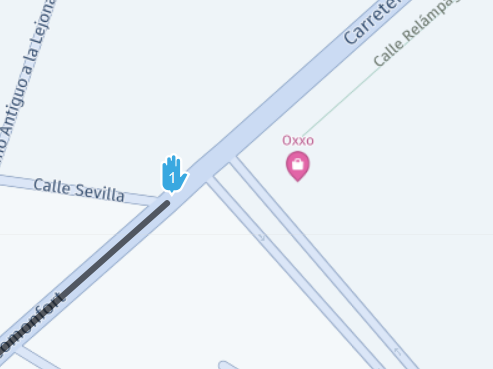
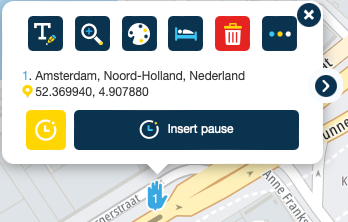
This is the start of a route I rode last weekend. I set the start of the route on the main highway near my home in Mexico. I am coming out of the small divided road to the southeast of the waypoint, making a left turn onto the main highway, past the @1 Hand. But when I make that left turn, I am on the far left of the right side of that divided highway The waypoint is essentially in the right lane, and I am in the left lane, with a center lane in the middle.
Navigation did not recognize that I had rode through waypoint 1, and I had to stop and manually bypass it.
Okay, I can move the waypoint, but this seems like it is too fussy about placement, and makes route planning more demanding than it might be.
I think if the system were >slightly< more forgiving about how precise the waypoint is placed, it would be a lot easier!
By the way, if it helps, the route is set to public and it is called "El Encanto to Dolores Jardin loop."
Thanks,
Vinnie
-
I'm guessing "no," but I'll ask anyway...
It seems to me that a rider has to be overly precise in placing waypoints to be sure that navigation recognizes that you passed them.
Here is an example:
This is the start of a route I rode last weekend. I set the start of the route on the main highway near my home in Mexico. I am coming out of the small divided road to the southeast of the waypoint, making a left turn onto the main highway, past the @1 Hand. But when I make that left turn, I am on the far left of the right side of that divided highway The waypoint is essentially in the right lane, and I am in the left lane, with a center lane in the middle.
Navigation did not recognize that I had rode through waypoint 1, and I had to stop and manually bypass it.
Okay, I can move the waypoint, but this seems like it is too fussy about placement, and makes route planning more demanding than it might be.
I think if the system were >slightly< more forgiving about how precise the waypoint is placed, it would be a lot easier!
By the way, if it helps, the route is set to public and it is called "El Encanto to Dolores Jardin loop."
Thanks,
Vinnie

@Vincent-Curren
Yes, the placement of the shaping and via points must be done precisely. Always put them on the route line, after a fork or intersection, after a roundabout, put them on the correct side of the road.
And for the 1st point (starting point), don't put it exactly at the point where you start, but a little further away. -

The required level of precision is really situational.
If there is only one lane, the waypoint can be easily placed 20 meters off the road and it will be recognised as passed.
The real challenge occurs if there is another lane / driving direction. What if it was placed on the other lane intentionally? In that case you want the navigation to be precise and force you to drive exactly over the waypoint

So in general, checking your waypoint placement is always recommended.
-
The required level of precision is really situational.
If there is only one lane, the waypoint can be easily placed 20 meters off the road and it will be recognised as passed.
The real challenge occurs if there is another lane / driving direction. What if it was placed on the other lane intentionally? In that case you want the navigation to be precise and force you to drive exactly over the waypoint
So in general, checking your waypoint placement is always recommended.
@Corjan-Meijerink: Thanks to you and @Hans-van-de-Ven-MRA-Master for the replies. As you can see from the screen capture, in this case that first waypoint is on the route line -- in fact, since it's the first route point, it actually defines the route line -- and it's pretty darn close to the middle of the highway, too. In this case, the anomaly is that the lane pattern at that point required me in the far left lane when I passed the waypoint, so I must have just barely missed it. Even looking at the screen grab again now, I don't know how I could see that there would be a problem - it looks like it is in the right place.
By the way, I also know that it is not that difficult to tell the app to skip a waypoint I may have missed - but I am not yet familiar enough with that feature to do it quickly and comfortably at the side of the road. Eventually it will get easier as I develop muscle memory using the app.
Thanks again,
Vinnie -
@Corjan-Meijerink: Thanks to you and @Hans-van-de-Ven-MRA-Master for the replies. As you can see from the screen capture, in this case that first waypoint is on the route line -- in fact, since it's the first route point, it actually defines the route line -- and it's pretty darn close to the middle of the highway, too. In this case, the anomaly is that the lane pattern at that point required me in the far left lane when I passed the waypoint, so I must have just barely missed it. Even looking at the screen grab again now, I don't know how I could see that there would be a problem - it looks like it is in the right place.
By the way, I also know that it is not that difficult to tell the app to skip a waypoint I may have missed - but I am not yet familiar enough with that feature to do it quickly and comfortably at the side of the road. Eventually it will get easier as I develop muscle memory using the app.
Thanks again,
Vinnie
@Vincent-Curren it's actually quite simple if you have the option set to displayed the next waypoint which appears at the top right of your screen. Simply long press on the next waypoint (or press Once and then answer yes to the question). You can try this while sitting in your chair at home. Cheers
-
The required level of precision is really situational.
If there is only one lane, the waypoint can be easily placed 20 meters off the road and it will be recognised as passed.
The real challenge occurs if there is another lane / driving direction. What if it was placed on the other lane intentionally? In that case you want the navigation to be precise and force you to drive exactly over the waypoint
So in general, checking your waypoint placement is always recommended.
@Corjan-Meijerink
I am all in favour of precise waypoints. Making them less precise will lead to other problems.However, the approach to go over all waypoints and correctly place them one by one could be improved. by adding a feature to the planner that puts all waypoints in a list on the screen, zooms to the firsdt one to place it perfectly, then zooms in on the second one , ... etc and only recalculates the entire route after they are all placed.
It is not difficult, it is easy, it's a hobby
-
@Corjan-Meijerink
I am all in favour of precise waypoints. Making them less precise will lead to other problems.However, the approach to go over all waypoints and correctly place them one by one could be improved. by adding a feature to the planner that puts all waypoints in a list on the screen, zooms to the firsdt one to place it perfectly, then zooms in on the second one , ... etc and only recalculates the entire route after they are all placed.
@Drabslab said in Waypoints overly precise?:
@Corjan-Meijerink
I am all in favour of precise waypoints. Making them less precise will lead to other problems.However, the approach to go over all waypoints and correctly place them one by one could be improved. by adding a feature to the planner that puts all waypoints in a list on the screen, zooms to the firsdt one to place it perfectly, then zooms in on the second one , ... etc and only recalculates the entire route after they are all placed.
You can already do most of that, right? Select the first waypoint from the list on the left (or on the map), click the "Zoom in" button (best to do this on the actual map used for calculations), move it if necessary, then use the right-arrow to move to the next point (it will stay at the same zoom-level).
-
@Drabslab said in Waypoints overly precise?:
@Corjan-Meijerink
I am all in favour of precise waypoints. Making them less precise will lead to other problems.However, the approach to go over all waypoints and correctly place them one by one could be improved. by adding a feature to the planner that puts all waypoints in a list on the screen, zooms to the firsdt one to place it perfectly, then zooms in on the second one , ... etc and only recalculates the entire route after they are all placed.
You can already do most of that, right? Select the first waypoint from the list on the left (or on the map), click the "Zoom in" button (best to do this on the actual map used for calculations), move it if necessary, then use the right-arrow to move to the next point (it will stay at the same zoom-level).
@Herko-ter-Horst or even use the arrow keys on your keyboard
-
@Herko-ter-Horst or even use the arrow keys on your keyboard

@Corjan-Meijerink said in Waypoints overly precise?:
or even use the arrow keys on your keyboard
Wow...!

-

Yes this works.... but... If I move the waypoint to other near location to improve route, a dialog appears to "rename" new point. After write new name o cancel to left old name, way point configuration dialog dissapears, so I need to click ok on way pont and use arroys (screen or keyboard) to access next way point.

Lluis Arasanz
- BMW F750GS
MotoMediaLink HW Interface for BMW's WonderWheel device - Samsung A14 with Beta MyRoute-App (primary bike use)
Tasker and MMLink SW for Android App Control - iPhone 14 with Beta MyRoute-App (personal and primary CP use)
- BMW F750GS
-
Yes this works.... but... If I move the waypoint to other near location to improve route, a dialog appears to "rename" new point. After write new name o cancel to left old name, way point configuration dialog dissapears, so I need to click ok on way pont and use arroys (screen or keyboard) to access next way point.
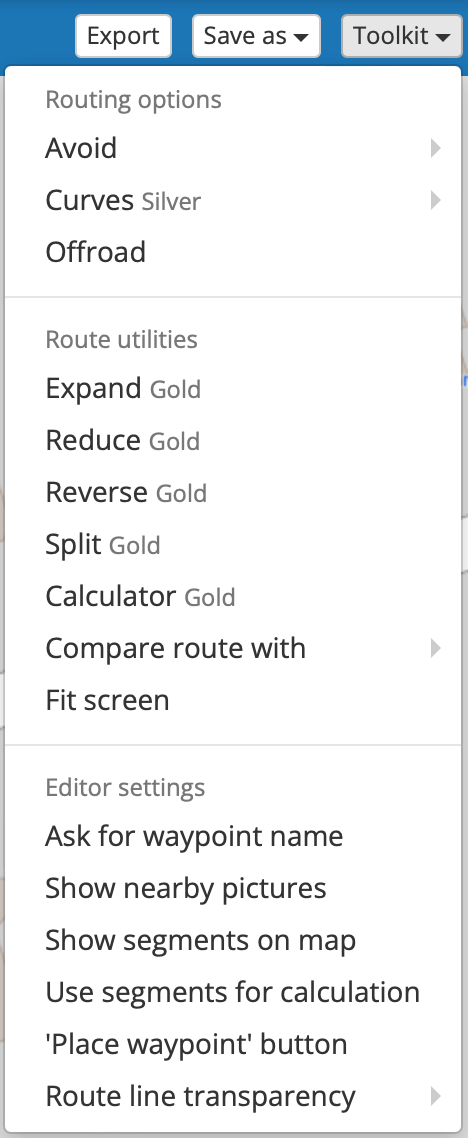
@Lluis-Arasanz this is a setting you can enable or disable yourself. Make sure "Ask for waypoint name" is unchecked in the Toolbox menu.
-
@Lluis-Arasanz this is a setting you can enable or disable yourself. Make sure "Ask for waypoint name" is unchecked in the Toolbox menu.
Hi @Herko-ter-Horst ,
Yes, this check avoids for "ask for naming" dialog box, but:
- does not conserve personal waypoint name (every move changes name by address). This behavior is bad for me 'cause I often rename all waypoints to something better to be read on motorbike
- does not avoid than waypoint tool dialog also closes (this is a little problem that does not need to have in mind)
As allways.... is my setting and my opinion,
Best regards
Hello! It looks like you're interested in this conversation, but you don't have an account yet.
Getting fed up of having to scroll through the same posts each visit? When you register for an account, you'll always come back to exactly where you were before, and choose to be notified of new replies (either via email, or push notification). You'll also be able to save bookmarks and upvote posts to show your appreciation to other community members.
With your input, this post could be even better 💗
Register Login-
 04131
04131
-
 0414
0414
-
039
-
0314
-
 06320
06320
-
 029
029
-
0230
-
0283