Motorrad-Ausflugsziele und Bikertreffs
-

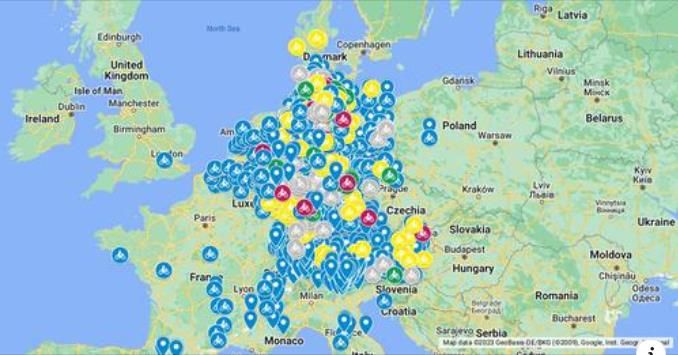
Motorrad-Ausflugsziele und Bikertreffs Deutschland (DACH) und Umland auf Google


Motorrad-Ausflugsziele und Bikertreffs
Hardware
iPhone 12 pro (iOS 26.2.1)
iPad (7.Gen.) 18.7.3
Oukitel RT3 Pro (Andr. 14)
Wireless CarPlay mit (Elebest C650)
Wired CarPlay (SEAT Arona - 2021)
MRA Workshops in Deutsch sind hier zu finden -
Motorrad-Ausflugsziele und Bikertreffs Deutschland (DACH) und Umland auf Google
Motorrad-Ausflugsziele und Bikertreffs

@Jörgen, This is great! Would be nice to convert this to a POI library.
I am just an enthusiastic MRA user, and hope you will be one too!
Most motorcycle problems are caused by the nut that connects the handlebar to the saddle.
Check out RideSleepRepeat.eu, a biker community for sharing stays across Europe
-
@Jörgen, This is great! Would be nice to convert this to a POI library.
@Con-Hennekens I thought the same, but haven't had time to try it yet. You can download the data as Google KML. Maybe you can convert it than into a POI file with GPS Babel.
Hardware
iPhone 12 pro (iOS 26.2.1)
iPad (7.Gen.) 18.7.3
Oukitel RT3 Pro (Andr. 14)
Wireless CarPlay mit (Elebest C650)
Wired CarPlay (SEAT Arona - 2021)
MRA Workshops in Deutsch sind hier zu finden -
@Con-Hennekens I thought the same, but haven't had time to try it yet. You can download the data as Google KML. Maybe you can convert it than into a POI file with GPS Babel.
@Jörgen
Great collection, thanks for sharing!I have converted the POIs into GPX files (one file per category) - but what is the best way to share them within MRA? I have uploaded the GPX files as POIs into my "MRA cloud space" and can find them in my POI library but there is nothing I can set to public...
-
@Jörgen
Great collection, thanks for sharing!I have converted the POIs into GPX files (one file per category) - but what is the best way to share them within MRA? I have uploaded the GPX files as POIs into my "MRA cloud space" and can find them in my POI library but there is nothing I can set to public...
@Martin-Wilcke, no there is no such setting. Anyone who wants it, will need to import the file themselves I am afraid. You could upload the file to a filestorage or the facebook page and share the link here.
-
@Martin-Wilcke, no there is no such setting. Anyone who wants it, will need to import the file themselves I am afraid. You could upload the file to a filestorage or the facebook page and share the link here.

@Con-Hennekens
It is possible, but it is a lot of work.
Empty route and place your POIs in the 'Manage' function of <Points of interest>.
This can be exported as "OV2" or "CSV".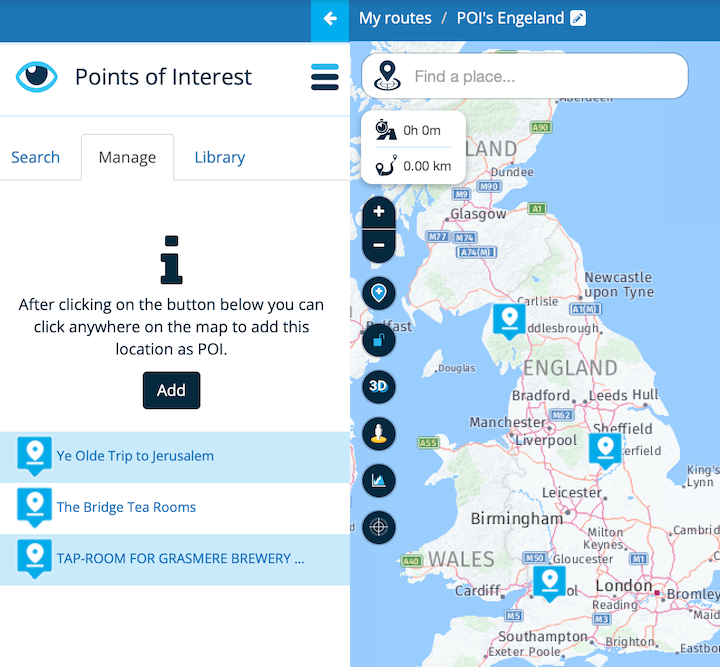
-
@Martin-Wilcke, no there is no such setting. Anyone who wants it, will need to import the file themselves I am afraid. You could upload the file to a filestorage or the facebook page and share the link here.
@Con-Hennekens
Yes, providing it via a cloud storage would be an option.
But the conversion is quite easy with the "GPS Visualizer", a web frontend for "GPS Babel": https://www.gpsvisualizer.com/gpsbabel/?lang=en@Jack-van-Tilburg
I know - this is how I currently manage my personal POI library. But for a file with 1000+ POIs this is not a good idea
-
@Con-Hennekens
It is possible, but it is a lot of work.
Empty route and place your POIs in the 'Manage' function of <Points of interest>.
This can be exported as "OV2" or "CSV".
@Jack-van-Tilburg, yes, but another user still has to import it into his own library, doesn't he? A system where you can enable a public or a friends library would be great. A bit like you can look into publicly shared routes.
EDIT:
I have put this into the WEB suggestions for further discussion.
https://forum.myrouteapp.com/post/36430 -
I had a look at this today again, and discovered the following:
- Click the 3-dot menu, choose Download KML
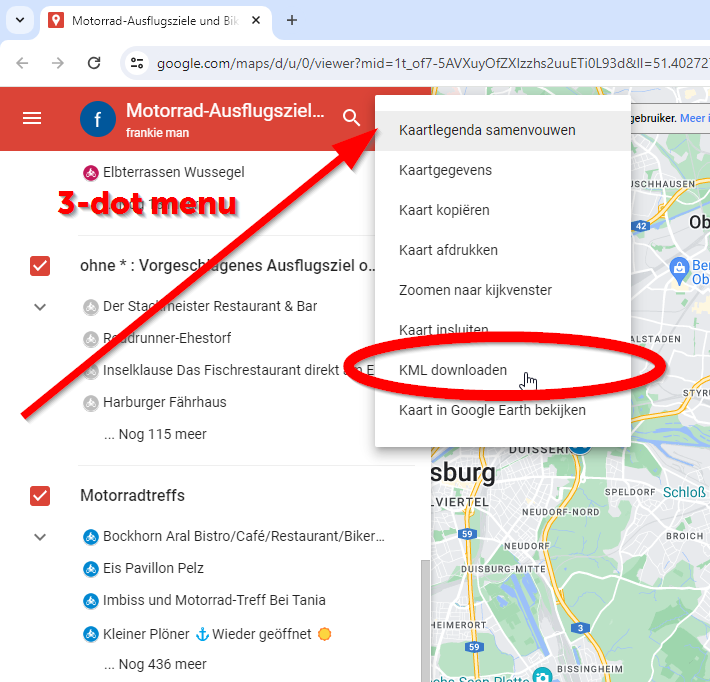
- You can even choose which category to download! Save the file and upload it into this website:
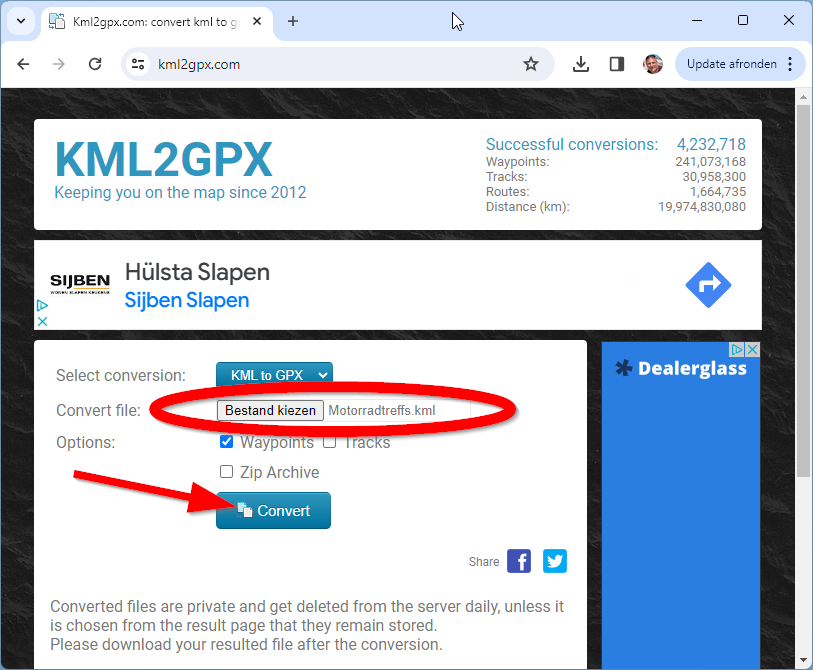
- after pressing "Convert" you can download the GPX file. This GPX file can be uploaded into the POI libraries as usual.
This makes @Jörgen his suggestion for this page very worthwhile!
I am saving the map into my favorites
Hello! It looks like you're interested in this conversation, but you don't have an account yet.
Getting fed up of having to scroll through the same posts each visit? When you register for an account, you'll always come back to exactly where you were before, and choose to be notified of new replies (either via email, or push notification). You'll also be able to save bookmarks and upvote posts to show your appreciation to other community members.
With your input, this post could be even better 💗
Register Login-
 012131
-
 1320187
-
 17363.5k
-
 0629
0629
-
 0640
0640
-
0578
-
0522
-
 05148
05148