Skip to content
  • Categories
  • Recent
  • Popular
  • Support
  • MyRoute-app
Collapse
Brand Logo

MRA Community Forum

  1. Home
  2. General Discussion
  3. Printing off a copy of the route Map

Printing off a copy of the route Map

Scheduled Pinned Locked Moved General Discussion
6 Posts 4 Posters 1.3k Views 1 Watching
  • Oldest to Newest
  • Newest to Oldest
  • Most Votes
Reply
  • Reply as topic
Log in to reply
This topic has been deleted. Only users with topic management privileges can see it.
  • John Forrester Offline
    John Forrester Offline
    John Forrester
    wrote on last edited by
    #1

    Hi, Can anyone tell me is is possible to print of a copy of the route map overview for other in my party who do not have a Satnav?
    TIA. John
    Reinhard-32 Nick Carthew 2 Replies Last reply
    0
    • John Forrester John Forrester

      Hi, Can anyone tell me is is possible to print of a copy of the route map overview for other in my party who do not have a Satnav?
      TIA. John

      Reinhard-32 Offline
      Reinhard-32 Offline
      Reinhard-32
      wrote on last edited by
      #2

      @john-forrester You can use the save as PDF function or you can make a screenshot from you computer screen.

      Kindly regards
      Reinhard

      Montana 700i and Mac

      1 Reply Last reply
      0
      • John Forrester John Forrester

        Hi, Can anyone tell me is is possible to print of a copy of the route map overview for other in my party who do not have a Satnav?
        TIA. John

        Nick Carthew Offline
        Nick Carthew Offline
        Nick Carthew
        RouteXpert
        wrote on last edited by
        #3

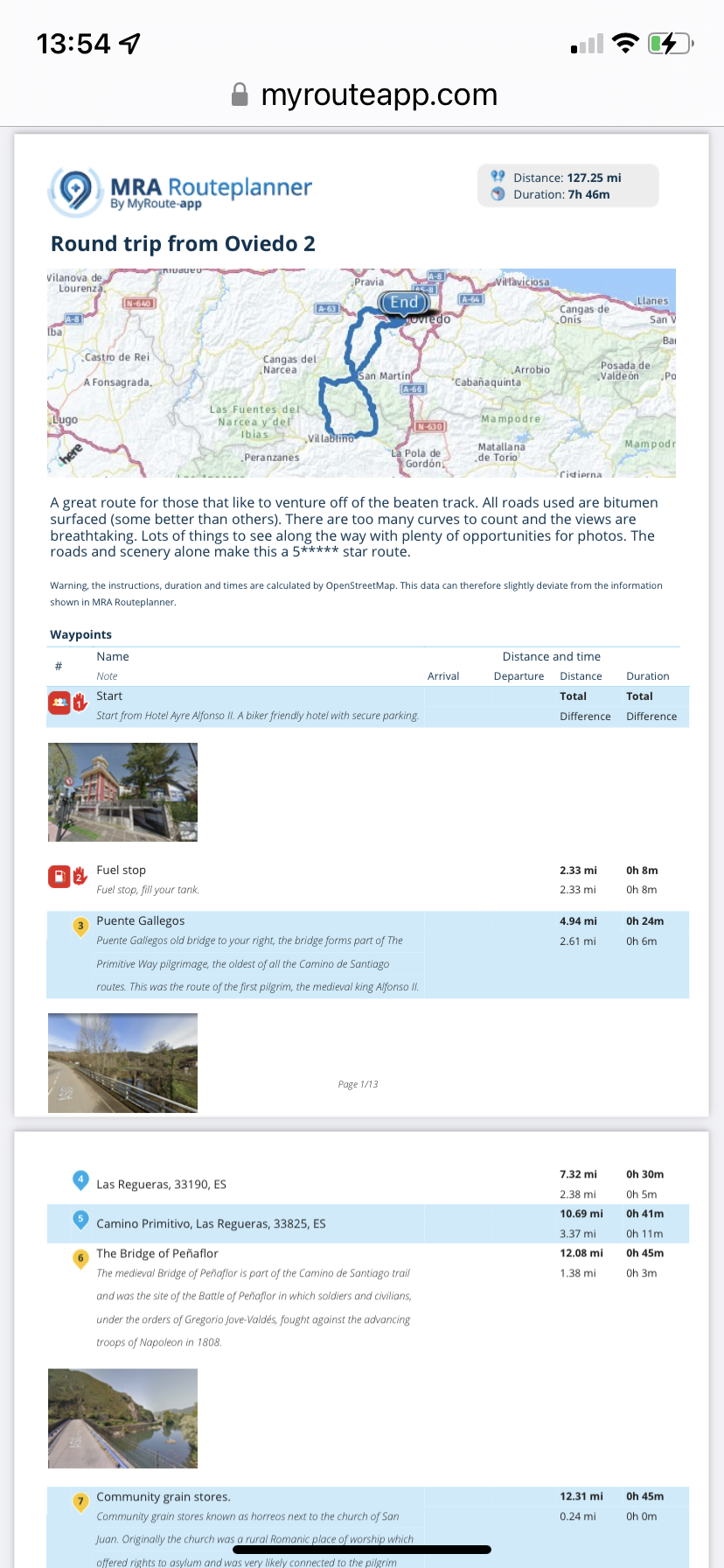
        @john-forrester It’s not possible directly through MRA. You can print a pdf of the route that looks like this.
        DE1223FD-B549-403E-BC48-E4E33D593ACA.png

        Or screenshot the maps on screen.

        Always willing to help if I can.
        Triumph Tiger 1200 XRT called Tina.
        MRA Navigation Next and SilverFox BJ8

        Paul Trill 0 1 Reply Last reply
        0
        • Nick Carthew Nick Carthew

          @john-forrester It’s not possible directly through MRA. You can print a pdf of the route that looks like this.

          DE1223FD-B549-403E-BC48-E4E33D593ACA.png

          Or screenshot the maps on screen.

          Paul Trill 0 Offline
          Paul Trill 0 Offline
          Paul Trill 0
          wrote on last edited by
          #4

          @Nick-Carthew Hi Nick - I've just seen your post on printing out routes via screenshot or pdf (posted 2022 under General Discussion). Please could you tell me how you get that screen view with the map outline at the top and the waypoints underneath. I've looked everywhere but can't see how to do that. Working on Mac and tried both Chrome and Safari. Also how did you get the photos in there? Many thanks Paul

          Nick Carthew 1 Reply Last reply
          0
          • Paul Trill 0 Paul Trill 0

            @Nick-Carthew Hi Nick - I've just seen your post on printing out routes via screenshot or pdf (posted 2022 under General Discussion). Please could you tell me how you get that screen view with the map outline at the top and the waypoints underneath. I've looked everywhere but can't see how to do that. Working on Mac and tried both Chrome and Safari. Also how did you get the photos in there? Many thanks Paul

            Nick Carthew Offline
            Nick Carthew Offline
            Nick Carthew
            RouteXpert
            wrote on last edited by
            #5

            @Paul-Trill-0 Open the route, click Save as and then choose .PDF. This saves the .PDF file to your computer. The photos are added in the route points by clicking the photo icon in the route point menu.

            Always willing to help if I can.
            Triumph Tiger 1200 XRT called Tina.
            MRA Navigation Next and SilverFox BJ8

            Paul Trill 0 1 Reply Last reply
            1
            • Nick Carthew Nick Carthew

              @Paul-Trill-0 Open the route, click Save as and then choose .PDF. This saves the .PDF file to your computer. The photos are added in the route points by clicking the photo icon in the route point menu.

              Paul Trill 0 Offline
              Paul Trill 0 Offline
              Paul Trill 0
              wrote on last edited by
              #6

              @Nick-Carthew Thank you so much,I have looking for this solution for weeks.
              Paul Trill

              1 Reply Last reply
              0

              Hello! It looks like you're interested in this conversation, but you don't have an account yet.

              Getting fed up of having to scroll through the same posts each visit? When you register for an account, you'll always come back to exactly where you were before, and choose to be notified of new replies (either via email, or push notification). You'll also be able to save bookmarks and upvote posts to show your appreciation to other community members.

              With your input, this post could be even better 💗

              Register Login
              Reply
              • Reply as topic
              Log in to reply
              • Oldest to Newest
              • Newest to Oldest
              • Most Votes


              ACTIVE USERS
              Nick Carthew
              Nick Carthew
              Reinhard-32
              Reinhard-32
              Paul Trill 0
              Paul Trill 0
              John Forrester
              John Forrester
              POPULAR TOPICS
              • Carpuride scherm vast
                De Ploey Georges
                De Ploey Georges
                3
                28
                1.3k

              • GPX Versions 1.1 vs 1.2 for Garmin Visually Explained
                John S Parry
                John S Parry
                7
                179
                14.6k

              • How can I change the verbal navigation directions from male to female?
                Brian McG
                Brian McG
                0
                5
                41

              • Linker in MRA kleurt blauw (alles geselecteerd)
                Travellexxie
                Travellexxie
                0
                13
                370

              • Apple Carplay - navigatie instructies zichtbaar, maar kaart niet??
                Nick Carthew
                Nick Carthew
                0
                3
                45

              • Camperroutes
                De Ploey Georges
                De Ploey Georges
                0
                4
                183

              • New update 5.2.1
                Peter Zehentreiter
                Peter Zehentreiter
                15
                17
                690

              • Wegwerkzaamheden / Road works
                LennyO
                LennyO
                0
                2
                40

              MY GROUPS
              • Login

              • Login or register to search.
              • First post
                Last post
              0
              • Categories
              • Recent
              • Popular
              • Support
              • MyRoute-app