Skip to content
  • Categories
  • Recent
  • Popular
  • Support
  • MyRoute-app
Collapse
Brand Logo

MRA Community Forum

  1. Home
  2. The MyRoute-app
  3. [App] Suggestions and Discussion
  4. Standard / Satelite view in-app route planner

Standard / Satelite view in-app route planner

Scheduled Pinned Locked Moved [App] Suggestions and Discussion
3 Posts 2 Posters 663 Views 2 Watching
  • Oldest to Newest
  • Newest to Oldest
  • Most Votes
Reply
  • Reply as topic
Log in to reply
This topic has been deleted. Only users with topic management privileges can see it.
  • Herman Veldhuizenundefined Offline
    Herman Veldhuizenundefined Offline
    Herman Veldhuizen
    wrote on last edited by
    #1

    I do most route planning while traveling, in the in-app route planner (not the in-app web based planner).
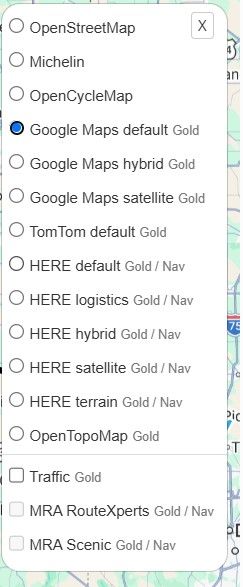
    What I miss there is a quick way to switch the map from standard to satellite view and back. I takes about 3 clicks in Kurviger and Google but 7 in MRA (Menu, Map style, etc ). I hope a quicker way can be provided in the future. Ideally a 1 click operation.

    Rob Verhoeffundefined 1 Reply Last reply
    0
    • Herman Veldhuizenundefined Herman Veldhuizen

      I do most route planning while traveling, in the in-app route planner (not the in-app web based planner).
      What I miss there is a quick way to switch the map from standard to satellite view and back. I takes about 3 clicks in Kurviger and Google but 7 in MRA (Menu, Map style, etc ). I hope a quicker way can be provided in the future. Ideally a 1 click operation.

      Rob Verhoeffundefined Offline
      Rob Verhoeffundefined Offline
      Rob Verhoeff
      Alpha tester
      wrote on last edited by
      #2

      @Herman-Veldhuizen said in Standard / Satelite view in-app route planner:

      but 7 in MRA

      On iOS in 5 steps: Once the route is on your screen, click Menu > Map style > Satellite > Back button (top left) > Close menu.

      BMW K1600GT-P (2013) | Nolan N100-5 with Sena 30K
      iOS on iPhone 13 & 16 (mounted on Quadlock or AliExpress extention on BMW-cradle)
      Apple CarPlay in VW T-Roc
      Routelab on MacBook Air & iMac (Tahoe & Ventura)

      Herman Veldhuizenundefined 1 Reply Last reply
      0
      • Rob Verhoeffundefined Rob Verhoeff

        @Herman-Veldhuizen said in Standard / Satelite view in-app route planner:

        but 7 in MRA

        On iOS in 5 steps: Once the route is on your screen, click Menu > Map style > Satellite > Back button (top left) > Close menu.

        Herman Veldhuizenundefined Offline
        Herman Veldhuizenundefined Offline
        Herman Veldhuizen
        wrote on last edited by
        #3

        @Rob-Verhoeff nice for you but its 5 plus 2 times scrolling down on my screen. these 2 are the most annoying ones. It would have been better already if the options for map style and map layer were a bit further on the top.

        1 Reply Last reply
        0

        Hello! It looks like you're interested in this conversation, but you don't have an account yet.

        Getting fed up of having to scroll through the same posts each visit? When you register for an account, you'll always come back to exactly where you were before, and choose to be notified of new replies (either via email, or push notification). You'll also be able to save bookmarks and upvote posts to show your appreciation to other community members.

        With your input, this post could be even better 💗

        Register Login
        Reply
        • Reply as topic
        Log in to reply
        • Oldest to Newest
        • Newest to Oldest
        • Most Votes


        ACTIVE USERS
        Rob Verhoeffundefined
        Rob Verhoeff
        Herman Veldhuizenundefined
        Herman Veldhuizen
        POPULAR TOPICS
        • Update 5.1 - CarPlay / Android Auto improvements and more!
          Marcel Prinsen 0 0undefined
          Marcel Prinsen 0 0
          12
          9
          208

        • Route Rx bibliotheek overzetten naar Garmin
          nomkoundefined
          nomko
          0
          7
          75

        • Mixed mode route
          Travellexxieundefined
          Travellexxie
          0
          7
          188

        • Compass with direction
          Dave J 0undefined
          Dave J 0
          2
          10
          74

        • Rondrit maken en vervolgens navigeren lukt niet
          supergundefined
          superg
          0
          10
          403

        • Kleur van de rit veranderen.
          Leike Lodiersundefined
          Leike Lodiers
          0
          2
          44

        • Ik krijg bij Scenic de vermijdopties (In mijn geval: Snelwegen, Steden en Woonwijken) niet uitgeschakeld.
          Leike Lodiersundefined
          Leike Lodiers
          0
          2
          28

        • Input Settings, Turned off v Standard
          Corjan Meijerinkundefined
          Corjan Meijerink
          0
          8
          969

        MY GROUPS
        • Login

        • Login or register to search.
        • First post
          Last post
        0
        • Categories
        • Recent
        • Popular
        • Support
        • MyRoute-app