On-Offline Navigation
-

Unfortunately, I can't find a suitable answer to my question about offline and online navigation. I navigate in online mode and lose internet reception. Now it is no longer possible to calculate a route, is displayed. Maps are available offline, route is available offline. Is there no automatic switch to offline mode during navigation in order to continue calculating the route and driving?
Do I then have to switch to offline mode via the menu during the tour or are there other options.
-
Unfortunately, I can't find a suitable answer to my question about offline and online navigation. I navigate in online mode and lose internet reception. Now it is no longer possible to calculate a route, is displayed. Maps are available offline, route is available offline. Is there no automatic switch to offline mode during navigation in order to continue calculating the route and driving?
Do I then have to switch to offline mode via the menu during the tour or are there other options.

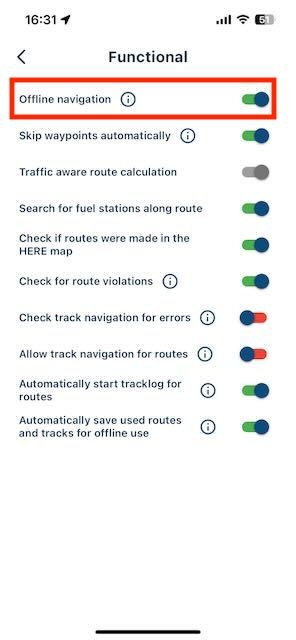
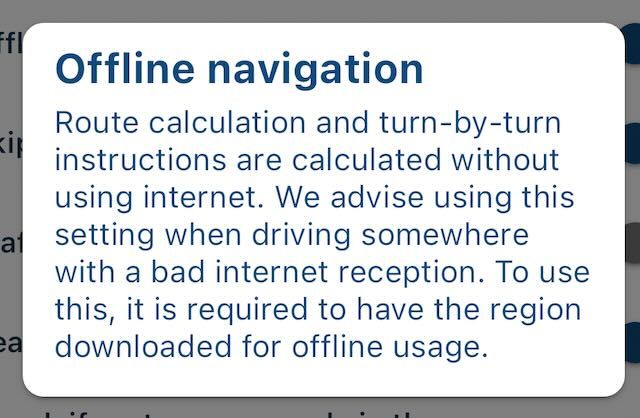
@Marschel In the settings menu, you need to switch the toggle to green. Only then you can use offline navigation. Of course, as you've already mentioned, you must have the maps of the areas your route passes through and the route itself available offline.
-
I was aware of the setting for offline operation in the menu. But then I wouldn't have live traffic when navigating. An example: I drive from A to C via B and want to have traffic information on this route. Then I drive in online mode. Now the internet goes down during the journey, the route and the maps are available offline, as long as I don't deviate from the previously calculated route everything is fine. Do I understand that correctly?
Now I deviate from the route, which triggers a recalculation. What happens then? Recalculation not possible, or does it use the offline maps and the offline route to navigate me to my points B and C. The moment it finds internet again, it is of course recalculated, but what does it do in the meantime?
-
I was aware of the setting for offline operation in the menu. But then I wouldn't have live traffic when navigating. An example: I drive from A to C via B and want to have traffic information on this route. Then I drive in online mode. Now the internet goes down during the journey, the route and the maps are available offline, as long as I don't deviate from the previously calculated route everything is fine. Do I understand that correctly?
Now I deviate from the route, which triggers a recalculation. What happens then? Recalculation not possible, or does it use the offline maps and the offline route to navigate me to my points B and C. The moment it finds internet again, it is of course recalculated, but what does it do in the meantime?
@Marschel If you navigate offline, you indeed won't have live traffic information. That's not possible because there is no internet connection!
Now the internet goes down during the journey, the route and the maps are available offline, as long as I don't deviate from the previously calculated route everything is fine. Do I understand that correctly?
That's correct.
Now I deviate from the route, which triggers a recalculation. What happens then? Recalculation not possible, or does it use the offline maps and the offline route to navigate me to my points B and C. The moment it finds internet again, it is of course recalculated, but what does it do in the meantime?
It will no longer take live traffic information into account, but the route will be recalculated based on the offline maps. Once an internet connection is available again, live traffic information will be included in the recalculation.
-
@Marschel If you navigate offline, you indeed won't have live traffic information. That's not possible because there is no internet connection!
Now the internet goes down during the journey, the route and the maps are available offline, as long as I don't deviate from the previously calculated route everything is fine. Do I understand that correctly?
That's correct.
Now I deviate from the route, which triggers a recalculation. What happens then? Recalculation not possible, or does it use the offline maps and the offline route to navigate me to my points B and C. The moment it finds internet again, it is of course recalculated, but what does it do in the meantime?
It will no longer take live traffic information into account, but the route will be recalculated based on the offline maps. Once an internet connection is available again, live traffic information will be included in the recalculation.
@Rob-Verhoeff
Thanks for the answers, then I don't have to worry about not seeing a route to navigate on my trip.
Then on my last trip it just wanted to recalculate, which didn't work because the route wasn't in the download folder for offline. -

That is why it is better to make Offline Navigation the default and always have online services enabled for secondairy options only like traffic info.
If people do not want offline navigation they can enable online navigation.
In Germany it is very normal not having a data connection when riding. In Scotland were also enough places where a data connection is difficult or absent at all. -
@Marschel If you navigate offline, you indeed won't have live traffic information. That's not possible because there is no internet connection!
Now the internet goes down during the journey, the route and the maps are available offline, as long as I don't deviate from the previously calculated route everything is fine. Do I understand that correctly?
That's correct.
Now I deviate from the route, which triggers a recalculation. What happens then? Recalculation not possible, or does it use the offline maps and the offline route to navigate me to my points B and C. The moment it finds internet again, it is of course recalculated, but what does it do in the meantime?
It will no longer take live traffic information into account, but the route will be recalculated based on the offline maps. Once an internet connection is available again, live traffic information will be included in the recalculation.

@Rob-Verhoeff said in On-Offline Navigation:
If you navigate offline, you indeed won't have live traffic information. That's not possible because there is no internet connection!
When navigating with the offline switch on (green), most of the time there is an active internet connection on my phone. It would be nice if MRA could still show live traffic information when there is an active internet connection, even when using the offline maps.
Hello! It looks like you're interested in this conversation, but you don't have an account yet.
Getting fed up of having to scroll through the same posts each visit? When you register for an account, you'll always come back to exactly where you were before, and choose to be notified of new replies (either via email, or push notification). You'll also be able to save bookmarks and upvote posts to show your appreciation to other community members.
With your input, this post could be even better 💗
Register Login-
5973.2k
-
 06164
06164
-
 05119
05119
-
 023895
-
 9943.2k
-
 05105
05105
-
05220
-
 07185
07185