Mouse with iPad
-
Hello,
I use MyRouteApp (Route Lab) on my iPad Air. I work with a mouse and keyboard.
When I connect with my iPad Air and want to create or modify a route while using a mouse, Route Lab stays in tablet mode, and I am unable to place or move points with the mouse.
How can I use the mouse with my iPad Air as I would with a PC?
Thank you in advance for your support.
-
Hello,
I use MyRouteApp (Route Lab) on my iPad Air. I work with a mouse and keyboard.
When I connect with my iPad Air and want to create or modify a route while using a mouse, Route Lab stays in tablet mode, and I am unable to place or move points with the mouse.
How can I use the mouse with my iPad Air as I would with a PC?
Thank you in advance for your support.
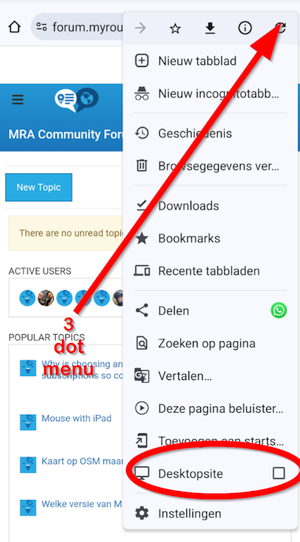
@Laurent-De-Clercq, are you starting routelab from within the MRA app? You might as well just load the webpage. I don't know about Safari, but Chrome can be set in "desktop mode". Maybe that helps?
-
@Peter-Schiefer I tried with Safari... I can try with Chrome. Where is this option in Chrome?
-
@Peter-Schiefer I tried with Safari... I can try with Chrome. Where is this option in Chrome?
Chrome is a browser
Just tested here on an iPad Pro MRA & Mouse, works without any problems (App & Web-Site).
-
@Peter-Schiefer : Short info
iPad Pro 11’ & Logitech MX Anywhere 2S (Bluetooth) in Safari browser or MyRoute app (4.2.0)I can only report subjectively positive about the satisfaction of the operation.
But according to the initial post, @Laurent-De-Clercq cannot set or move points and I can't confirm that.
-
Chrome is a browser
Just tested here on an iPad Pro MRA & Mouse, works without any problems (App & Web-Site).
@Dirk-Kevin-K
I know Chrome is a browser

I was asking where is the option you mention in your prepious post, the "desktop mode".

I will try with Chrome and let you know.
-
@Dirk-Kevin-K
I know Chrome is a browser
I was asking where is the option you mention in your prepious post, the "desktop mode".
I will try with Chrome and let you know.
@Laurent-De-Clercq, it was me suggesting the desktop-mode
I am just an enthusiastic MRA user, and hope you will be one too!
Most motorcycle problems are caused by the nut that connects the handlebar to the saddle.
Check out RideSleepRepeat.eu, a biker community for sharing stays across Europe
-
@Laurent-De-Clercq, it was me suggesting the desktop-mode
Thanks a lot !!
-
Chrome is a browser
Just tested here on an iPad Pro MRA & Mouse, works without any problems (App & Web-Site).
@Dirk-Kevin-K said in Mouse with iPad:
Chrome is a browser
Just tested here on an iPad Pro MRA & Mouse, works without any problems (App & Web-Site).
Same for me. Same setup, same result: works very well.



Hello! It looks like you're interested in this conversation, but you don't have an account yet.
Getting fed up of having to scroll through the same posts each visit? When you register for an account, you'll always come back to exactly where you were before, and choose to be notified of new replies (either via email, or push notification). You'll also be able to save bookmarks and upvote posts to show your appreciation to other community members.
With your input, this post could be even better 💗
Register Login-
 04111
04111
-
 716611.8k
-
 010192
-
 0341.3k
-
 33156
33156
-
06127
-
 05306
05306
-
 023614