Skip to content
  • Categories
  • Recent
  • Popular
  • Support
  • MyRoute-app
Collapse
Brand Logo

MRA Community Forum

  1. Home
  2. MyRoute-app Routeplanner
  3. [Web] Problems, Bugs and other Issues
  4. BMW Connected Ride Navigator not importing waypoints

BMW Connected Ride Navigator not importing waypoints

Scheduled Pinned Locked Moved [Web] Problems, Bugs and other Issues
41 Posts 7 Posters 26.6k Views 4 Watching
  • Oldest to Newest
  • Newest to Oldest
  • Most Votes
Reply
  • Reply as topic
Log in to reply
This topic has been deleted. Only users with topic management privileges can see it.
  • Topcat502 Topcat502

    Hi all. Really appreciate the help from all, but what an absolute faff!! It looks like MRA and CRN doesn't play well together and hopefully MRA will rectify this in the future. Other GPX files we have downloaded from other bike sites have worked fine. We ride to planned routes so need the waypoints/shaping points, always have. Sadly, regretting buying MRA/CRN at present. Fingers crossed on future updates.

    HABVEN aka MrMRA
    HABVEN aka MrMRA
    HABVEN aka MrMRA
    Valued contributor
    wrote on last edited by
    #28

    @Topcat502

    So what doesn't work? Can you share some screenshots of what you see in the CRN of other gpx files and not of an MRA file.

    BMW BMW Connected Ride Navigator/Garmin Zumo XT3/XT2/XT//Tourstart/ MyRouteapp (The App)/...
    Een dag niet gelachen is een dag niet geleefd / Een route is net zo goed als deze uitgezet is.

    Topcat502 1 Reply Last reply
    0
    • HABVEN aka MrMRA HABVEN aka MrMRA

      @Dikke-Wim
      The CRN sees all points as injured points, if you change the name of the points, you will see the name in the CRN at a point, for example Coffee or lunch.
      You will not receive a notification from the CRN, but you can see them. Or indeed remember the number where you want to stop.

      Dikke Wim
      Dikke Wim
      Dikke Wim
      Valued contributor
      wrote on last edited by
      #29

      @Hans-van-de-Ven-MR-MRA

      Ik probeer de namen van de punten in de Connect Ride App te veranderen nadat ik een route vanuit MRA heb geëxporteerd als GPX 1.1 file en heb omgezet naar route met waypoints.
      Helaas kan ik dan geen namen van de routepunten aanpassen.

      Hooguit kan in in MRA de namen veranderen (bv. Lunch, koffie, etc.), maar die namen komen niet terug in de Connect Ride app op mijn iPhone. Ook niet op de CRN zelf.

      Hoe kun jij de namen veranderen zodat ze uiteindelijk op de CRN zichtbaar worden?
      Ik hoor graag van je Hans!

      BMW R1300 GS, BMW Connect Ride Next navigator; Quad Lock with Samsung Galaxy Ultra, iPad Pro (iPadOS 18.0 bèta version) MacBook Pro (MacOS Sequoia 15.2 bèta version), iMac (MacOS Monterey 12.7.6)

      1 Reply Last reply
      0
      • HABVEN aka MrMRA HABVEN aka MrMRA

        @Topcat502

        So what doesn't work? Can you share some screenshots of what you see in the CRN of other gpx files and not of an MRA file.

        Topcat502
        Topcat502
        Topcat502
        wrote on last edited by
        #30

        @Hans-van-de-Ven-MR-MRA !

        I'm not saying it doesn't work, but it just seems very strange to need these workarounds when previously technology has worked fine.
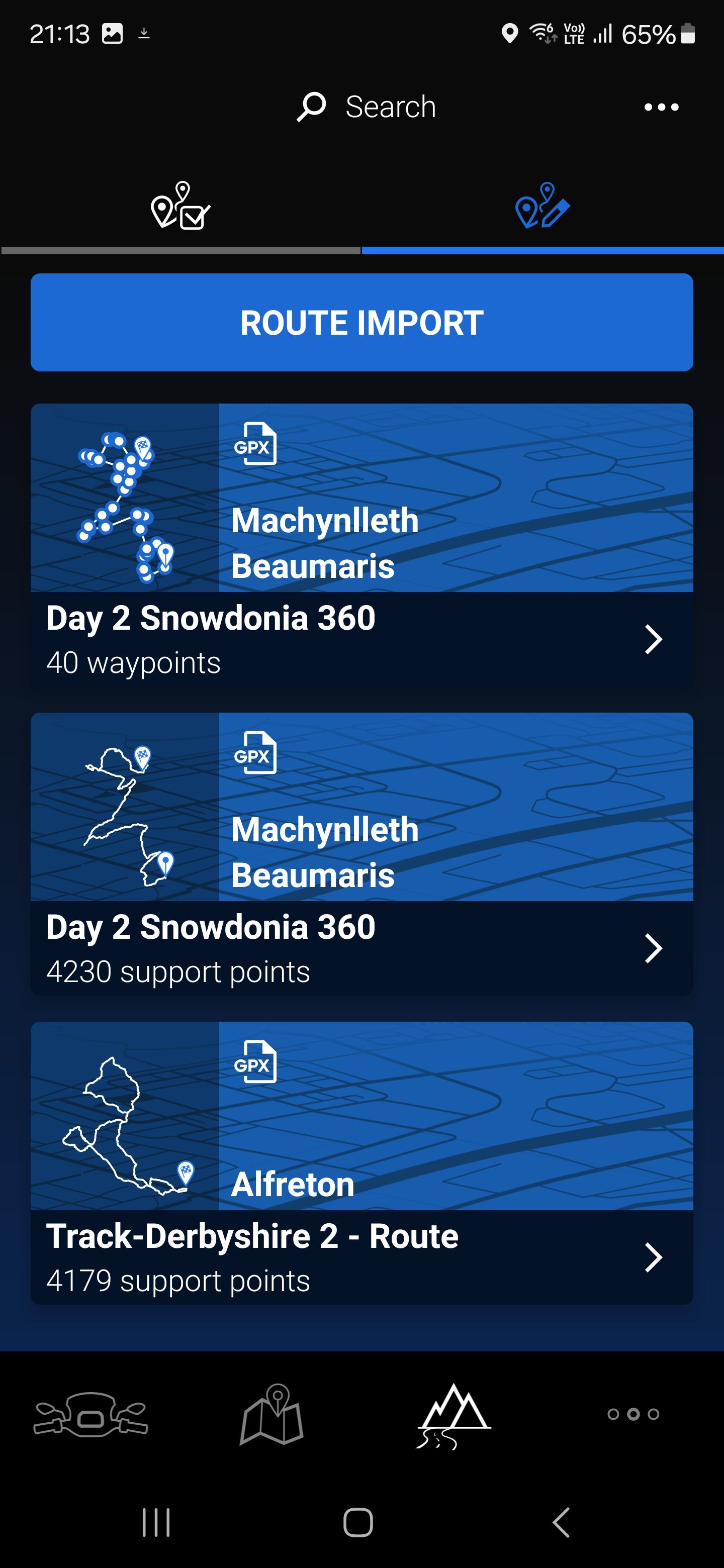
        Screenshot_20240607_211356_Connected.jpg
        The top route is a gpx file showing a route made in Basecamp. As you can see it has the waypoints already set up as per the gpx file created. This can be imported directly into the CRN.
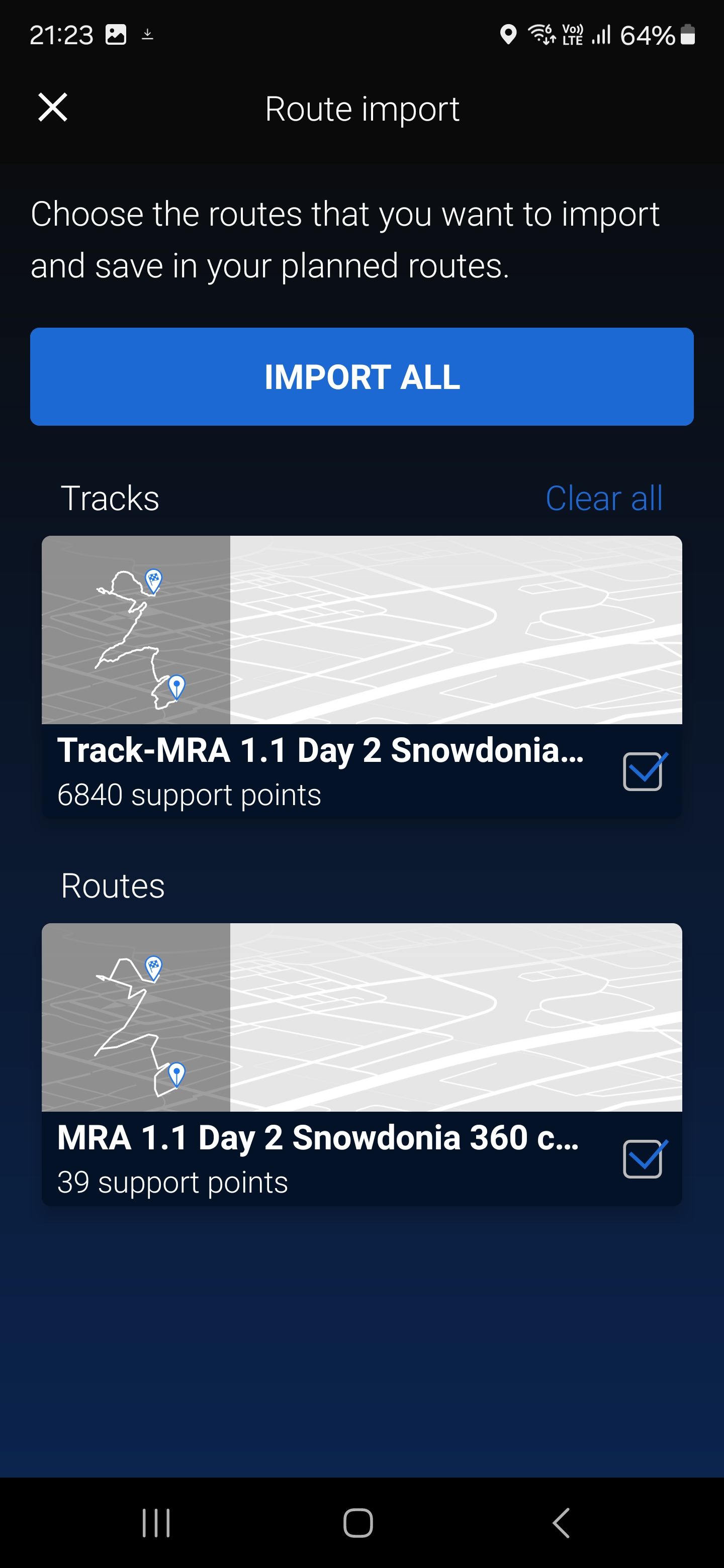
        Screenshot_20240607_212317_Connected.jpg
        This shows the same route created in MRA and exported as GPX 1.1
        As you can see the CRA shows them as support points and as you have explained, the route has to be converted to waypoints in the app, you then have to export this to the CRN (because you don't have the option to convert in the CRN. )

        Other points to note are that, unlike our previous NAV5, there isn't the option to "fix" your route. Therefore, if you're like us and ride to planned routes (either from mags or ones we've created) we have to add more waypoints than previously added because it doesn't recognise shaping points and is more likely to take you off your route. We have to add them in after junctions so that it sticks to the route as much as possible, but then if needed we can skip them due to traffic/road closure etc. Therefore, the 50 max waypoints doesn't help and we have to break up our tours into smaller chunks. I understand this isn't an MRA issue and hopefully the CRN will provide further updates from everyone's feedback as it's still relatively new.

        As I say it's not impossible, but for us, using Basecamp and the NAV5 was straight forward to plan, export and ride our routes compared to MRA/CRA/CRN set up.

        HABVEN aka MrMRA 1 Reply Last reply
        1
        • Topcat502 Topcat502

          @Hans-van-de-Ven-MR-MRA !

          I'm not saying it doesn't work, but it just seems very strange to need these workarounds when previously technology has worked fine.

          Screenshot_20240607_211356_Connected.jpg
          The top route is a gpx file showing a route made in Basecamp. As you can see it has the waypoints already set up as per the gpx file created. This can be imported directly into the CRN.

          Screenshot_20240607_212317_Connected.jpg
          This shows the same route created in MRA and exported as GPX 1.1
          As you can see the CRA shows them as support points and as you have explained, the route has to be converted to waypoints in the app, you then have to export this to the CRN (because you don't have the option to convert in the CRN. )

          Other points to note are that, unlike our previous NAV5, there isn't the option to "fix" your route. Therefore, if you're like us and ride to planned routes (either from mags or ones we've created) we have to add more waypoints than previously added because it doesn't recognise shaping points and is more likely to take you off your route. We have to add them in after junctions so that it sticks to the route as much as possible, but then if needed we can skip them due to traffic/road closure etc. Therefore, the 50 max waypoints doesn't help and we have to break up our tours into smaller chunks. I understand this isn't an MRA issue and hopefully the CRN will provide further updates from everyone's feedback as it's still relatively new.

          As I say it's not impossible, but for us, using Basecamp and the NAV5 was straight forward to plan, export and ride our routes compared to MRA/CRA/CRN set up.

          HABVEN aka MrMRA
          HABVEN aka MrMRA
          HABVEN aka MrMRA
          Valued contributor
          wrote on last edited by
          #31

          @Topcat502
          Different technology.
          BMW Nav 5 and Basecamp = Garmin
          BMW Connected App and the CRN = TomTom

          BMW BMW Connected Ride Navigator/Garmin Zumo XT3/XT2/XT//Tourstart/ MyRouteapp (The App)/...
          Een dag niet gelachen is een dag niet geleefd / Een route is net zo goed als deze uitgezet is.

          Jez 0 1 Reply Last reply
          0
          • Topcat502
            Topcat502
            Topcat502
            wrote on last edited by
            #32

            A further update to this
            We've now done a ride where we have converted to waypoints through the Connected Ride App and then used the CRN to navigate. It doesn't recognise the difference between a destination and a waypoint, as the navigation display shows ETA for the next waypoint and the destination as the same. It also removes the waypoint from the route on the map as you go along. It doesn't alert you to the name of the waypoint either, it just tells you (sometimes) that you have reached your destination.

            1 Reply Last reply
            0
            • HABVEN aka MrMRA HABVEN aka MrMRA

              @Topcat502
              Different technology.
              BMW Nav 5 and Basecamp = Garmin
              BMW Connected App and the CRN = TomTom

              Jez 0
              Jez 0
              Jez 0
              wrote on last edited by
              #33

              @Hans-van-de-Ven-MR-MRA

              Hi just started withn this ConnectedRide Navigator.

              Question 1) Do i have to use TOMTOM Maps as default to export the GPX 1.1 file so it's recognised accurately in Navigator or does it not matter?

              I have created both the track and Route files to test with HERE Maps and the TOMTOM Maps- not sure what is going to work here.

              Question 2) Should i just create the Routes with the maximum 50 Shaping points and use that in GPX 1.1 format? either TOMTOM or HERE Maps (what works)?

              Question 3) I preume if a track is too large it just can't handle it. Had a error when testing.

              Hope they update so we can see the detail of way points, as that's most dissapointing.

              Regards

              Jez

              HABVEN aka MrMRA 1 Reply Last reply
              0
              • Jez 0 Jez 0

                @Hans-van-de-Ven-MR-MRA

                Hi just started withn this ConnectedRide Navigator.

                Question 1) Do i have to use TOMTOM Maps as default to export the GPX 1.1 file so it's recognised accurately in Navigator or does it not matter?

                I have created both the track and Route files to test with HERE Maps and the TOMTOM Maps- not sure what is going to work here.

                Question 2) Should i just create the Routes with the maximum 50 Shaping points and use that in GPX 1.1 format? either TOMTOM or HERE Maps (what works)?

                Question 3) I preume if a track is too large it just can't handle it. Had a error when testing.

                Hope they update so we can see the detail of way points, as that's most dissapointing.

                Regards

                Jez

                HABVEN aka MrMRA
                HABVEN aka MrMRA
                HABVEN aka MrMRA
                Valued contributor
                wrote on last edited by
                #34

                @Jez-0

                Hello

                1. Yes, it is best to use the TomTom card, because the CRN also uses the TomTom card. And the GPX 1.1 file also gives the best result and you can make the Shaping points visible in the connected app and therefore also on the CRN. There are no formation points in a GPX 1.2.

                2. You can create more than 50 Shaping points, only the connected app can make a maximum of 50 visible.

                3. If you have more than 50 Shaping points in your route, take the track, this is the file with more than 3000 support points.

                BMW BMW Connected Ride Navigator/Garmin Zumo XT3/XT2/XT//Tourstart/ MyRouteapp (The App)/...
                Een dag niet gelachen is een dag niet geleefd / Een route is net zo goed als deze uitgezet is.

                Jez 0 1 Reply Last reply
                0
                • HABVEN aka MrMRA HABVEN aka MrMRA

                  @Jez-0

                  Hello

                  1. Yes, it is best to use the TomTom card, because the CRN also uses the TomTom card. And the GPX 1.1 file also gives the best result and you can make the Shaping points visible in the connected app and therefore also on the CRN. There are no formation points in a GPX 1.2.

                  2. You can create more than 50 Shaping points, only the connected app can make a maximum of 50 visible.

                  3. If you have more than 50 Shaping points in your route, take the track, this is the file with more than 3000 support points.

                  Jez 0
                  Jez 0
                  Jez 0
                  wrote on last edited by
                  #35

                  @Hans-van-de-Ven-MR-MRA

                  Many thanks i will try that.

                  Do you think we will eventually be able to obtain the information as per way points in MRA Navigation. Or at least some way to communicate the notes for each way point like Fuel - Coffee stop etc.

                  Regards

                  Jez

                  HABVEN aka MrMRA 1 Reply Last reply
                  0
                  • Jez 0 Jez 0

                    @Hans-van-de-Ven-MR-MRA

                    Many thanks i will try that.

                    Do you think we will eventually be able to obtain the information as per way points in MRA Navigation. Or at least some way to communicate the notes for each way point like Fuel - Coffee stop etc.

                    Regards

                    Jez

                    HABVEN aka MrMRA
                    HABVEN aka MrMRA
                    HABVEN aka MrMRA
                    Valued contributor
                    wrote on last edited by
                    #36

                    @Jez-0

                    No, I don't think so, because TomTom has to change this

                    BMW BMW Connected Ride Navigator/Garmin Zumo XT3/XT2/XT//Tourstart/ MyRouteapp (The App)/...
                    Een dag niet gelachen is een dag niet geleefd / Een route is net zo goed als deze uitgezet is.

                    Jez 0 1 Reply Last reply
                    0
                    • HABVEN aka MrMRA HABVEN aka MrMRA

                      @Jez-0

                      No, I don't think so, because TomTom has to change this

                      Jez 0
                      Jez 0
                      Jez 0
                      wrote on last edited by
                      #37

                      @Hans-van-de-Ven-MR-MRA

                      Hi,

                      On another note when we look at routes could you add a field so we can see what mapping we used to create; either TOMTOM or HERE Maps.

                      Save me having to open all the routes.
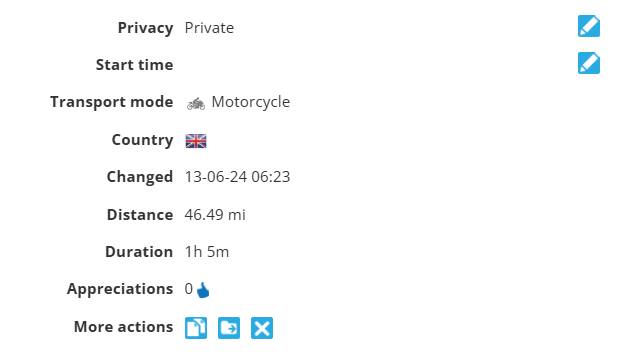
                      71d98562-ef29-4674-b984-4322c14cd67c-image.png

                      HABVEN aka MrMRA 1 Reply Last reply
                      0
                      • Jez 0 Jez 0

                        @Hans-van-de-Ven-MR-MRA

                        Hi,

                        On another note when we look at routes could you add a field so we can see what mapping we used to create; either TOMTOM or HERE Maps.

                        Save me having to open all the routes.

                        71d98562-ef29-4674-b984-4322c14cd67c-image.png

                        HABVEN aka MrMRA
                        HABVEN aka MrMRA
                        HABVEN aka MrMRA
                        Valued contributor
                        wrote on last edited by
                        #38

                        @Jez-0

                        When you create a route you can choose the map

                        BMW BMW Connected Ride Navigator/Garmin Zumo XT3/XT2/XT//Tourstart/ MyRouteapp (The App)/...
                        Een dag niet gelachen is een dag niet geleefd / Een route is net zo goed als deze uitgezet is.

                        Jez 0 1 Reply Last reply
                        0
                        • HABVEN aka MrMRA HABVEN aka MrMRA

                          @Jez-0

                          When you create a route you can choose the map

                          Jez 0
                          Jez 0
                          Jez 0
                          wrote on last edited by
                          #39

                          @Hans-van-de-Ven-MR-MRA

                          Hi,

                          Yes i know that - but if i am planning for TOMTOM or HERE Maps it be good to see what system i used in the information. Maybe we could add other details like avoidances used and if road closures are ignored etc.

                          Only other way but without all that detail would be to create seperate folders fot HERE and TOMTOM but missing the information in that box that would be nice.

                          Regards

                          Jez

                          1 Reply Last reply
                          0
                          • HABVEN aka MrMRA HABVEN aka MrMRA

                            @Topcat502

                            Use the TomTom map, use max 50 shaping points. Then send it to the connected app, choose the track and route with 50 points.
                            Then in the route file tick on the 3 dots in the upper right corner and choose convert to route with points. The 50 points will be visible.
                            Choose that route on the CRN and you can also make the track visible on the CRN

                            Kenneth de Miranda
                            Kenneth de Miranda
                            Kenneth de Miranda
                            wrote on last edited by
                            #40

                            @Hans-van-de-Ven-MR-MRA yes correct. I just uploaded a topic on the same issue, did not know you had already posted this here. Is the 50 points a Tom Tom limit or is it just the Connected Ride app the limiting factor?

                            Jez 0 1 Reply Last reply
                            0
                            • Kenneth de Miranda Kenneth de Miranda

                              @Hans-van-de-Ven-MR-MRA yes correct. I just uploaded a topic on the same issue, did not know you had already posted this here. Is the 50 points a Tom Tom limit or is it just the Connected Ride app the limiting factor?

                              Jez 0
                              Jez 0
                              Jez 0
                              wrote on last edited by
                              #41

                              @Kenneth-de-Miranda

                              Maybe BMW should have collaborated with MRA - i have now had some correspondence with them with a list of improvements that could be made.

                              Only option at present is possibly the Carpe Iter. Then I can use MRA for Navigation and the Tablet allows far greater use.

                              1 Reply Last reply
                              0

                              Hello! It looks like you're interested in this conversation, but you don't have an account yet.

                              Getting fed up of having to scroll through the same posts each visit? When you register for an account, you'll always come back to exactly where you were before, and choose to be notified of new replies (either via email, or push notification). You'll also be able to save bookmarks and upvote posts to show your appreciation to other community members.

                              With your input, this post could be even better 💗

                              Register Login
                              Reply
                              • Reply as topic
                              Log in to reply
                              • Oldest to Newest
                              • Newest to Oldest
                              • Most Votes


                              • 1
                              • 2
                              • 3
                              ACTIVE USERS
                              HABVEN aka MrMRA
                              HABVEN aka MrMRA
                              Dikke Wim
                              Dikke Wim
                              paul69
                              paul69
                              Jez 0
                              Jez 0
                              Kenneth de Miranda
                              Kenneth de Miranda
                              Philip Goh
                              Philip Goh
                              Topcat502
                              Topcat502
                              POPULAR TOPICS
                              • MRA 6.0.0 (526) - Offline Calculation Problem
                                Dave J 0
                                Dave J 0
                                0
                                7
                                47

                              • MRA Studio export speed
                                Jörgen
                                Jörgen
                                1
                                5
                                14

                              • Route with one Waypoint cannot be saved
                                MotoCon
                                MotoCon
                                0
                                5
                                24

                              • Routeberekening zonder invloed van actuele verkeerssituaties en wegafsluitingen
                                M. Schrijver
                                M. Schrijver
                                0
                                6
                                272

                              • what is the best way to view navigation from app?
                                Marinus van Deudekom
                                Marinus van Deudekom
                                0
                                6
                                242

                              • Maps Michelin
                                BertM
                                BertM
                                0
                                4
                                145

                              • Hiya from UK
                                Russ Nattrass 1
                                Russ Nattrass 1
                                1
                                7
                                223

                              • geeft routepunt niet weer
                                MotoCon
                                MotoCon
                                0
                                3
                                66

                              MY GROUPS
                              • Login

                              • Login or register to search.
                              • First post
                                Last post
                              0
                              • Categories
                              • Recent
                              • Popular
                              • Support
                              • MyRoute-app