MRA Nav
-
I feel like I wasted my money on Nav. Last week I had a choice of two exits running parallel and it did not tell me which one was correct. Luckily I chose the correct exit. Nav NEVER tells the name of the road you should turn on to. My wife will no longer trust Nav for any directions. I will be searching for a new alternative for directions on my phone. As far as MRA is concerned, it works great when downloaded to my motorcycle.
As you can see from the screenshot below the road I am just about to turn into is clearly shown as Grand Drive.
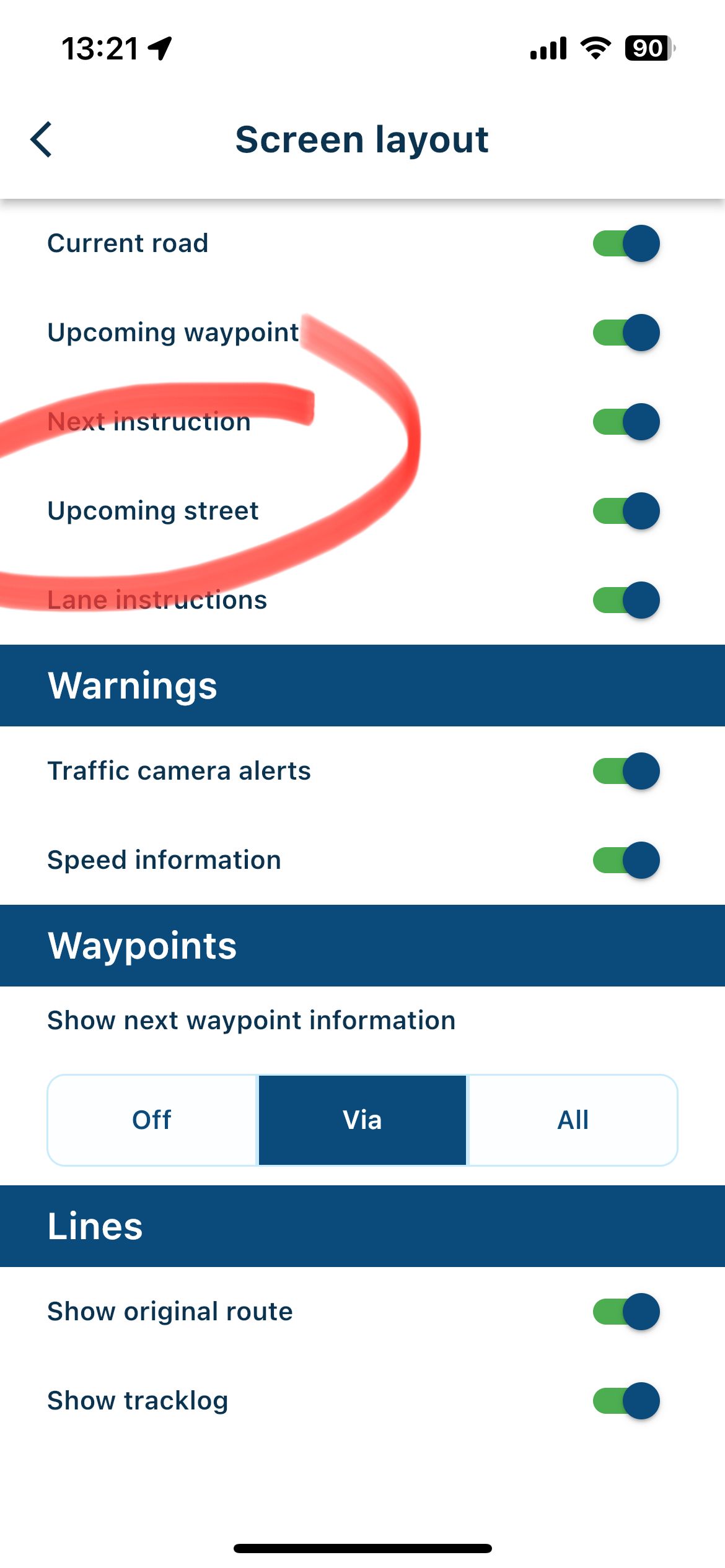
Have you activated the “Upcoming street” toggle?
If you share your route and make it Public there are plenty of very knowledgable forum users here that will help you regarding the parallel issue.
The usual issue for this is that a Waypoint has not been placed exactly on the route line.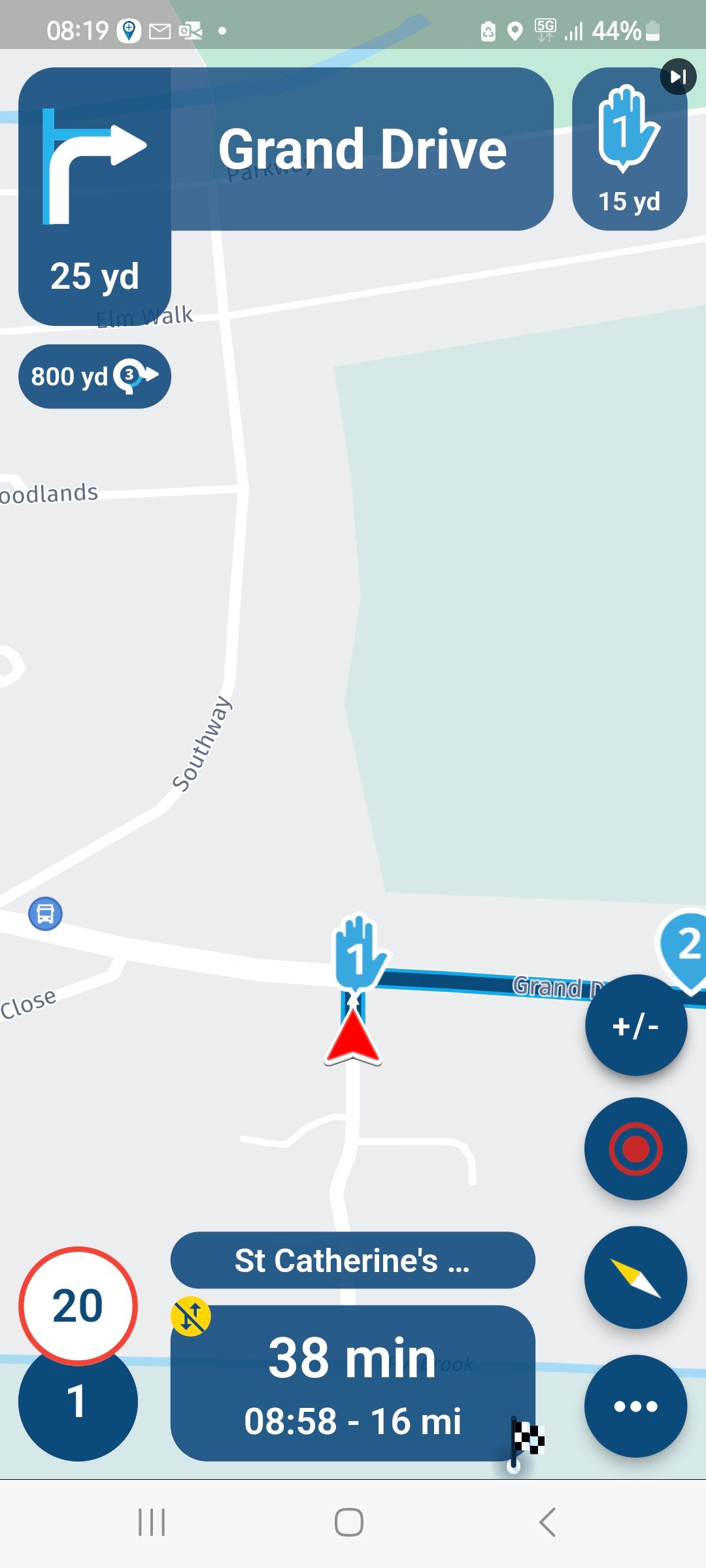
-
I feel like I wasted my money on Nav. Last week I had a choice of two exits running parallel and it did not tell me which one was correct. Luckily I chose the correct exit. Nav NEVER tells the name of the road you should turn on to. My wife will no longer trust Nav for any directions. I will be searching for a new alternative for directions on my phone. As far as MRA is concerned, it works great when downloaded to my motorcycle.

@Bob-Stratman Sounds like an settings error
Maybe you can share yours as well do we might be able to help you -

@Bob-Stratman, a bit odd to walk away from an app after one less well experience. Spending money on the next app sounds like a waste indeed. I always look at the route line, that gives an excellent idea of the way to follow. If you want to give it a second chance, I happen to know that the way lane assistance is being presented is up for a large improvement in the next update.
-
I feel like I wasted my money on Nav. Last week I had a choice of two exits running parallel and it did not tell me which one was correct. Luckily I chose the correct exit. Nav NEVER tells the name of the road you should turn on to. My wife will no longer trust Nav for any directions. I will be searching for a new alternative for directions on my phone. As far as MRA is concerned, it works great when downloaded to my motorcycle.

@Bob-Stratman Thank you all for the help. In my settings, I have no toggle for upcoming street that I can find. I am using Apple I phone. The only toggle that is turned off is speed settings. I have made my map in question Public, it is named home-Albany. The problem is just before waypoint 8. When traveling east on I-70, just before the cloverleaf with I-270. The road widens on I-70 into two exits, one for north I- 270, and one for south I-270. Nav didn't tell us which lane was correct. The exact words were "take the exit". Luckily at this point of the trip I knew where to turn. This isn't the first problem we have encountered, as we have tried to use Nav for about a year. We have never seen a screen like that in the picture with Grand Drive, or heard the voice telling us to turn right to Grand Drive. We would be thrilled to be able to use Nav with the same confidence as with MRA. I am thankful and willing to accept all help.
-
@Bob-Stratman Thank you all for the help. In my settings, I have no toggle for upcoming street that I can find. I am using Apple I phone. The only toggle that is turned off is speed settings. I have made my map in question Public, it is named home-Albany. The problem is just before waypoint 8. When traveling east on I-70, just before the cloverleaf with I-270. The road widens on I-70 into two exits, one for north I- 270, and one for south I-270. Nav didn't tell us which lane was correct. The exact words were "take the exit". Luckily at this point of the trip I knew where to turn. This isn't the first problem we have encountered, as we have tried to use Nav for about a year. We have never seen a screen like that in the picture with Grand Drive, or heard the voice telling us to turn right to Grand Drive. We would be thrilled to be able to use Nav with the same confidence as with MRA. I am thankful and willing to accept all help.

@Bob-Stratman goto Navigation settings > Screen layout:
-
@Bob-Stratman Thank you all for the help. In my settings, I have no toggle for upcoming street that I can find. I am using Apple I phone. The only toggle that is turned off is speed settings. I have made my map in question Public, it is named home-Albany. The problem is just before waypoint 8. When traveling east on I-70, just before the cloverleaf with I-270. The road widens on I-70 into two exits, one for north I- 270, and one for south I-270. Nav didn't tell us which lane was correct. The exact words were "take the exit". Luckily at this point of the trip I knew where to turn. This isn't the first problem we have encountered, as we have tried to use Nav for about a year. We have never seen a screen like that in the picture with Grand Drive, or heard the voice telling us to turn right to Grand Drive. We would be thrilled to be able to use Nav with the same confidence as with MRA. I am thankful and willing to accept all help.
@Bob-Stratman said in MRA Nav:
we have tried to use Nav for about a year. We have never seen a screen like that in the picture with Grand Drive
This wording makes me believe you are using the old app still... The current app is introduced publically first in june, and in beta only since december.
The new app is called "MyRoute-app" and does not have the name "Navigation" in it. I advise searching in the app-store and try it again. It is a completely different and much more modern app now!
-
I feel like I wasted my money on Nav. Last week I had a choice of two exits running parallel and it did not tell me which one was correct. Luckily I chose the correct exit. Nav NEVER tells the name of the road you should turn on to. My wife will no longer trust Nav for any directions. I will be searching for a new alternative for directions on my phone. As far as MRA is concerned, it works great when downloaded to my motorcycle.
Apologies for my assumption that you were using the current Beta or Public version of MyRoute-App
-
@Bob-Stratman said in MRA Nav:
we have tried to use Nav for about a year. We have never seen a screen like that in the picture with Grand Drive
This wording makes me believe you are using the old app still... The current app is introduced publically first in june, and in beta only since december.
The new app is called "MyRoute-app" and does not have the name "Navigation" in it. I advise searching in the app-store and try it again. It is a completely different and much more modern app now!
@Con-Hennekens Well, I was on the wrong app. I downloaded the new app, and things are working fairly well. We did a couple of test routes from home to the store and back. It did fail to give us two turns verbally, but we will try to figure that out. On Apple Carplay, the radio volume and the app volume seemed to be linked. When in a unfamiliar area, we prefer to keep the radio off so we can concentrate on the route. This could be a function of the car that we can't change. I am going to try tuning into a radio station that doesn't exist, and see if it is silent, or static on the radio. My wife is much happier with this app. Thanks again to all!
-
@Con-Hennekens Well, I was on the wrong app. I downloaded the new app, and things are working fairly well. We did a couple of test routes from home to the store and back. It did fail to give us two turns verbally, but we will try to figure that out. On Apple Carplay, the radio volume and the app volume seemed to be linked. When in a unfamiliar area, we prefer to keep the radio off so we can concentrate on the route. This could be a function of the car that we can't change. I am going to try tuning into a radio station that doesn't exist, and see if it is silent, or static on the radio. My wife is much happier with this app. Thanks again to all!
@Bob-Stratman said in MRA Nav:
It did fail to give us two turns verbally
Do you by any change have waypoints close to those turns? It is a known thing that having Waypoints in the direct vicinity of turns or crossings prevent the voice guidance to kick in.
I am just an enthusiastic MRA user, and hope you will be one too!
Most motorcycle problems are caused by the nut that connects the handlebar to the saddle.
Check out RideSleepRepeat.eu, a biker community for sharing stays across Europe
-
@Bob-Stratman said in MRA Nav:
It did fail to give us two turns verbally
Do you by any change have waypoints close to those turns? It is a known thing that having Waypoints in the direct vicinity of turns or crossings prevent the voice guidance to kick in.
@Con-Hennekens I think I did. I'll watch more closely when I place my waypoints.
Hello! It looks like you're interested in this conversation, but you don't have an account yet.
Getting fed up of having to scroll through the same posts each visit? When you register for an account, you'll always come back to exactly where you were before, and choose to be notified of new replies (either via email, or push notification). You'll also be able to save bookmarks and upvote posts to show your appreciation to other community members.
With your input, this post could be even better 💗
Register Login-
 17124
17124
-
 06122
06122
-
0490
-
 0414
0414
-
 06304
06304
-
 0316
0316
-
 0210
0210
-
0211