Skip to content
  • Categories
  • Recent
  • Popular
  • Support
  • MyRoute-app
Collapse
Brand Logo

MRA Community Forum

  1. Home
  2. [App-Beta] The MyRoute-app
  3. [App-Beta] Problems, Bugs and other Issues
  4. CarPlay - Icon Position

CarPlay - Icon Position

Scheduled Pinned Locked Moved [App-Beta] Problems, Bugs and other Issues
6 Posts 2 Posters 50 Views
  • Oldest to Newest
  • Newest to Oldest
  • Most Votes
Reply
  • Reply as topic
Log in to reply
This topic has been deleted. Only users with topic management privileges can see it.
  • Frappawotsit
    Frappawotsit
    Frappawotsit
    wrote on last edited by Frappawotsit
    #1

    The Triangle icon showing your own position is not in the lower centre as it should be (as with other mapping software) instead it's on the right hand side lower, with itself and route ahead almost entirely hidden by the information banners on the screen. I don't know if this is particular to the UK with right hand drive cars, or if all instances are the same.

    When manually moving the screen, as soon as you select "done" the screen moves back to it's default position on the right side hidden by the information banners.

    Currently this is making the app un-useable with Car Play. It's worth noting that the icon is correctly in the lower centre when not connected to CarPlay and just using the Navigation app on the phone.
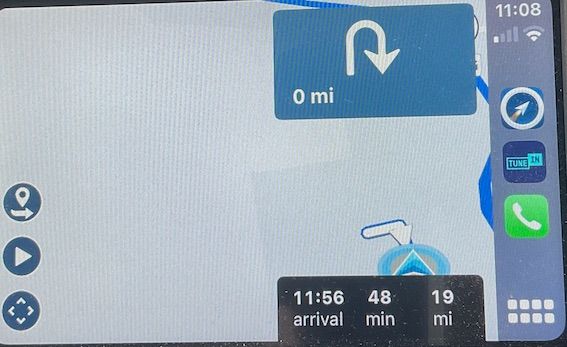
    IMG_0213.jpeg

    Corjan Meijerink 1 Reply Last reply
    0
    • Frappawotsit Frappawotsit

      The Triangle icon showing your own position is not in the lower centre as it should be (as with other mapping software) instead it's on the right hand side lower, with itself and route ahead almost entirely hidden by the information banners on the screen. I don't know if this is particular to the UK with right hand drive cars, or if all instances are the same.

      When manually moving the screen, as soon as you select "done" the screen moves back to it's default position on the right side hidden by the information banners.

      Currently this is making the app un-useable with Car Play. It's worth noting that the icon is correctly in the lower centre when not connected to CarPlay and just using the Navigation app on the phone.

      IMG_0213.jpeg

      Corjan Meijerink
      Corjan Meijerink
      Corjan Meijerink
      Developer
      wrote on last edited by
      #2

      @Frappawotsit we still need to take UK oriented devices into account 🙂

      Frappawotsit 1 Reply Last reply
      0
      • Corjan Meijerink Corjan Meijerink

        @Frappawotsit we still need to take UK oriented devices into account 🙂

        Frappawotsit
        Frappawotsit
        Frappawotsit
        wrote on last edited by
        #3

        @Corjan-Meijerink Thank you, I did think this may be specific to right hand drive cars as the information banners are on the opposite side of the screen.

        Is this something that's being actively developed, or is it likely to be a low priority and therefore slow progress?

        Corjan Meijerink 1 Reply Last reply
        0
        • Frappawotsit Frappawotsit

          @Corjan-Meijerink Thank you, I did think this may be specific to right hand drive cars as the information banners are on the opposite side of the screen.

          Is this something that's being actively developed, or is it likely to be a low priority and therefore slow progress?

          Corjan Meijerink
          Corjan Meijerink
          Corjan Meijerink
          Developer
          wrote on last edited by Corjan Meijerink
          #4

          @Frappawotsit I’m sorry, but you use the old MRA Navigation app - not the Beta 😉

          It will be fixed before release for sure! It’s important 🙂

          Frappawotsit 1 Reply Last reply
          0
          • Corjan Meijerink Corjan Meijerink

            @Frappawotsit I’m sorry, but you use the old MRA Navigation app - not the Beta 😉

            It will be fixed before release for sure! It’s important 🙂

            Frappawotsit
            Frappawotsit
            Frappawotsit
            wrote on last edited by
            #5

            @Corjan-Meijerink my apologies, thanks.

            Corjan Meijerink 1 Reply Last reply
            0
            • Frappawotsit Frappawotsit

              @Corjan-Meijerink my apologies, thanks.

              Corjan Meijerink
              Corjan Meijerink
              Corjan Meijerink
              Developer
              wrote on last edited by
              #6

              @Frappawotsit no need to apologise! Your point is still valid 😉 The current Beta won't support this correctly either - but as said we will make sure this is fixed in one of the coming updates!

              1 Reply Last reply
              0

              Hello! It looks like you're interested in this conversation, but you don't have an account yet.

              Getting fed up of having to scroll through the same posts each visit? When you register for an account, you'll always come back to exactly where you were before, and choose to be notified of new replies (either via email, or push notification). You'll also be able to save bookmarks and upvote posts to show your appreciation to other community members.

              With your input, this post could be even better 💗

              Register Login
              Reply
              • Reply as topic
              Log in to reply
              • Oldest to Newest
              • Newest to Oldest
              • Most Votes


              ACTIVE USERS
              Corjan Meijerink
              Corjan Meijerink
              Frappawotsit
              Frappawotsit
              POPULAR TOPICS
              • Strange translation
                Stefan Hummelink
                Stefan Hummelink
                0
                12
                22

              • Add delete route button to library
                Jörgen
                Jörgen
                0
                8
                17

              • Crazy routing
                Hubert Thoring
                Hubert Thoring
                0
                7
                24

              • Compatibility and synchronization of the "old" database with the new beta
                b0hd1
                b0hd1
                1
                5
                16

              • Where is the "Routes" option?
                LennyO
                LennyO
                0
                5
                26

              • Shared toggle switch
                LennyO
                LennyO
                0
                4
                17

              • Undo/Redo tool is hidden
                Stefan Hummelink
                Stefan Hummelink
                0
                4
                4

              • google street view volledige boord zichtbaar maken.
                Corjan Meijerink
                Corjan Meijerink
                0
                4
                87

              MY GROUPS
              • Login

              • Login or register to search.
              • First post
                Last post
              0
              • Categories
              • Recent
              • Popular
              • Support
              • MyRoute-app