Skip to content
  • Categories
  • Recent
  • Popular
  • Support
  • MyRoute-app
Collapse
Brand Logo

MRA Community Forum

  1. Home
  2. General Discussion
  3. BMW Connected

BMW Connected

Scheduled Pinned Locked Moved General Discussion
14 Posts 6 Posters 2.8k Views 2 Watching
  • Oldest to Newest
  • Newest to Oldest
  • Most Votes
Reply
  • Reply as topic
Log in to reply
This topic has been deleted. Only users with topic management privileges can see it.
  • Jack van Tilburg Jack van Tilburg

    @Brian-Marchand-0
    It's not entirely clear to me what your question is.
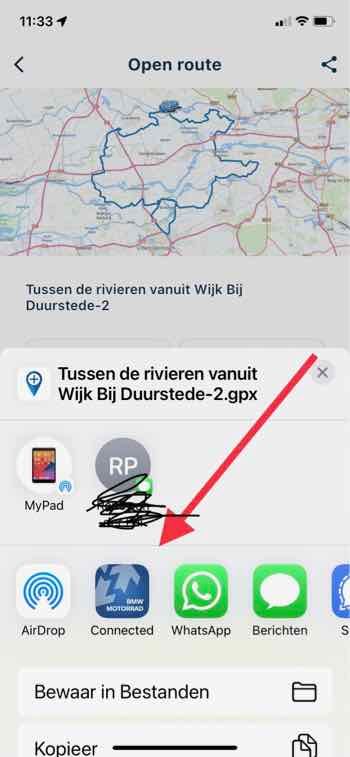
    When you export the route you have several choices with which you can do that.
    Connected is obvious to me, but there are more apps that you can choose from. (depends on your smartphone. this is an iPhone image)

    IMG_1122.jpg

    Brian Marchand 0 Offline
    Brian Marchand 0 Offline
    Brian Marchand 0
    wrote on last edited by
    #3

    @Jack-van-Tilburg ok no worries. It seemed by reading the 3.1 updated there was something new with the way it works with connected app and Garmin drive. The way you described is how I have been doing it in past. Thanks

    1 Reply Last reply
    0
    • Corjan Meijerink Offline
      Corjan Meijerink Offline
      Corjan Meijerink
      Developer
      wrote on last edited by
      #4

      Regarding Android, the downloaded file will also be visible directly in your "Downloads" folder in the next update. Please see my remark there: https://forum.myrouteapp.com/post/14767

      In summary for Android, downloading a file will:

      • allow you to directly export it from the MyRoute-app Mobile app
      • you can export the file in a later stage by navigating to the "Offline available" menu located in your account page (in the app)
      • NEW: a copy of the file is also stored in your Downloads folder
      1 Reply Last reply
      0
      • Jack van Tilburg Jack van Tilburg

        @Brian-Marchand-0
        It's not entirely clear to me what your question is.
        When you export the route you have several choices with which you can do that.
        Connected is obvious to me, but there are more apps that you can choose from. (depends on your smartphone. this is an iPhone image)

        IMG_1122.jpg

        MR-1600GTL Offline
        MR-1600GTL Offline
        MR-1600GTL
        wrote on last edited by
        #5

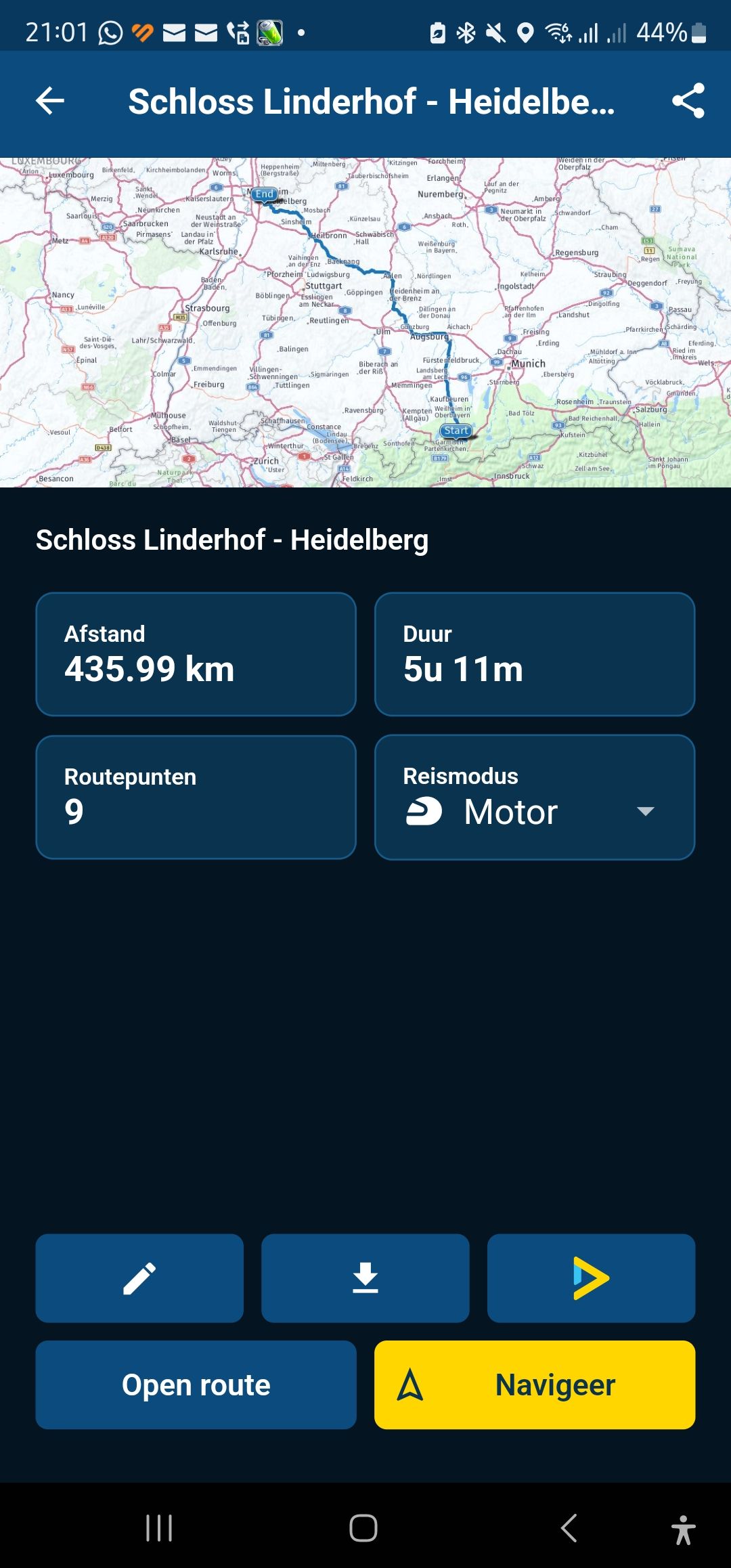
        @Jack-van-Tilburg When I open the route in the App, I don't see the different options that are shown in your picture. So I want to direct import the route in Connected, yet to me that's not an option on my Samsung S23 Ultra.MRA-App 1.jpg
        When I now click on open the actual navigation starts in the MRA Navigation screen.

        Jack van Tilburg 1 Reply Last reply
        0
        • MR-1600GTL MR-1600GTL

          @Jack-van-Tilburg When I open the route in the App, I don't see the different options that are shown in your picture. So I want to direct import the route in Connected, yet to me that's not an option on my Samsung S23 Ultra.MRA-App 1.jpg
          When I now click on open the actual navigation starts in the MRA Navigation screen.

          Jack van Tilburg Offline
          Jack van Tilburg Offline
          Jack van Tilburg
          wrote on last edited by
          #6

          @MR-1600GTL

          Use:

          Scherm­afbeelding 2024-02-06 om 21.36.05.png

          Then choose GPX 1.1 and Export

          1 Reply Last reply
          0
          • MR-1600GTL Offline
            MR-1600GTL Offline
            MR-1600GTL
            wrote on last edited by
            #7

            Hi Jac,
            Thxs for the swift reply.
            I have seen the Download button, yet as shown on the earlier screen of earlier posters as well as done by Corjan it looks there should be a way as where I would/should be able to take away the download step and open directly into the Connected App of BMW. Or is taking away that step only reserved for Apple iOS users, as the print screen I responded to was a iOS screenprint as where mine is a Android.

            Jack van Tilburg 1 Reply Last reply
            0
            • MR-1600GTL MR-1600GTL

              Hi Jac,
              Thxs for the swift reply.
              I have seen the Download button, yet as shown on the earlier screen of earlier posters as well as done by Corjan it looks there should be a way as where I would/should be able to take away the download step and open directly into the Connected App of BMW. Or is taking away that step only reserved for Apple iOS users, as the print screen I responded to was a iOS screenprint as where mine is a Android.

              Jack van Tilburg Offline
              Jack van Tilburg Offline
              Jack van Tilburg
              wrote on last edited by
              #8

              @MR-1600GTL
              I do indeed have an iOS. After I choose "Export" I can select the ConnectedApp as dol and then enter the import screen of the ConnectedApp.
              That is not entirely direct either. But I don't know if it works differently on Android.

              MR-1600GTL 1 Reply Last reply
              0
              • Jack van Tilburg Jack van Tilburg

                @MR-1600GTL
                I do indeed have an iOS. After I choose "Export" I can select the ConnectedApp as dol and then enter the import screen of the ConnectedApp.
                That is not entirely direct either. But I don't know if it works differently on Android.

                MR-1600GTL Offline
                MR-1600GTL Offline
                MR-1600GTL
                wrote on last edited by
                #9

                @Jack-van-Tilburg Hi Jack, Thxs again. I checked the Dutch webinar of yesterday (feb. 6th) and indeed around the 27th minut Corjan is doeing as what you described. I was under te impression that this could be done without the import part, yet now indeed I see he first downloads the file and than exports it to the respective app. Thanks for clearing this out for me.
                Will the BMW App work better with TomTom , OpenStreetmap or Garmin maps?

                Hans van de Ven MR.MRA Jack van Tilburg 2 Replies Last reply
                0
                • MR-1600GTL MR-1600GTL

                  @Jack-van-Tilburg Hi Jack, Thxs again. I checked the Dutch webinar of yesterday (feb. 6th) and indeed around the 27th minut Corjan is doeing as what you described. I was under te impression that this could be done without the import part, yet now indeed I see he first downloads the file and than exports it to the respective app. Thanks for clearing this out for me.
                  Will the BMW App work better with TomTom , OpenStreetmap or Garmin maps?

                  Hans van de Ven MR.MRA Offline
                  Hans van de Ven MR.MRA Offline
                  Hans van de Ven MR.MRA
                  Valued contributor
                  wrote on last edited by Hans van de Ven MR.MRA
                  #10

                  @MR-1600GTL

                  TomTom and max 50 shaping points per route

                  Garmin Zumo XT3/XT2/XT/BMW Connected Ride Navigator/Tourstart/ MyRouteapp (The App)/...
                  Een dag niet gelachen is een dag niet geleefd / Een route is net zo goed als deze uitgezet is.

                  MR-1600GTL 1 Reply Last reply
                  0
                  • MR-1600GTL MR-1600GTL

                    @Jack-van-Tilburg Hi Jack, Thxs again. I checked the Dutch webinar of yesterday (feb. 6th) and indeed around the 27th minut Corjan is doeing as what you described. I was under te impression that this could be done without the import part, yet now indeed I see he first downloads the file and than exports it to the respective app. Thanks for clearing this out for me.
                    Will the BMW App work better with TomTom , OpenStreetmap or Garmin maps?

                    Jack van Tilburg Offline
                    Jack van Tilburg Offline
                    Jack van Tilburg
                    wrote on last edited by
                    #11

                    @MR-1600GTL
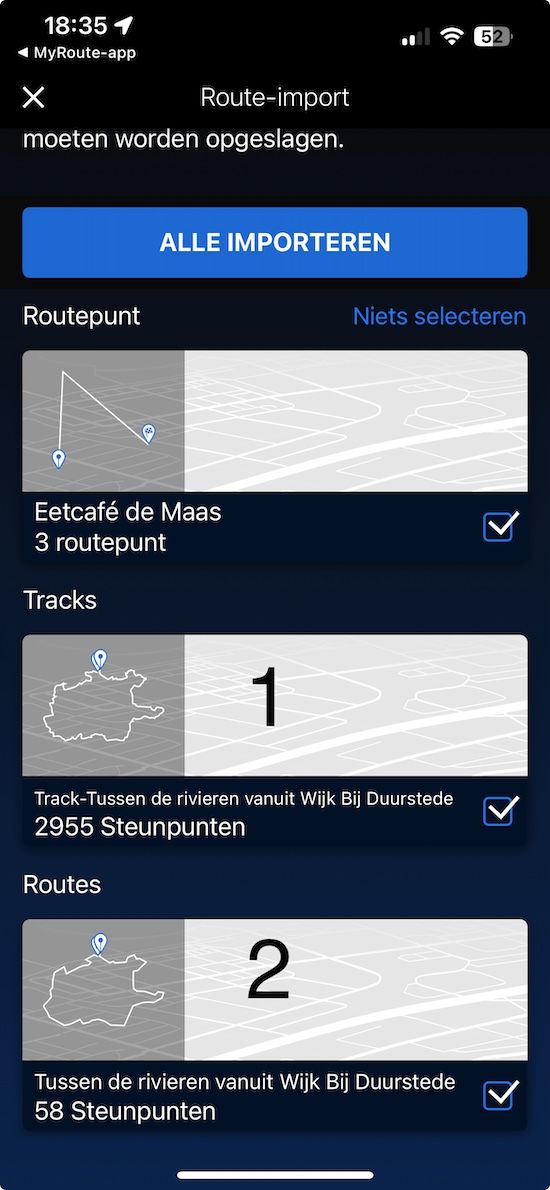
                    After you have imported the route into the ConnectedApp, there are several choices (see screenshot).
                    If you choose option 1, you can navigate the route as if you are using a track. The number of shaping points in MRA does not play a role here, nor does the chosen map.
                    If you choose option 2, you are creating a route in the ConnectedApp based on the shaping points included in MRA. And then a maximum number of 50 applies. To ensure that the route matches your planning in MRA as much as possible, it is recommended to use the TomTom map there.
                    IMG_1959.jpg

                    MR-1600GTL 1 Reply Last reply
                    0
                    • Jack van Tilburg Jack van Tilburg

                      @MR-1600GTL
                      After you have imported the route into the ConnectedApp, there are several choices (see screenshot).
                      If you choose option 1, you can navigate the route as if you are using a track. The number of shaping points in MRA does not play a role here, nor does the chosen map.
                      If you choose option 2, you are creating a route in the ConnectedApp based on the shaping points included in MRA. And then a maximum number of 50 applies. To ensure that the route matches your planning in MRA as much as possible, it is recommended to use the TomTom map there.

                      IMG_1959.jpg

                      MR-1600GTL Offline
                      MR-1600GTL Offline
                      MR-1600GTL
                      wrote on last edited by
                      #12

                      @Jack-van-Tilburg Thxs. So TomTom Map is best in my case, with max 50 waypoints, which normally schould be enough. Thxs again.

                      1 Reply Last reply
                      0
                      • Hans van de Ven MR.MRA Hans van de Ven MR.MRA

                        @MR-1600GTL

                        TomTom and max 50 shaping points per route

                        MR-1600GTL Offline
                        MR-1600GTL Offline
                        MR-1600GTL
                        wrote on last edited by
                        #13

                        @Hans-van-de-Ven-MRA-Master Great addition. Thxs.

                        1 Reply Last reply
                        0
                        • Jörgen Offline
                          Jörgen Offline
                          Jörgen
                          Valued contributor
                          wrote on last edited by
                          #14

                          The Rider 550 allows max. 250 waypoints in the ITN route file.

                          Hardware
                          iPhone 12 pro (iOS 26.2.1)
                          iPad (7.Gen.) 18.7.3
                          Oukitel RT3 Pro (Andr. 14)
                          Wireless CarPlay mit (Elebest C650)
                          Wired CarPlay (SEAT Arona - 2021)
                          MRA Workshops in Deutsch sind hier zu finden

                          1 Reply Last reply
                          0

                          Hello! It looks like you're interested in this conversation, but you don't have an account yet.

                          Getting fed up of having to scroll through the same posts each visit? When you register for an account, you'll always come back to exactly where you were before, and choose to be notified of new replies (either via email, or push notification). You'll also be able to save bookmarks and upvote posts to show your appreciation to other community members.

                          With your input, this post could be even better 💗

                          Register Login
                          Reply
                          • Reply as topic
                          Log in to reply
                          • Oldest to Newest
                          • Newest to Oldest
                          • Most Votes


                          ACTIVE USERS
                          Jörgen
                          Jörgen
                          Corjan Meijerink
                          Corjan Meijerink
                          Hans van de Ven MR.MRA
                          Hans van de Ven MR.MRA
                          MR-1600GTL
                          MR-1600GTL
                          Jack van Tilburg
                          Jack van Tilburg
                          Brian Marchand 0
                          Brian Marchand 0
                          POPULAR TOPICS
                          • Garmin XT2 - losing my mind!
                            John S Parry
                            John S Parry
                            0
                            6
                            104

                          • Export to BMW CRN
                            John S Parry
                            John S Parry
                            1
                            17
                            690

                          • Did somebody see 5.2.2 (489) on android Yet!
                            Marinus van Deudekom
                            Marinus van Deudekom
                            2
                            3
                            47

                          • NC500 glitch
                            Nick Carthew
                            Nick Carthew
                            0
                            8
                            273

                          • Auto skip many waypoints by itself while I was on route. [5.2.0 - 474]
                            M. Schrijver
                            M. Schrijver
                            0
                            40
                            3.0k

                          • MRA Beta V6.x - und Beta Webplaner 2.0 vielleicht bald
                            Hubert Thoring
                            Hubert Thoring
                            0
                            3
                            81

                          • High Contrast Maps
                            TuonoPants
                            TuonoPants
                            3
                            18
                            1.7k

                          • Ability to change units as your navigating
                            0
                            1
                            6

                          MY GROUPS
                          • Login

                          • Login or register to search.
                          • First post
                            Last post
                          0
                          • Categories
                          • Recent
                          • Popular
                          • Support
                          • MyRoute-app