Skip to content
  • Categories
  • Recent
  • Popular
  • Support
  • MyRoute-app
Collapse
Brand Logo

MRA Community Forum

  1. Home
  2. General Discussion
  3. 2019 GTS Boom Box Export

2019 GTS Boom Box Export

Scheduled Pinned Locked Moved General Discussion
6 Posts 3 Posters 955 Views 1 Watching
  • Oldest to Newest
  • Newest to Oldest
  • Most Votes
Reply
  • Reply as topic
Log in to reply
This topic has been deleted. Only users with topic management privileges can see it.
  • David Hetherington Offline
    David Hetherington Offline
    David Hetherington
    wrote on last edited by
    #1

    Help
    I’m having a problem exporting to USB.
    I click on 2019 Track, then save as, I go to where it has been uploaded and move into the USB.
    The file size is only 3kb
    Connect to GTS Boom Box click on select all, and the import.
    After a second, I get unable to import.

    I click on saved on the Boom Box it shows the file but only the start addresses and finish address, and It calculates the route from my home address, via the start address to the destination ignoring my saved routes.
    Frustrating when destinations are in the alps.
    I am using the same USB stick as last year which worked then.

    Can anyone help
    I am not a techno person so it has to be simple.

    Jack van Tilburg 1 Reply Last reply
    0
    • David Hetherington David Hetherington

      Help
      I’m having a problem exporting to USB.
      I click on 2019 Track, then save as, I go to where it has been uploaded and move into the USB.
      The file size is only 3kb
      Connect to GTS Boom Box click on select all, and the import.
      After a second, I get unable to import.

      I click on saved on the Boom Box it shows the file but only the start addresses and finish address, and It calculates the route from my home address, via the start address to the destination ignoring my saved routes.
      Frustrating when destinations are in the alps.
      I am using the same USB stick as last year which worked then.

      Can anyone help
      I am not a techno person so it has to be simple.

      Jack van Tilburg Offline
      Jack van Tilburg Offline
      Jack van Tilburg
      wrote on last edited by
      #2

      @david-hetherington
      Would you please post a link to the respective route here.
      Make sure that the privacy setting of the route is set to "public".
      I assume that you normally have no problems loading a route in your boombox.

      David Hetherington 1 Reply Last reply
      0
      • Douglas McBean Offline
        Douglas McBean Offline
        Douglas McBean
        wrote on last edited by
        #3

        David,

        Do not choose (SELECT ALL) highlight the next one down for importing on the bike. It will have a waypoint and a destination flag. Import and this should work

        Doug

        David Hetherington 1 Reply Last reply
        0
        • Jack van Tilburg Jack van Tilburg

          @david-hetherington
          Would you please post a link to the respective route here.
          Make sure that the privacy setting of the route is set to "public".
          I assume that you normally have no problems loading a route in your boombox.

          David Hetherington Offline
          David Hetherington Offline
          David Hetherington
          wrote on last edited by
          #4

          @jack-van-tilburg
          Hi not sure how to post link but will have a go

          Jack van Tilburg 1 Reply Last reply
          0
          • Douglas McBean Douglas McBean

            David,

            Do not choose (SELECT ALL) highlight the next one down for importing on the bike. It will have a waypoint and a destination flag. Import and this should work

            Doug

            David Hetherington Offline
            David Hetherington Offline
            David Hetherington
            wrote on last edited by
            #5

            @douglas-mcbean
            Hi Doug

            I will have a go when able as time short for the next couple of weeks.
            In the end I saved to the computer, then download the Harley router and loaded it on that. Then saved it again and transferred on to memory stick, and then it did load.
            The only one day that won’t load is one that could be affected by seasonal closures.
            It’s ok on the planner but loaded onto Harley one it reroutes it.
            I will have ago at your suggestion when back home. Thanks

            1 Reply Last reply
            0
            • David Hetherington David Hetherington

              @jack-van-tilburg
              Hi not sure how to post link but will have a go

              Jack van Tilburg Offline
              Jack van Tilburg Offline
              Jack van Tilburg
              wrote on last edited by
              #6

              @david-hetherington said in 2019 GTS Boom Box Export:

              @jack-van-tilburg
              Hi not sure how to post link but will have a go

              Open the route in the Routelab;
              Select 'Route information' in the left-hand column;
              Click on 'Privacy"
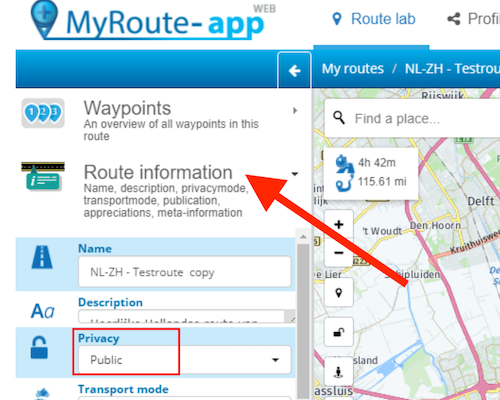
              Schermafbeelding 2022-05-24 om 22.03.39.png

              Now click on the three dots behind the route name in the route library to get to the "More options" window.
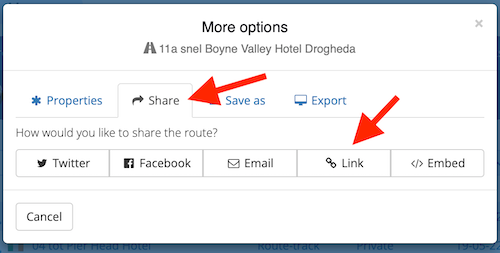
              Schermafbeelding 2022-05-24 om 22.10.01.png

              1 Reply Last reply
              0

              Hello! It looks like you're interested in this conversation, but you don't have an account yet.

              Getting fed up of having to scroll through the same posts each visit? When you register for an account, you'll always come back to exactly where you were before, and choose to be notified of new replies (either via email, or push notification). You'll also be able to save bookmarks and upvote posts to show your appreciation to other community members.

              With your input, this post could be even better 💗

              Register Login
              Reply
              • Reply as topic
              Log in to reply
              • Oldest to Newest
              • Newest to Oldest
              • Most Votes


              ACTIVE USERS
              Jack van Tilburg
              Jack van Tilburg
              Douglas McBean
              Douglas McBean
              David Hetherington
              David Hetherington
              POPULAR TOPICS
              • GPX Versions 1.1 vs 1.2 for Garmin Visually Explained
                Mzokk
                Mzokk
                7
                174
                13.5k

              • The compas direction on the elevation circle is wrong
                Guzzist
                Guzzist
                0
                30
                1.0k

              • HERE maps updates
                Travellexxie
                Travellexxie
                0
                9
                278

              • App probleem scenic route niet mogelijk
                Philip Verbeek
                Philip Verbeek
                0
                3
                56

              • Latest version of the App?
                white.mouse
                white.mouse
                0
                3
                73

              • Auto skip many waypoints by itself while I was on route. [5.2.0 - 474]
                paul69
                paul69
                0
                35
                1.6k

              • Straatnamen worden uitgesproken
                M. Schrijver
                M. Schrijver
                0
                6
                375

              MY GROUPS
              • Login

              • Login or register to search.
              • First post
                Last post
              0
              • Categories
              • Recent
              • Popular
              • Support
              • MyRoute-app