Skip to content
  • Categories
  • Recent
  • Popular
  • Support
  • MyRoute-app
Collapse
Brand Logo

MRA Community Forum

  1. Home
  2. Announcements
  3. GPX export improvements

GPX export improvements

Scheduled Pinned Locked Moved Announcements
16 Posts 6 Posters 4.3k Views 3 Watching
  • Oldest to Newest
  • Newest to Oldest
  • Most Votes
Reply
  • Reply as topic
Log in to reply
This topic has been deleted. Only users with topic management privileges can see it.
  • Jack van Tilburg Offline
    Jack van Tilburg Offline
    Jack van Tilburg
    wrote on last edited by
    #2

    I tested the export with a BMW Nav6 and it works fine.
    No more straight lines on the device and the route exactly follows the line of the track that I also have in view also.
    This is a very big improvement that I honestly did not expect given the age of the navi's for which this is intended. Chapeau!
    But:
    Since this improvement is announced as "GPX export improvements" I would expect that in the <Export menu> "GPX 1.2 export" can be found.
    I see it in the <Save as> menu but not in the <Export menu>.
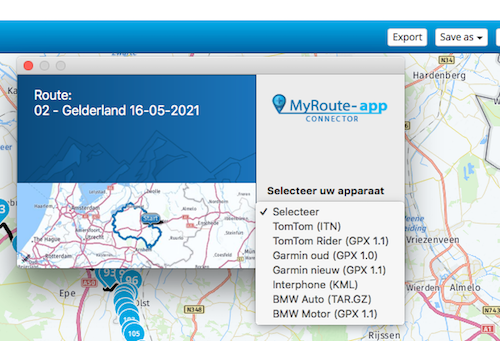
    Schermafbeelding 2021-10-28 om 11.22.48.png

    1 Reply Last reply
    0
    • Hans van de Ven MR.MRA Offline
      Hans van de Ven MR.MRA Offline
      Hans van de Ven MR.MRA
      Valued contributor
      wrote on last edited by
      #3

      @Jack-van-Tilburg
      Do you use a Windows PC or a Mac?

      Garmin Zumo XT3/XT2/XT/BMW Connected Ride Navigator/Tourstart/ MyRouteapp (The App)/...
      Een dag niet gelachen is een dag niet geleefd / Een route is net zo goed als deze uitgezet is.

      1 Reply Last reply
      0
      • Jack van Tilburg Offline
        Jack van Tilburg Offline
        Jack van Tilburg
        wrote on last edited by
        #4

        @Hans-van-de-Ven-MRA-Master
        Mac

        Hans van de Ven MR.MRA 2 Replies Last reply
        0
        • Hans van de Ven MR.MRA Offline
          Hans van de Ven MR.MRA Offline
          Hans van de Ven MR.MRA
          Valued contributor
          wrote on last edited by
          #5

          I use a Windows 10 Pro, and no problems with the menu's

          Garmin Zumo XT3/XT2/XT/BMW Connected Ride Navigator/Tourstart/ MyRouteapp (The App)/...
          Een dag niet gelachen is een dag niet geleefd / Een route is net zo goed als deze uitgezet is.

          1 Reply Last reply
          0
          • Jack van Tilburg Jack van Tilburg

            @Hans-van-de-Ven-MRA-Master
            Mac

            Hans van de Ven MR.MRA Offline
            Hans van de Ven MR.MRA Offline
            Hans van de Ven MR.MRA
            Valued contributor
            wrote on last edited by
            #6

            @Jack-van-Tilburg
            Ik heb hem gemeld

            Garmin Zumo XT3/XT2/XT/BMW Connected Ride Navigator/Tourstart/ MyRouteapp (The App)/...
            Een dag niet gelachen is een dag niet geleefd / Een route is net zo goed als deze uitgezet is.

            1 Reply Last reply
            0
            • Jack van Tilburg Jack van Tilburg

              @Hans-van-de-Ven-MRA-Master
              Mac

              Hans van de Ven MR.MRA Offline
              Hans van de Ven MR.MRA Offline
              Hans van de Ven MR.MRA
              Valued contributor
              wrote on last edited by
              #7

              @Jack-van-Tilburg

              Altijd weer die Mac's... 🤣 🤣

              Garmin Zumo XT3/XT2/XT/BMW Connected Ride Navigator/Tourstart/ MyRouteapp (The App)/...
              Een dag niet gelachen is een dag niet geleefd / Een route is net zo goed als deze uitgezet is.

              1 Reply Last reply
              0
              • Jack van Tilburg Offline
                Jack van Tilburg Offline
                Jack van Tilburg
                wrote on last edited by
                #8

                Sorry 😞
                I have removed the browser data from MyRoute but that does not improve the situation.

                1 Reply Last reply
                0
                • MyRoute-app community Offline
                  MyRoute-app community Offline
                  MyRoute-app community
                  Administrator
                  wrote on last edited by
                  #9

                  @Jack-van-Tilburg thanks for letting us know.

                  1 Reply Last reply
                  0
                  • Handscombmp Offline
                    Handscombmp Offline
                    Handscombmp
                    wrote on last edited by
                    #10

                    Is it right that if i use this new option on my Zumo XT it doesn't show the shaping points at all in the trip planner but it seems to be paying attention to them as it is following the correct route.

                    Is there a way to see the shaping points in the trip planner?

                    1 Reply Last reply
                    0
                    • Hans van de Ven MR.MRA Offline
                      Hans van de Ven MR.MRA Offline
                      Hans van de Ven MR.MRA
                      Valued contributor
                      wrote on last edited by Hans van de Ven MR.MRA
                      #11

                      Hello All,

                      The MRA Team listens, as you are used to, to the users.
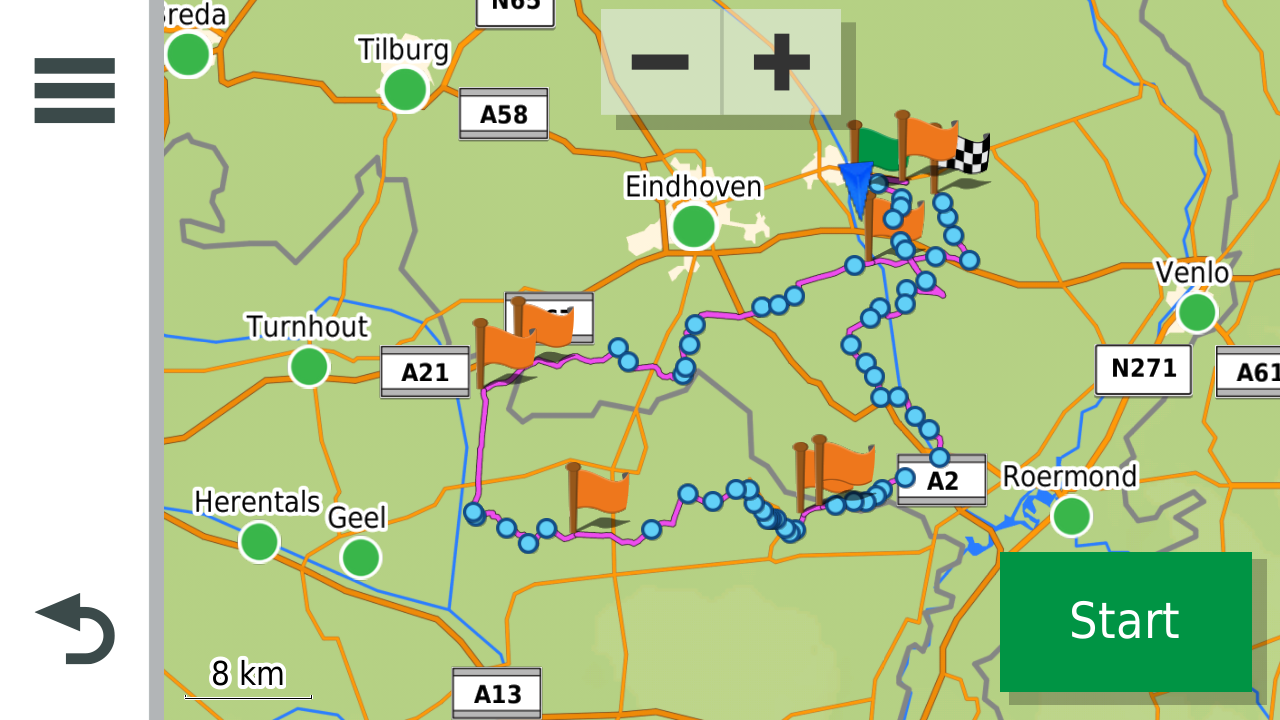
                      If you want a route with waypoints and shapingpoints, use the gpx 1.1. Both in the connector at "Save as"

                      Picture from a route (gpx 1.1 in my Zumo XT.)
                      13.png

                      Garmin Zumo XT3/XT2/XT/BMW Connected Ride Navigator/Tourstart/ MyRouteapp (The App)/...
                      Een dag niet gelachen is een dag niet geleefd / Een route is net zo goed als deze uitgezet is.

                      Dave J 0 1 Reply Last reply
                      1
                      • Hans van de Ven MR.MRA Hans van de Ven MR.MRA

                        Hello All,

                        The MRA Team listens, as you are used to, to the users.
                        If you want a route with waypoints and shapingpoints, use the gpx 1.1. Both in the connector at "Save as"

                        Picture from a route (gpx 1.1 in my Zumo XT.)

                        13.png

                        Dave J 0 Offline
                        Dave J 0 Offline
                        Dave J 0
                        Valued contributor
                        wrote on last edited by
                        #12

                        @Hans-van-de-Ven-MRA-Master Just tried this and brilliant. Thank you for listening to feedback. I presume you mean gps 1.2 format for the ‘Save as”? That is what I used for my XT.
                        Kind Regards. Help where I can.
                        Ducati Multistrada V4 Rally
                        iPhone 15 Pro
                        CHIGEE AIO-6 LTE
                        Google Pixel 6 Pro - mounted on SP Connect Plus
                        Ex Garmin XT2 and XT1 as well as Ex TomTom Rider User

                        Steve Lynch Hans van de Ven MR.MRA 2 Replies Last reply
                        0
                        • Dave J 0 Dave J 0

                          @Hans-van-de-Ven-MRA-Master Just tried this and brilliant. Thank you for listening to feedback. I presume you mean gps 1.2 format for the ‘Save as”? That is what I used for my XT.

                          Steve Lynch Offline
                          Steve Lynch Offline
                          Steve Lynch
                          Valued contributor
                          wrote on last edited by Steve Lynch
                          #13

                          @Dave-J-0

                          “I presume you mean gps 1.2 format for the 'Save as'? That is what I used for my XT.”

                          It’s the other way around as I believe you want to see the Shaping Points and the Via Points.
                          The .GPX 1.2 (Route,Track, POI) is the one that will only show the Via Points but does give the full route.
                          The .GPX 1.1 (Route,Track, POI) is the one that will show Via Points and Shaping Points.
                          Both will automatically create the route in the Garmin XT Trip Planner.

                          49554[1].png

                          5505[1].png

                          46957[1].png

                          3806[1].png

                          You don’t stop riding when you get old, you get old when you stop riding.

                          Dave J 0 1 Reply Last reply
                          1
                          • Dave J 0 Dave J 0

                            @Hans-van-de-Ven-MRA-Master Just tried this and brilliant. Thank you for listening to feedback. I presume you mean gps 1.2 format for the ‘Save as”? That is what I used for my XT.

                            Hans van de Ven MR.MRA Offline
                            Hans van de Ven MR.MRA Offline
                            Hans van de Ven MR.MRA
                            Valued contributor
                            wrote on last edited by Hans van de Ven MR.MRA
                            #14

                            @Dave-J-0 and @Steve-Lynch

                            You can use both if you want.
                            1.1 with saping points
                            1.2 without the shapingpoints

                            Garmin Zumo XT3/XT2/XT/BMW Connected Ride Navigator/Tourstart/ MyRouteapp (The App)/...
                            Een dag niet gelachen is een dag niet geleefd / Een route is net zo goed als deze uitgezet is.

                            Dave J 0 1 Reply Last reply
                            1
                            • Steve Lynch Steve Lynch

                              @Dave-J-0

                              “I presume you mean gps 1.2 format for the 'Save as'? That is what I used for my XT.”

                              It’s the other way around as I believe you want to see the Shaping Points and the Via Points.
                              The .GPX 1.2 (Route,Track, POI) is the one that will only show the Via Points but does give the full route.
                              The .GPX 1.1 (Route,Track, POI) is the one that will show Via Points and Shaping Points.
                              Both will automatically create the route in the Garmin XT Trip Planner.

                              49554[1].png

                              5505[1].png

                              46957[1].png

                              3806[1].png

                              Dave J 0 Offline
                              Dave J 0 Offline
                              Dave J 0
                              Valued contributor
                              wrote on last edited by
                              #15

                              @Steve-Lynch Thanks Steve. Just tried it and yes 1.1 is what I am after. Thank you.

                              Kind Regards. Help where I can.
                              Ducati Multistrada V4 Rally
                              iPhone 15 Pro
                              CHIGEE AIO-6 LTE
                              Google Pixel 6 Pro - mounted on SP Connect Plus
                              Ex Garmin XT2 and XT1 as well as Ex TomTom Rider User

                              1 Reply Last reply
                              0
                              • Hans van de Ven MR.MRA Hans van de Ven MR.MRA

                                @Dave-J-0 and @Steve-Lynch

                                You can use both if you want.
                                1.1 with saping points
                                1.2 without the shapingpoints

                                Dave J 0 Offline
                                Dave J 0 Offline
                                Dave J 0
                                Valued contributor
                                wrote on last edited by
                                #16

                                @Hans-van-de-Ven-MRA-Master Thanks Hans.

                                Kind Regards. Help where I can.
                                Ducati Multistrada V4 Rally
                                iPhone 15 Pro
                                CHIGEE AIO-6 LTE
                                Google Pixel 6 Pro - mounted on SP Connect Plus
                                Ex Garmin XT2 and XT1 as well as Ex TomTom Rider User

                                1 Reply Last reply
                                0

                                Hello! It looks like you're interested in this conversation, but you don't have an account yet.

                                Getting fed up of having to scroll through the same posts each visit? When you register for an account, you'll always come back to exactly where you were before, and choose to be notified of new replies (either via email, or push notification). You'll also be able to save bookmarks and upvote posts to show your appreciation to other community members.

                                With your input, this post could be even better 💗

                                Register Login
                                Reply
                                • Reply as topic
                                Log in to reply
                                • Oldest to Newest
                                • Newest to Oldest
                                • Most Votes


                                ACTIVE USERS
                                Hans van de Ven MR.MRA
                                Hans van de Ven MR.MRA
                                Dave J 0
                                Dave J 0
                                Jack van Tilburg
                                Jack van Tilburg
                                Steve Lynch
                                Steve Lynch
                                Handscombmp
                                Handscombmp
                                MyRoute-app community
                                MyRoute-app community
                                POPULAR TOPICS
                                • GPX Versions 1.1 vs 1.2 for Garmin Visually Explained
                                  John S Parry
                                  John S Parry
                                  7
                                  162
                                  10.3k

                                • Audio cuttet via Bluetooth
                                  Corjan Meijerink
                                  Corjan Meijerink
                                  1
                                  67
                                  22.2k

                                • Linker in MRA kleurt blauw (alles geselecteerd)
                                  white.mouse
                                  white.mouse
                                  0
                                  7
                                  84

                                • Lost all route points after repeatedly hitting Ctrl+Z (Undo)
                                  white.mouse
                                  white.mouse
                                  0
                                  4
                                  54

                                • The compas direction on the elevation circle is wrong
                                  Guzzist
                                  Guzzist
                                  0
                                  22
                                  414

                                • Auto skip many waypoints by itself while I was on route. [5.2.0 - 474]
                                  paul69
                                  paul69
                                  0
                                  31
                                  1.1k

                                • Route maken in TomTom kaart en vervolgens met de app navigeren
                                  Hans van de Ven MR.MRA
                                  Hans van de Ven MR.MRA
                                  0
                                  5
                                  87

                                • Startpagina Route Lab
                                  white.mouse
                                  white.mouse
                                  0
                                  3
                                  77

                                MY GROUPS
                                • Login

                                • Login or register to search.
                                • First post
                                  Last post
                                0
                                • Categories
                                • Recent
                                • Popular
                                • Support
                                • MyRoute-app