
Keep all routes visible when editing a route from a library folder
-

Suggestion: Keep all routes visible when editing a route from a library folder
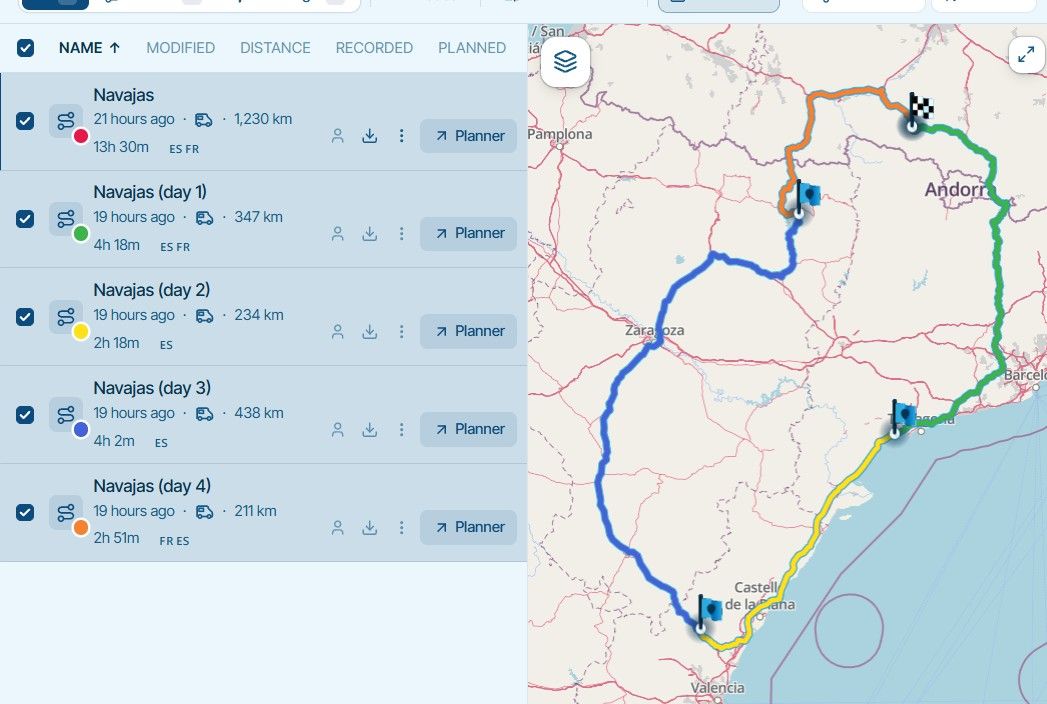
When planning a multi-day trip, it is very useful to have all routes in a selected library folder visible on the map simultaneously, each with its own colour. As is currently possible in the current Beta Planner.
However, in the current Beta Planner, selecting a route for editing causes the other routes to disappear from the map.
I would like to suggest an improvement to this workflow.
Proposed functionality
When a library folder is displayed on the map:
- Keep all routes in that folder visible, each with its own colour.
- Allow the user to select an individual route directly on the map for editing.
- When editing that route, keep all other routes visible as references.
- Allow the user to switch directly to another route by selecting it on the map, without having to return to the library folder. And still keep all other routes visible as references.
Why would this be useful?
When planning a multi-day motorcycle trip, maintaining an overview of the complete journey is important.
For example:
- Am I using the same roads on multiple days?
- Am I unnecessarily repeating sections of a route?
- Is there a more logical way to connect two consecutive days?
- Which day's route would be the most practical one to modify?
Being able to edit individual routes while keeping the entire journey visible makes it much easier to assess the overall route structure and make informed adjustments.
The key point is that all routes should remain visible as references, while allowing the user to select and edit any route directly from the map.
This would be a valuable improvement to the workflow, particularly for users planning longer, multi-day trips.
-

That is a good one

-
@corjan-meijerink or @nick-carthew
Unfortunately, I posted this proposal in the wrong forum.
It should, of course, have been placed in the MRA Routeplanner Next Beta forum.
Perhaps a moderator could move it to the correct forum? -
 Nick Carthew moved this topic from [App-Beta] Suggestions and Discussions
-

I like the concept , so a +1 from me.
A small suggestion from me:
I thnik it would be great, if you can switch this "feature" on and of within the planning screen. Sometimes it would be helpfull to remove the other rooutes for a moment to get a better view on the route you are currently editing.The idea is: Lets have a small button or command to hide and un-hide all other routes.
-

This is how I work with the current functionality.
I use the application to plan long trips in my camping car. In a trip of say 21 days, this would involve 8 driving days in the camping car and 10+ days where I use the app for planning and tracking hikes.
For the driving, I initially plan a single route. Only when I have a feasible trip that I am reasonably happy with, then and only then, I split the route into the daily stages. Currently, if I want to make modifications I have to use the summary route, because when I last tried, working on the daily stages is not sychronised back to the multiday parent. My understanding is that this is being implemented. When it is, I would make minor changes on the daily stages and if multiple stages were impacted use the summary parent.
John
Hello! It looks like you're interested in this conversation, but you don't have an account yet.
Getting fed up of having to scroll through the same posts each visit? When you register for an account, you'll always come back to exactly where you were before, and choose to be notified of new replies (either via email, or push notification). You'll also be able to save bookmarks and upvote posts to show your appreciation to other community members.
With your input, this post could be even better 💗
Register Login-
 013264
-
08190
-
 010114
-
 0859
-
4529
-
 0597
-
 0452
-
0784