MRA no longer works with Sygic
-

After updating the Sygic App (Version 20.4.4) on my iphone 7, I find I am no longer able to open a track into Sygic as I was able to do before. Any ideas why this feature no longer works?
-
After updating the Sygic App (Version 20.4.4) on my iphone 7, I find I am no longer able to open a track into Sygic as I was able to do before. Any ideas why this feature no longer works?

@David-Bonner
Number of waypoints perhaps?BMW BMW Connected Ride Navigator/Garmin Zumo XT3/XT2/XT//Tourstart/ MyRouteapp (The App)/...
Een dag niet gelachen is een dag niet geleefd / Een route is net zo goed als deze uitgezet is. -
@David-Bonner
Number of waypoints perhaps?
@Hans-van-de-Ven-MRA-Master
Hi Hans, no it is not that. I have tried very simple routes with few waypoints, but it still does not work. I used the route shown yesterday, but with a previous version of Sygic and it worked perfectly. After I updated - nothing.
I suspect MRA have not yet caught up with the latest version of Sygic, which has only just been released in the last few days. I am hoping this can happen quite soon, as it is a very useful feature. Unfortunately there is no way of reverting to the previous version of Sygic. -
@Hans-van-de-Ven-MRA-Master
Hi Hans, no it is not that. I have tried very simple routes with few waypoints, but it still does not work. I used the route shown yesterday, but with a previous version of Sygic and it worked perfectly. After I updated - nothing.
I suspect MRA have not yet caught up with the latest version of Sygic, which has only just been released in the last few days. I am hoping this can happen quite soon, as it is a very useful feature. Unfortunately there is no way of reverting to the previous version of Sygic.
@David-Bonner
Wich .gpx file did you use?BMW BMW Connected Ride Navigator/Garmin Zumo XT3/XT2/XT//Tourstart/ MyRouteapp (The App)/...
Een dag niet gelachen is een dag niet geleefd / Een route is net zo goed als deze uitgezet is. -
@David-Bonner
Wich .gpx file did you use?
@Hans-van-de-Ven-MRA-Master
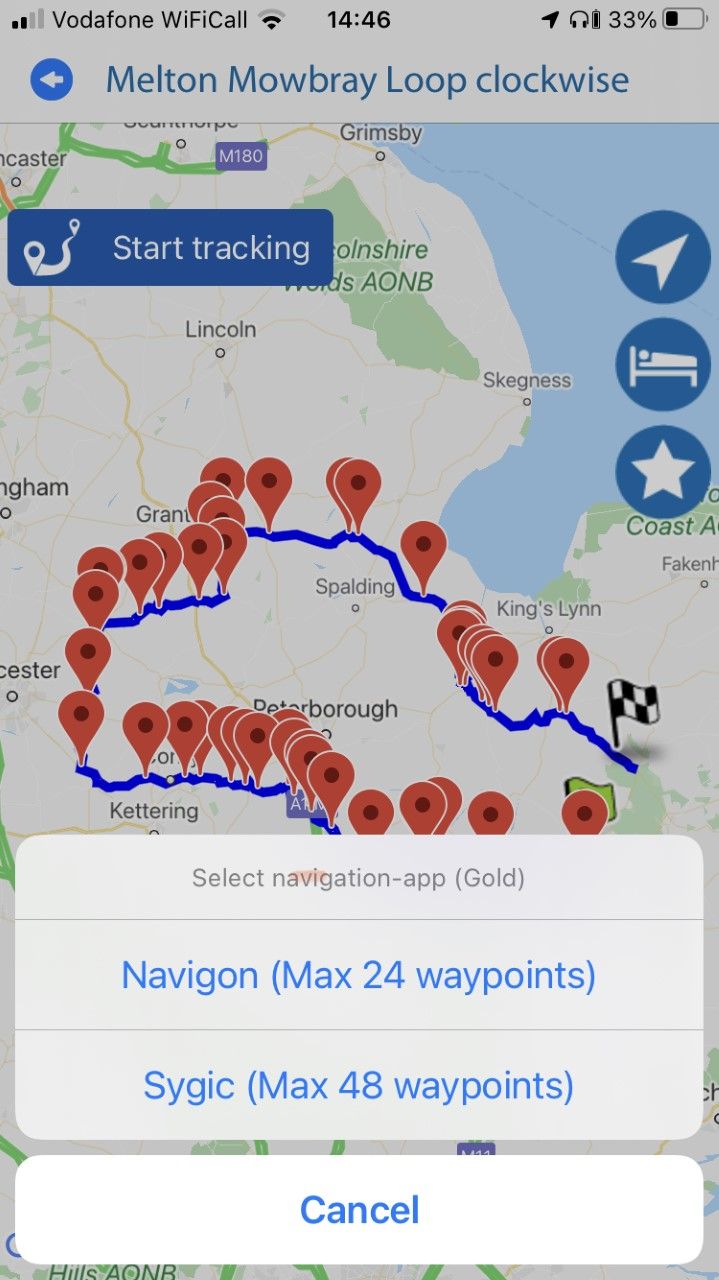
You don't use a gpx. When you select Sygic, from the screen shown, MRA opens Sygic with the route selected. Or rather it did previously, but not now. -

Hi,
I have the same issue, however have some additional comments or perhaps clarification on the same issue:
Routes created a week ago with the PC still work today; I create them on the PC and in the my route app I select "Tracken" / "Tracking", select the route and it shows in the my route app the route points. Then I hit the start button, export to Sygic and it works just fine.
Routes I created in the last days do not work. I create them on the PC and in the my route app I select "Tracken" / "Tracking", select the route and it does NOT show the route points in the my route app. Hitting start button and export to Sygic results in a navigation from current location to the first route-point. Other route points are not shown.
Hope you can fix this so I can continue making new routes and using them on my Iphone with Sygic, since this is the only navigation app being able to be mirrored to Ducati screen.
-
Hi,
I have the same issue, however have some additional comments or perhaps clarification on the same issue:
Routes created a week ago with the PC still work today; I create them on the PC and in the my route app I select "Tracken" / "Tracking", select the route and it shows in the my route app the route points. Then I hit the start button, export to Sygic and it works just fine.
Routes I created in the last days do not work. I create them on the PC and in the my route app I select "Tracken" / "Tracking", select the route and it does NOT show the route points in the my route app. Hitting start button and export to Sygic results in a navigation from current location to the first route-point. Other route points are not shown.
Hope you can fix this so I can continue making new routes and using them on my Iphone with Sygic, since this is the only navigation app being able to be mirrored to Ducati screen.
@Armand-Thomassen I tried opening some 'old' routes into Sygic using my iPhone7, unfortunately no success. Looks like the issue is more general with IOS. Agree it would be good to fix this bug asap.
Hello! It looks like you're interested in this conversation, but you don't have an account yet.
Getting fed up of having to scroll through the same posts each visit? When you register for an account, you'll always come back to exactly where you were before, and choose to be notified of new replies (either via email, or push notification). You'll also be able to save bookmarks and upvote posts to show your appreciation to other community members.
With your input, this post could be even better 💗
Register Login-
012188
-
 0926
0926
-
 0623
0623
-
 05125
05125
-
 0529
0529
-
 0484
0484
-
0417
-
 0431
0431