Navigating on NEX
-

First, I'd like to congratulate the developers on their excellent work.
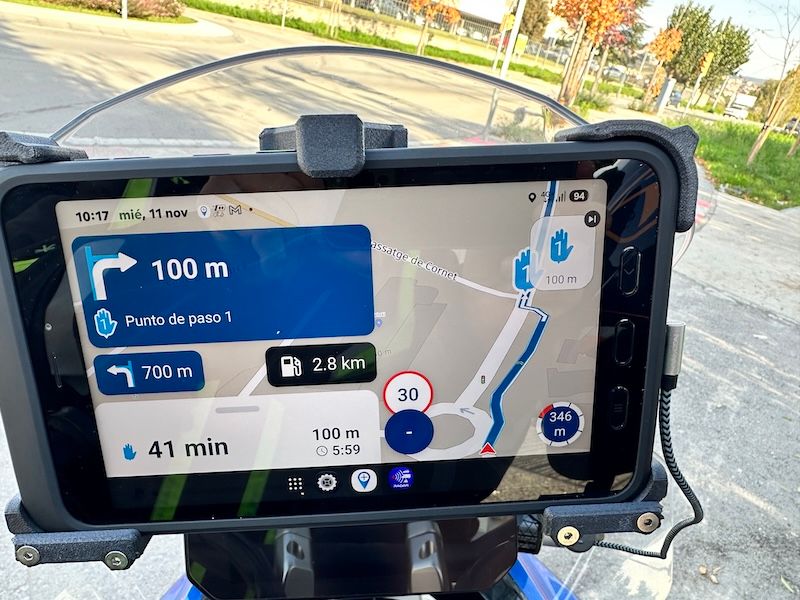
I'd like to suggest that in the NEX app, I'm navigating with an 8" Samsung A5 tablet. As you can see in the photo, the upper (blue) box indicating the next maneuver is excessively large for this purpose, as is the lower (white) box showing the remaining time. I think they significantly reduce the visibility of the route map and consequently make it appear smaller. Do you think these boxes could be reduced in size? Thank you for your attention and congratulations on MRA! -

Thanks for the kind words!
I can confirm this will be fixed in the upcoming update

-
First, I'd like to congratulate the developers on their excellent work.
I'd like to suggest that in the NEX app, I'm navigating with an 8" Samsung A5 tablet. As you can see in the photo, the upper (blue) box indicating the next maneuver is excessively large for this purpose, as is the lower (white) box showing the remaining time. I think they significantly reduce the visibility of the route map and consequently make it appear smaller. Do you think these boxes could be reduced in size? Thank you for your attention and congratulations on MRA!
@Lluís-Casals Hi Lluis, on Sunday we noticed the same "problem" on Xavi's tablet. We fixed it by changing a couple of settings—specifically font size and resolution—in the "display" section on the tablet itself. Give that a try and see if it works for you!
Seeks: "tamaño y estilo de fuente" and "zoom de pantalla":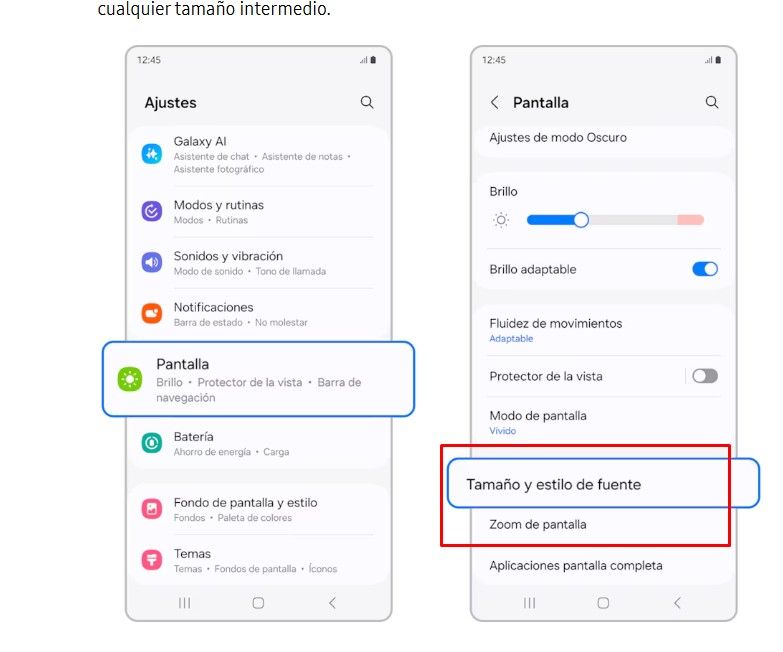
Regards!
-
Thanks Corjan.
Thanks Oscar, I'll try it.
Cheers.
-
That's right, Oscar, it's not in "font size" and "display size".
It's in "screen zoom".
Solved!!!!!
Regards -
That's right, Oscar, it's not in "font size" and "display size".
It's in "screen zoom".
Solved!!!!!
Regards
That's right, Oscar, it's not in "font size" and "display size".
It's in "screen zoom".
Solved!!!!!
Regards...hmmm - have the same issue - but at my device, there is no option "screen zoom" available

Hello! It looks like you're interested in this conversation, but you don't have an account yet.
Getting fed up of having to scroll through the same posts each visit? When you register for an account, you'll always come back to exactly where you were before, and choose to be notified of new replies (either via email, or push notification). You'll also be able to save bookmarks and upvote posts to show your appreciation to other community members.
With your input, this post could be even better 💗
Register Login-
 2513.1k
-
1642
-
 0624
-
 0565
-
014365
-
 25156
-
 0557
-
 8378