Changing nickname
-

Hi,
how can I remove the 0 that appears after my name in my profile?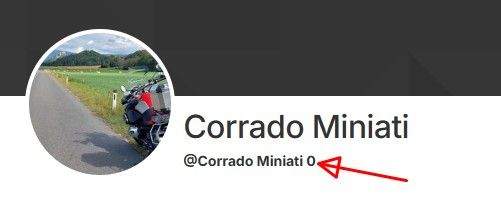
Thanks a lot
-
Submit a support ticket. Worked for me....
-
Submit a support ticket. Worked for me....
@Bull-Tahr
Thanks a lot for the feedback. -

Sounds funny, but if you have access to the old planner, click on your avatar top right. On the page there is a text box for "Forum username". That's the one you are looking for. Coming to think of it, I don't know where to find this in the new planner

-
Sounds funny, but if you have access to the old planner, click on your avatar top right. On the page there is a text box for "Forum username". That's the one you are looking for. Coming to think of it, I don't know where to find this in the new planner
It works with the Navigation Next App too, at least with V6.
Tap the pic/icon at the top right corner and then "Manage account > Forum username" -
Sounds funny, but if you have access to the old planner, click on your avatar top right. On the page there is a text box for "Forum username". That's the one you are looking for. Coming to think of it, I don't know where to find this in the new planner
@MotoCon
Hi, thanks a lot for the feedback, on my account, the name is correct but on the forum there is a "0" at the end, I'don't undertand the reason.
-
It works with the Navigation Next App too, at least with V6.
Tap the pic/icon at the top right corner and then "Manage account > Forum username"
@MartinW
Thanks for feedback, on Navigation Next app the situation is the same that the web planner.
I wrote an email to Bettina.
Hello! It looks like you're interested in this conversation, but you don't have an account yet.
Getting fed up of having to scroll through the same posts each visit? When you register for an account, you'll always come back to exactly where you were before, and choose to be notified of new replies (either via email, or push notification). You'll also be able to save bookmarks and upvote posts to show your appreciation to other community members.
With your input, this post could be even better 💗
Register Login-
 035219
-
 01031
-
01153
-
11077
-
21158
-
 0717
-
0720
-
 2241383