Skip to content
  • Categories
  • Recent
  • Popular
  • Support
  • MyRoute-app
Collapse
Brand Logo

MRA Community Forum

  1. Home
  2. MRA Routeplanner Next Beta
  3. [Web-Beta] Announcements
  4. Website update - More maps, better Street View, embeds and a lot of your feedback

Website update - More maps, better Street View, embeds and a lot of your feedback

Scheduled Pinned Locked Moved [Web-Beta] Announcements
23 Posts 23 Posters 118 Views 7 Watching
  • Oldest to Newest
  • Newest to Oldest
  • Most Votes
Reply
  • Reply as topic
Log in to reply
This topic has been deleted. Only users with topic management privileges can see it.
  • Corjan Meijerink
    Corjan Meijerink
    Corjan Meijerink
    Developer
    wrote last edited by
    #1

    Hi everyone! 👋

    Busy days here! You've been giving a lot of feedback on the forum and we've been working through it. More than 30 of your topics are done in this update. And we added a few big things on top 😏

    This one is all about the beta. Let's go!

    More map layers
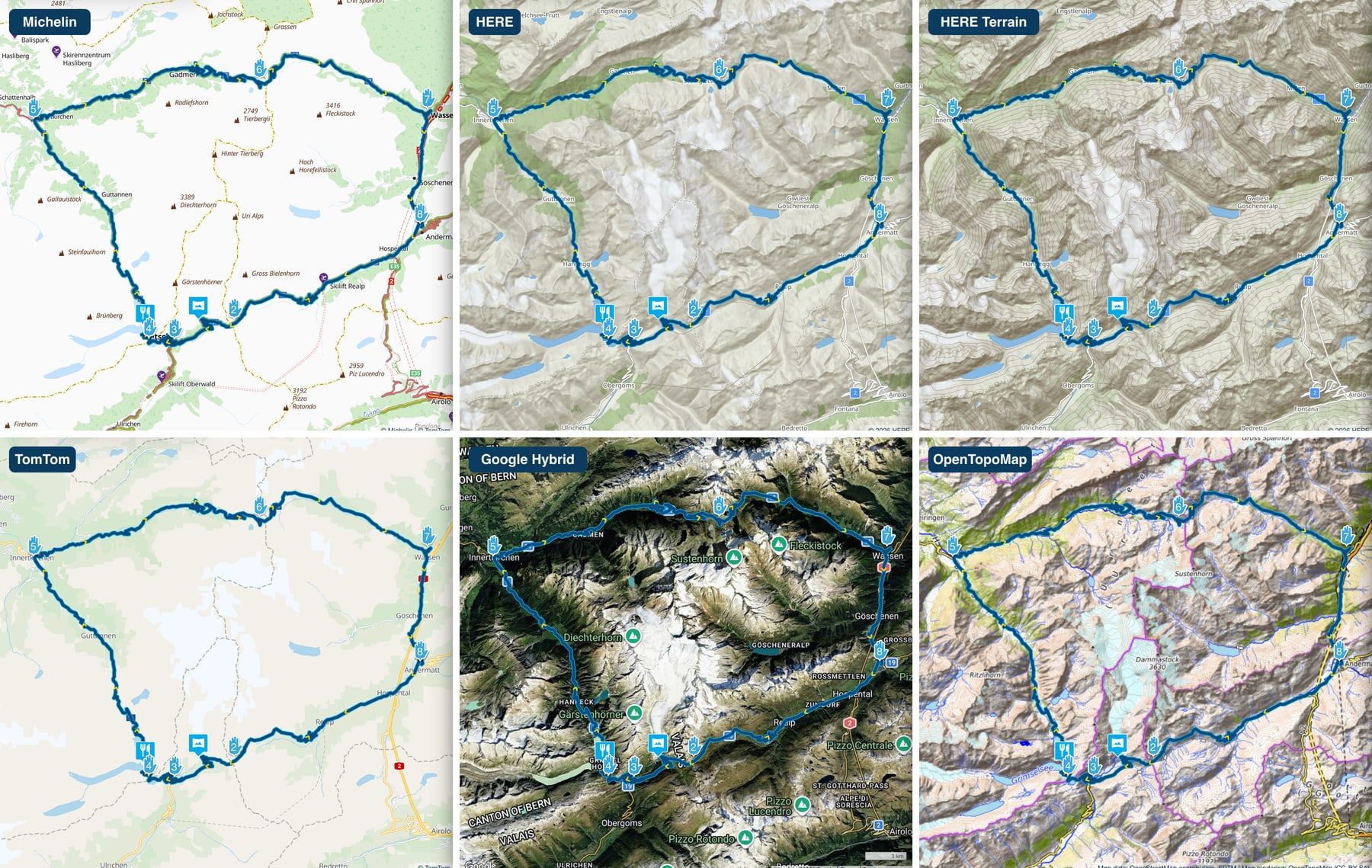
    01-more-map-layers.jpg

    One of the most asked for things on the forum. Here it is! 🎉

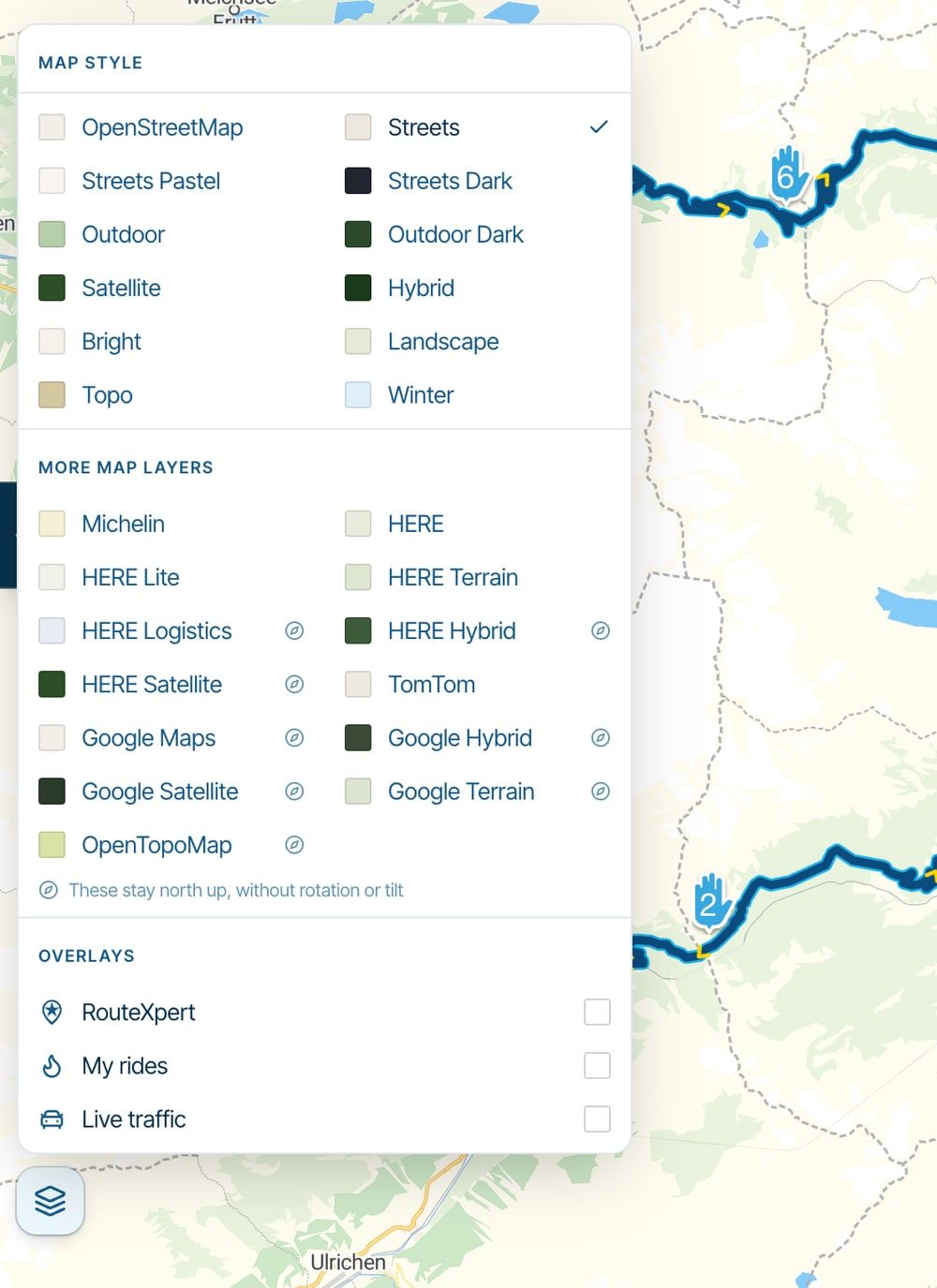
    Click the map style button at the bottom left of the map and you'll find them under More map layers:

    • Michelin, for everyone
    • OpenCycleMap, for everyone, on a bike route
    • HERE, HERE Lite, HERE Terrain, HERE Logistics, HERE Hybrid and HERE Satellite, with MRA Premium Routing or Navigation Next
    • TomTom, Google Maps, Google Hybrid, Google Satellite, Google Terrain and OpenTopoMap, with MRA Premium Routing
    02-map-picker.jpg

    Good to know: the maps with the little compass stay north up, without rotation or tilt. And a map from this list is for the session you're in. Reload the page and you're back on your own map style. Only OpenCycleMap is remembered.

    The regular maps got better too. They now show fuel, shops, castles, restaurants and places to stay sooner when you zoom in. So you can actually see where to stop 😉

    Street View and the map, together

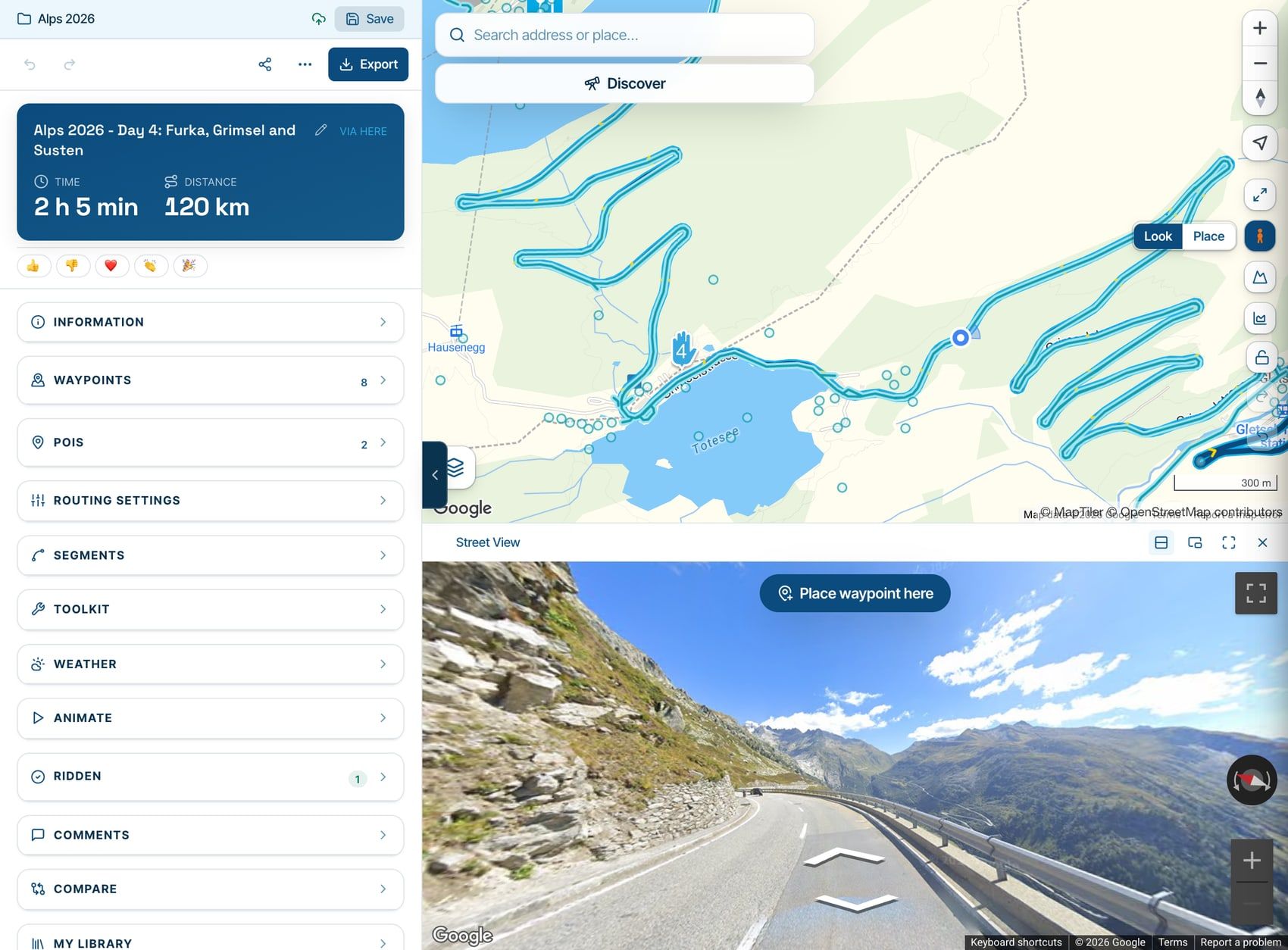
    03-street-view-below-the-map.jpg

    Street View no longer gets in the way of planning 😍

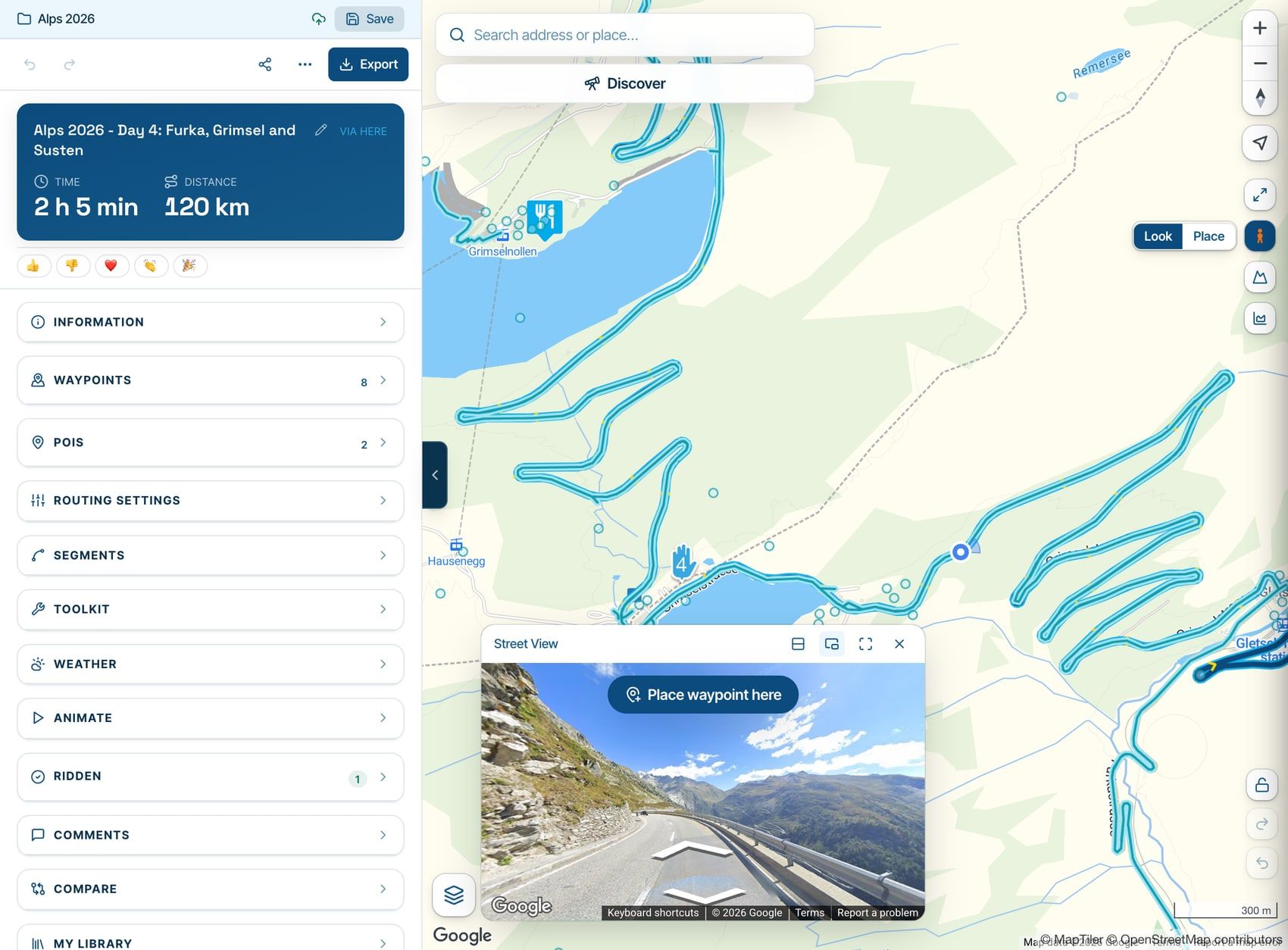
    You can now place waypoints while Street View is on. Next to the little orange man there is a new Look | Place switch:

    • On Look, a click on the map shows Street View there, just like you're used to
    • On Place, a click adds a waypoint
    • Place waypoint here on the panorama adds one right where you're looking from
    • Hold Option / Alt while you click to add a waypoint on Look as well

    And you choose how it looks. The buttons above the panorama give you three layouts. The one above is the map with Street View below it, and you can drag the divider between them.
    04-street-view-small-window.jpg

    Street View in a small window over the map. Drag it anywhere and resize it from a corner.
    05-street-view-large.jpg

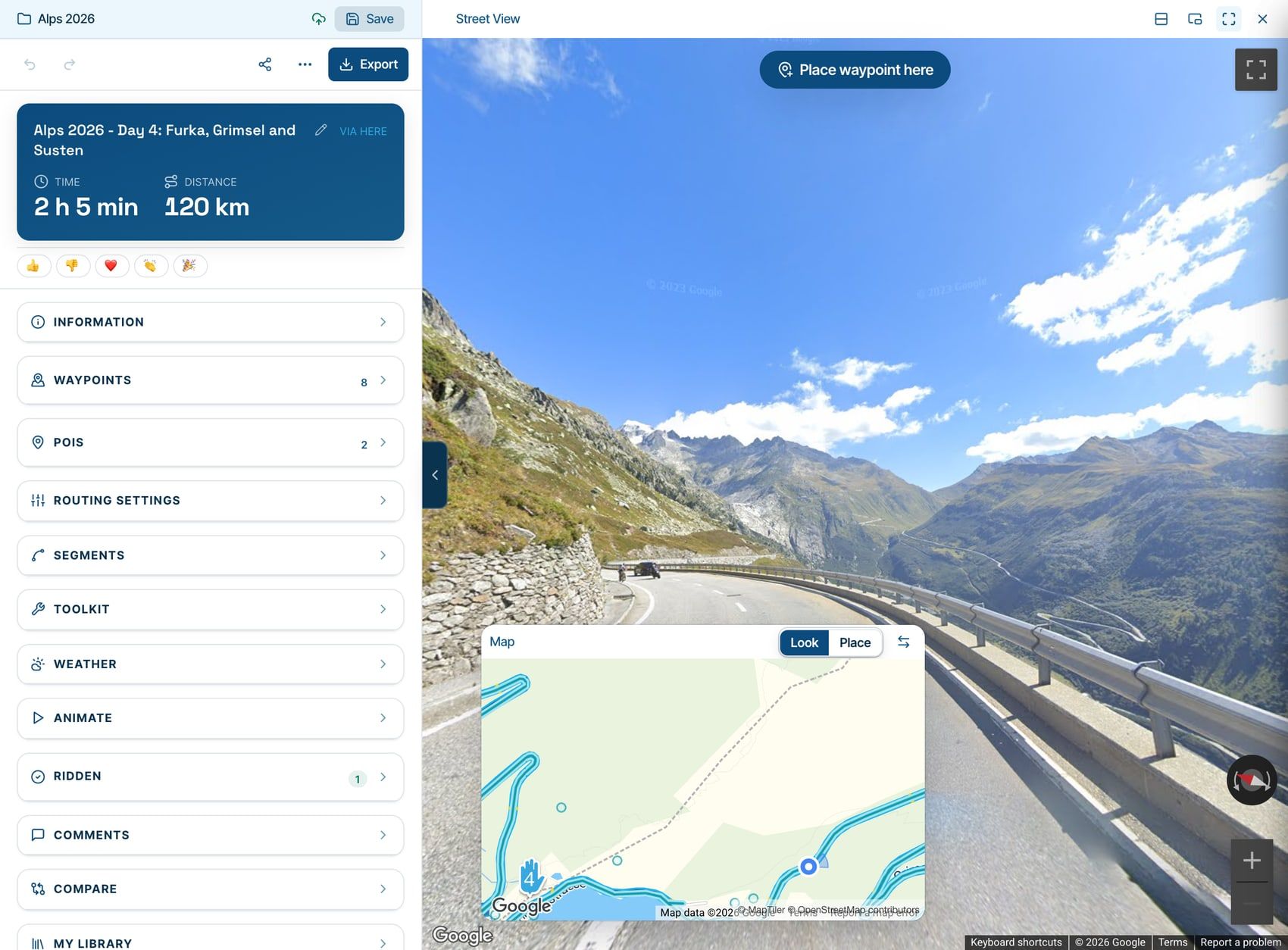
    Street View large, with the map in the small window. Perfect to really look at a road before you ride it 😁

    Your choice is remembered, and the layouts work on tracklogs and in the scenic generator too. The small window and Look | Place are for bigger screens, not for phones. Street View comes with MRA Premium Routing.

    Your route or tracklog on your own website
    06-embed-on-your-website.jpg

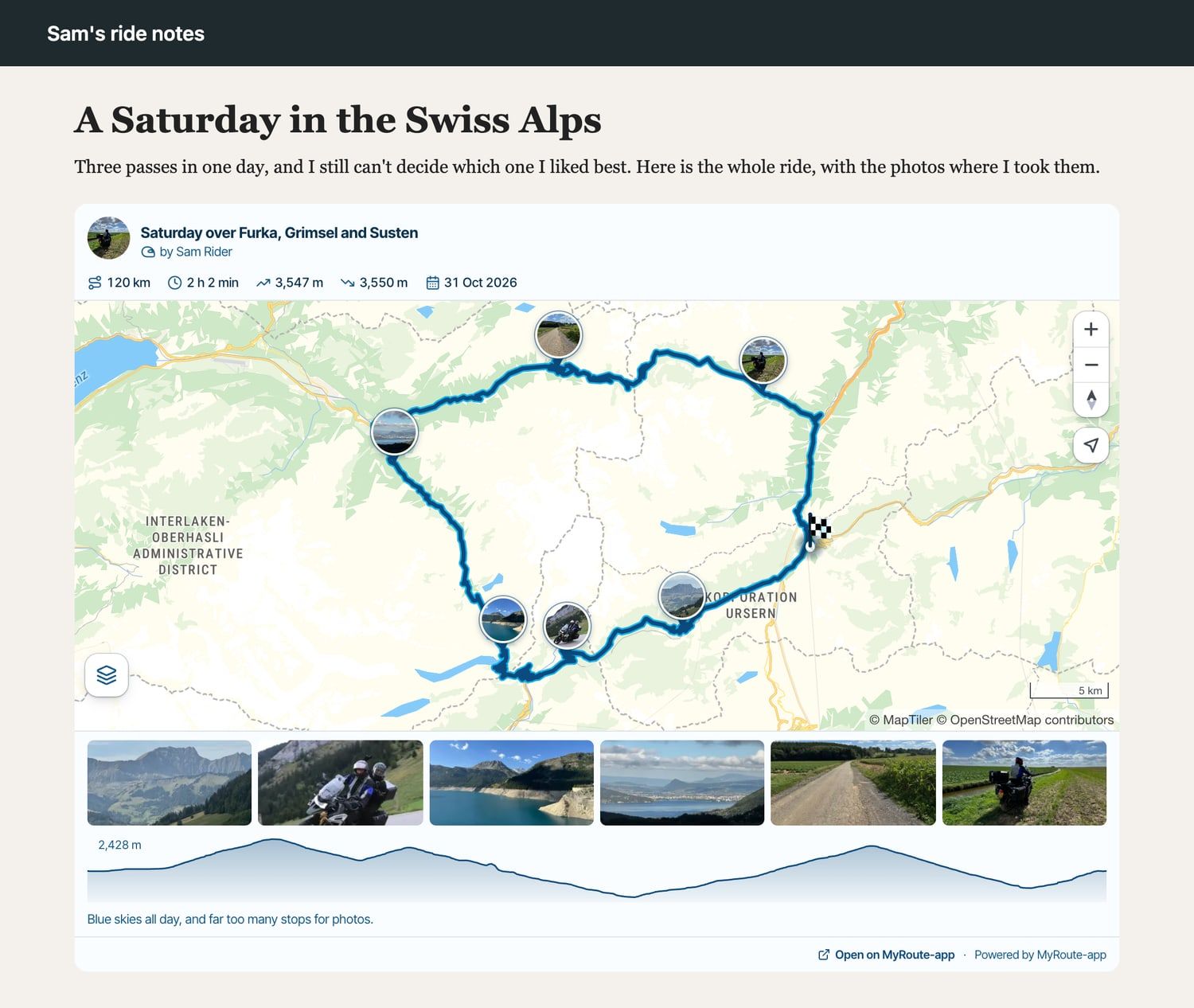
    Got your own website or blog? With MRA Toolkit Pro you can now put a route or tracklog on it! 🚀

    Visitors see your name and picture, the figures, the map, the elevation profile and your description. On a tracklog your photos come along too: in a strip below the map, as pins on the map, or both. Click one and the gallery opens.

    It updates by itself when you change the route, and it works on a phone, in light and dark.
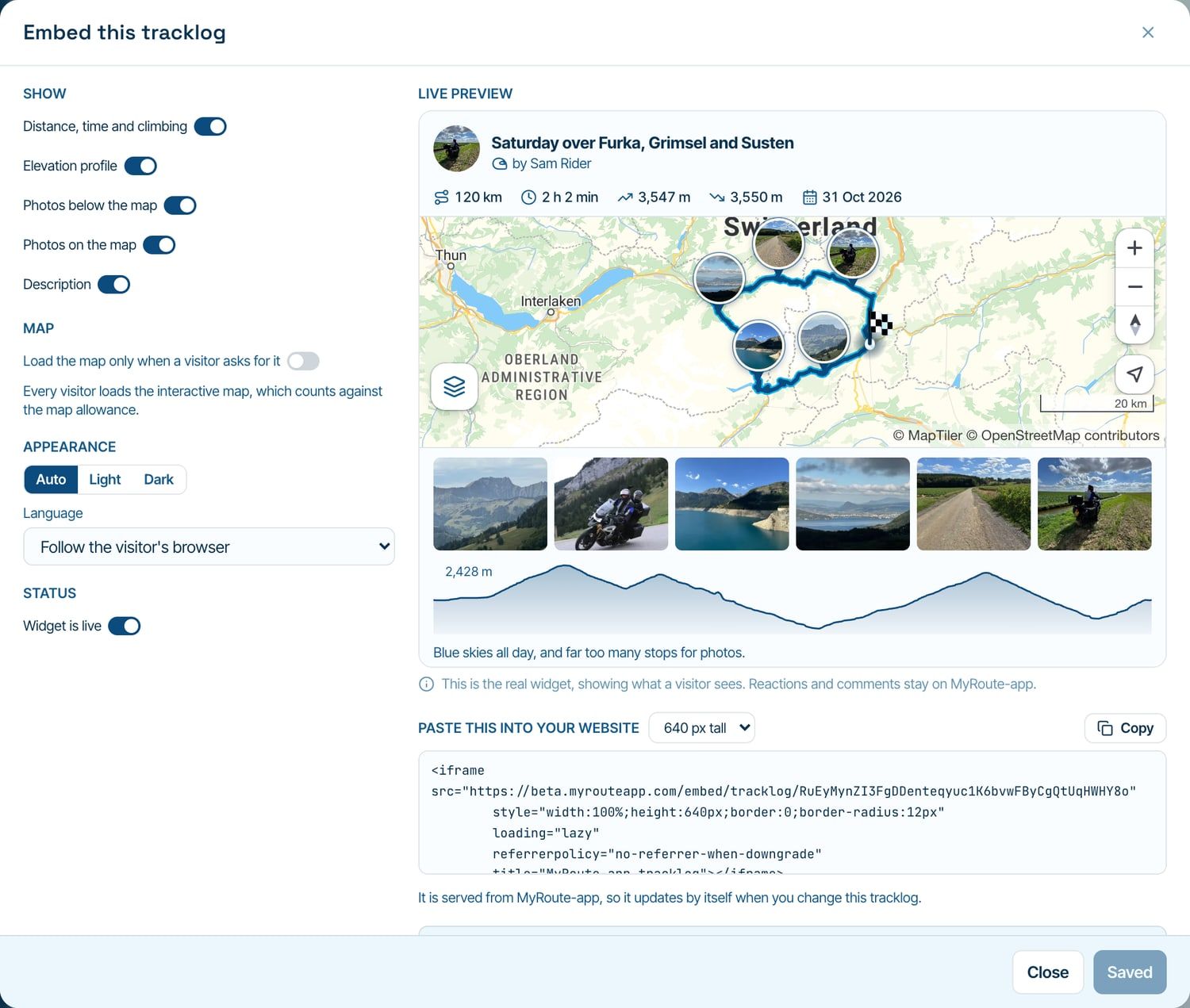
    07-embed-builder.jpg

    Click Share, then Embed on your website, choose what to show and paste the code into your site. The preview shows exactly what your visitors will get.

    A few details:

    • It needs to be Unlisted or Public. If it isn't, it offers to change that right there
    • By default the map only loads when a visitor asks for it. You can turn that off
    • Photos not on the map? Then where you took them stays private too
    • RouteXpert library routes and copies of them can't be embedded

    One share popup
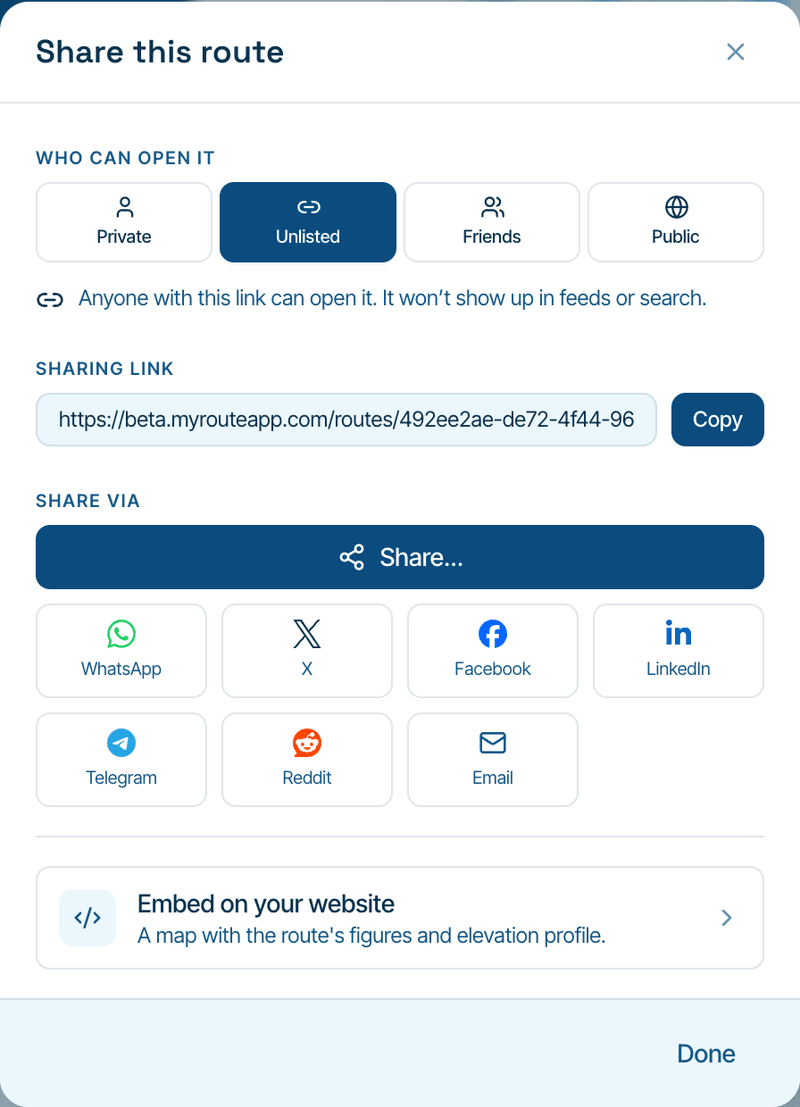
    08-share-popup.png

    Every Share button on a route or tracklog now opens the same popup: in the planner, on the route and tracklog page, in the feed and, new, in the ⋯ menu in your library.

    And you can change the privacy right there. No more detour through Information! Trips, your profile and commercial clubs have Embed in their share popup too.

    Your feedback

    Now for the things you asked for 💪

    Compare

    09-compare.jpg

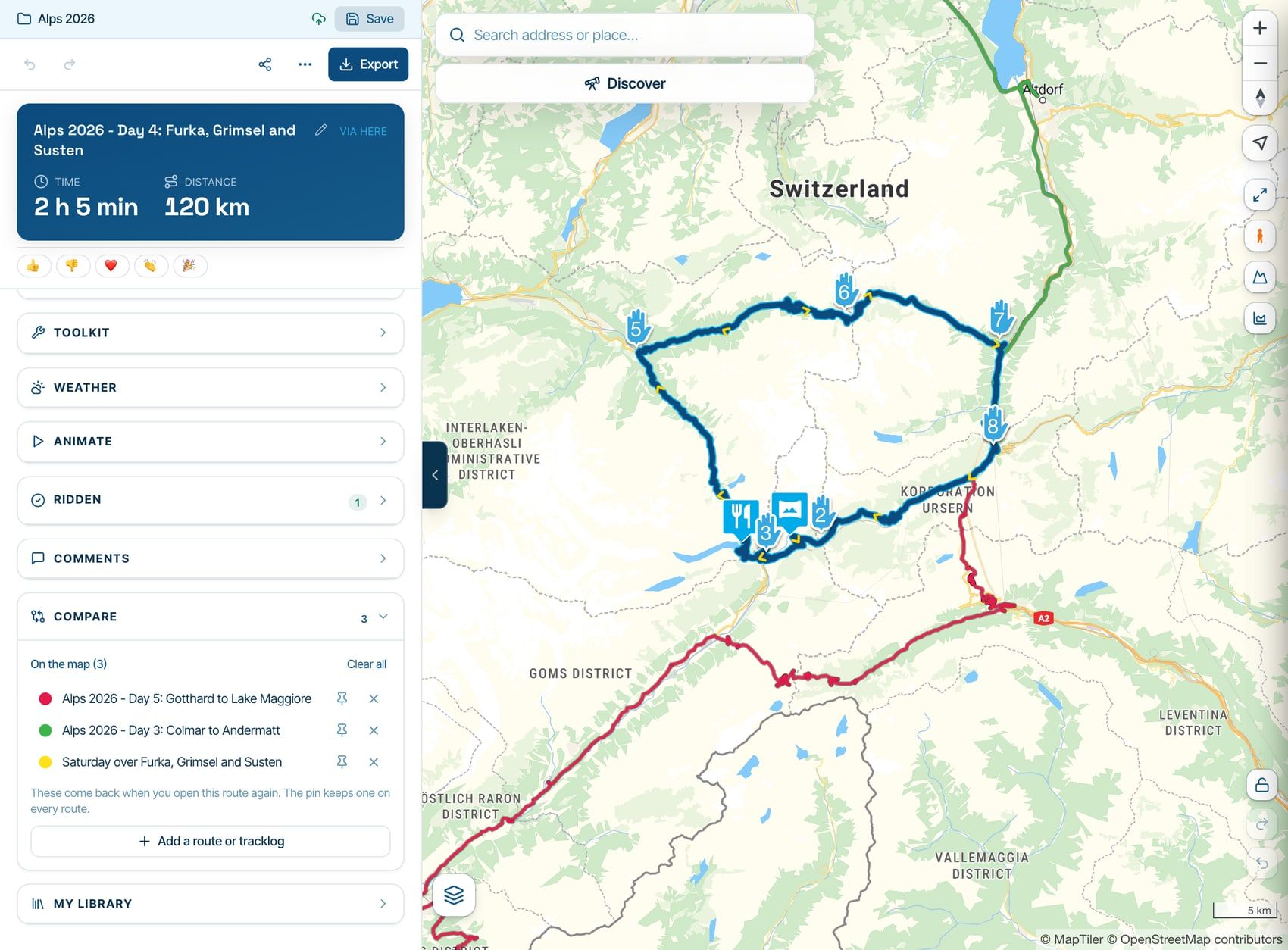
    Comparing with other routes and tracklogs now has its own section in the planner, right above My library. What you add comes back when you open that route again and stays off your other routes. Want something on every route? Pin it.

    Fuel range
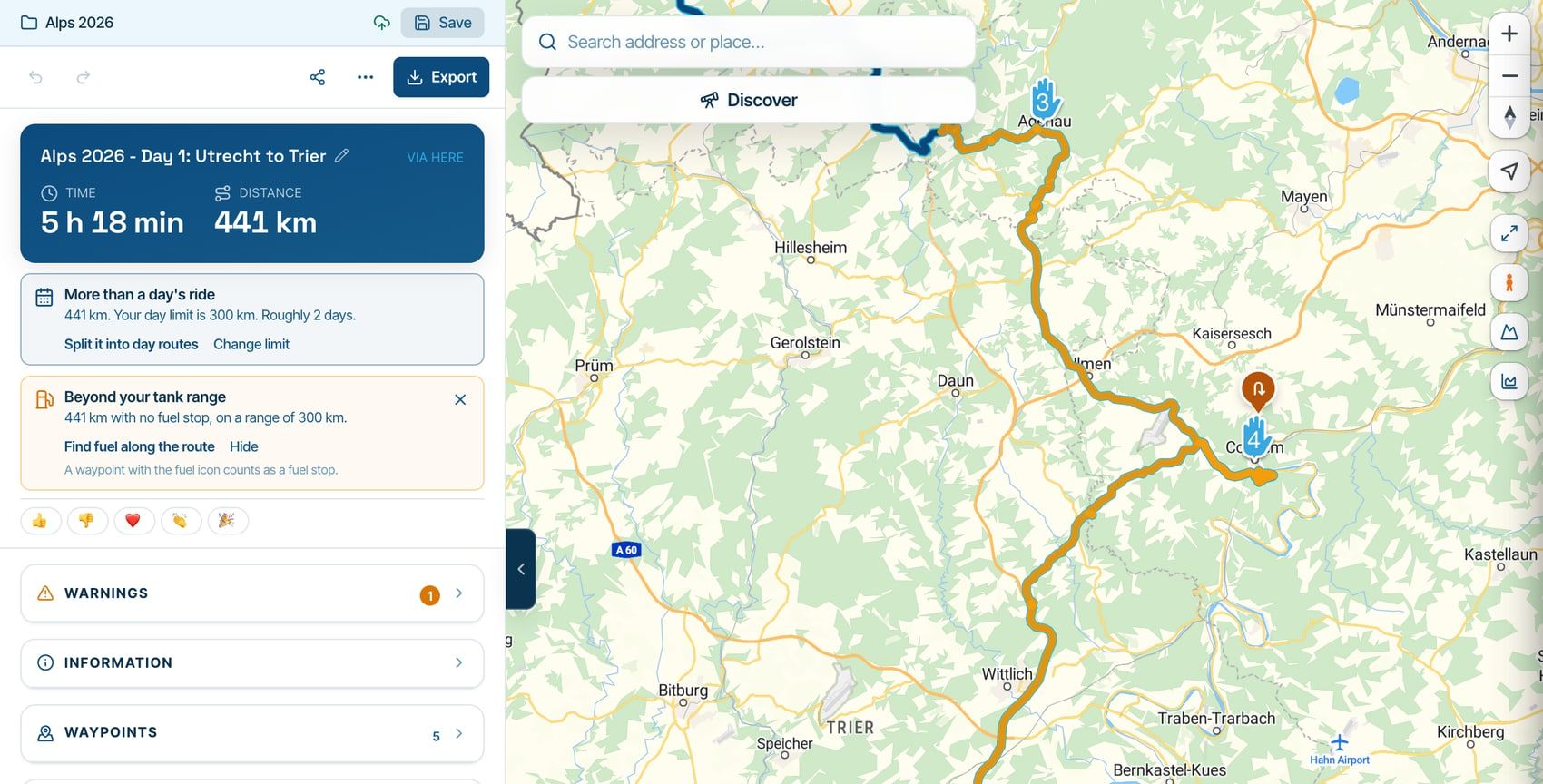
    10-fuel-range.jpg

    Tell your vehicle in the garage how far it goes on a full tank (or set it in Routing settings). When a route goes further between fuel stops, you'll see it under the totals, with Find fuel along the route and Show where. A waypoint with the fuel icon counts as a stop, and a fuel station from Discover or your POIs arrives as one.

    Know it's fine? Hide the warning for that route. It only comes back when the route asks more of your tank.

    POI card
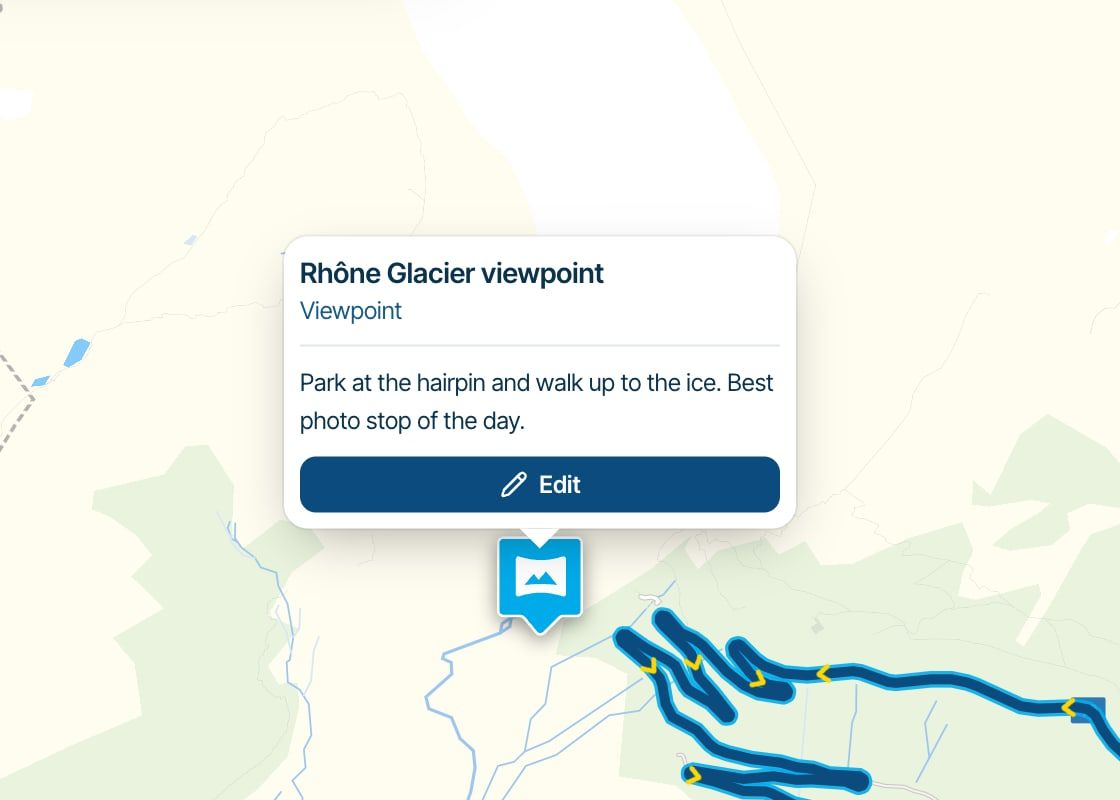
    11-poi-card.jpg

    Rest your mouse on a POI and a card shows its name, type and description. Also on routes you can only view, and on the POI groups on your map.

    Totals in your library
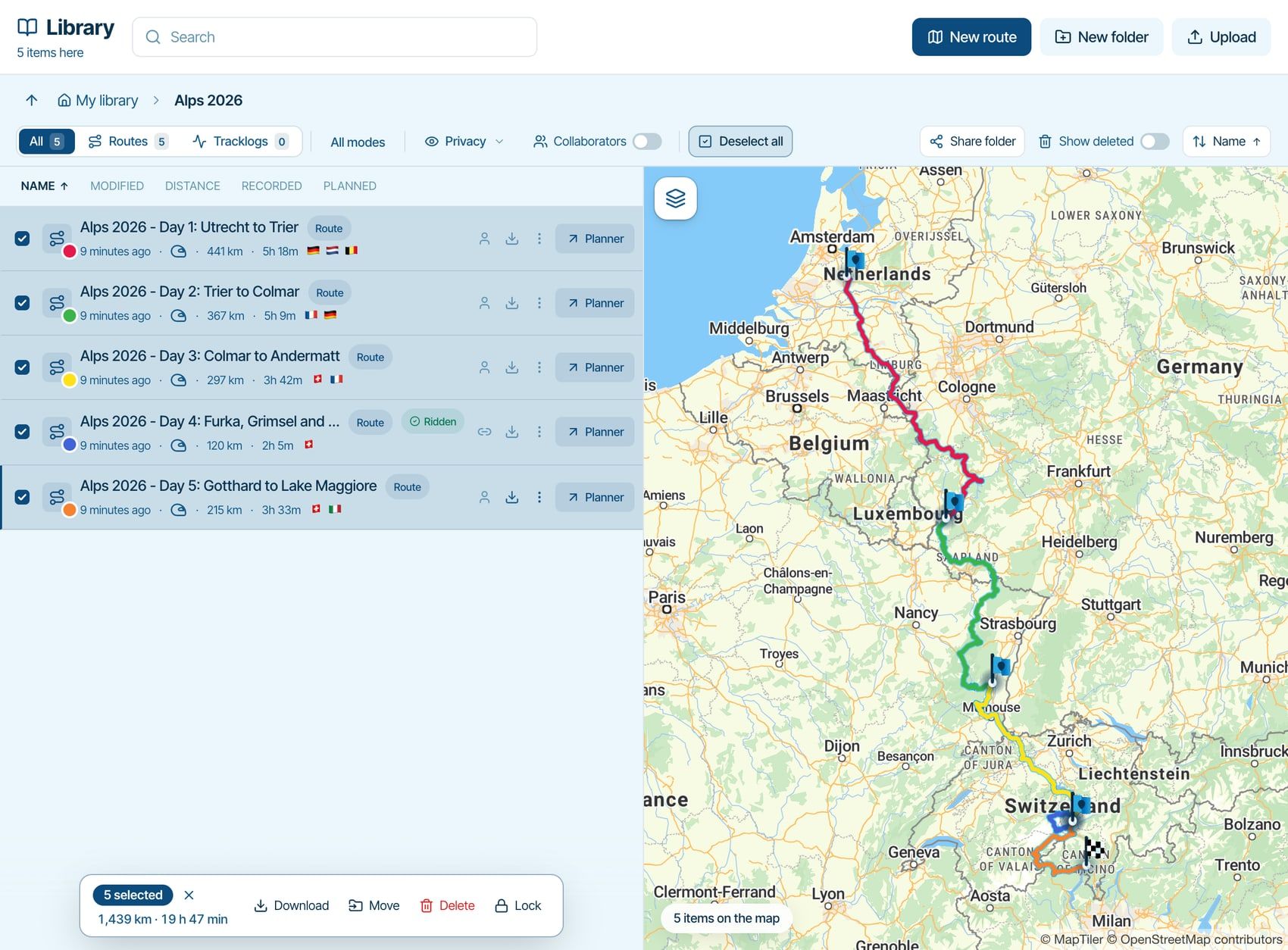
    12-selection-totals.jpg

    Tick the days of your trip and the bar adds them up: 5 selected, 1,439 km, 19 h 47 min. Ticked folders count too.

    Compare routing engines
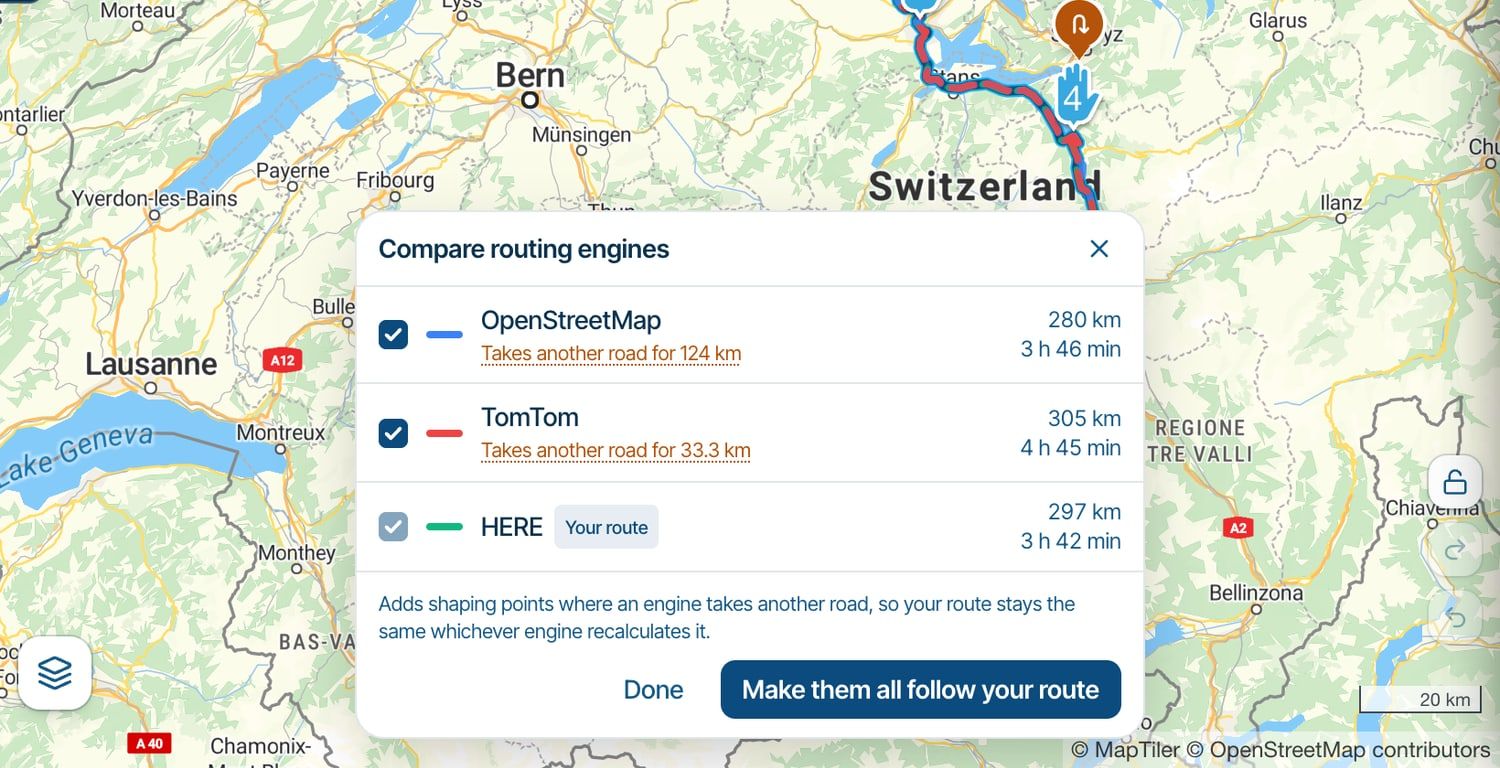
    13-compare-engines.jpg

    This is now a card on the map. It calculates as soon as you open it and tells you per engine what differs. Want them all to follow your route? One click, and you can undo it.

    Search
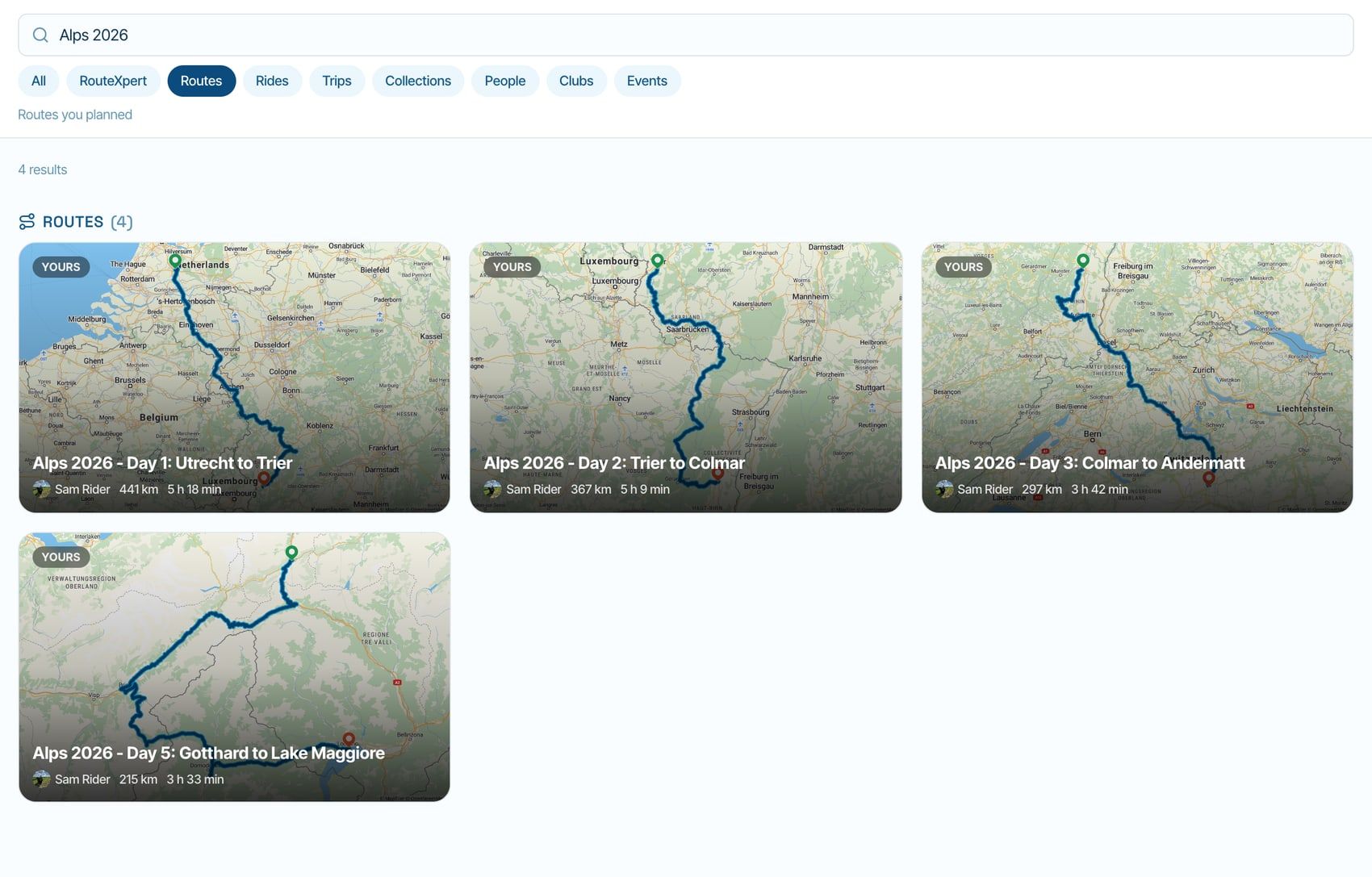
    14-search-map-images.jpg

    Search results now show the real map image behind every route and tracklog, not just the RouteXpert ones. They appear shortly after you stop typing.
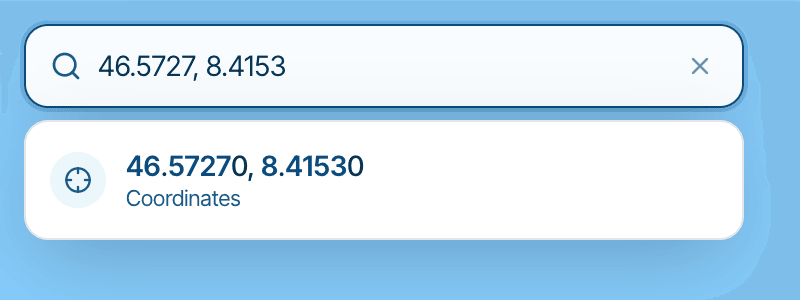
    15-search-coordinates.png

    And every search box understands coordinates: pasted from Google, from your own waypoints, with a decimal comma, with N/E letters or in degrees, minutes and seconds.

    A padlock on the map

    A new padlock above undo and redo locks the map, so a tap or click adds no waypoint and pins can't be dragged. Moving the map still works. Especially nice on a tablet 😄

    Times where you are

    A waypoint's arrival now reads in its own local time and names the zone when it differs from the start. Route and tracklog PDFs print their times the same way. Dates and the clock follow your settings, with a new Time format setting (Automatic, 24-hour or 12-hour). And date fields finally have a proper time picker.

    And a whole lot more

    Planner

    • A long route, tracklog or folder name shows in full when you hover over it
    • The map style button is bigger, the list shows every style at once, and the layers button has its own eye icon
    • Open Street View here is a small link right under the waypoint's address
    • On a via point, the waypoint sheet counts from the previous via point
    • New POIs reach the groups on your planner map without a reload
    • The day limit also works with only a drive time
    • The vehicle picker shows a renamed vehicle right away
    • Curvy TomTom routes over 900 km work now, and a single leg that is too long tells you what to do
    • The scenic generator says when there is no route through your points, instead of blaming the engine, and its default name uses your units
    • A map that stays blank tries again and tells you, and the elevation chart says when its lookup fails

    Library and export

    • Lock all routes and Unlock all routes on a folder's menu, subfolders included
    • plan.tomtom works again
    • Harley-Davidson Boom! Box has its own line in the export dialog, with the three models
    • An .mra backup brings back the route's description and a POI's address, website, phone and opening hours
    • The Explore map moves to the country or region you pick

    Clubs, events and friends

    • MRA Route Collaboration works on the routes of a free club or event, when both of you hold the add-on
    • A club's activity lists your own items only when other members could see them, so you see what the club sees
    • A small picture from the classic app becomes the club's logo instead of a stretched header, and clubs and events can remove both
    • An event's End calendar opens on the day it starts, with a Same day shortcut
    • Somebody you removed as a friend is no longer offered back from the classic app, and Remove friend and Block are in the ⋯ on every profile

    On a phone

    • Discover's chips scroll sideways, and Show on the map folds the panel away so you can see the pins
    • Waypoint rows are cleaner: no coordinates running under the times, and a long name may take two lines

    The boring but important stuff

    • A maintenance entry with an odometer value now also saves before noon 😅
    • A classic import no longer gets stuck, and your classic device limit comes along
    • A payment your bank is still confirming says so, so you can't pay twice. One-off purchases no longer offer SEPA direct debit, because that can take up to two weeks
    • Classic routes with an impossible time (7,025 hours anyone?) no longer show it

    That's it! Thanks for all your feedback, it makes a huge difference 🙏

    I'll also reply in your topics. And let me know what you think!
    We really try to process all your feedback but these first two days have already been quite exhausting ❤ Do keep it coming! Tonight I however will try to sleep a few hours more.

    Cheers,
    Corjan

    Òscar 1 Reply Last reply
    15
    • a white mouse on the motorbike
      a white mouse on the motorbike
      a white mouse on the motorbike
      Valued contributor
      wrote last edited by
      #2

      Super, Just the way I like the steetmapview.
      We’re being looked after down to the last detail!

      met een R1250RT met TFT en BMW Connected Ride App (die dus nog steeds niet voldoet!) ; M.R.A. in combinatie met de Carpuride W702 (voor Android op de Motor!), de Garmin Zumo XT als backup en een Samsung Galaxy S24

      1 Reply Last reply
      0
      • Skellum
        Skellum
        Skellum
        wrote last edited by
        #3

        Incredibly quick, thank you and very well done!

        1 Reply Last reply
        2
        • David Rudgley
          David Rudgley
          David Rudgley
          wrote last edited by
          #4

          Wow, I'm so grateful for all your hard work Corjan, I'm already blow away with all the changes and then you go an introduce more... we're not worthy..!! 😊

          MRA Gold Planner + App + Navigation Next user
          Android Pixel 10 Pro Fold
          TomTomGo as backup

          KTM 1290 Super Adventure S
          Quad Lock + Phone + Carpuride W702

          2026 Kawasaki Z900 RS
          Beeline Moto II

          1 Reply Last reply
          0
          • denWINNE
            denWINNE
            denWINNE
            wrote last edited by denWINNE
            #5

            BIG thx, Corjan. je bent een SUPER developer/admin.

            1 Reply Last reply
            0
            • Parantapa
              Parantapa
              Parantapa
              wrote last edited by Parantapa
              #6

              @corjan-meijerink
              WOW, great job!
              Thank you!

              1 Reply Last reply
              0
              • Bart 9a 0
                Bart 9a 0
                Bart 9a 0
                wrote last edited by
                #7

                WOW WOW en nog eens WOW, meer kan ik niet zeggen dan fantasties.
                bedankt Corjan en Team

                1 Reply Last reply
                0
                • Bart De Medts
                  Bart De Medts
                  Bart De Medts
                  Alpha tester
                  wrote last edited by
                  #8

                  What an amazing job! 👏 Sleep well 🙂

                  🏍️ Tiger: DMD Nor7e + SilverFox controller
                  🏍️ Bobber: iPhone 15 Pro + Quad Lock mount
                  🚗 Car: iPhone 15 Pro with wireless Apple CarPlay

                  1 Reply Last reply
                  0
                  • Nick Carthew
                    Nick Carthew
                    Nick Carthew
                    RouteXpert
                    wrote last edited by
                    #9

                    They asked and you provided - great work Corjan 👏 👏 👏

                    Always willing to help if I can.
                    Triumph Tiger 1200 XRT called Tina.
                    MRA Navigation Next and SilverFox BJ8

                    1 Reply Last reply
                    1
                    • Lluis Arasanz
                      Lluis Arasanz
                      Lluis Arasanz
                      wrote last edited by
                      #10

                      @corjan-meijerink
                      Yes, you're great. A lot of job done
                      Sleep a lot, so wednesday become another great day!!!

                      Regards

                      Lluis Arasanz

                      • BMW F750GS
                        MotoMediaLink HW Interface for BMW's WonderWheel device
                      • Samsung A14 with Beta MyRoute-App (primary bike use)
                        Tasker and MMLink SW for Android App Control
                      • iPhone 14 with Beta MyRoute-App (personal and primary CP use)
                      1 Reply Last reply
                      0
                      • Andy Nicholson
                        Andy Nicholson
                        Andy Nicholson
                        wrote last edited by
                        #11

                        Great response to so many so quickly.

                        1 Reply Last reply
                        0
                        • Corjan Meijerink Corjan Meijerink

                          Hi everyone! 👋

                          Busy days here! You've been giving a lot of feedback on the forum and we've been working through it. More than 30 of your topics are done in this update. And we added a few big things on top 😏

                          This one is all about the beta. Let's go!

                          More map layers

                          01-more-map-layers.jpg

                          One of the most asked for things on the forum. Here it is! 🎉

                          Click the map style button at the bottom left of the map and you'll find them under More map layers:

                          • Michelin, for everyone
                          • OpenCycleMap, for everyone, on a bike route
                          • HERE, HERE Lite, HERE Terrain, HERE Logistics, HERE Hybrid and HERE Satellite, with MRA Premium Routing or Navigation Next
                          • TomTom, Google Maps, Google Hybrid, Google Satellite, Google Terrain and OpenTopoMap, with MRA Premium Routing

                          02-map-picker.jpg

                          Good to know: the maps with the little compass stay north up, without rotation or tilt. And a map from this list is for the session you're in. Reload the page and you're back on your own map style. Only OpenCycleMap is remembered.

                          The regular maps got better too. They now show fuel, shops, castles, restaurants and places to stay sooner when you zoom in. So you can actually see where to stop 😉

                          Street View and the map, together

                          03-street-view-below-the-map.jpg

                          Street View no longer gets in the way of planning 😍

                          You can now place waypoints while Street View is on. Next to the little orange man there is a new Look | Place switch:

                          • On Look, a click on the map shows Street View there, just like you're used to
                          • On Place, a click adds a waypoint
                          • Place waypoint here on the panorama adds one right where you're looking from
                          • Hold Option / Alt while you click to add a waypoint on Look as well

                          And you choose how it looks. The buttons above the panorama give you three layouts. The one above is the map with Street View below it, and you can drag the divider between them.

                          04-street-view-small-window.jpg

                          Street View in a small window over the map. Drag it anywhere and resize it from a corner.

                          05-street-view-large.jpg

                          Street View large, with the map in the small window. Perfect to really look at a road before you ride it 😁

                          Your choice is remembered, and the layouts work on tracklogs and in the scenic generator too. The small window and Look | Place are for bigger screens, not for phones. Street View comes with MRA Premium Routing.

                          Your route or tracklog on your own website

                          06-embed-on-your-website.jpg

                          Got your own website or blog? With MRA Toolkit Pro you can now put a route or tracklog on it! 🚀

                          Visitors see your name and picture, the figures, the map, the elevation profile and your description. On a tracklog your photos come along too: in a strip below the map, as pins on the map, or both. Click one and the gallery opens.

                          It updates by itself when you change the route, and it works on a phone, in light and dark.

                          07-embed-builder.jpg

                          Click Share, then Embed on your website, choose what to show and paste the code into your site. The preview shows exactly what your visitors will get.

                          A few details:

                          • It needs to be Unlisted or Public. If it isn't, it offers to change that right there
                          • By default the map only loads when a visitor asks for it. You can turn that off
                          • Photos not on the map? Then where you took them stays private too
                          • RouteXpert library routes and copies of them can't be embedded

                          One share popup

                          08-share-popup.png

                          Every Share button on a route or tracklog now opens the same popup: in the planner, on the route and tracklog page, in the feed and, new, in the ⋯ menu in your library.

                          And you can change the privacy right there. No more detour through Information! Trips, your profile and commercial clubs have Embed in their share popup too.

                          Your feedback

                          Now for the things you asked for 💪

                          Compare

                          09-compare.jpg

                          Comparing with other routes and tracklogs now has its own section in the planner, right above My library. What you add comes back when you open that route again and stays off your other routes. Want something on every route? Pin it.

                          Fuel range

                          10-fuel-range.jpg

                          Tell your vehicle in the garage how far it goes on a full tank (or set it in Routing settings). When a route goes further between fuel stops, you'll see it under the totals, with Find fuel along the route and Show where. A waypoint with the fuel icon counts as a stop, and a fuel station from Discover or your POIs arrives as one.

                          Know it's fine? Hide the warning for that route. It only comes back when the route asks more of your tank.

                          POI card

                          11-poi-card.jpg

                          Rest your mouse on a POI and a card shows its name, type and description. Also on routes you can only view, and on the POI groups on your map.

                          Totals in your library

                          12-selection-totals.jpg

                          Tick the days of your trip and the bar adds them up: 5 selected, 1,439 km, 19 h 47 min. Ticked folders count too.

                          Compare routing engines

                          13-compare-engines.jpg

                          This is now a card on the map. It calculates as soon as you open it and tells you per engine what differs. Want them all to follow your route? One click, and you can undo it.

                          Search

                          14-search-map-images.jpg

                          Search results now show the real map image behind every route and tracklog, not just the RouteXpert ones. They appear shortly after you stop typing.

                          15-search-coordinates.png

                          And every search box understands coordinates: pasted from Google, from your own waypoints, with a decimal comma, with N/E letters or in degrees, minutes and seconds.

                          A padlock on the map

                          A new padlock above undo and redo locks the map, so a tap or click adds no waypoint and pins can't be dragged. Moving the map still works. Especially nice on a tablet 😄

                          Times where you are

                          A waypoint's arrival now reads in its own local time and names the zone when it differs from the start. Route and tracklog PDFs print their times the same way. Dates and the clock follow your settings, with a new Time format setting (Automatic, 24-hour or 12-hour). And date fields finally have a proper time picker.

                          And a whole lot more

                          Planner

                          • A long route, tracklog or folder name shows in full when you hover over it
                          • The map style button is bigger, the list shows every style at once, and the layers button has its own eye icon
                          • Open Street View here is a small link right under the waypoint's address
                          • On a via point, the waypoint sheet counts from the previous via point
                          • New POIs reach the groups on your planner map without a reload
                          • The day limit also works with only a drive time
                          • The vehicle picker shows a renamed vehicle right away
                          • Curvy TomTom routes over 900 km work now, and a single leg that is too long tells you what to do
                          • The scenic generator says when there is no route through your points, instead of blaming the engine, and its default name uses your units
                          • A map that stays blank tries again and tells you, and the elevation chart says when its lookup fails

                          Library and export

                          • Lock all routes and Unlock all routes on a folder's menu, subfolders included
                          • plan.tomtom works again
                          • Harley-Davidson Boom! Box has its own line in the export dialog, with the three models
                          • An .mra backup brings back the route's description and a POI's address, website, phone and opening hours
                          • The Explore map moves to the country or region you pick

                          Clubs, events and friends

                          • MRA Route Collaboration works on the routes of a free club or event, when both of you hold the add-on
                          • A club's activity lists your own items only when other members could see them, so you see what the club sees
                          • A small picture from the classic app becomes the club's logo instead of a stretched header, and clubs and events can remove both
                          • An event's End calendar opens on the day it starts, with a Same day shortcut
                          • Somebody you removed as a friend is no longer offered back from the classic app, and Remove friend and Block are in the ⋯ on every profile

                          On a phone

                          • Discover's chips scroll sideways, and Show on the map folds the panel away so you can see the pins
                          • Waypoint rows are cleaner: no coordinates running under the times, and a long name may take two lines

                          The boring but important stuff

                          • A maintenance entry with an odometer value now also saves before noon 😅
                          • A classic import no longer gets stuck, and your classic device limit comes along
                          • A payment your bank is still confirming says so, so you can't pay twice. One-off purchases no longer offer SEPA direct debit, because that can take up to two weeks
                          • Classic routes with an impossible time (7,025 hours anyone?) no longer show it

                          That's it! Thanks for all your feedback, it makes a huge difference 🙏

                          I'll also reply in your topics. And let me know what you think!
                          We really try to process all your feedback but these first two days have already been quite exhausting ❤ Do keep it coming! Tonight I however will try to sleep a few hours more.

                          Cheers,
                          Corjan

                          Òscar
                          Òscar
                          Òscar
                          wrote last edited by
                          #12

                          @Corjan-Meijerink An incredible array of improvements. My sincerest congratulations!

                          Creator and administrator of the largest MRA groups.

                          • https://t.me/MRa_by_b0hd1
                          • https://www.myrouteapp.com/group/messages/7007
                          • YouTube: @demco17
                          • Ex-routexpert, current beta tester and MRA expert. Creator of tutorials, manuals, and MRA user trainer.
                          1 Reply Last reply
                          0
                          • Hubert Thoring
                            Hubert Thoring
                            Hubert Thoring
                            Valued contributor
                            wrote last edited by
                            #13

                            Thanks for that!

                            VG Hubert
                            Beta Test "Next App" dazu die Hardware .
                            iPad 9. Gen iOS 27.2.0/ iPhone 16e iOS 27.2.0/ Navi iPhone Xr iOS 18.7.11 / PC mit MS Win11 /❗️MyRoute-App im Cradel und Remotek-One❗️ Info zu MRA & Remotek One

                            1 Reply Last reply
                            0
                            • Edward W
                              Edward W
                              Edward W
                              wrote last edited by
                              #14

                              Amazing!!!

                              1 Reply Last reply
                              0
                              • Jörgen
                                Jörgen
                                Jörgen
                                Valued contributor
                                wrote last edited by
                                #15

                                Is it Christmas already?
                                So many presents already.
                                I’d only just asked, and it’s already been implemented.
                                Thank you!

                                Hardware
                                iPhone 12 pro (iOS 26.2.1)
                                iPad (7.Gen.) 18.7.3
                                Oukitel RT3 Pro (Andr. 14)
                                Wireless CarPlay mit (Elebest C650)
                                Wired CarPlay (SEAT Arona - 2021)
                                MRA Workshops in Deutsch sind hier zu finden

                                1 Reply Last reply
                                0
                                • tfdahazellgmail.com
                                  tfdahazellgmail.com
                                  tfdahazellgmail.com
                                  wrote last edited by
                                  #16

                                  Thank you very much for this

                                  1 Reply Last reply
                                  0
                                  • Kudee
                                    Kudee
                                    Kudee
                                    wrote last edited by Kudee
                                    #17

                                    Just Thanks 🙂
                                    Ohh, Google Terrain, thats cool!

                                    1 Reply Last reply
                                    0
                                    • Corrado Miniati 0
                                      Corrado Miniati 0
                                      Corrado Miniati 0
                                      wrote last edited by
                                      #18

                                      Absolutely a great work Team

                                      1 Reply Last reply
                                      0
                                      • Nick Elsom 0
                                        Nick Elsom 0
                                        Nick Elsom 0
                                        wrote last edited by
                                        #19

                                        Amazing, impressed. 🤗

                                        1 Reply Last reply
                                        0
                                        • Jannes van Dijken
                                          Jannes van Dijken
                                          Jannes van Dijken
                                          wrote last edited by
                                          #20

                                          Yes! Diepe buiging.

                                          1 Reply Last reply
                                          0

                                          Hello! It looks like you're interested in this conversation, but you don't have an account yet.

                                          Getting fed up of having to scroll through the same posts each visit? When you register for an account, you'll always come back to exactly where you were before, and choose to be notified of new replies (either via email, or push notification). You'll also be able to save bookmarks and upvote posts to show your appreciation to other community members.

                                          With your input, this post could be even better 💗

                                          Register Login
                                          Reply
                                          • Reply as topic
                                          Log in to reply
                                          • Oldest to Newest
                                          • Newest to Oldest
                                          • Most Votes


                                          • 1
                                          • 2
                                          ACTIVE USERS
                                          tfdahazellgmail.com
                                          tfdahazellgmail.com
                                          a white mouse on the motorbike
                                          a white mouse on the motorbike
                                          Edwin_M
                                          Edwin_M
                                          Corrado Miniati 0
                                          Corrado Miniati 0
                                          Solo1138
                                          Solo1138
                                          David Rudgley
                                          David Rudgley
                                          Nick Carthew
                                          Nick Carthew
                                          Hans Lamers
                                          Hans Lamers
                                          Edward W
                                          Edward W
                                          Corjan Meijerink
                                          Corjan Meijerink
                                          Jannes van Dijken
                                          Jannes van Dijken
                                          Nick Elsom 0
                                          Nick Elsom 0
                                          Kudee
                                          Kudee
                                          Andy Nicholson
                                          Andy Nicholson
                                          Jörgen
                                          Jörgen
                                          Hubert Thoring
                                          Hubert Thoring
                                          Òscar
                                          Òscar
                                          Lluis Arasanz
                                          Lluis Arasanz
                                          Bart De Medts
                                          Bart De Medts
                                          Bart 9a 0
                                          Bart 9a 0
                                          Parantapa
                                          Parantapa
                                          denWINNE
                                          denWINNE
                                          Skellum
                                          Skellum
                                          POPULAR TOPICS
                                          • Website update - More maps, better Street View, embeds and a lot of your feedback
                                            Edwin_M
                                            Edwin_M
                                            15
                                            23
                                            118

                                          • Here Terrain maps style
                                            Corjan Meijerink
                                            Corjan Meijerink
                                            0
                                            33
                                            246

                                          • Kaart niet zichtbaar
                                            a white mouse on the motorbike
                                            a white mouse on the motorbike
                                            0
                                            14
                                            106

                                          • New update 6.0.0 - An absolute masterpiece, ready for Routeplanner Next
                                            M. Schrijver
                                            M. Schrijver
                                            14
                                            29
                                            1.7k

                                          • scrollwiel gebruiken om in en uit te zoomen
                                            a white mouse on the motorbike
                                            a white mouse on the motorbike
                                            0
                                            10
                                            83

                                          • Map layers
                                            Stanisław
                                            Stanisław
                                            4
                                            12
                                            142

                                          • Comparison route remains on map
                                            Corjan Meijerink
                                            Corjan Meijerink
                                            0
                                            7
                                            51

                                          • waypoint staan niet meer op mijn blauwe lijn na het inporteren in de Beta
                                            Parantapa
                                            Parantapa
                                            0
                                            13
                                            61

                                          MY GROUPS
                                          • Login

                                          • Login or register to search.
                                          • First post
                                            Last post
                                          0
                                          • Categories
                                          • Recent
                                          • Popular
                                          • Support
                                          • MyRoute-app