Skip to content
  • Categories
  • Recent
  • Popular
  • Support
  • MyRoute-app
Collapse
Brand Logo

MRA Community Forum

  1. Home
  2. [App-Beta] The MyRoute-app
  3. [App-Beta] Problems, Bugs and other Issues
  4. Drive restriction for vehicle

Drive restriction for vehicle

Scheduled Pinned Locked Moved [App-Beta] Problems, Bugs and other Issues
32 Posts 7 Posters 282 Views 4 Watching
  • Oldest to Newest
  • Newest to Oldest
  • Most Votes
Reply
  • Reply as topic
Log in to reply
This topic has been deleted. Only users with topic management privileges can see it.
  • Travellexxie Travellexxie

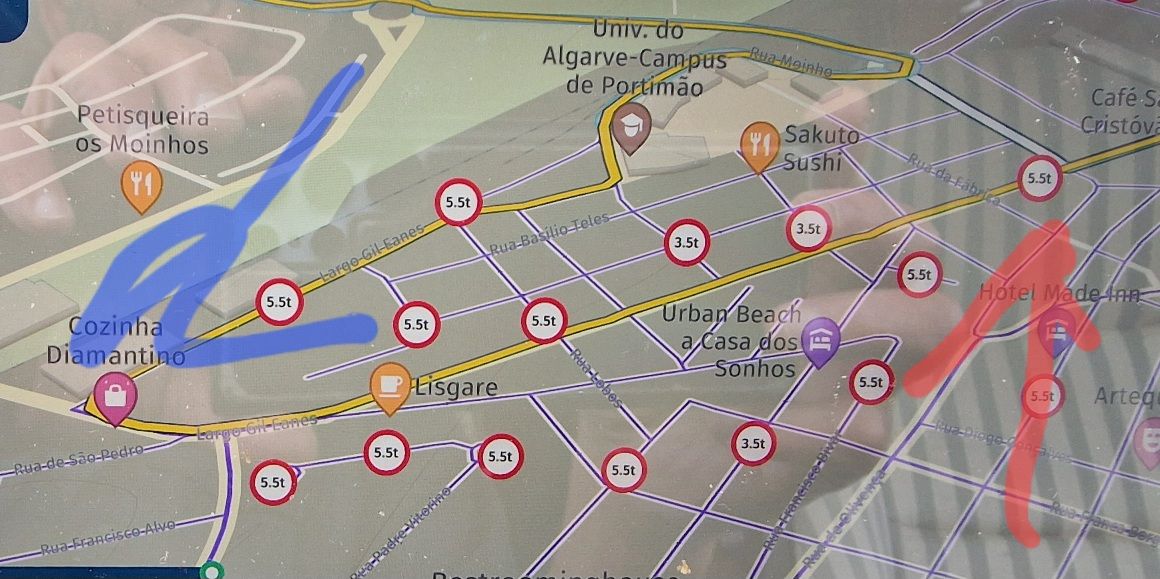
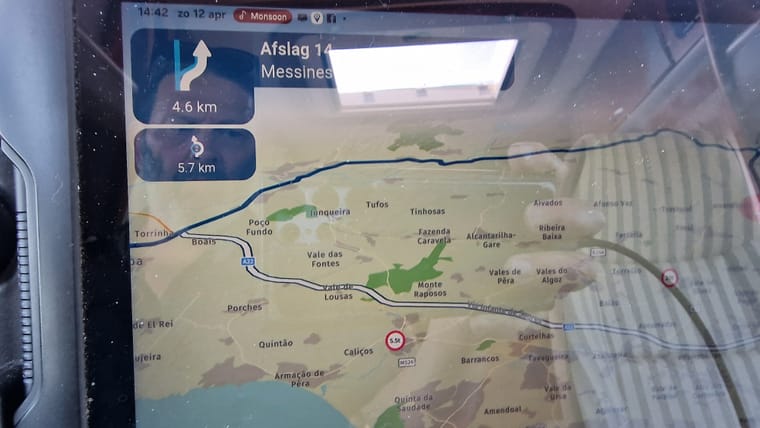
    @Nick-Carthew I opened the navigation app and also there these weight and length indicators are gone. So that would indicate that the camperprofile does not show these indicators, whether I use the web planner or the navigation app. But surprise surprise I made some screenshots during my trip. These were taken in the south of Portugal, with the camper profile on, on the 12th and 12th of April. In no way is there a layer with these weight and length indicators. So how would you explain that?
    20260412_134221.jpg
    20260413_110909.jpg

    Nick Carthew
    Nick Carthew
    Nick Carthew
    RouteXpert
    wrote last edited by
    #22

    @Travellexxie Maybe you should be asking Corjan, I was merely making a suggestion trying to help you find a solution.

    Always willing to help if I can.
    Triumph Tiger 1200 XRT called Tina.
    MRA Navigation Next and SilverFox BJ8

    1 Reply Last reply
    0
    • HABVEN aka MrMRA
      HABVEN aka MrMRA
      HABVEN aka MrMRA
      Valued contributor
      wrote last edited by
      #23

      Shortly after the introduction of the camper profile, I conducted a training session for the Camper Club Netherlands; at that time, the signs on the map became visible as soon as you selected the camper profile, meaning the logistics map layer was automatically loaded—just as it was with the truck profile.

      BMW BMW Connected Ride Navigator/Garmin Zumo XT3/XT2/XT//Tourstart/ MyRouteapp (The App)/...
      Een dag niet gelachen is een dag niet geleefd / Een route is net zo goed als deze uitgezet is.

      Travellexxie 1 Reply Last reply
      0
      • HABVEN aka MrMRA HABVEN aka MrMRA

        Shortly after the introduction of the camper profile, I conducted a training session for the Camper Club Netherlands; at that time, the signs on the map became visible as soon as you selected the camper profile, meaning the logistics map layer was automatically loaded—just as it was with the truck profile.

        Travellexxie
        Travellexxie
        Travellexxie
        Valued contributor
        wrote last edited by
        #24

        @Hans-van-de-Ven-MR.MRA thank you for the confirmation!

        Met andere apps maak je een route, met MRA componeer je een route!

        Ducati Monster 1200 met Garmin Zümo XT
        Fiat 124 Spider/Camper Dethleffs met Navigation-App op Samsung Tab Active4 Pro
        MRA Lifetime Gold

        1 Reply Last reply
        0
        • Corjan Meijerink
          Corjan Meijerink
          Corjan Meijerink
          Developer
          wrote last edited by
          #25

          Camper profile does not open the logistics layer since 2024-09-25.
          If we're still talking about the website.

          1 Reply Last reply
          0
          • Travellexxie Travellexxie

            @Nick-Carthew no I didn't, I have used the camperprofile plenty of times during my 3 months travel through Spain and Portugal, The "weight-indicator" was there when I started this profile.
            Robineke
            Robineke
            Robineke
            wrote last edited by
            #26

            @Travellexxie I can see your printscreens and both are in here-logistic mode as the maps are, except for signs, identical.
            As mentioned I have in both modes weight limitation signs. Funny, but not nice, you do not have it.
            I do not know how to resolve this except for deleting and new downloading of the app.

            1 Reply Last reply
            0
            • Con Hennekens
              Con Hennekens
              Con Hennekens
              Alpha tester
              wrote last edited by
              #27

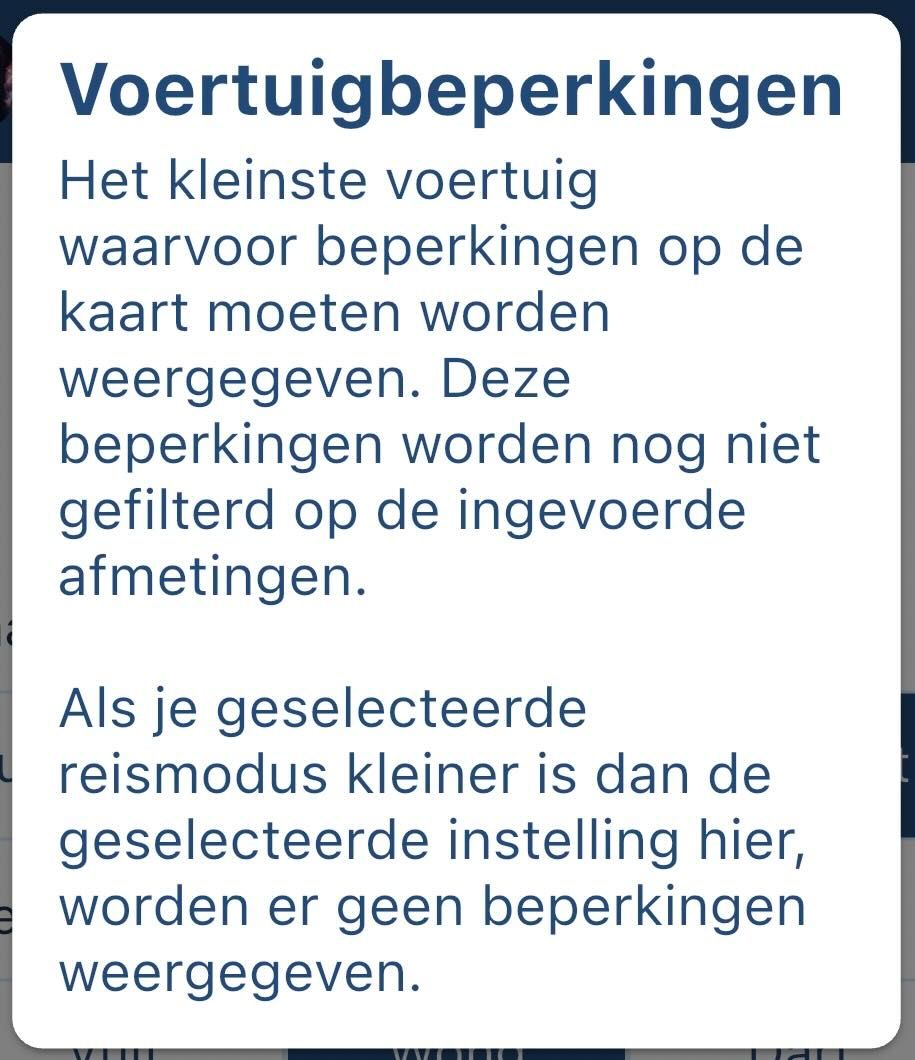
              Guys, In the mapsettings there is a setting for at what level you want restrictions to be shown. If you set that to truck, it will not be shown for campers.
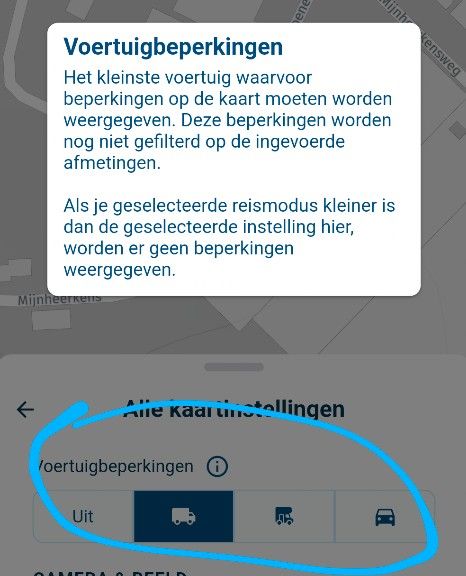
              image.jpeg

              I am just an enthusiastic MRA user, and hope you will be one too!

              Most motorcycle problems are caused by the nut that connects the handlebar to the saddle.

              Check out RideSleepRepeat.eu, a biker community for sharing stays across Europe

              Robineke 2 Replies Last reply
              0
              • Con Hennekens Con Hennekens

                Guys, In the mapsettings there is a setting for at what level you want restrictions to be shown. If you set that to truck, it will not be shown for campers.

                image.jpeg

                Robineke
                Robineke
                Robineke
                wrote last edited by
                #28

                @Con-Hennekens thank you. extremely valuable contribution. Perfect👍

                1 Reply Last reply
                0
                • Con Hennekens Con Hennekens

                  Guys, In the mapsettings there is a setting for at what level you want restrictions to be shown. If you set that to truck, it will not be shown for campers.

                  image.jpeg

                  Robineke
                  Robineke
                  Robineke
                  wrote last edited by
                  #29

                  @Con-Hennekens
                  @corjan-meijerink
                  Waarom dient het voertuig type elke keer bij opstarten van een route te worden aangevinkt? Ergens opslaan in geheugen zou veel handiger zijn toch?

                  Con Hennekens 1 Reply Last reply
                  0
                  • Robineke Robineke

                    @Con-Hennekens
                    @corjan-meijerink
                    Waarom dient het voertuig type elke keer bij opstarten van een route te worden aangevinkt? Ergens opslaan in geheugen zou veel handiger zijn toch?

                    Con Hennekens
                    Con Hennekens
                    Con Hennekens
                    Alpha tester
                    wrote last edited by
                    #30

                    @Robineke, Misschien begrijp ik niet precies wat je bedoeld, maar je kunt per route aangeven welk profiel en zelfs voor welk voertuig in je virtuele garage de route gepland is. Dat heeft dan ook weer zijn weerslag op de statistieken. Je kunt dat vanuit de app instellen door vóór je "navigeer" kiest, het menu iets omhoog te swipen, en te kiezen voor Route informatie.

                    I am just an enthusiastic MRA user, and hope you will be one too!

                    Most motorcycle problems are caused by the nut that connects the handlebar to the saddle.

                    Check out RideSleepRepeat.eu, a biker community for sharing stays across Europe

                    Robineke 1 Reply Last reply
                    0
                    • Con Hennekens Con Hennekens

                      @Robineke, Misschien begrijp ik niet precies wat je bedoeld, maar je kunt per route aangeven welk profiel en zelfs voor welk voertuig in je virtuele garage de route gepland is. Dat heeft dan ook weer zijn weerslag op de statistieken. Je kunt dat vanuit de app instellen door vóór je "navigeer" kiest, het menu iets omhoog te swipen, en te kiezen voor Route informatie.

                      Robineke
                      Robineke
                      Robineke
                      wrote last edited by
                      #31

                      @Con-Hennekens Beste Cor,
                      Je hebt het helemaal juist en je begrijpt het goed.
                      voordat ik navigeer kies kijk ik wat er voor reismodus is geslecteerd. In mijn geval staat dit altijd op camper.
                      Dan kies ik navigeer en kom in het volgende scherm. Dan kies ik start en ben ik gereed om te navigeren.
                      Dan kies ik de driepuntjes en rechtboven de kaartstijl. En wat blijkt: Voertuig beperking staat UIT.
                      Vandaar mijn vraag hoe krijg ik het zo dat dit automatisch wordt overgenomen alvorens Navigeer te kiezen.
                      Wat denk jij??

                      Rob Verhoeff 1 Reply Last reply
                      0
                      • Robineke Robineke

                        @Con-Hennekens Beste Cor,
                        Je hebt het helemaal juist en je begrijpt het goed.
                        voordat ik navigeer kies kijk ik wat er voor reismodus is geslecteerd. In mijn geval staat dit altijd op camper.
                        Dan kies ik navigeer en kom in het volgende scherm. Dan kies ik start en ben ik gereed om te navigeren.
                        Dan kies ik de driepuntjes en rechtboven de kaartstijl. En wat blijkt: Voertuig beperking staat UIT.
                        Vandaar mijn vraag hoe krijg ik het zo dat dit automatisch wordt overgenomen alvorens Navigeer te kiezen.
                        Wat denk jij??

                        Rob Verhoeff
                        Rob Verhoeff
                        Rob Verhoeff
                        Alpha tester
                        wrote last edited by Rob Verhoeff
                        #32

                        @Robineke said:

                        hoe krijg ik het zo dat dit automatisch wordt overgenomen alvorens Navigeer te kiezen.

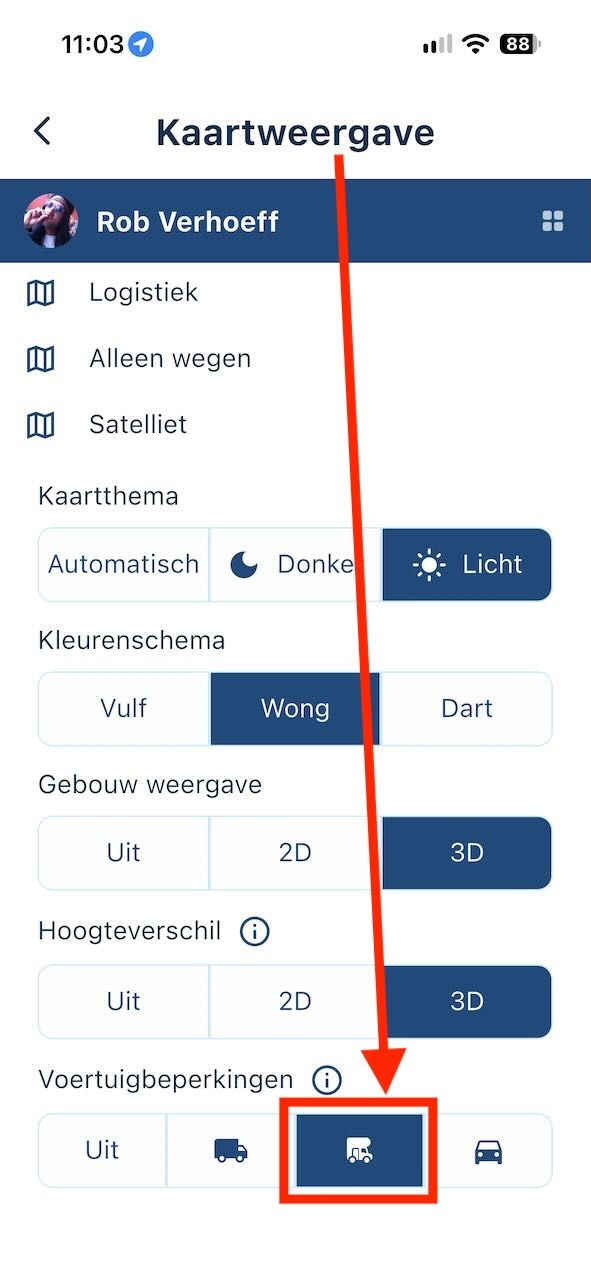
                        Het is een aanname van mij dat je ook met de beta (v6) navigeert? Dan vermoed ik dat je in dit het scherm nog niet hebt aangegeven dat de app altijd rekening moet houden met deze voertuigbeperkingen:
                        IMG_7657.jpeg

                        IMG_7658.jpeg

                        🏍️ BMW K1600GT-P (2013) | Nolan N100-5 with Sena 30K
                        📱 iOS on iPhone 13 & 16 (mounted on Quadlock or AliExpress extention on BMW-cradle)
                        🚙 Apple CarPlay in VW T-Roc
                        💻 Routelab on MacBook Air & iMac (Golden Gate & Ventura)

                        1 Reply Last reply
                        0

                        Hello! It looks like you're interested in this conversation, but you don't have an account yet.

                        Getting fed up of having to scroll through the same posts each visit? When you register for an account, you'll always come back to exactly where you were before, and choose to be notified of new replies (either via email, or push notification). You'll also be able to save bookmarks and upvote posts to show your appreciation to other community members.

                        With your input, this post could be even better 💗

                        Register Login
                        Reply
                        • Reply as topic
                        Log in to reply
                        • Oldest to Newest
                        • Newest to Oldest
                        • Most Votes


                        • 1
                        • 2
                        ACTIVE USERS
                        Nick Carthew
                        Nick Carthew
                        Corjan Meijerink
                        Corjan Meijerink
                        Rob Verhoeff
                        Rob Verhoeff
                        Robineke
                        Robineke
                        Con Hennekens
                        Con Hennekens
                        Travellexxie
                        Travellexxie
                        HABVEN aka MrMRA
                        HABVEN aka MrMRA
                        POPULAR TOPICS
                        • [EN] MyRoute-app Routeplanner Next (Beta)
                          Corjan Meijerink
                          Corjan Meijerink
                          9
                          126
                          12.1k

                        • LAN004 - Route Import filetypes
                          Corjan Meijerink
                          Corjan Meijerink
                          0
                          13
                          36

                        • Route line is not easy to follow on map
                          Corjan Meijerink
                          Corjan Meijerink
                          0
                          6
                          22

                        • Issues on one-way streets when reversing routes
                          b0hd1
                          b0hd1
                          0
                          10
                          39

                        • Custom POI color and icons
                          Nick Carthew
                          Nick Carthew
                          0
                          5
                          24

                        • F004 MRA Navigation Error
                          Hubert Thoring
                          Hubert Thoring
                          0
                          5
                          21

                        • Probleem met eigen Stay
                          Albert van den Elsen
                          Albert van den Elsen
                          0
                          5
                          17

                        • Reclame van Navigation Next blokkeert de navigatie.
                          Rob Verhoeff
                          Rob Verhoeff
                          0
                          4
                          125

                        MY GROUPS
                        • Login

                        • Login or register to search.
                        • First post
                          Last post
                        0
                        • Categories
                        • Recent
                        • Popular
                        • Support
                        • MyRoute-app