Skip to content
  • Categories
  • Recent
  • Popular
  • Support
  • MyRoute-app
Collapse
Brand Logo

MRA Community Forum

  1. Home
  2. Routes & Tracks
  3. New Zealand Routes

New Zealand Routes

Scheduled Pinned Locked Moved Routes & Tracks
22 Posts 5 Posters 2.1k Views 1 Watching
  • Oldest to Newest
  • Newest to Oldest
  • Most Votes
Reply
  • Reply as topic
Log in to reply
This topic has been deleted. Only users with topic management privileges can see it.
  • BertM BertM

    @bull-tahr To get your routes visible in your route libary you must use the Car profile and not the motor profile, this is a bug in the program that hopefully will be solved in the upcomming version.

    routes are looking good, one comments and this is what I prefer.
    On the below you have the stop as a Via point, I personal do not use via points for that, as it is a choice to stop. with a via point you must always hit the point otherwise the program will always lead you back to that point. To hit the point on a busy carpark will be a challange.
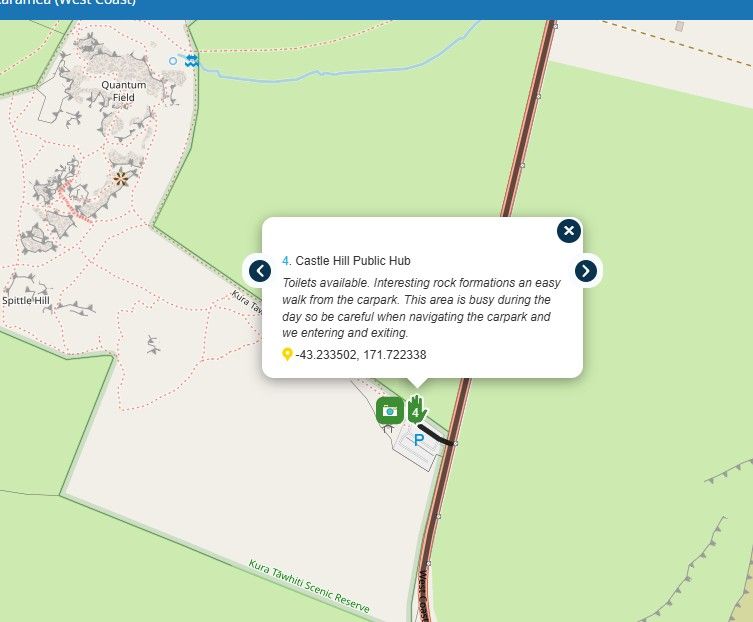

    image.jpeg

    Marinus van Deudekom
    Marinus van Deudekom
    Marinus van Deudekom
    RouteXpert
    wrote last edited by
    #13

    @BertM said:

    To get your routes visible in your route libary you must use the Car profile and not the motor profile, this is a bug in the program that hopefully will be solved in the upcomming version.

    To see the routes of a friend you must be friends and the routes must be set to at least friends to see them in your friends library.
    The car or bike profile is of no interest.
    However if you use the bike profile bare in mind that those routes, once exported by the recipiënt to their nav can't be used since Garmin does not allow the bike profile. Therefore the carefully composed route will be recalculated by the Garmin and thus messed up.
    My advise use the car profile like all the RouteXperts do

    Honda Goldwing GL1500,
    Honda Silverwing GL 650
    DMD2 T865X 8 inch Android tablet using MRA next for navigation
    Garmin XT sold
    Samsung S24FE mounted on a Quadlock and using Android Auto in my car

    BertM 1 Reply Last reply
    0
    • Bull Tahr
      Bull Tahr
      Bull Tahr
      wrote last edited by
      #14

      Got that, Car Profile. Good to know. Cheers,
      Bull

      🎥 YouTube: https://www.youtube.com/@DustyVisorMotorcycles
      🌐 https://linktr.ee/dustyvisor
      📘 Facebook: https://www.facebook.com/dustyvisormotorcycles/
      📷 Instagram: https://www.instagram.com/dustyvisormotorcycles/

      1 Reply Last reply
      0
      • Marinus van Deudekom Marinus van Deudekom

        @BertM said:

        To get your routes visible in your route libary you must use the Car profile and not the motor profile, this is a bug in the program that hopefully will be solved in the upcomming version.

        To see the routes of a friend you must be friends and the routes must be set to at least friends to see them in your friends library.
        The car or bike profile is of no interest.
        However if you use the bike profile bare in mind that those routes, once exported by the recipiënt to their nav can't be used since Garmin does not allow the bike profile. Therefore the carefully composed route will be recalculated by the Garmin and thus messed up.
        My advise use the car profile like all the RouteXperts do

        BertM
        BertM
        BertM
        wrote last edited by
        #15

        @Marinus-van-Deudekom said:

        To see the routes of a friend you must be friends and the routes must be set to at least friends to see them in your friends library.
        The car or bike profile is of no interest.

        I do not know why you mentioned this as it is confirmed a bug in the webapplication.

        @bull-tahr :
        if you want to get the routes visible in your libary you have to set them to "Public", use the Car profile AND you have to publish you route.
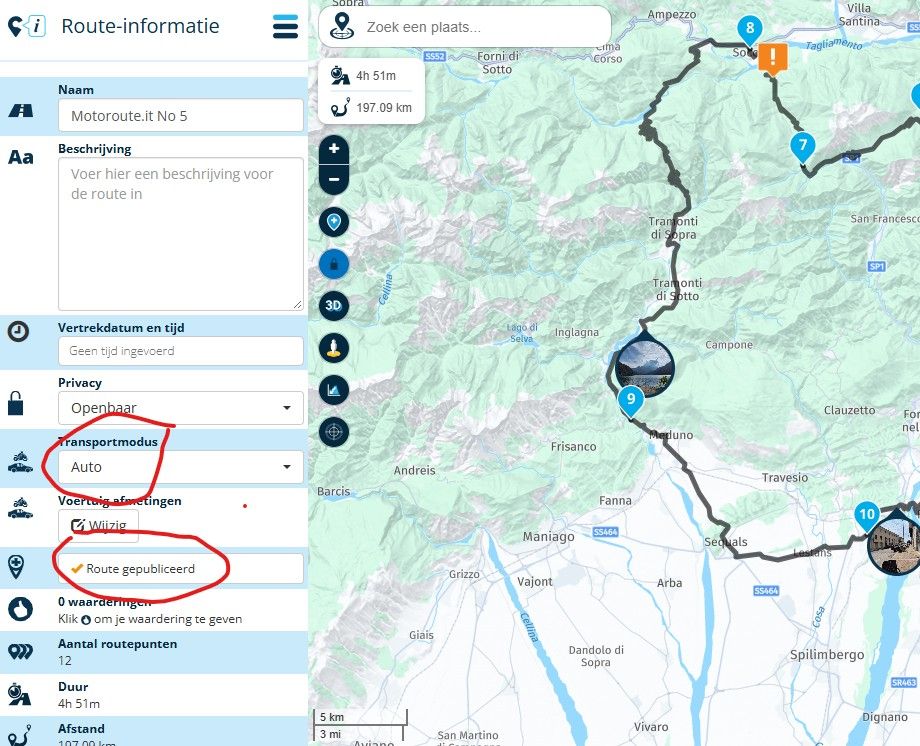
        image.jpeg
        your libary is still not visable so I presume you have not published your routes.
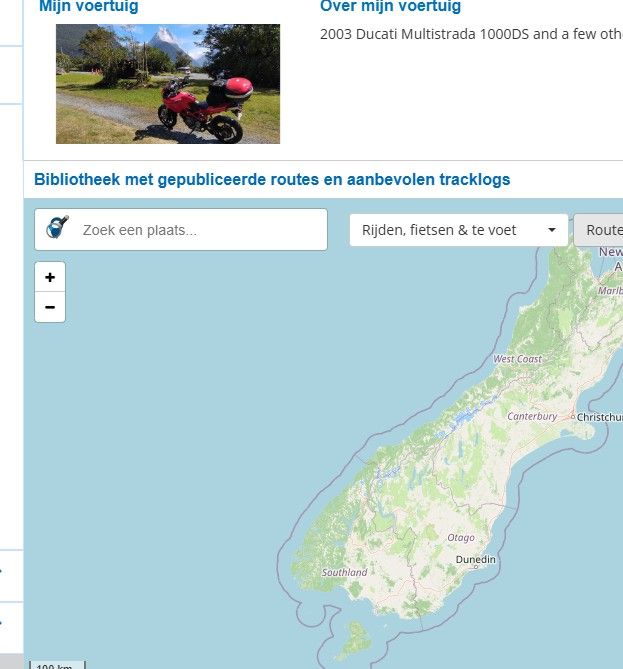
        image.jpeg

        I can see you still have some routes with the motor profile
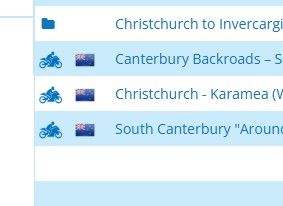
        image.jpeg

        if the above criteria are met , you should see the routes in your profile:
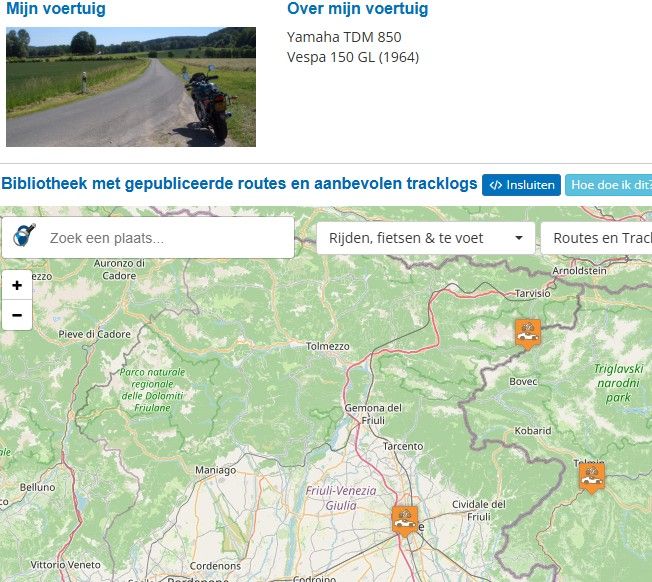
        image.jpeg

        To prove the remark about the bug, when the routes are visible in your libary, switch one back to the "motor" modus and you will see it will not pop-up anymore in your libary.
        Bull Tahr Marinus van Deudekom 2 Replies Last reply
        0
        • BertM BertM

          @Marinus-van-Deudekom said:

          To see the routes of a friend you must be friends and the routes must be set to at least friends to see them in your friends library.
          The car or bike profile is of no interest.

          I do not know why you mentioned this as it is confirmed a bug in the webapplication.

          @bull-tahr :
          if you want to get the routes visible in your libary you have to set them to "Public", use the Car profile AND you have to publish you route.

          image.jpeg
          your libary is still not visable so I presume you have not published your routes.

          image.jpeg

          I can see you still have some routes with the motor profile
          image.jpeg

          if the above criteria are met , you should see the routes in your profile:

          image.jpeg

          To prove the remark about the bug, when the routes are visible in your libary, switch one back to the "motor" modus and you will see it will not pop-up anymore in your libary.

          Bull Tahr
          Bull Tahr
          Bull Tahr
          wrote last edited by
          #16

          @BertM Thanks for all that. The South Island folder is now all published, car mode and public to view. In library tab I only see 30 routes in New Zealand all RouteXpert, none of mine. Maybe it's Route Expert only or I am on the basic account ATM.... Either way, you should be able to see the South Island folder and routes now.
          Thanks for all the help!

          🎥 YouTube: https://www.youtube.com/@DustyVisorMotorcycles
          🌐 https://linktr.ee/dustyvisor
          📘 Facebook: https://www.facebook.com/dustyvisormotorcycles/
          📷 Instagram: https://www.instagram.com/dustyvisormotorcycles/

          1 Reply Last reply
          0
          • BertM BertM

            @Marinus-van-Deudekom said:

            To see the routes of a friend you must be friends and the routes must be set to at least friends to see them in your friends library.
            The car or bike profile is of no interest.

            I do not know why you mentioned this as it is confirmed a bug in the webapplication.

            @bull-tahr :
            if you want to get the routes visible in your libary you have to set them to "Public", use the Car profile AND you have to publish you route.

            image.jpeg
            your libary is still not visable so I presume you have not published your routes.

            image.jpeg

            I can see you still have some routes with the motor profile
            image.jpeg

            if the above criteria are met , you should see the routes in your profile:

            image.jpeg

            To prove the remark about the bug, when the routes are visible in your libary, switch one back to the "motor" modus and you will see it will not pop-up anymore in your libary.

            Marinus van Deudekom
            Marinus van Deudekom
            Marinus van Deudekom
            RouteXpert
            wrote last edited by
            #17

            @BertM said:

            @Marinus-van-Deudekom said:

            To see the routes of a friend you must be friends and the routes must be set to at least friends to see them in your friends library.
            The car or bike profile is of no interest.

            I do not know why you mentioned this as it is confirmed a bug in the webapplication.

            @bull-tahr :
            if you want to get the routes visible in your libary you have to set them to "Public", use the Car profile AND you have to publish you route.

            image.jpeg
            your libary is still not visable so I presume you have not published your routes.

            image.jpeg

            I can see you still have some routes with the motor profile
            image.jpeg

            if the above criteria are met , you should see the routes in your profile:

            image.jpeg

            To prove the remark about the bug, when the routes are visible in your libary, switch one back to the "motor" modus and you will see it will not pop-up anymore in your libary.
            I did not

            Honda Goldwing GL1500,
            Honda Silverwing GL 650
            DMD2 T865X 8 inch Android tablet using MRA next for navigation
            Garmin XT sold
            Samsung S24FE mounted on a Quadlock and using Android Auto in my car

            BertM 1 Reply Last reply
            0
            • Marinus van Deudekom Marinus van Deudekom

              @BertM said:

              @Marinus-van-Deudekom said:

              To see the routes of a friend you must be friends and the routes must be set to at least friends to see them in your friends library.
              The car or bike profile is of no interest.

              I do not know why you mentioned this as it is confirmed a bug in the webapplication.

              @bull-tahr :
              if you want to get the routes visible in your libary you have to set them to "Public", use the Car profile AND you have to publish you route.

              image.jpeg
              your libary is still not visable so I presume you have not published your routes.

              image.jpeg

              I can see you still have some routes with the motor profile
              image.jpeg

              if the above criteria are met , you should see the routes in your profile:

              image.jpeg

              To prove the remark about the bug, when the routes are visible in your libary, switch one back to the "motor" modus and you will see it will not pop-up anymore in your libary.
              I did not

              BertM
              BertM
              BertM
              wrote last edited by
              #18

              @Marinus-van-Deudekom said:

              @BertM said:

              @Marinus-van-Deudekom said:

              To see the routes of a friend you must be friends and the routes must be set to at least friends to see them in your friends library.
              The car or bike profile is of no interest.

              I do not know why you mentioned this as it is confirmed a bug in the webapplication.

              What the word says: it is conformed by the Developers that it is a bug in the system.

              If you want to publish your routes in the libary and do not know this bug and as @bull-tahr use the motor mode they will never show up.
              It that simple.

              1 Reply Last reply
              0
              • Bull Tahr
                Bull Tahr
                Bull Tahr
                wrote last edited by
                #19

                Try them now Bert, All edited to the settings you mentioned... Thanks.

                🎥 YouTube: https://www.youtube.com/@DustyVisorMotorcycles
                🌐 https://linktr.ee/dustyvisor
                📘 Facebook: https://www.facebook.com/dustyvisormotorcycles/
                📷 Instagram: https://www.instagram.com/dustyvisormotorcycles/

                BertM 1 Reply Last reply
                0
                • Bull Tahr Bull Tahr

                  Try them now Bert, All edited to the settings you mentioned... Thanks.

                  BertM
                  BertM
                  BertM
                  wrote last edited by BertM
                  #20

                  @Bull-Tahr said:

                  Try them now Bert, All edited to the settings you mentioned... Thanks.

                  @bull-tahr

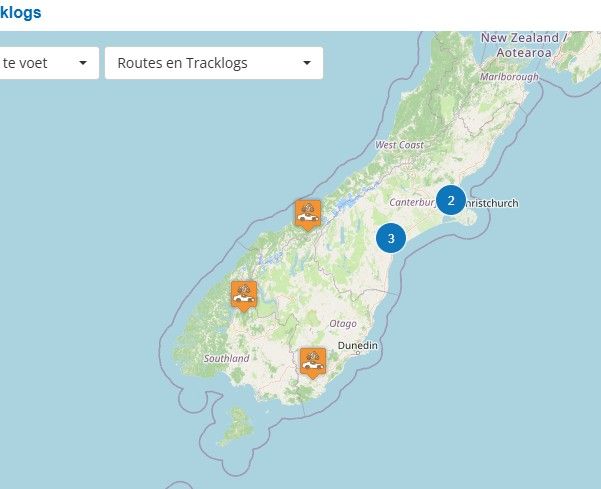
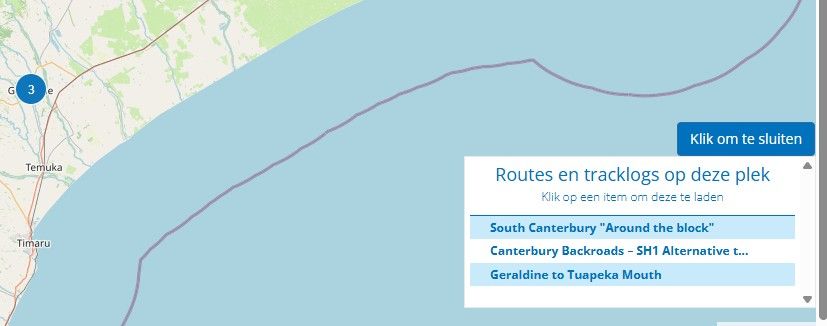
                  Succes! I can see the routes now 😉
                  image.jpeg

                  image.jpeg

                  1 Reply Last reply
                  0
                  • BertM
                    BertM
                    BertM
                    wrote last edited by
                    #21

                    @bull-tahr

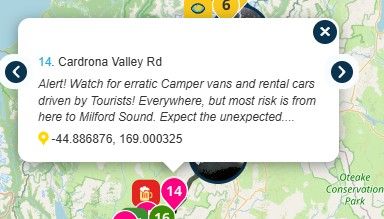
                    LOL
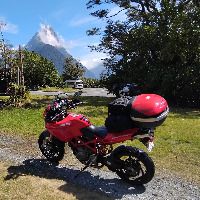
                    Clear how the Kiwi's think of our driving 🙂

                    image.jpeg

                    1 Reply Last reply
                    0
                    • Marinus van Deudekom
                      Marinus van Deudekom
                      Marinus van Deudekom
                      RouteXpert
                      wrote last edited by
                      #22

                      Maybe I have magical fingers because I could see all of his routes from the start

                      Honda Goldwing GL1500,
                      Honda Silverwing GL 650
                      DMD2 T865X 8 inch Android tablet using MRA next for navigation
                      Garmin XT sold
                      Samsung S24FE mounted on a Quadlock and using Android Auto in my car

                      1 Reply Last reply
                      0

                      Hello! It looks like you're interested in this conversation, but you don't have an account yet.

                      Getting fed up of having to scroll through the same posts each visit? When you register for an account, you'll always come back to exactly where you were before, and choose to be notified of new replies (either via email, or push notification). You'll also be able to save bookmarks and upvote posts to show your appreciation to other community members.

                      With your input, this post could be even better 💗

                      Register Login

                      Reply
                      • Reply as topic
                      Log in to reply
                      • Oldest to Newest
                      • Newest to Oldest
                      • Most Votes


                      • 1
                      • 2
                      ACTIVE USERS
                      Marinus van Deudekom
                      Marinus van Deudekom
                      Nick Carthew
                      Nick Carthew
                      Bull Tahr
                      Bull Tahr
                      BertM
                      BertM
                      A Former User?
                      [[global:former-user]]
                      POPULAR TOPICS
                      • A12 Group Trip – How Does It Work? ... Beta Planner and Next App
                        Stefan Hummelink
                        Stefan Hummelink
                        0
                        20
                        42

                      • screen
                        Jörgen
                        Jörgen
                        0
                        7
                        35

                      • Live tracking
                        Corjan Meijerink
                        Corjan Meijerink
                        11
                        7
                        55

                      • still no (Beta) Update 6.0.0 -514
                        Marinus van Deudekom
                        Marinus van Deudekom
                        0
                        13
                        203

                      • Where are the deleted routes?
                        Corjan Meijerink
                        Corjan Meijerink
                        0
                        7
                        32

                      • Navigation Next - wie is waar tijdens de dagrit ?
                        Corjan Meijerink
                        Corjan Meijerink
                        1
                        6
                        85

                      • Routenplaner on iPad
                        Aiello antonino
                        Aiello antonino
                        0
                        11
                        738

                      • Rondrit generator ervaring
                        AWDC LAO
                        AWDC LAO
                        1
                        5
                        143

                      MY GROUPS
                      • Login

                      • Login or register to search.
                      • First post
                        Last post
                      0
                      • Categories
                      • Recent
                      • Popular
                      • Support
                      • MyRoute-app