Another Erratic Routing Incident
-

I was out yesterday putting some miles on my new BMW 1300GSA for break-in. I put together a route in an area I've ridden often.
Here it is: https://www.myrouteapp.com/route/open/13878114
As I approached waypoint #8, I noticed that it was going to have me turn left off the main road to a parallel side road (Calamigos Rd) that wasn't part of my route. below is a screen shot that I stopped and took:
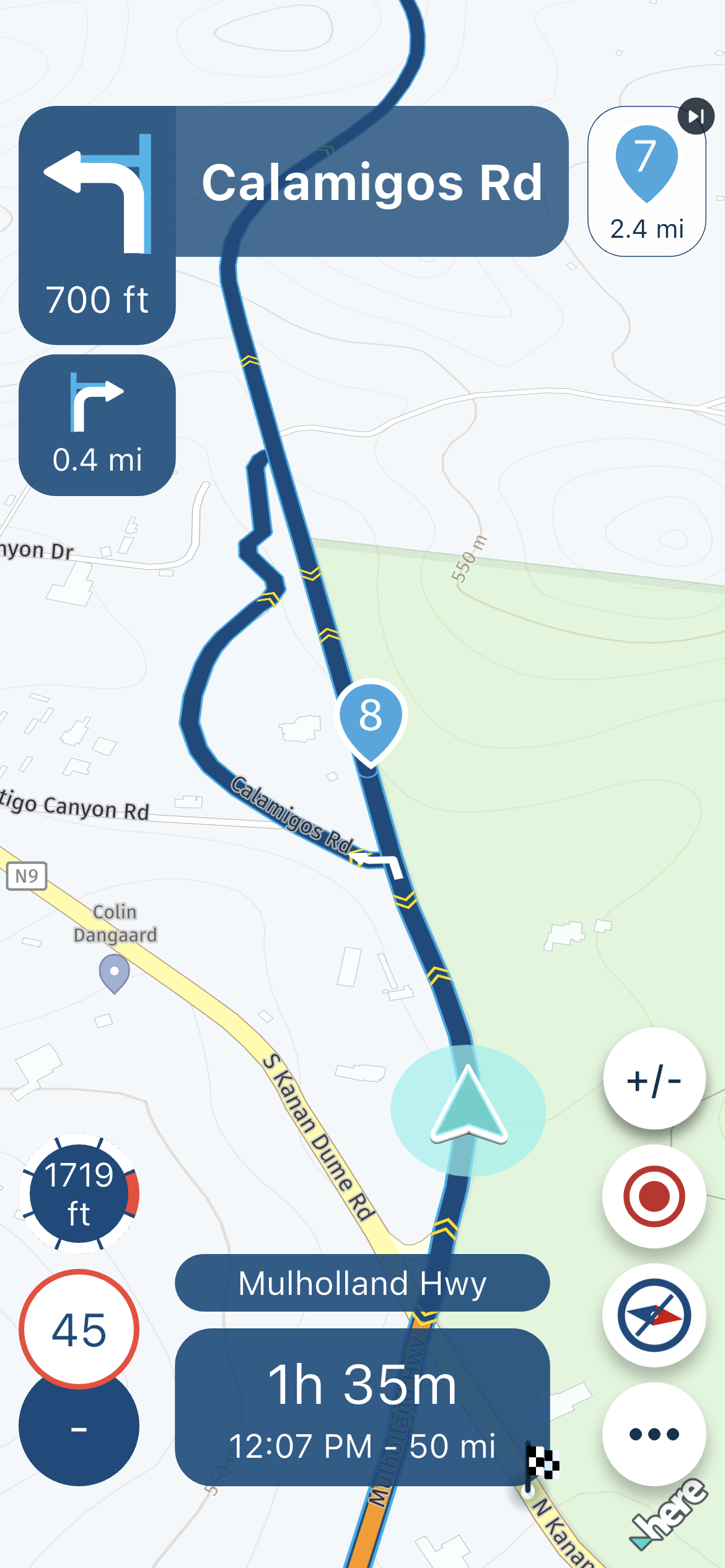
Again, I know the area, and I know this scenic diversion wasn't intentionally part of the route. I ignored the left-hand turn, and the route continued without incident. When I got home, I double checked the route for anything that obviously would have caused this but came up empty on both the route created in Routeplanner and the route synced to my phone. BTW, the route executed online.
Any thoughts would be appreciated.
-

It looks to me like you missed a waypoint and MRA is routing back to the missed waypoint.
2010 GL1800 Goldwing using Samsung Galaxy S20 5G Android 13.
-
It looks to me like you missed a waypoint and MRA is routing back to the missed waypoint.
@RetiredWingMan Interesting. Indeed, it seems to be showing reference to waypoint #7. The problem is that #7 is on the same road (Mulholland Hwy) as #8, and I 100% passed it just a few minutes before. It's a rural area, and even if Dementia due to advanced age is kicking in
 there is no other road option where #7 could have been missed, which again, I'm positive didn't happen.
The only thing I can speculate is that the terrain for #7 is very twisty/technical, so maybe HERE didn't calculate it correctly. But the waypoint is square on the road, so I don't know what I could have done different. I guess I could delete waypoint#7 and re-ride that segment to verify.....
-
Update: I went back out today to see if I could repeat the behavior related to waypoint#7. I fired up the route and followed it without deviation. Just like I did the first time around.
And I got the exact same result. It's repeatable! MRA/HERE thought I had missed waypoint #7 (I didn't) and I was directed to turn around at Calamigos Rd to return.
In preparation for this expected outcome, I copied the route and moved #7 further up the road (closer to #8) to see if it would change HERE calculation behavior.
https://www.myrouteapp.com/route/open/13885843
I re-ran the modified route, the new #7 calculated correctly, and I reached #8 without incident.
This isn't the first time I've encountered this kind of behavior in MRA -- Both with the Routeplanner (using HERE as the base) and the phone app. I love MRA Routeplanner and will continue to use it with OSM as the base map. It's very stable. Since I mostly use Garmin GPS units for route execution, no problems. As far as the app, I'm out. I can't have this strange HERE behavior mess a route up. Especially when I'm leading a larger group ride. Hopefully, it can be dealt with at some future point.
-

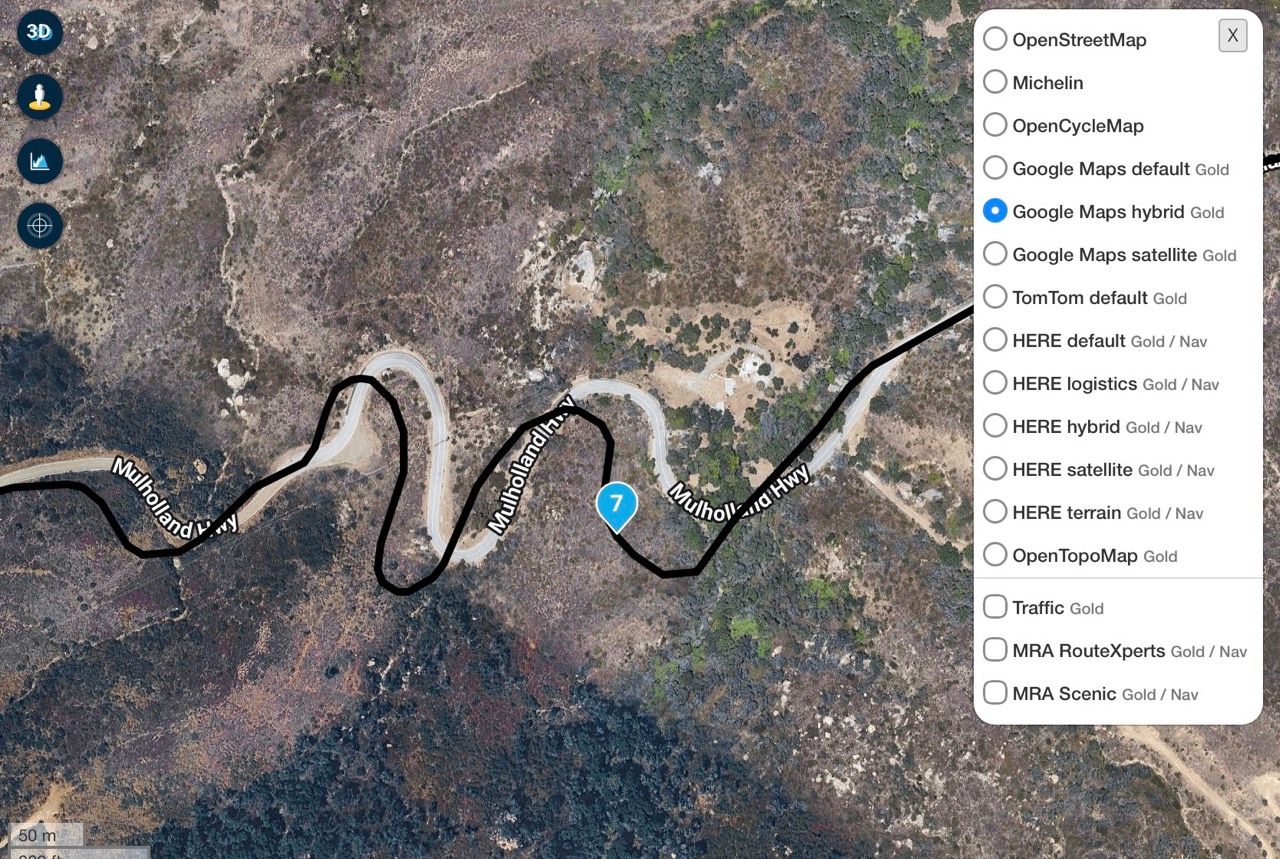
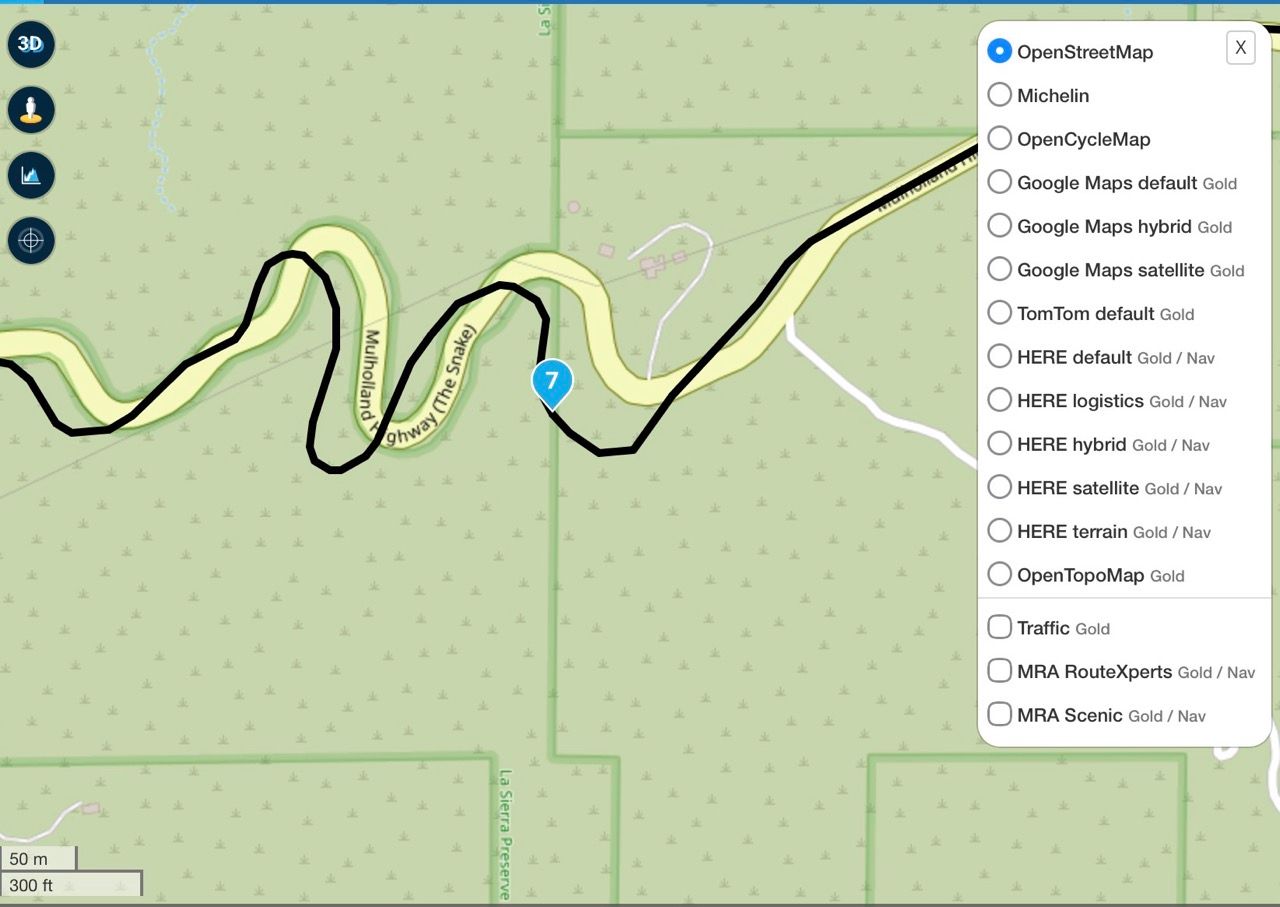
The cause is the discrepancy between the road layout on the HERE map and the actual situation. There is an error in the road layout on the map. See screenshot. If you switch on the OSM or Google Maps overlay, you can see this. The waypoint #7 is in the middle of nowhere and cannot be reached by car or motorcycle.
-
@reinhard-32 Yes, I suspected it had something to do with the placement of waypoint #7 in the curvy/technical section of Mulholland Highway. I didn't take the rigorous investigative step you presented to compare against the other map overlays or use the Compare option in Toolkit. It confirms why moving #7 to a section where HERE is in sync with the actual road fixes the problem. Thanks.
It's ironic that all the maps except HERE are in sync with the actual road layout. Should I be surprised?
I'm not an expert in the internal workings of MRA or HERE. But intuitively, it seems that if HERE in Routeplanner thinks the placement of #7 is OK, that HERE at calculation time in the App would also be OK with the placement. That's obviously not the case. My belief as a user is that I should not have to be concerned with inner workings at this level, but....
Moving forward, one option (during route development) is to always compare to the other overlays and never place a HERE waypoint where there is a map discrepancy. That could work in the majority of cases, but what if it doesn't? There may be situations where a waypoint is needed, but I don't have the option of simply relocating it further up the road. Since I have to use HERE for any route executed within the App, what then?
This is my dilemma and frustration. Some might say "I never have this problem", which might be true. However, many of the rural areas of the mountainous western US present unique challenges. My solution in MRA Routeplanner has been to develop using the OSM base map, and then load the GPX into my Garmin XT for route execution. Over the past year, that process has worked without issue.
This is actually the first time in almost a year since I've tried the App again. I've been toying with the idea of migrating to CarPlay, so I thought I'd try the App out again first. My impression right now is that MRA w/HERE may not be the right solution for me.
-
In my opinion: The point is on the (HERE) road so if the cursor while driving was on the (HERE) road too, then the point (7) should have been registered. Of course I dont know if this is possible to implement.
I have had a similar but different case : the app registered that i had reached a waypoint which was slightly off the road but the navigation did not so it sent me back (despite the fact that the new target point was the next). The logic that checks wether a waypoint has been hit seems loosly connected to the navigation logic.
-
In my opinion: The point is on the (HERE) road so if the cursor while driving was on the (HERE) road too, then the point (7) should have been registered. Of course I dont know if this is possible to implement.
I have had a similar but different case : the app registered that i had reached a waypoint which was slightly off the road but the navigation did not so it sent me back (despite the fact that the new target point was the next). The logic that checks wether a waypoint has been hit seems loosly connected to the navigation logic.
@Herman-Veldhuizen I don't know where the cursor was approaching point (7). It's a very technical section of Mulholland Highway that demands 100% attention on the road. The hairpins of that section are incredibly demanding, made even more challenging with a 9% upwards grade. It's a Butler Maps G2 rated section that I would argue probably deserves the highest level G1.
To your point, HERE does seem to have oddities. Whatever the situation, the route developer should be alerted of potential problems before actually executing it. Being hit with strange behavior while on the route is absolutely the wrong time. Using the Garmin GPS, I absolutely know ahead of time if the unit will treat the route differently (at execution) than what I developed. I sometimes have to do more than one iteration of adjustment before finalizing the route but it's worth the effort.
-
This issue would have been less of an issue if the app had a way to automatically skip waypoint(s) independent from how far the next waypoint is.
-
@Herman-Veldhuizen I don't know where the cursor was approaching point (7). It's a very technical section of Mulholland Highway that demands 100% attention on the road. The hairpins of that section are incredibly demanding, made even more challenging with a 9% upwards grade. It's a Butler Maps G2 rated section that I would argue probably deserves the highest level G1.
To your point, HERE does seem to have oddities. Whatever the situation, the route developer should be alerted of potential problems before actually executing it. Being hit with strange behavior while on the route is absolutely the wrong time. Using the Garmin GPS, I absolutely know ahead of time if the unit will treat the route differently (at execution) than what I developed. I sometimes have to do more than one iteration of adjustment before finalizing the route but it's worth the effort.

@John-S-Parry my tip would be not to place points on twisty sections of road because this is where the map data from the different map providers will differ the most
if you compare the maps from TomTom, OpenStreetMap & Here you will see that straight sections of road tend to be much more similar & accurate
plus having a point on the navigation device mid-corner is a distraction you don't needBlackView BV7100, Android 12
Navigate "Routes as Tracks" in Offline mode with Offline Maps
No Wifi, no internet, no interruptions, works well -
@John-S-Parry my tip would be not to place points on twisty sections of road because this is where the map data from the different map providers will differ the most
if you compare the maps from TomTom, OpenStreetMap & Here you will see that straight sections of road tend to be much more similar & accurate
plus having a point on the navigation device mid-corner is a distraction you don't need
@Brian-McG Good suggestion, and I agree. That's why in my second iteration, linked in post#4, I moved point#7 further up the road to the straight area where the map and the route line converged again. For good MRA practice, I'll definitely be more conscious of this in the future.
I'm more concerned that the MRA route line and HERE map are out of sync. I use other phone apps (inRoute and OsmAnd) and I've never an issue where I place a waypoint/marker along the middle of a road. It shouldn't matter. In fact, OsmAnd has a "snap" feature to ensure the route line is attached to the road. Back to MRA, I trusted that what is OK in Routeplanner will sync accurately to the Next App without issue. Clearly that isn't always the case.
Again, I get what happened. It's a HERE issue, and the MRA developers seem to wash their hands of anything happening at that layer. I understand they have enough on their plate having to chase endlessly evolving CarPlay/Android Auto issues. I'll leave them at peace....
-
As an aside here, you can see from my original post (#1) that the app tried to turn me around to go back to waypoint #7. I checked my Navigation Functional Settings, and "Skip waypoints automatically" is set on ON.
It's been a while since I've used the app, so my memory on details is fuzzy here, but should I have been directed back to waypoint #7 with this setting on? I remember simply continuing past waypoint #8 and the route resumed as normal. Any clarification is appreciated.
-
@Brian-McG Good suggestion, and I agree. That's why in my second iteration, linked in post#4, I moved point#7 further up the road to the straight area where the map and the route line converged again. For good MRA practice, I'll definitely be more conscious of this in the future.
I'm more concerned that the MRA route line and HERE map are out of sync. I use other phone apps (inRoute and OsmAnd) and I've never an issue where I place a waypoint/marker along the middle of a road. It shouldn't matter. In fact, OsmAnd has a "snap" feature to ensure the route line is attached to the road. Back to MRA, I trusted that what is OK in Routeplanner will sync accurately to the Next App without issue. Clearly that isn't always the case.
Again, I get what happened. It's a HERE issue, and the MRA developers seem to wash their hands of anything happening at that layer. I understand they have enough on their plate having to chase endlessly evolving CarPlay/Android Auto issues. I'll leave them at peace....
@John-S-Parry I would say you only see the issue on MRA because MRA allows for a large number of map overlays & 3 different route calculation algorithms
this allows users to use whichever navigation device they wish while still using the very intuitive & easy to use MRA web planner
this was how MRA began it was a multi-platform planner long before it got into being a navigatorhow many other apps & navigation systems allow such a large variety of maps & route calculators
-
@brian-mcg I saw this issue on MRA because there is the discrepancy between the road layout on the HERE map and the actual location of the road itself. In the nutshell, there is an error in the road layout on the HERE map. With respect, the error on HERE has nothing to do with the overall architecture of the product. An error is an error, and I happened to run across it.
I agree with you that what makes MRA unique are the different Routeplanner base map options and overlays. Routeplanner in particular is an incredible product that I use for 90% of my desktop route creation. I occasionally still use Garmin Basecamp and inRoute for special case situations, but Routeplanner is definitely my go-to.
Back to this situation: in this case I was only using HERE. That was HERE on the Desktop synced to HERE on the app. There weren't any user related errors triggered by injecting other base maps into the equation. Nothing outside of HERE came into play.
The bottom line?? There was a map error and I didn't catch it. If I had interogated the route on my HERE map with OSM and Google overlays I probably would have caught the route-to-road discrepancy in that section with the waypoint. It's not something I normally do (again, I shouldn't have to) but I got bit will do the additional step in the future.
-
@brian-mcg I saw this issue on MRA because there is the discrepancy between the road layout on the HERE map and the actual location of the road itself. In the nutshell, there is an error in the road layout on the HERE map. With respect, the error on HERE has nothing to do with the overall architecture of the product. An error is an error, and I happened to run across it.
I agree with you that what makes MRA unique are the different Routeplanner base map options and overlays. Routeplanner in particular is an incredible product that I use for 90% of my desktop route creation. I occasionally still use Garmin Basecamp and inRoute for special case situations, but Routeplanner is definitely my go-to.
Back to this situation: in this case I was only using HERE. That was HERE on the Desktop synced to HERE on the app. There weren't any user related errors triggered by injecting other base maps into the equation. Nothing outside of HERE came into play.
The bottom line?? There was a map error and I didn't catch it. If I had interogated the route on my HERE map with OSM and Google overlays I probably would have caught the route-to-road discrepancy in that section with the waypoint. It's not something I normally do (again, I shouldn't have to) but I got bit will do the additional step in the future.
@John-S-Parry in the "Toolkit" menu the function "Compare route with" is very helpful when deciding where to place points
where the 3 route calculations (Here, TomTom & OSM) overlay each other, you can be pretty sure that is where the road really is, & regardless of which navigation system you use, you will cross/passover that point when actually riding your route
-
@John-S-Parry in the "Toolkit" menu the function "Compare route with" is very helpful when deciding where to place points
where the 3 route calculations (Here, TomTom & OSM) overlay each other, you can be pretty sure that is where the road really is, & regardless of which navigation system you use, you will cross/passover that point when actually riding your route
@Brian-McG Yes, the Toolkit compare is a handy function. For safety, you definitely want to place waypoints where the other base maps agree.
Having to worry about the accuracy of a base map (any map) is a new concept for me. I've developed hundreds of routes in Basecamp (HERE) and inRoute (Apple), executed on Garmin GPS units, and have never encountered this. I know -- different environments, different behaviors.
I don't plan to use the MRA Next app again anytime soon, so at this point it's a non-issue. As I type, I'm setting up a new Garmin Zumo XT3, and that's going to be my primary route execution layer. Like I have been doing with my Zumo XT, I'll execute routes developed in MRA using the OSM base map. I've been snake bit using MRA HERE too many times.
-
@John-S-Parry in the "Toolkit" menu the function "Compare route with" is very helpful when deciding where to place points
where the 3 route calculations (Here, TomTom & OSM) overlay each other, you can be pretty sure that is where the road really is, & regardless of which navigation system you use, you will cross/passover that point when actually riding your route
@Brian-McG I thought you might find this interesting. I got out to test executing the route using my new Garmin Zumo XT3. Like MRA at waypoint#7, the XT3 recognized that the actual road did not match the HERE generated route. Zumo XT's have an Off-Route Recalculation option that essentially stops routing until the route rejoins the actual road, which it did further up where the road straightened out. The route re-started automatically with no intervention required on my part.
At the same time (side-by-side), I executed the route using the MRA Phone app. I had been playing with Nav Functional settings on the app to try to correct the "turn around" behavior from my first attempt. I enabled the "Skip Waypoints automatically" hoping it would ignore WP#7 and continue onward to WP#8 as it normally would. Well, that didn't work like I thought it would. The skip didn't kick in immediately. It wasn't until I was almost on top of WP#8 before I got a message, and then when I passed WP#8, the app tried to turn me around back to it. It was getting unworkable, so I stopped the route on the app altogther.
I'm going to change things up on the app again to try to get a successful run through that segment:
-
Switch to "Offline Navigation" from Online -- I don't know if this will change any behavior, but it's worth it to see if anything changes.
-
"Skip Waypoints automatically" turned OFF -- Maybe a manual skip when the problem with WP#7 first appears will give me a clean path to waypoint#8.
-
"Automatic recalculations" -- I was considering turning that option ON, but my fear is that it will trigger MRA trying to turn me around. If all else fails, maybe I change that on a subsequent attempt.
When getting ready to start the route on the app, it's clear that that it knows ahead of time about the issue:
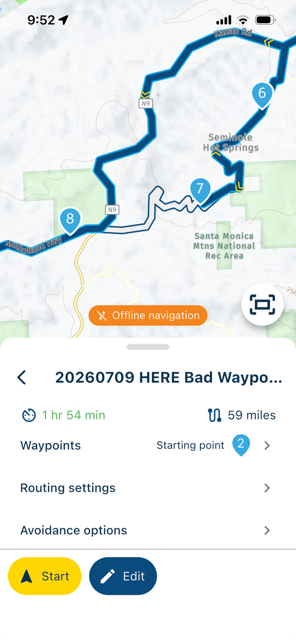
It looks like it has already decided to turn around at WP#7, and double back counterclockwise to the main road (Kanan Road) to reach WP#8. That's not what I want, but....
-
-
@Brian-McG I thought you might find this interesting. I got out to test executing the route using my new Garmin Zumo XT3. Like MRA at waypoint#7, the XT3 recognized that the actual road did not match the HERE generated route. Zumo XT's have an Off-Route Recalculation option that essentially stops routing until the route rejoins the actual road, which it did further up where the road straightened out. The route re-started automatically with no intervention required on my part.
At the same time (side-by-side), I executed the route using the MRA Phone app. I had been playing with Nav Functional settings on the app to try to correct the "turn around" behavior from my first attempt. I enabled the "Skip Waypoints automatically" hoping it would ignore WP#7 and continue onward to WP#8 as it normally would. Well, that didn't work like I thought it would. The skip didn't kick in immediately. It wasn't until I was almost on top of WP#8 before I got a message, and then when I passed WP#8, the app tried to turn me around back to it. It was getting unworkable, so I stopped the route on the app altogther.
I'm going to change things up on the app again to try to get a successful run through that segment:
-
Switch to "Offline Navigation" from Online -- I don't know if this will change any behavior, but it's worth it to see if anything changes.
-
"Skip Waypoints automatically" turned OFF -- Maybe a manual skip when the problem with WP#7 first appears will give me a clean path to waypoint#8.
-
"Automatic recalculations" -- I was considering turning that option ON, but my fear is that it will trigger MRA trying to turn me around. If all else fails, maybe I change that on a subsequent attempt.
When getting ready to start the route on the app, it's clear that that it knows ahead of time about the issue:
It looks like it has already decided to turn around at WP#7, and double back counterclockwise to the main road (Kanan Road) to reach WP#8. That's not what I want, but....
@John-S-Parry I know a bit about garmin routing, not a fan, ditched my XT2 because the recalculation function just does not work, but that’s another thread!
What you describe is not surprising, if a point is a long way off a route most nav devices wont recognise that you have gone through that point
It sounds like the XT3 is clever enough to recognise you are back on the correct path/track after you have passed point # 7 which is something MRA does not do
Auto skipping of points in MRA is not perfect but it does sort of work,
I believe it attempts to direct you back at least 2 or 3 times to a missed point, i.e. it will recalculate 2 or 3 times to take you back, if you ignore these new instructed paths 2 or 3 times then the auto skip function kicks in & the route calculation will resume heading to your next point
In you case point #8 is not a great distance from point #7 & there are not many options for MRA to recalculate back to #7 before you hit #8 hence what you experiencedas for your ideas
-
this should have no effect on this issue
-
I would recommend keeping auto skip on, it just requires a bit of patience to let it do its thing
it would be better if MRA was as clever as a garmin / tomtom & recognised it was back on track but the MRA devs have not figured out how to do that......yet!
the fact that points are sometimes missed by nav systems is just one of those things & is why remote controllers for phones running MRA are probably so popular, it is a quick lift of a finger & press of a button to manually skip a point
I loved my Tomtom because it could only navigate tracks so no Via or shaping points to miss but that sort of track navigation also has its limits -
"Automatic recalculations" is for when you deviate from a route/track, it will try & recalculate a path back to the route/track, it should not really be relevant here but its worth experimenting, maybe point #7 is far enough off route that its considered a deviation if you stay on the road
Interesting the app has recognised something is amiss, odd the way it has tried to resolve it
BlackView BV7100, Android 12
Navigate "Routes as Tracks" in Offline mode with Offline Maps
No Wifi, no internet, no interruptions, works well -
-
@John-S-Parry I know a bit about garmin routing, not a fan, ditched my XT2 because the recalculation function just does not work, but that’s another thread!
What you describe is not surprising, if a point is a long way off a route most nav devices wont recognise that you have gone through that point
It sounds like the XT3 is clever enough to recognise you are back on the correct path/track after you have passed point # 7 which is something MRA does not do
Auto skipping of points in MRA is not perfect but it does sort of work,
I believe it attempts to direct you back at least 2 or 3 times to a missed point, i.e. it will recalculate 2 or 3 times to take you back, if you ignore these new instructed paths 2 or 3 times then the auto skip function kicks in & the route calculation will resume heading to your next point
In you case point #8 is not a great distance from point #7 & there are not many options for MRA to recalculate back to #7 before you hit #8 hence what you experiencedas for your ideas
-
this should have no effect on this issue
-
I would recommend keeping auto skip on, it just requires a bit of patience to let it do its thing
it would be better if MRA was as clever as a garmin / tomtom & recognised it was back on track but the MRA devs have not figured out how to do that......yet!
the fact that points are sometimes missed by nav systems is just one of those things & is why remote controllers for phones running MRA are probably so popular, it is a quick lift of a finger & press of a button to manually skip a point
I loved my Tomtom because it could only navigate tracks so no Via or shaping points to miss but that sort of track navigation also has its limits -
"Automatic recalculations" is for when you deviate from a route/track, it will try & recalculate a path back to the route/track, it should not really be relevant here but its worth experimenting, maybe point #7 is far enough off route that its considered a deviation if you stay on the road
Interesting the app has recognised something is amiss, odd the way it has tried to resolve it
@Brian-McG Well, I just ran the route again, running the XT3 and MRA Next app on my phone in parallel. Success! I suspect (it's just my best guess) that skipping WP#7 manually instead waiting for "Skip Waypoints automatically" to kick in was the difference. The first time around, it really did take (in my mind) too long for the skip to trigger, which created problems around WP#8 that doomed the route. I agree that the "Offline Navigation" probably didn't affect what happened with WP#7, but I needed it any way for the second half of the route, where cell coverage was spotty and sometimes non-excitant returning back over the mountains.
As for the XT3, instead of just letting the route 'sleep' until auto rejoining further up the road, I instead selected off-route recalculate just to see the result. On the XT's I almost never issue a recalculate (that's another discussion), so it was an additional learning experience too. Like MRA, it recalculated back to the route as originally intended.
I'm sure we could have a spirited discussion on the pros-and-cons of a dedicated Garmin GPS vs. the MRA phone app. They both have relative advantages/disadvantages, and a lot depends on where and how you ride. For me, the XT3 will mostly be my first choice. But you're correct -- that's better left to a separate dedicated thread.
Anyway, thanks for your time on this. I've learned a lot about the app going through this process. Not all scenarios can be documented, and learning by doing is the only solution. At least I'm comfortable enough now to use either the XT3 or the app based on the situation.
-
-
@Brian-McG Well, I just ran the route again, running the XT3 and MRA Next app on my phone in parallel. Success! I suspect (it's just my best guess) that skipping WP#7 manually instead waiting for "Skip Waypoints automatically" to kick in was the difference. The first time around, it really did take (in my mind) too long for the skip to trigger, which created problems around WP#8 that doomed the route. I agree that the "Offline Navigation" probably didn't affect what happened with WP#7, but I needed it any way for the second half of the route, where cell coverage was spotty and sometimes non-excitant returning back over the mountains.
As for the XT3, instead of just letting the route 'sleep' until auto rejoining further up the road, I instead selected off-route recalculate just to see the result. On the XT's I almost never issue a recalculate (that's another discussion), so it was an additional learning experience too. Like MRA, it recalculated back to the route as originally intended.
I'm sure we could have a spirited discussion on the pros-and-cons of a dedicated Garmin GPS vs. the MRA phone app. They both have relative advantages/disadvantages, and a lot depends on where and how you ride. For me, the XT3 will mostly be my first choice. But you're correct -- that's better left to a separate dedicated thread.
Anyway, thanks for your time on this. I've learned a lot about the app going through this process. Not all scenarios can be documented, and learning by doing is the only solution. At least I'm comfortable enough now to use either the XT3 or the app based on the situation.
@John-S-Parry yes the issues with garmins are all around the "recalculate" function, it destroyed multiple days touring for me, thats why the XT2 got ditched
As far as I am aware the XT3 uses the same route calculation algorithm so it may be newer & have some additional features but it is still the same flawed device, recalculate has to be offAs for your route being "doomed" around waypiont #8 that would surprise me, given time to sort itself out I would expect MRA to recover, at worst case MRA might need a manual skip or 2 to catch up
This is my third season using MRA & I have to say MRA is far more consistent & reliable than my XT 2
MRA is far from perfect, it does glitch & fail occasionally but if you have the original track/path displayed (white line) then you can normally recover pretty easilywhen my XT 2 failed to route, as it did a lot, it was often very difficult or impossible to recover
a garmin with the "recalculate" function enabled is frankly useless, my XT2 messed up 2 whole seasons worth of touring hence it sits at the bottom of a drawerBlackView BV7100, Android 12
Navigate "Routes as Tracks" in Offline mode with Offline Maps
No Wifi, no internet, no interruptions, works well
Hello! It looks like you're interested in this conversation, but you don't have an account yet.
Getting fed up of having to scroll through the same posts each visit? When you register for an account, you'll always come back to exactly where you were before, and choose to be notified of new replies (either via email, or push notification). You'll also be able to save bookmarks and upvote posts to show your appreciation to other community members.
With your input, this post could be even better 💗
Register Login-
014681
-
 417183
-
 0831
0831
-
 1201.1k
-
06178
-
 05136
05136
-
 0461
0461
-
0344