Modify a scenic route in the Navigation Naxt app
-

So just a quick explanation of how I got to this question:
I went to a location for work. Finished the meeting and then decided to take a scenic route back home. Navigation Next makes a nice scenic route for me but I know 1 cool little road that it's not taking right now. Can I add a point on the map so that the scenic route is modified to that that cool little road too?I used to use Kurviger and in that app it's crazy simple to modify a scenic route to your liking on the mobile app.
Preferably I would like the same functionality as below (just an example route):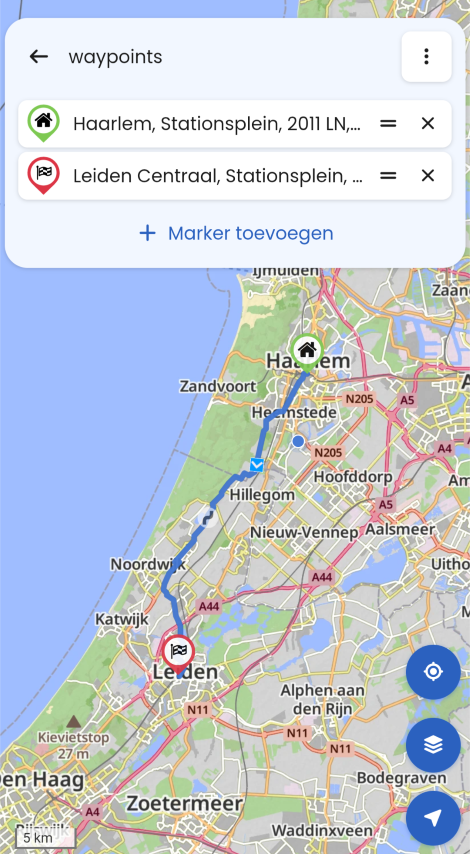
So this is the first scenic route that Kurviger makes from A to B.I now want to make the route go via the dunes road just north of Noordwijk so I zoom in on the map to that road and tap it. Then Kurviger askes me what type of point I want to add here.
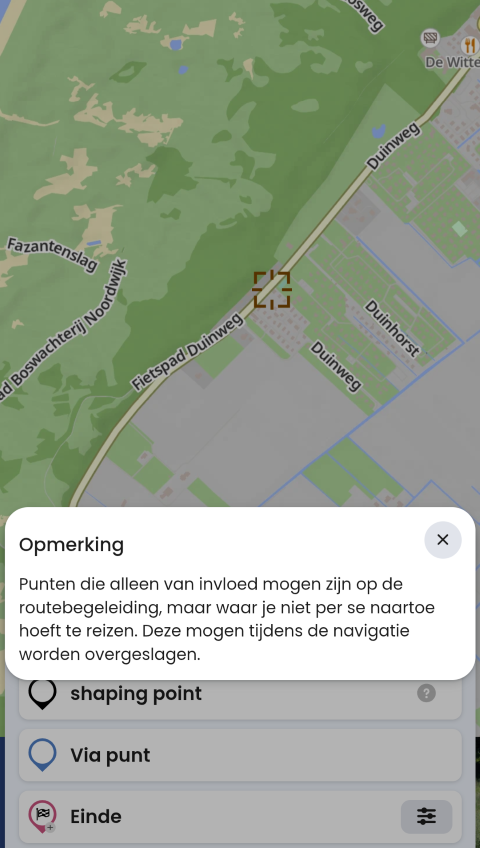
If you use 'shaping point' it just moves the route over that spot but doesn't add a route point. Exactly what I want.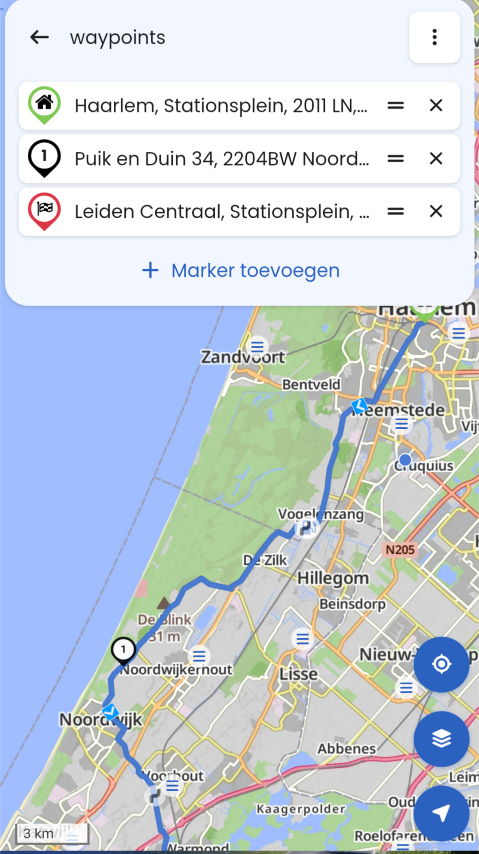
Here you can see the route has been updated to go via that added 'shaping point'.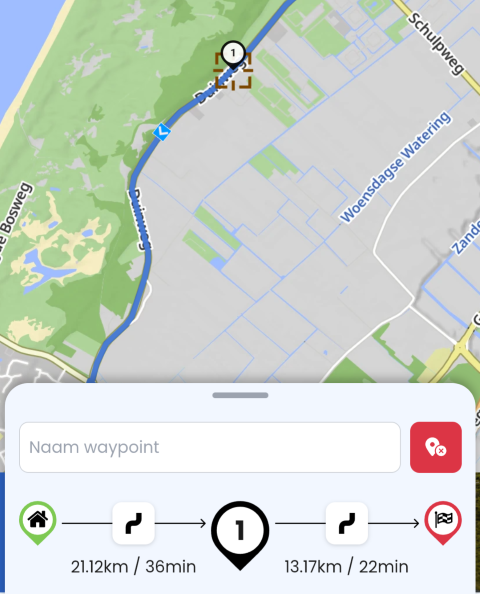
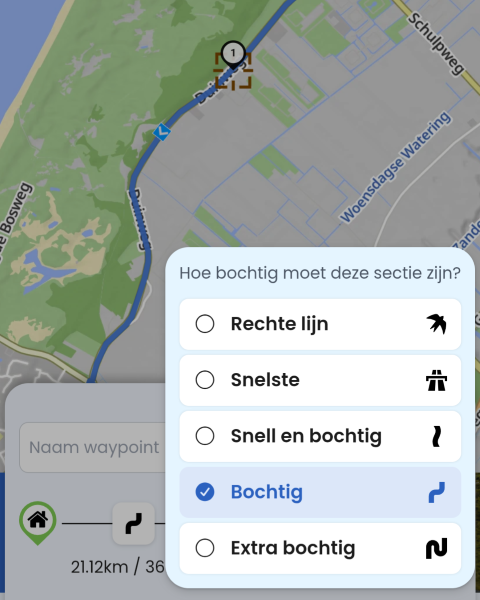
If you tap on the shaping point again, you can then even modify the route in 2 parts and make it a direct fast route till that point and then scenic from there.
Pretty cool and useful when you can't plan a route in MRA on the PC.All the above can be tested in the free version of Kurviger by the way if you want to try out what I am trying to explain yourself.
I'm not at all promoting Kurviger, I'm just missing this feature in the Navigation Next app.Is there an option to do something similar in the app that I haven't found yet?
Or can something like this be added in a future version?
Would be a real big plus for me!Thanks!
-
Warner 1 0 referenced this topic on
-
So just a quick explanation of how I got to this question:
I went to a location for work. Finished the meeting and then decided to take a scenic route back home. Navigation Next makes a nice scenic route for me but I know 1 cool little road that it's not taking right now. Can I add a point on the map so that the scenic route is modified to that that cool little road too?I used to use Kurviger and in that app it's crazy simple to modify a scenic route to your liking on the mobile app.
Preferably I would like the same functionality as below (just an example route):
So this is the first scenic route that Kurviger makes from A to B.I now want to make the route go via the dunes road just north of Noordwijk so I zoom in on the map to that road and tap it. Then Kurviger askes me what type of point I want to add here.
If you use 'shaping point' it just moves the route over that spot but doesn't add a route point. Exactly what I want.
Here you can see the route has been updated to go via that added 'shaping point'.
If you tap on the shaping point again, you can then even modify the route in 2 parts and make it a direct fast route till that point and then scenic from there.
Pretty cool and useful when you can't plan a route in MRA on the PC.All the above can be tested in the free version of Kurviger by the way if you want to try out what I am trying to explain yourself.
I'm not at all promoting Kurviger, I'm just missing this feature in the Navigation Next app.Is there an option to do something similar in the app that I haven't found yet?
Or can something like this be added in a future version?
Would be a real big plus for me!Thanks!

@Warner-1-0 I think something similar is possible in MRA
maybe try the following & see if it works for yougoto the route options draw in the MRA app & select either "Destination" or "Round Trip"
generate the route so you have a path displayed on the map
& then this may be the step you are missing as it is not obvious
at the bottom of the route controls dialogue window where the buttons for "Navigate", "Destination Curves" or "Round Trip" are, you can slide, scroll these buttons to the left to reveal a "Save" buttonOnce you save the route it is added to your route library as a "Route-Track"
you should be able edit the route-track like any other route after you select "Use Route" or "Edit Route Track"I know it is a bit of a long way round & maybe could/should be simpler but there is a way

BlackView BV7100, Android 12
Navigate "Routes as Tracks" in Offline mode with Offline Maps
No Wifi, no internet, no interruptions, works well -
@Warner-1-0 I think something similar is possible in MRA
maybe try the following & see if it works for yougoto the route options draw in the MRA app & select either "Destination" or "Round Trip"
generate the route so you have a path displayed on the map
& then this may be the step you are missing as it is not obvious
at the bottom of the route controls dialogue window where the buttons for "Navigate", "Destination Curves" or "Round Trip" are, you can slide, scroll these buttons to the left to reveal a "Save" buttonOnce you save the route it is added to your route library as a "Route-Track"
you should be able edit the route-track like any other route after you select "Use Route" or "Edit Route Track"I know it is a bit of a long way round & maybe could/should be simpler but there is a way
@Brian-McG said:
Once you save the route it is added to your route library as a "Route-Track"
you should be able edit the route-track like any other route after you select "Use Route" or "Edit Route Track"Thanks for the reply! That would indeed be a solution! Not very intuitive or easy to do but better than nothing for sure!
I'm missing the last step here. I made a route and saved it on the mobile app. How and where can I then edit the route track?
If I open routes & tracklogs I see the route but it just opens it if I tap it, can't see how to edit it...? -
@Brian-McG said:
Once you save the route it is added to your route library as a "Route-Track"
you should be able edit the route-track like any other route after you select "Use Route" or "Edit Route Track"Thanks for the reply! That would indeed be a solution! Not very intuitive or easy to do but better than nothing for sure!
I'm missing the last step here. I made a route and saved it on the mobile app. How and where can I then edit the route track?
If I open routes & tracklogs I see the route but it just opens it if I tap it, can't see how to edit it...?
@Warner-1-0 you need to convert the route-track to a route which can be done via the web planner
in the app when you select the route-track you can click the globe icon (I think it is meant to represent the internet) to take you to the web planer & edit the route -
Ok, I had a look at what you said but that's a very tedious way to do something so very simple. Thanks again for explaining but I very much hope that this can be added to the app in the future in a far more intuitive way (such as how Kurviger approach it).
...fingers crossed it get's some attention!BTW, how do I edit the original post? I made a couple of frustrating typo's.
I can find the edit button on replies but haven't found it on the opening post. -
Ok, I had a look at what you said but that's a very tedious way to do something so very simple. Thanks again for explaining but I very much hope that this can be added to the app in the future in a far more intuitive way (such as how Kurviger approach it).
...fingers crossed it get's some attention!BTW, how do I edit the original post? I made a couple of frustrating typo's.
I can find the edit button on replies but haven't found it on the opening post.
@Warner-1-0 I dont think you can edit old posts
if you click the 3 dot menu bar bottom right of a new post there is an edit / delete option
but I think the edit/delete options only last for either a certain time or till the post is viewed
there is some kind of limit not sure what it is -
@Brian-McG said:
Once you save the route it is added to your route library as a "Route-Track"
you should be able edit the route-track like any other route after you select "Use Route" or "Edit Route Track"Thanks for the reply! That would indeed be a solution! Not very intuitive or easy to do but better than nothing for sure!
I'm missing the last step here. I made a route and saved it on the mobile app. How and where can I then edit the route track?
If I open routes & tracklogs I see the route but it just opens it if I tap it, can't see how to edit it...?
If I open routes & tracklogs I see the route but it just opens it if I tap it, can't see how to edit it...?
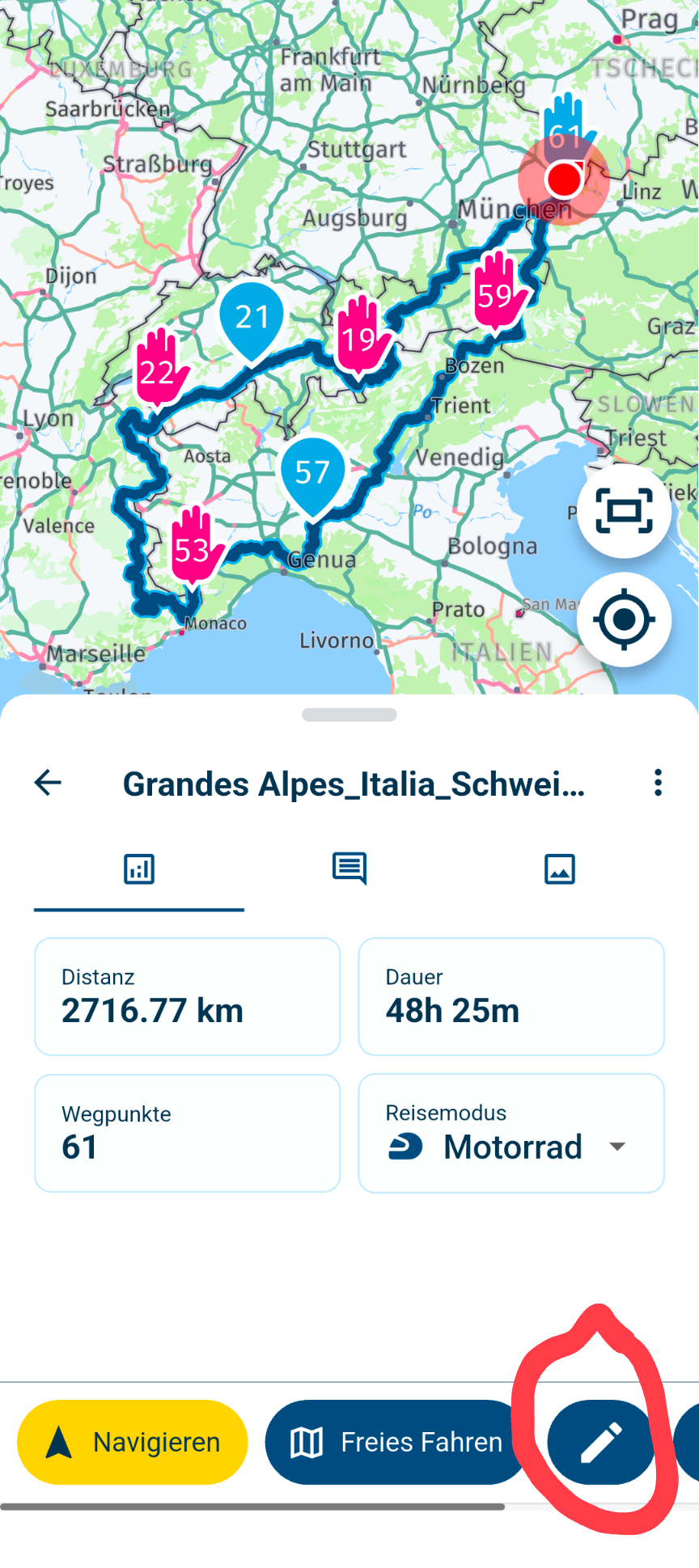
If you tap the pencil icon, you can also edit the route in the app
BMW R 1250 GS
MRA Navigation & SilverFox C1 Controller
DMD-NOR7E 7"
SPC Universal mount
Motorola Edge 40 "offline"
Sena SLR 3
Sena 50 R -
If I open routes & tracklogs I see the route but it just opens it if I tap it, can't see how to edit it...?
If you tap the pencil icon, you can also edit the route in the app
@Peter-Zehentreiter Thanks for the reply. Found it, that does indeed work. However, for my example short trip I would need to move 3 or 4 points to make only a slight detour over the other road I mentioned in the opening post. So yes, this is a way to make a custom route in the app, great to see its possible! But is it easy to use and intuitive... no, not really. Not if you compare it to how Kurviger approaches this.
So hopefully the programming team can implement something just as easy as in Kurviger. Would be a great improvement for making scenic routes in the app when already underway and no PC/laptop nearby.
-
@Peter-Zehentreiter Thanks for the reply. Found it, that does indeed work. However, for my example short trip I would need to move 3 or 4 points to make only a slight detour over the other road I mentioned in the opening post. So yes, this is a way to make a custom route in the app, great to see its possible! But is it easy to use and intuitive... no, not really. Not if you compare it to how Kurviger approaches this.
So hopefully the programming team can implement something just as easy as in Kurviger. Would be a great improvement for making scenic routes in the app when already underway and no PC/laptop nearby.
Not if you compare it to how Kurviger approaches this.
I have to disagree with you there.
I’ve also tried out various platforms, including Kurviger.
MRA might seem a bit tricky at first because it offers far more features than Kurviger.
Please just take the time to have a look at the support page and read through all the tips and guidance: https://www.myrouteapp.com/support
You’ll soon realise that planning with MRA isn’t difficult at all (both on the website and in the app).
Navigating the app also offers a wide range of options.
But if you still have any questions, people are happy to offer help in the forum.
-
So just a quick explanation of how I got to this question:
I went to a location for work. Finished the meeting and then decided to take a scenic route back home. Navigation Next makes a nice scenic route for me but I know 1 cool little road that it's not taking right now. Can I add a point on the map so that the scenic route is modified to that that cool little road too?I used to use Kurviger and in that app it's crazy simple to modify a scenic route to your liking on the mobile app.
Preferably I would like the same functionality as below (just an example route):
So this is the first scenic route that Kurviger makes from A to B.I now want to make the route go via the dunes road just north of Noordwijk so I zoom in on the map to that road and tap it. Then Kurviger askes me what type of point I want to add here.
If you use 'shaping point' it just moves the route over that spot but doesn't add a route point. Exactly what I want.
Here you can see the route has been updated to go via that added 'shaping point'.
If you tap on the shaping point again, you can then even modify the route in 2 parts and make it a direct fast route till that point and then scenic from there.
Pretty cool and useful when you can't plan a route in MRA on the PC.All the above can be tested in the free version of Kurviger by the way if you want to try out what I am trying to explain yourself.
I'm not at all promoting Kurviger, I'm just missing this feature in the Navigation Next app.Is there an option to do something similar in the app that I haven't found yet?
Or can something like this be added in a future version?
Would be a real big plus for me!Thanks!
So this is the first scenic route that Kurviger makes from A to B.
I now want to make the route go via the dunes road just north of Noordwijk so I zoom in on the map to that road and tap it. Then Kurviger askes me what type of point I want to add here.
By the way, you can do this just as easily in the MRA app.
- Open the app
- Open the MRA route planner
- Enter your start and destination
- Use the map zoom or the search function to select the new route and manually set a waypoint on the road you’d prefer to take.
To change the type of point, tap on it and choose whether it should be a ‘Via’ or a ‘Shaping’ point.
Please note that start and destination points are always ‘Via’ points
(hand icon)
BMW R 1250 GS
MRA Navigation & SilverFox C1 Controller
DMD-NOR7E 7"
SPC Universal mount
Motorola Edge 40 "offline"
Sena SLR 3
Sena 50 R -
So this is the first scenic route that Kurviger makes from A to B.
I now want to make the route go via the dunes road just north of Noordwijk so I zoom in on the map to that road and tap it. Then Kurviger askes me what type of point I want to add here.
By the way, you can do this just as easily in the MRA app.
- Open the app
- Open the MRA route planner
- Enter your start and destination
- Use the map zoom or the search function to select the new route and manually set a waypoint on the road you’d prefer to take.
To change the type of point, tap on it and choose whether it should be a ‘Via’ or a ‘Shaping’ point.
Please note that start and destination points are always ‘Via’ points
(hand icon)
@Peter-Zehentreiter Thanks for the reply. Only just noticed it, bit late, apologies.
This does indeed work, thanks for explaining the steps.
One thing I do mis here is that I (think I) can only do this with the shortest or fastest route. I don't see an option to have the MRA app make a scenic route first and then to add a waypoint like you explained. Or am I missing this option somewhere?That would be a great addition, at least for me. I quite often end up half way across the country for work and then like to take a scenic route home. If I can then guide that scenic route via certain spots, that makes it a lot more usable for me.
If possible, please do add it to the list of possible future options.
-
@Peter-Zehentreiter Thanks for the reply. Only just noticed it, bit late, apologies.
This does indeed work, thanks for explaining the steps.
One thing I do mis here is that I (think I) can only do this with the shortest or fastest route. I don't see an option to have the MRA app make a scenic route first and then to add a waypoint like you explained. Or am I missing this option somewhere?That would be a great addition, at least for me. I quite often end up half way across the country for work and then like to take a scenic route home. If I can then guide that scenic route via certain spots, that makes it a lot more usable for me.
If possible, please do add it to the list of possible future options.
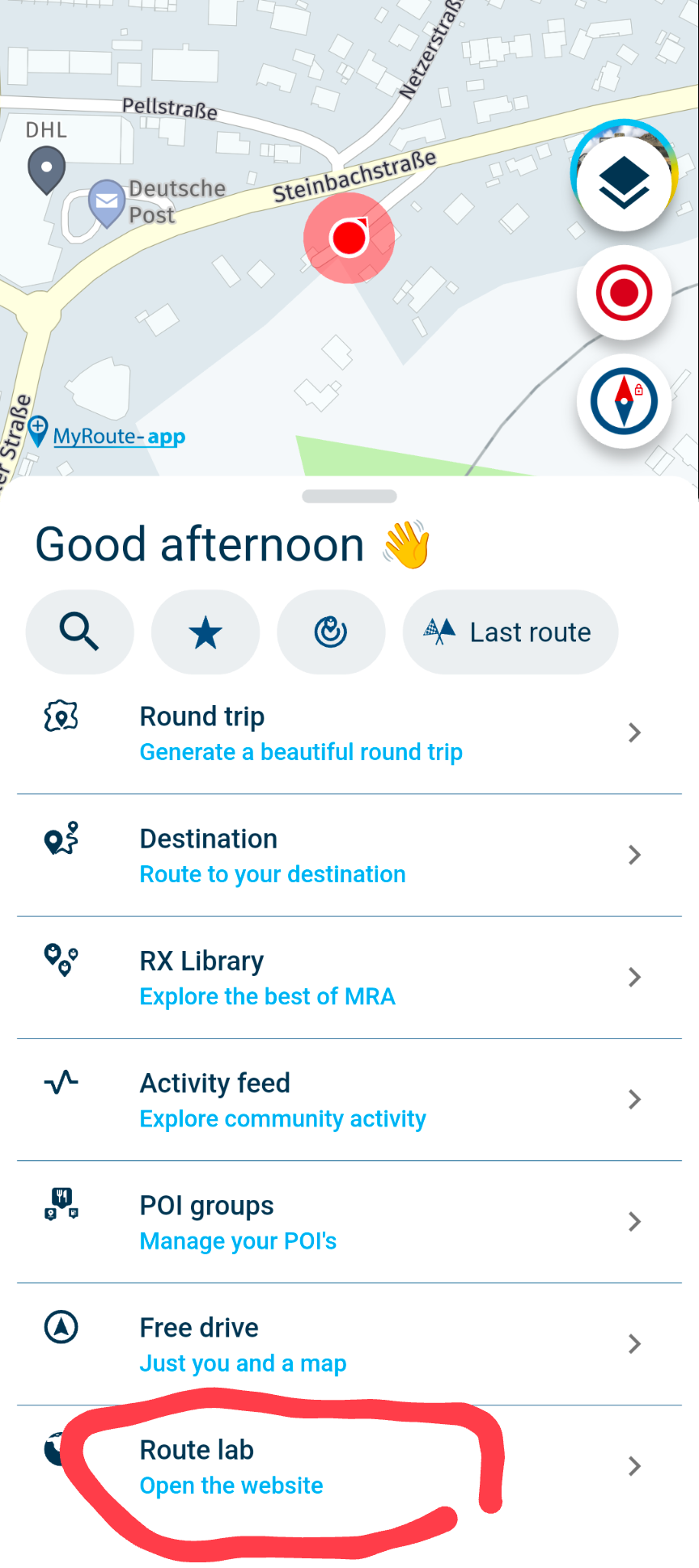
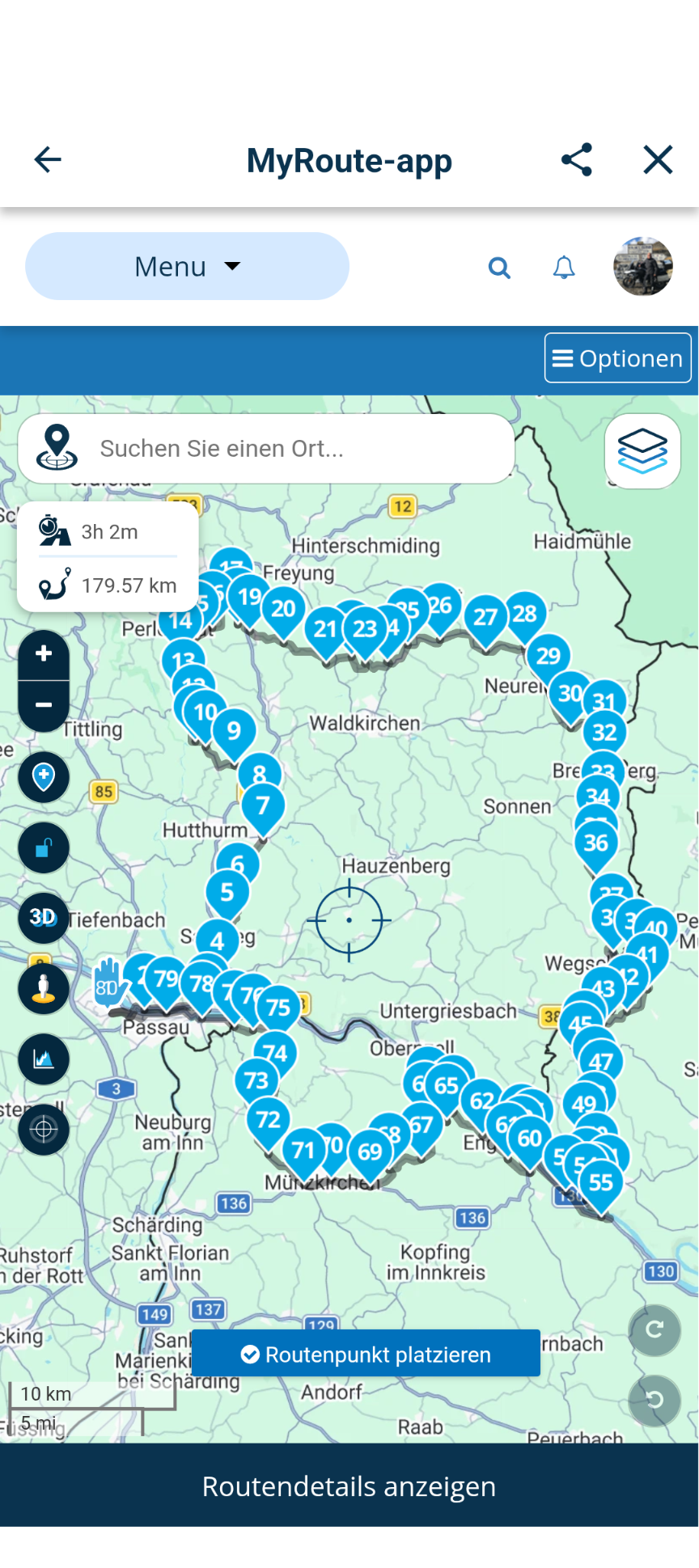
@Warner-1-0 You can also create a scenicRoute in the app and then add waypoints to it.....
Open the MRA app
Go to Round Trip
Create a loop route of your choice...
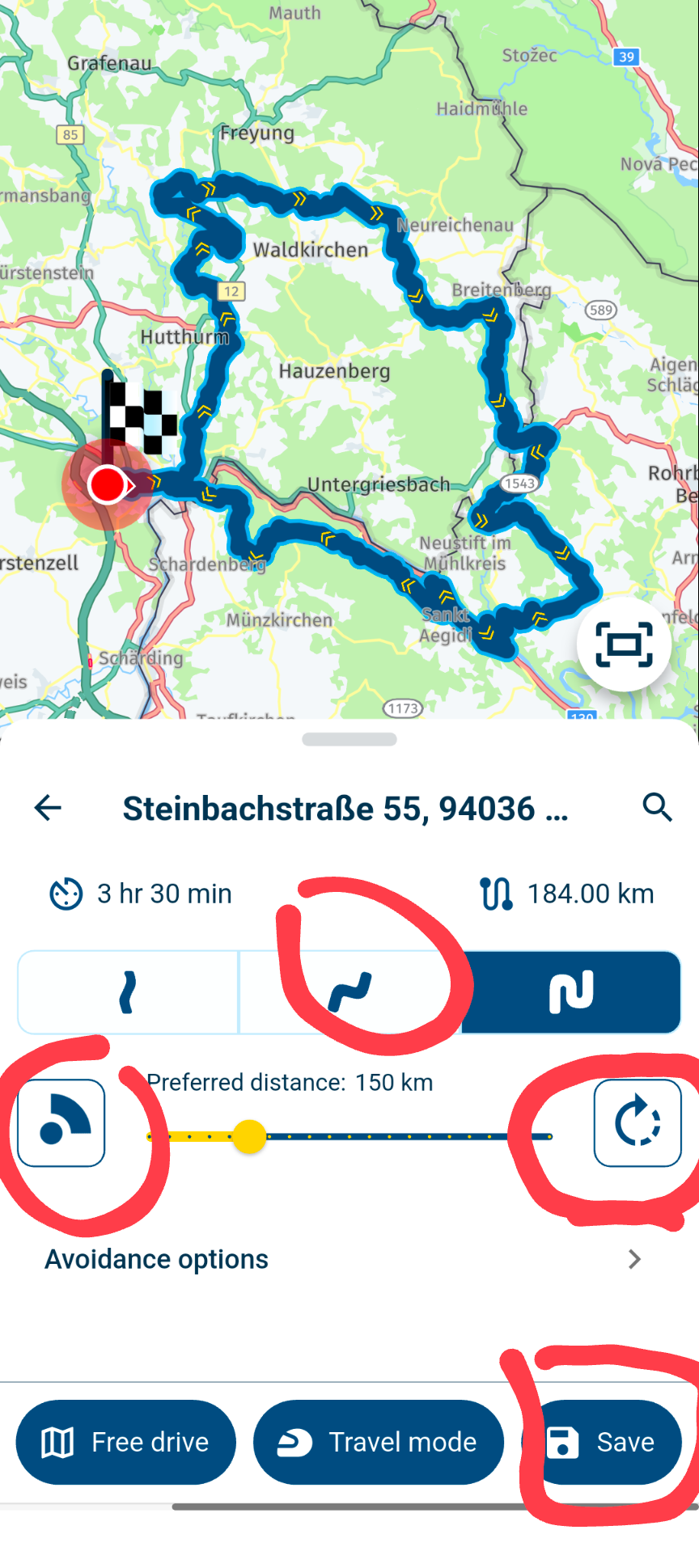
You can adjust the curvature, set the distance, specify the compass directions you want the route to follow, and navigate the route in the opposite direction.After creating your desired route, you must first save the “Track.”
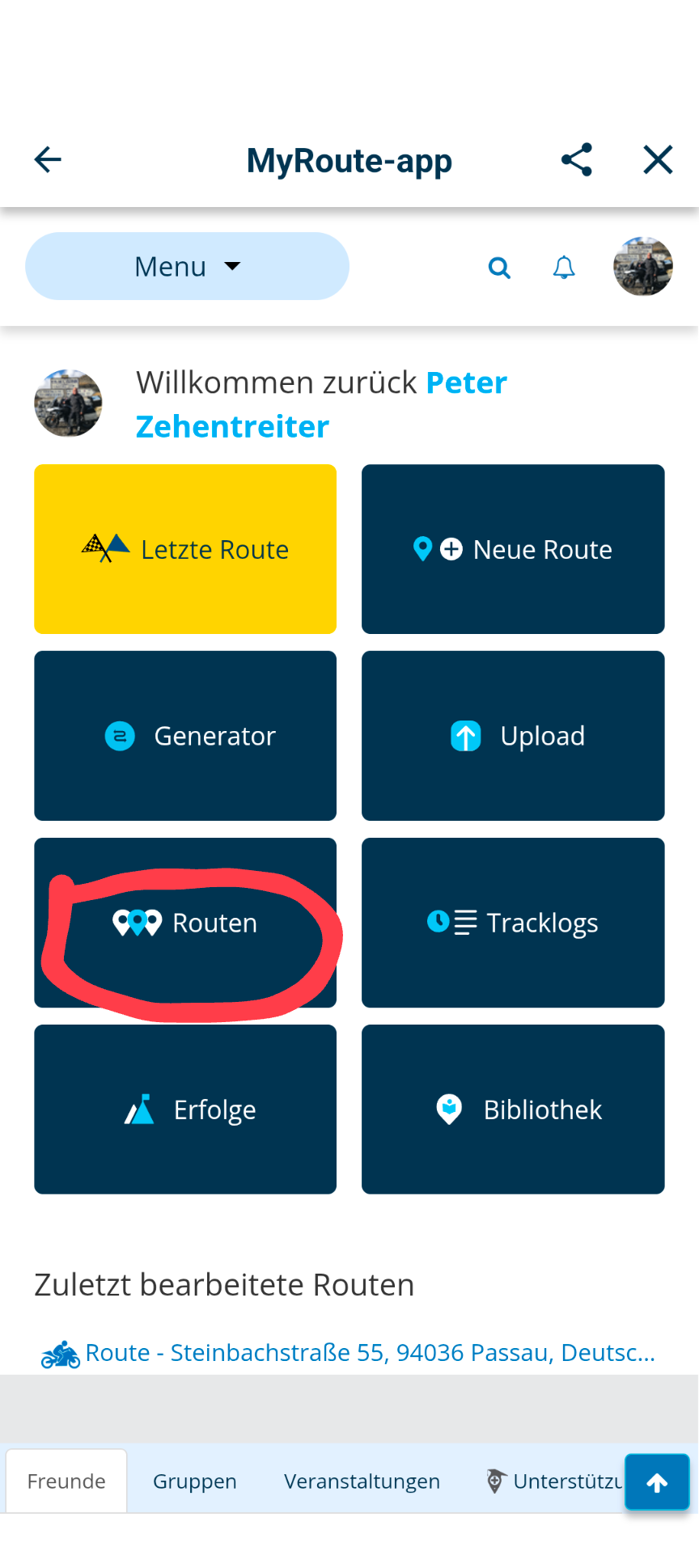
After you’ve saved the route, go to the Route Lab.
Under “Routes,” search for the track you saved earlier
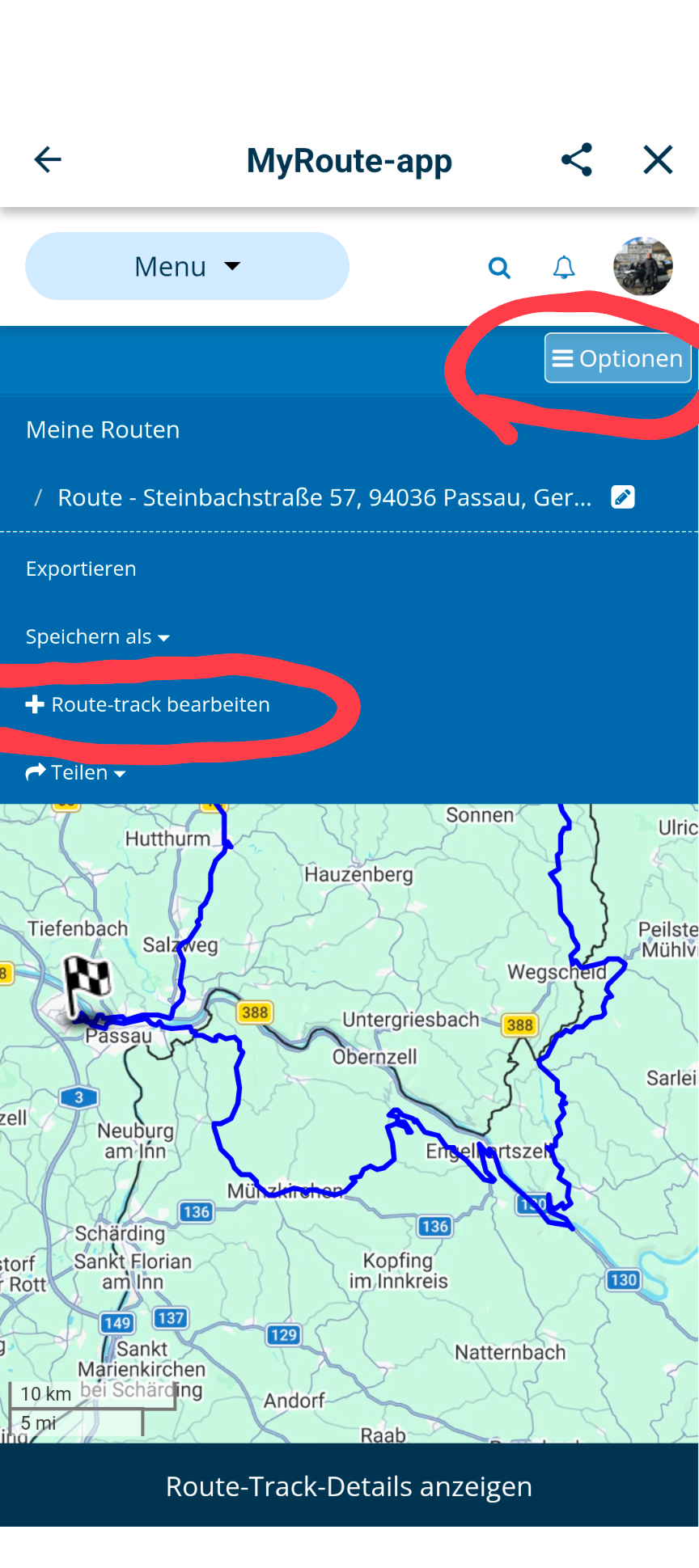
Open the track
Go to the options in the top-right corner
Select the “Edit Route-Track” option
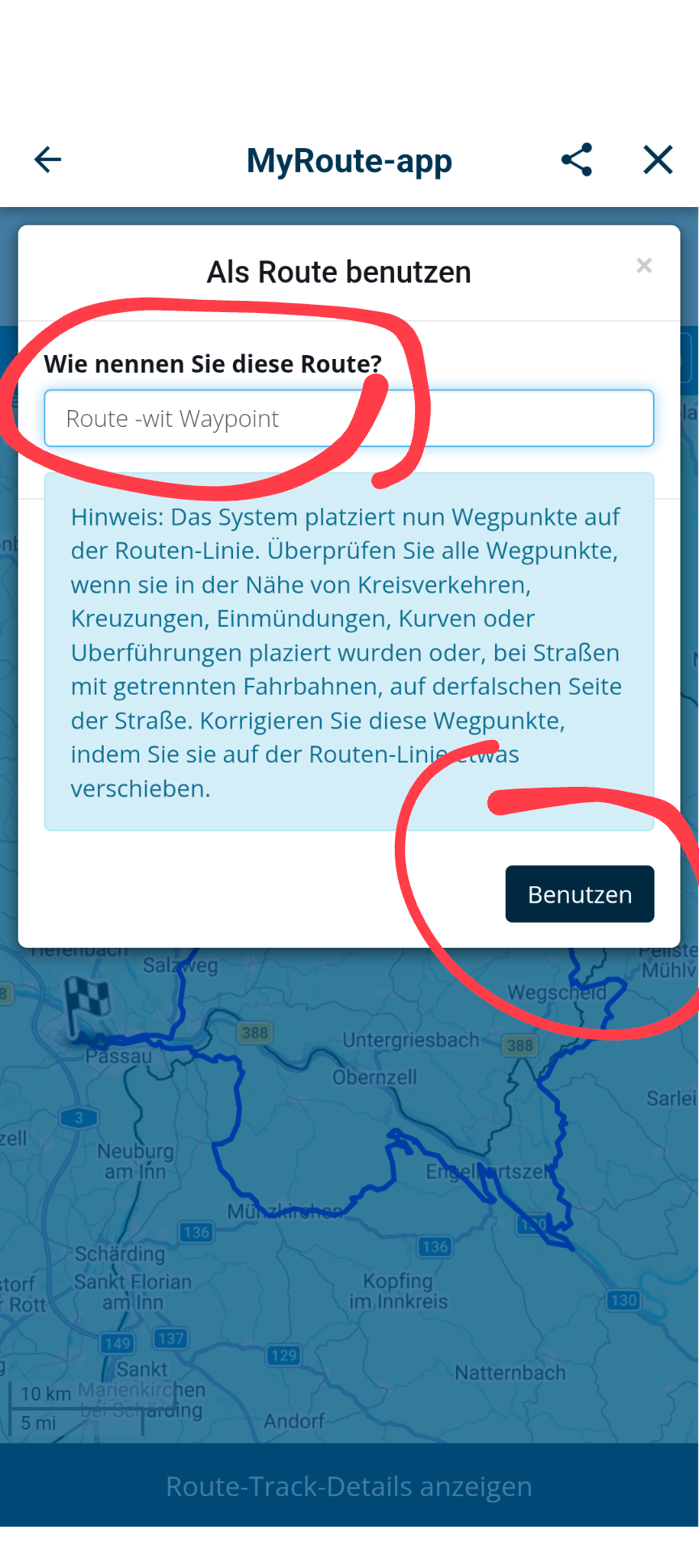
Then give it a different name so you can distinguish between the track and the route... then tap “Use”
Your track will now automatically be populated with waypoints, which you can delete or move as you like.
Hello! It looks like you're interested in this conversation, but you don't have an account yet.
Getting fed up of having to scroll through the same posts each visit? When you register for an account, you'll always come back to exactly where you were before, and choose to be notified of new replies (either via email, or push notification). You'll also be able to save bookmarks and upvote posts to show your appreciation to other community members.
With your input, this post could be even better 💗
Register Login-
023144
-
 118155
-
015118
-
 01192
01192
-
0937
-
3994
-
2888
-
-1876