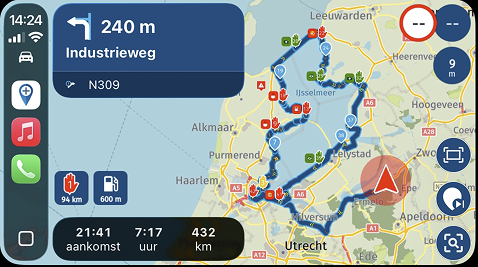
Punt of komma als scheidingsteken voor cijfers achter de komma.
-
Het is meer een verzoek dan een bug. Wel een probleem maar niet echt aan de zijde van MRA.
De Head-up displays in de EV's van de Volkswagengroep (MEB platform) kunnen niet overweg met een getallen achter de komma (,). Terwijl in de instellingen van het infotainment wel goed ingesteld staat.
112,6 km wordt in op het Heads-up display getoond als 1126 km.
112.6 km wordt wel getoond als 112.6 km.MRA is niet de enige die hierdoor getroffen is. Iedere navigatie software gaat hier op zijn eigen manier mee om
- MRA en ANWB Navigatie gebruiken de , (komma). Beiden zijn dus getroffen door de rare bug in de software van MEB.
-TomTom werkt helemaal niet met getallen achter de komma in de getoonde afstand. Zij stappen vanaf ongeveer 3 kilometer over op meters. Dus 3000 meter. - Waze werkt wel met een . (punt) en met Waze gaat aanduiding dus goed.
- Google Maps werkt volgens mij ook met een . (punt) maar die gebruik ik heel weinig (vind die vrouwenstem hoogst irritant).
- Volkswagens eigen navigatie gebruikt ook de . (punt).
Als ik het goed onthouden heb, gebruikt MRA zelfs nog getallen achter de komma als de afstand in meters aangegeven wordt. Misschien ook iets om van af te stappen. Op zo'n korte afstand is het redelijk nutteloos. De GPS onnauwkeurigheid is soms groter.
- MRA en ANWB Navigatie gebruiken de , (komma). Beiden zijn dus getroffen door de rare bug in de software van MEB.

Hello! It looks like you're interested in this conversation, but you don't have an account yet.
Getting fed up of having to scroll through the same posts each visit? When you register for an account, you'll always come back to exactly where you were before, and choose to be notified of new replies (either via email, or push notification). You'll also be able to save bookmarks and upvote posts to show your appreciation to other community members.
With your input, this post could be even better 💗
Register Login-
05123
-
14351.6k
-
0474
-
1425
-
0547
-
0653
-
0342
-
0796