Skip to content
  • Categories
  • Recent
  • Popular
  • Support
  • MyRoute-app
Collapse
Brand Logo

MRA Community Forum

  1. Home
  2. General Discussion
  3. Is there a way find out the time of a partular location on a tracklog.

Is there a way find out the time of a partular location on a tracklog.

Scheduled Pinned Locked Moved General Discussion
7 Posts 3 Posters 457 Views 2 Watching
  • Oldest to Newest
  • Newest to Oldest
  • Most Votes
Reply
  • Reply as topic
Log in to reply
This topic has been deleted. Only users with topic management privileges can see it.
  • Laryundefined Offline
    Laryundefined Offline
    Lary
    wrote last edited by
    #1

    It's my understanding that a tracklog is both location and time. Is there a way to find out what time one passed a given tracklog location?

    1 Reply Last reply
    0
    • Jörgenundefined Offline
      Jörgenundefined Offline
      Jörgen
      Valued contributor
      wrote last edited by
      #2

      Hi, with a text editor you can see the geocoordinates and usually the timestamp from the downloaded GPX file.

      Like:
      <trkpt lon="6.777487" lat="51.408030"><ele>84</ele><time>2026-02-28T11:00:10+01:00</time></trkpt>

      But it would be difficult to find the right location.

      You can copy 51.408030, 6.777487 (from the above sample) into Google Maps, and it will show you the location of these coordinates.

      Hardware
      iPhone 12 pro (iOS 26.2.1)
      iPad (7.Gen.) 18.7.3
      Oukitel RT3 Pro (Andr. 14)
      Wireless CarPlay mit (Elebest C650)
      Wired CarPlay (SEAT Arona - 2021)
      MRA Workshops in Deutsch sind hier zu finden

      Laryundefined 1 Reply Last reply
      0
      • Jörgenundefined Jörgen

        Hi, with a text editor you can see the geocoordinates and usually the timestamp from the downloaded GPX file.

        Like:
        <trkpt lon="6.777487" lat="51.408030"><ele>84</ele><time>2026-02-28T11:00:10+01:00</time></trkpt>

        But it would be difficult to find the right location.

        You can copy 51.408030, 6.777487 (from the above sample) into Google Maps, and it will show you the location of these coordinates.

        Laryundefined Offline
        Laryundefined Offline
        Lary
        wrote last edited by
        #3

        @Jörgen
        Thanks I can see how that would work and would be more accurate than the method I tried. I converted the tracklog to a route. MRA then gives the times between waypoints like a normal route. However, I think these times could be what the program estimates from it's calculations. This would only be meaningful if there are plenty of waypoints that it can't calculate a different route. In my case it let be guess close enough to estimate what time I got there.

        1 Reply Last reply
        0
        • Léon Hassingundefined Offline
          Léon Hassingundefined Offline
          Léon Hassing
          wrote last edited by
          #4

          You could use RouteConverter for this (www.routeconverter.com). It is open-source and freeware. You can click on the route and see the time and coordinates.
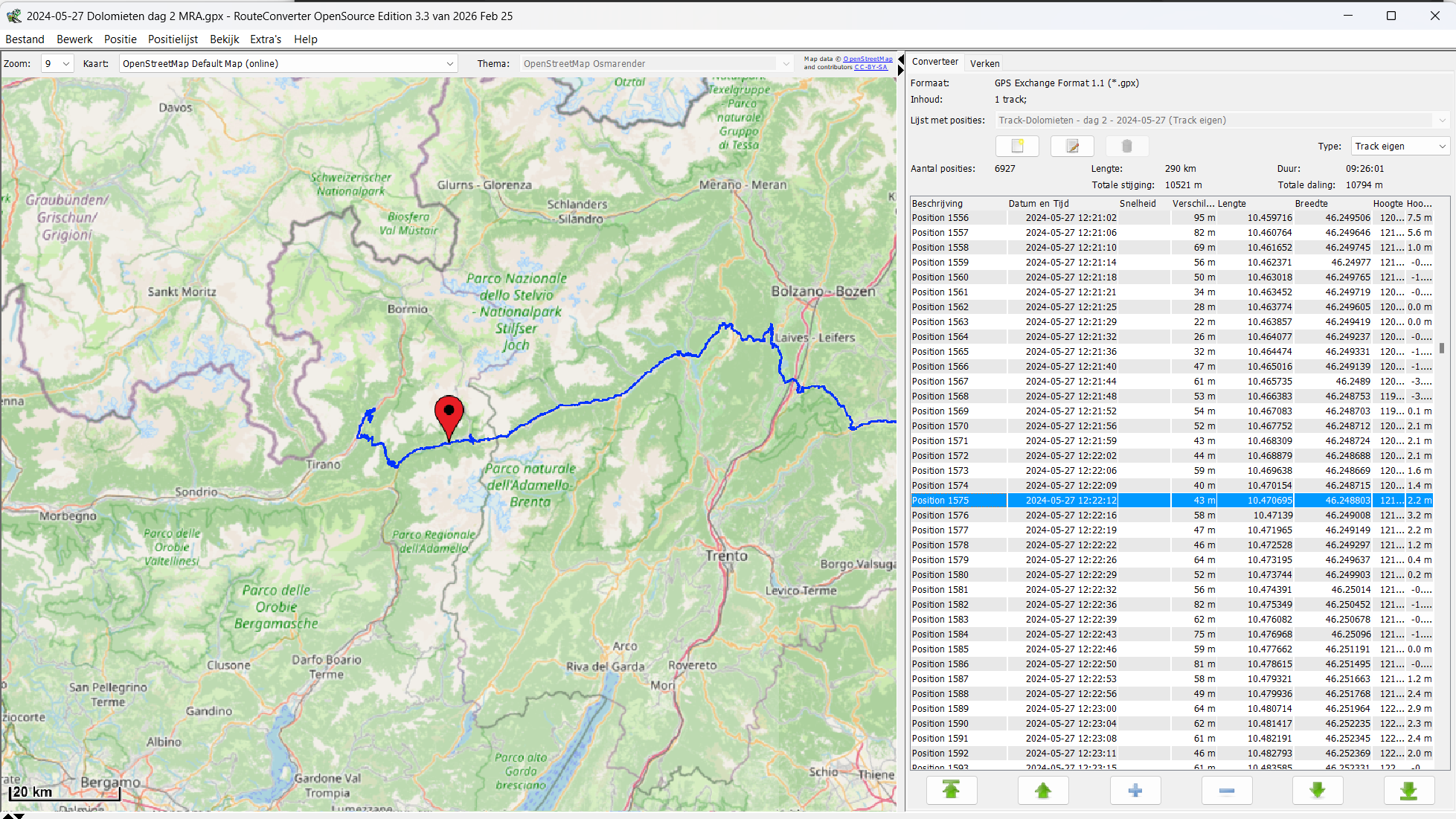
          image.png

          1 Reply Last reply
          1
          • Laryundefined Offline
            Laryundefined Offline
            Lary
            wrote last edited by
            #5

            I tried routeconvert. It gave lat and long but I didn't not see time.

            Léon Hassingundefined 1 Reply Last reply
            0
            • Jörgenundefined Offline
              Jörgenundefined Offline
              Jörgen
              Valued contributor
              wrote last edited by
              #6

              Use an editor,open the gpx file and look if your coordinates have a timestamp.

              Hardware
              iPhone 12 pro (iOS 26.2.1)
              iPad (7.Gen.) 18.7.3
              Oukitel RT3 Pro (Andr. 14)
              Wireless CarPlay mit (Elebest C650)
              Wired CarPlay (SEAT Arona - 2021)
              MRA Workshops in Deutsch sind hier zu finden

              1 Reply Last reply
              0
              • Laryundefined Lary

                I tried routeconvert. It gave lat and long but I didn't not see time.

                Léon Hassingundefined Offline
                Léon Hassingundefined Offline
                Léon Hassing
                wrote last edited by
                #7

                @Lary said in Is there a way find out the time of a partular location on a tracklog.:

                I tried routeconvert. It gave lat and long but I didn't not see time.

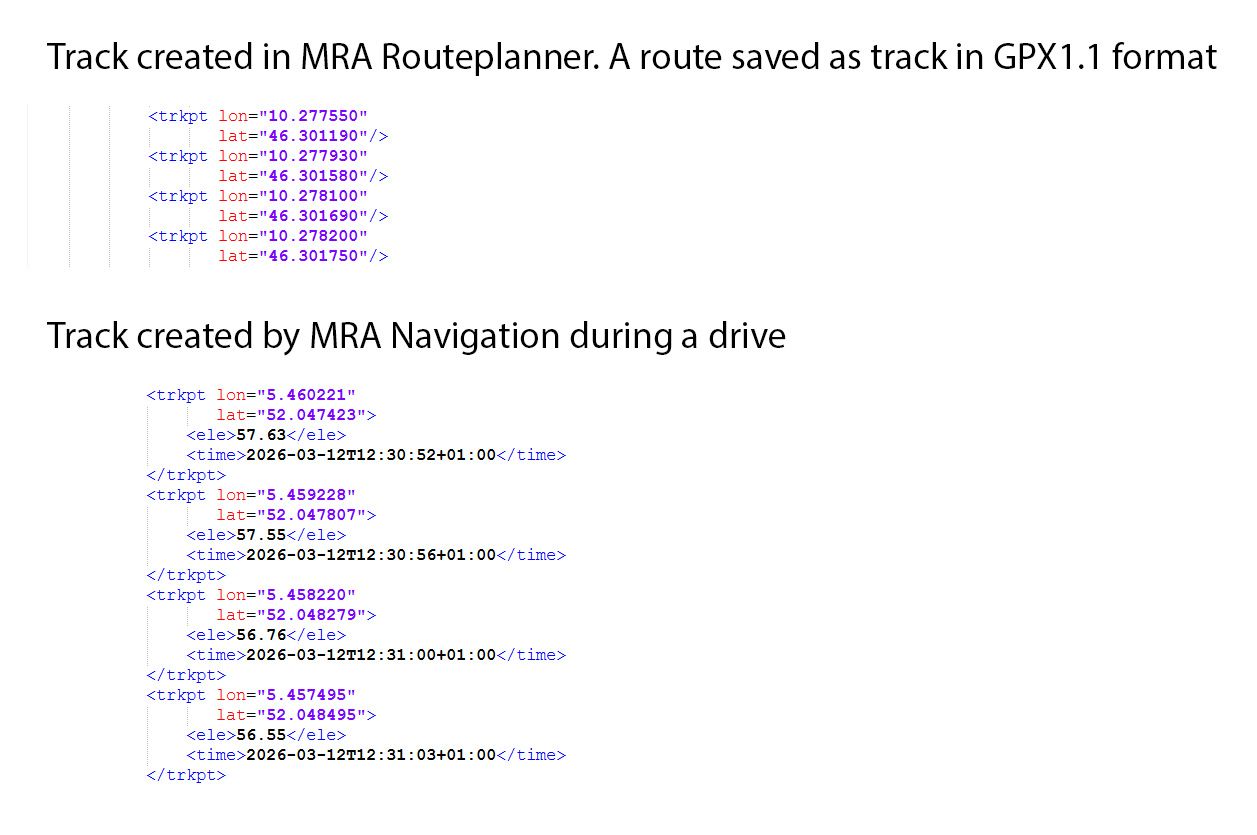
                There are two occurrences of 'tracks'.

                • The first one is the one you create in MRA Routeplanner. Based on a route you created earlier, you can save the route as track with type .gpx 1.1 (track, POI). These tracks don't have time stamps.

                • The second one is the track you recorded in MRA Navigation while you were driving e.g. a route. These tracks have timestamps and elevation.

                Probably you have used the first one.
                Tracks.jpg

                1 Reply Last reply
                0
                Reply
                • Reply as topic
                Log in to reply
                • Oldest to Newest
                • Newest to Oldest
                • Most Votes


                ACTIVE USERS
                Jörgenundefined
                Jörgen
                Léon Hassingundefined
                Léon Hassing
                Laryundefined
                Lary
                POPULAR TOPICS
                • Hoeveel apparaten op 1 account ?
                  M. Schrijverundefined
                  M. Schrijver
                  0
                  7
                  112

                • Here kaart
                  CD130undefined
                  CD130
                  0
                  9
                  182

                • Basecamp-Kurviger Overlay!
                  Reinhard-32undefined
                  Reinhard-32
                  2
                  5
                  177

                • Voeg bij de routepunten de straatnaam en gemeente toe.
                  Nomko Nomdenundefined
                  Nomko Nomden
                  0
                  4
                  33

                • back to old situation with 2 apps
                  Bouke Entundefined
                  Bouke Ent
                  0
                  13
                  192

                • Proposal for an algorithm to guide around unexpected road closures
                  BMWBiker58undefined
                  BMWBiker58
                  3
                  9
                  243

                • Default POIs
                  Nick Carthewundefined
                  Nick Carthew
                  0
                  2
                  7

                • Nice to have in Carplay
                  Sieds Eitensundefined
                  Sieds Eitens
                  0
                  2
                  166
                MY GROUPS
                • Login

                • Login or register to search.
                • First post
                  Last post
                0
                • Categories
                • Recent
                • Popular
                • Support
                • MyRoute-app