Website update - Waypoint list export, routetracks from tracklogs and more of your feedback
-

Hi everyone!

Another website update is live, and again a lot of it comes straight from your forum topics
 Here's what changed since Saturday's update.
New
- Waypoint list as a spreadsheet. Export a route as a list of its waypoints, with the distance and driving time from the start, the arrival time when you set a departure, and an empty column for your own notes. Export a folder and you get one sheet for the whole trip, with totals that carry on from route to route. It opens in Excel, Numbers and Google Sheets, and it's free.
- Up to 999 waypoints per route, up from 150. Exporting a route with more than 200 warns that your navigation device may not take them all, and offers a copy with fewer.
- Routetracks from tracklogs. A tracklog's Convert button now offers both Convert to route and Convert to routetrack. Tick several tracklogs or routetracks in your library to combine them into one routetrack, in the order you choose.
- Copy to library. Tick routes and folders in a club, an event, a folder a friend shared or your own library, and copy them all to your library in one go. The folders come along. A club or event route also has Save as copy in its ⋯ menu.
- Change your password in Settings, or set one if you signed up with Google or Apple. You get an e-mail when it changes, and your other devices are signed out.
- Show deleted lists everything you deleted in the last 30 days, from every folder, with the folder it came from.
- Several routes in one GPX. Downloading several routes and tracklogs as GPX can give one file instead of a ZIP, and a GPX with several routes imports as separate routes. In the planner it asks whether to save them all in a new folder or open one of them.
- Upload a ZIP. Its route files are imported together, into a new folder named after the ZIP.
- A tracklog can show its route's waypoints and POIs when it's linked to the route you planned. Point at one to see what it is. Your choice is remembered for every tracklog.
- Route plan PDF: choose what goes in. Leave out the turn-by-turn directions for a route book, skip the shaping points, print photos larger, add how the route was planned and pick the text size. The directions start on their own page, and the export dialog now points to the PDF.
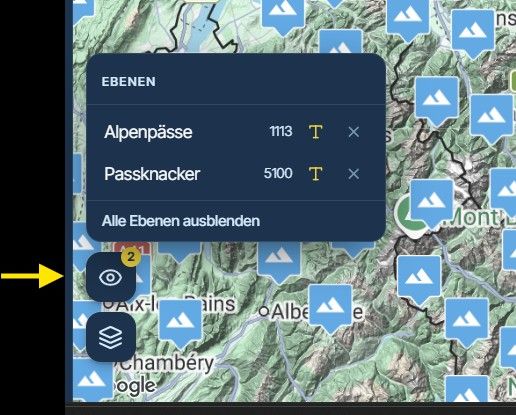
- The planner's Layers panel lists your POI groups and the routes and tracklogs you compare, each with a checkbox. Switched-off ones stay in the list so you can turn them back on, and you can add a POI group or a route to compare from there.
- Street View has a Google Maps button that opens the same view on Google Maps, where you see when it was taken and older captures of that spot.
- More keys. + and - zoom the map (⌘ or Ctrl with the up and down arrows too), and F on an empty planner takes you back to where it opened. P steps a via point's pause through 15, 30, 45 and 60 minutes, and 45 minutes is a new pause option. Press ? to see them all.
- On a tablet, hold your finger on the map to add a waypoint. A light tap, or a tap just next to a map button, no longer adds one by accident. With a mouse, trackpad or Apple Pencil a click still does.
- The Feed and the Heatmap open with the filters you chose last time.
Improvements and changes
- AI Routeplanner: a round trip through places far apart no longer rides the same roads there and back. When a draft does, it now offers a version that keeps the two sides apart, and the towns you name stay the towns you meant.
- Club and event libraries count everything inside a folder, like your own library does, and show the folder's routes on the map.
- On a computer, Discover can fold into a small bar, so the results stay on the map without the list.
- The zoom, compass and tool buttons move aside when a waypoint, POI or stay panel opens.
- When you scroll the planner or tracklog sidebar, the distance and time card folds into one line, so long waypoint lists get more room.
- Reduce can also remove shaping points that only have a name (often an address the classic app filled in), and via points or coloured waypoints, if you tick it.
- Library: Move is in a row's ⋯ menu and on right-click, the Move dialog marks the folder things are already in, moving a folder next to one with the same name now says why it can't, tracklog rows show their travel mode, and search shows the same Ridden, Linked and Shared chips as the folder list.
- The route picker opens in the folder you used last, handy when you add a trip's routes day by day.
- Routes and tracklogs in Compare show direction arrows.
- Without a departure time, the Arrive by check assumes you leave now.
- POI groups with thousands of points no longer slow down the planner map, and moving or merging them is much faster.
- Small maps (AI draft, event overview, collections) lost the buttons they didn't need, and the map style list fits inside a small map.
- An invitation to a club or event now opens for a new account without Beta Access, and tells them it keeps waiting until they have access.
Fixed
- Opening an old route no longer marks it as changed today.
- A GPX downloaded on an Android phone keeps the route's name, so Garmin Drive and other apps recognise it.
- Converting a friend's tracklog to a route works: the route goes into your own library.
- POI groups from the classic app with points that had no place on the map no longer break the page.
- On a phone, the map in Street View fills its window again.
- Compare engines no longer says an engine takes another road for more than your whole route

- A waypoint under a segment label is hidden instead of drawn through the label.
That's it! Thanks again for all your feedback

Cheers,
Corjan -
just one word: Great!

-

weer een mooie verbetering!

-

Phenomenal. Thank you.
-

@corjan-meijerink Fantastic work!!!


-
Hi everyone!
Another website update is live, and again a lot of it comes straight from your forum topics
Here's what changed since Saturday's update.New
- Waypoint list as a spreadsheet. Export a route as a list of its waypoints, with the distance and driving time from the start, the arrival time when you set a departure, and an empty column for your own notes. Export a folder and you get one sheet for the whole trip, with totals that carry on from route to route. It opens in Excel, Numbers and Google Sheets, and it's free.
- Up to 999 waypoints per route, up from 150. Exporting a route with more than 200 warns that your navigation device may not take them all, and offers a copy with fewer.
- Routetracks from tracklogs. A tracklog's Convert button now offers both Convert to route and Convert to routetrack. Tick several tracklogs or routetracks in your library to combine them into one routetrack, in the order you choose.
- Copy to library. Tick routes and folders in a club, an event, a folder a friend shared or your own library, and copy them all to your library in one go. The folders come along. A club or event route also has Save as copy in its ⋯ menu.
- Change your password in Settings, or set one if you signed up with Google or Apple. You get an e-mail when it changes, and your other devices are signed out.
- Show deleted lists everything you deleted in the last 30 days, from every folder, with the folder it came from.
- Several routes in one GPX. Downloading several routes and tracklogs as GPX can give one file instead of a ZIP, and a GPX with several routes imports as separate routes. In the planner it asks whether to save them all in a new folder or open one of them.
- Upload a ZIP. Its route files are imported together, into a new folder named after the ZIP.
- A tracklog can show its route's waypoints and POIs when it's linked to the route you planned. Point at one to see what it is. Your choice is remembered for every tracklog.
- Route plan PDF: choose what goes in. Leave out the turn-by-turn directions for a route book, skip the shaping points, print photos larger, add how the route was planned and pick the text size. The directions start on their own page, and the export dialog now points to the PDF.
- The planner's Layers panel lists your POI groups and the routes and tracklogs you compare, each with a checkbox. Switched-off ones stay in the list so you can turn them back on, and you can add a POI group or a route to compare from there.
- Street View has a Google Maps button that opens the same view on Google Maps, where you see when it was taken and older captures of that spot.
- More keys. + and - zoom the map (⌘ or Ctrl with the up and down arrows too), and F on an empty planner takes you back to where it opened. P steps a via point's pause through 15, 30, 45 and 60 minutes, and 45 minutes is a new pause option. Press ? to see them all.
- On a tablet, hold your finger on the map to add a waypoint. A light tap, or a tap just next to a map button, no longer adds one by accident. With a mouse, trackpad or Apple Pencil a click still does.
- The Feed and the Heatmap open with the filters you chose last time.
Improvements and changes
- AI Routeplanner: a round trip through places far apart no longer rides the same roads there and back. When a draft does, it now offers a version that keeps the two sides apart, and the towns you name stay the towns you meant.
- Club and event libraries count everything inside a folder, like your own library does, and show the folder's routes on the map.
- On a computer, Discover can fold into a small bar, so the results stay on the map without the list.
- The zoom, compass and tool buttons move aside when a waypoint, POI or stay panel opens.
- When you scroll the planner or tracklog sidebar, the distance and time card folds into one line, so long waypoint lists get more room.
- Reduce can also remove shaping points that only have a name (often an address the classic app filled in), and via points or coloured waypoints, if you tick it.
- Library: Move is in a row's ⋯ menu and on right-click, the Move dialog marks the folder things are already in, moving a folder next to one with the same name now says why it can't, tracklog rows show their travel mode, and search shows the same Ridden, Linked and Shared chips as the folder list.
- The route picker opens in the folder you used last, handy when you add a trip's routes day by day.
- Routes and tracklogs in Compare show direction arrows.
- Without a departure time, the Arrive by check assumes you leave now.
- POI groups with thousands of points no longer slow down the planner map, and moving or merging them is much faster.
- Small maps (AI draft, event overview, collections) lost the buttons they didn't need, and the map style list fits inside a small map.
- An invitation to a club or event now opens for a new account without Beta Access, and tells them it keeps waiting until they have access.
Fixed
- Opening an old route no longer marks it as changed today.
- A GPX downloaded on an Android phone keeps the route's name, so Garmin Drive and other apps recognise it.
- Converting a friend's tracklog to a route works: the route goes into your own library.
- POI groups from the classic app with points that had no place on the map no longer break the page.
- On a phone, the map in Street View fills its window again.
- Compare engines no longer says an engine takes another road for more than your whole route
- A waypoint under a segment label is hidden instead of drawn through the label.
That's it! Thanks again for all your feedback
Cheers,
Corjan
Route plan PDF: choose what goes in. Leave out the turn-by-turn directions for a route book, skip the shaping points, print photos larger, add how the route was planned and pick the text size. The directions start on their own page, and the export dialog now points to the PDF.
Thanks for this implementation, but the waypoints are no longer shown on the map, even though they are in the list.
-

Lots of good work!!!! This thing will be AMAZING!!!!!
-

Obi One at it again. Thnkx, great job
-

Prachtige update weer!! Er zitten een aantal aanpassingen in die echt heel fijn zijn.
Heb nog wel een verzoekje rondom de export naar pdf, maar weet niet van dat uberhaupt makkelijk valt aan te passen: Bij het opmaken van het document koos ik ervoor om de routepunten niet weer te geven. Deze worden dan nog wel benoemd in de routebeschrijving. Graag zou ik ze daar dan ook willen verwijderen. Dit is er wel 1 van de categorie “zoveel mensen, zoveel wensen”…

Hello! It looks like you're interested in this conversation, but you don't have an account yet.
Getting fed up of having to scroll through the same posts each visit? When you register for an account, you'll always come back to exactly where you were before, and choose to be notified of new replies (either via email, or push notification). You'll also be able to save bookmarks and upvote posts to show your appreciation to other community members.
With your input, this post could be even better 💗
Register Login-
 01698
-
011185
-
91065
-
 2352.2k
-
015500
-
 0643
-
 3684
-
07100