
F024 Route selection – copying within MRA is still too cumbersome
-

Within the MRA WebPlanner, copying more than one carefully planned route—while retaining all the original MRA data—is currently quite cumbersome.
-
Copying a single route requires a workaround: you must first open it in the Planner and then save it as a copy.
-
For multiple routes, the only option is to download them—a process that requires careful attention to the file format. Downloading more than one route always results in a ZIP file, which must then be unzipped before the files can be re-uploaded. When doing so, it is essential to select the new format: MyRoute-App (.mra "Complete Roundtrip").
Suggestion: Add an option to copy routes directly into your own library within MRA.
Data sources: Clubs or friends
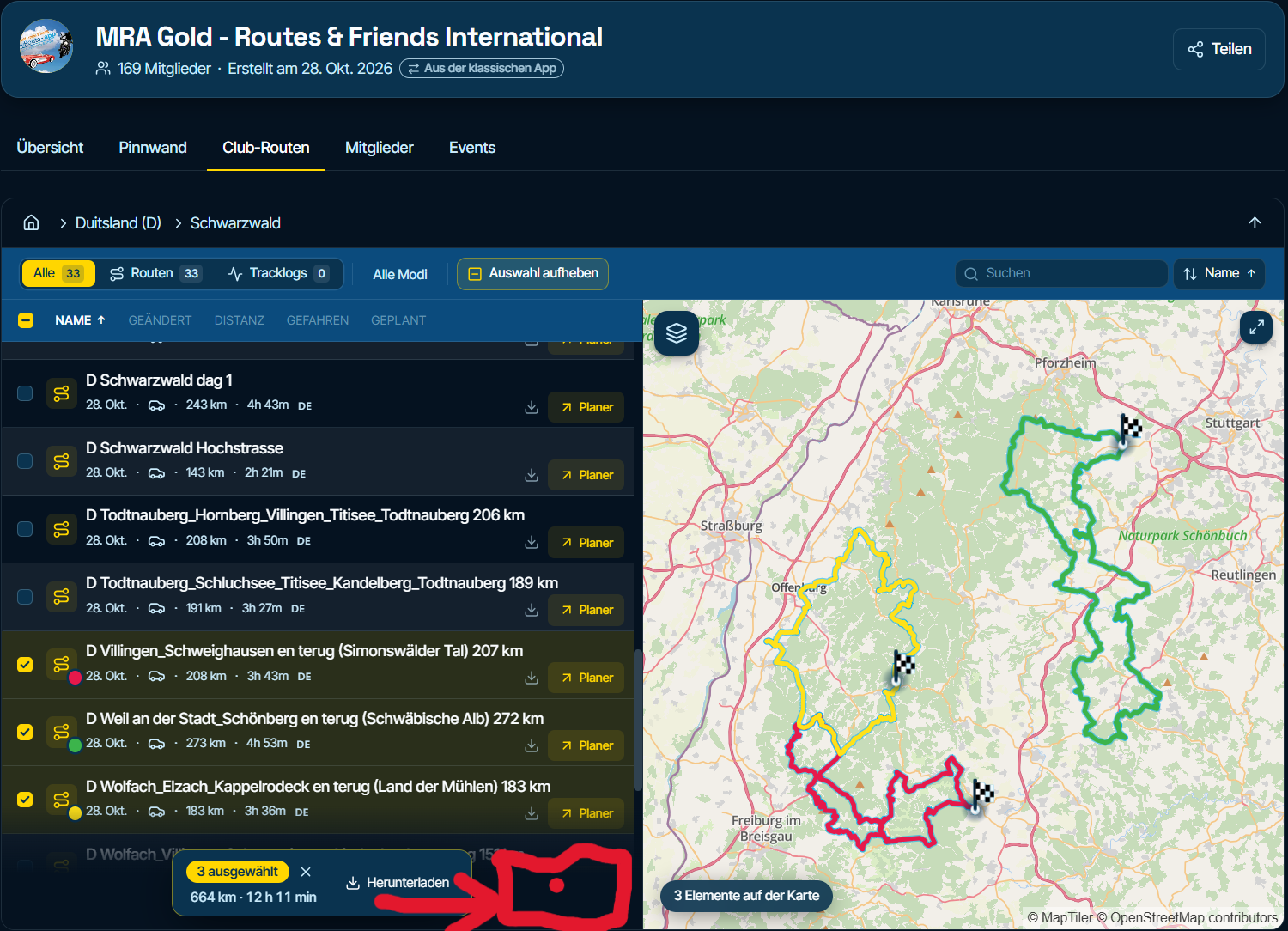
- Enable multi-selection via the checkboxes on the left, and provide an option to copy the selected routes directly into your own library or a subfolder within your personal routes.
New field: "Copy to Library," located to the right of the "Download" button.
-
-

Thanks for the clear suggestion and the screenshot. We've built it, and it will be on the beta with the next update.
When you tick routes in a club's, an event's or a friend's library, a "Copy to library" button now appears next to Download. You choose a folder in your own library, and the routes are copied straight in with all their waypoints, POIs and settings. You can tick whole folders too: their subfolders and routes come along. No ZIP, no unzipping and no file format to choose.
For a single route there's also "Save a copy" in the ⋯ menu of a club route now, so you don't have to open it in the planner first.
Let us know how it works for you!
-
Hey, thanks for that! I’ll test it once it becomes available to us. Thanks a lot for the quick support!!
-
@corjan-meijerink : How about adding a feature within the library itself that allows you to select multiple routes at once and copy them internally? This would enable you to revise and adapt them elsewhere—for instance, by creating a new "2027" folder in your library—since you might want to change certain hotels or specific sections of the routes while keeping the originals intact.
Note: I am currently planning a "2027 Black Forest" trip and have some routes from 2016 that I’d like to reuse but not exactly as they are; at the same time, I don’t want to alter the original versions stored in my "2016 Black Forest" collection.
-

I like the copy internally feature proposed.
I've looked for it and found it missing. My use was having a number of collaborators developing a tour each with the ability to mess up any route, I wanted to copy the live set every now and then as a backup.
Hello! It looks like you're interested in this conversation, but you don't have an account yet.
Getting fed up of having to scroll through the same posts each visit? When you register for an account, you'll always come back to exactly where you were before, and choose to be notified of new replies (either via email, or push notification). You'll also be able to save bookmarks and upvote posts to show your appreciation to other community members.
With your input, this post could be even better 💗
Register Login-
 01684
-
 2332.1k
-
 118118
-
 01386
-
 014381
-
0677
-
 08284
-
1191.7k