Skip to content
  • Categories
  • Recent
  • Popular
  • Support
  • MyRoute-app
Collapse
Brand Logo

MRA Community Forum

  1. Home
  2. MyRoute-app Routeplanner
  3. [Web] Suggestions and Discussion
  4. How to plan correctly

How to plan correctly

Scheduled Pinned Locked Moved [Web] Suggestions and Discussion
18 Posts 6 Posters 2.0k Views 4 Watching
  • Oldest to Newest
  • Newest to Oldest
  • Most Votes
Reply
  • Reply as topic
Log in to reply
This topic has been deleted. Only users with topic management privileges can see it.
  • Christian Feurstein
    Christian Feurstein
    Christian Feurstein
    wrote on last edited by
    #5

    I am able to reproduce this issue with my planned route. So I have checked your question regarding the distance and it is keeping exact the same amount of km when starting the navigation. Today the navigation of the 7h route tells me 7h46min duration. The difference seems to occur probably due to traffic ...

    BMcG 1 Reply Last reply
    1
    • Christian Feurstein Christian Feurstein

      I am able to reproduce this issue with my planned route. So I have checked your question regarding the distance and it is keeping exact the same amount of km when starting the navigation. Today the navigation of the 7h route tells me 7h46min duration. The difference seems to occur probably due to traffic ...

      BMcG
      BMcG
      BMcG
      wrote on last edited by
      #6

      @Christian-Feurstein said:
      The difference seems to occur probably due to traffic ...

      How were you able to deduce the issue was due to traffic?
      If you turn off the "Traffic Aware Calculation" does the estimated time stay the same as the planner?

      BlackView BV7100, Android 12
      USED to navigate "Routes as Tracks" in Offline mode with Offline Maps
      No Wifi, no internet, no interruptions, worked well
      Track navigation deprecated without explanation so jury is out on how well things work now!

      Christian Feurstein 1 Reply Last reply
      0
      • BMcG BMcG

        @Christian-Feurstein said:
        The difference seems to occur probably due to traffic ...

        How were you able to deduce the issue was due to traffic?
        If you turn off the "Traffic Aware Calculation" does the estimated time stay the same as the planner?

        Christian Feurstein
        Christian Feurstein
        Christian Feurstein
        wrote on last edited by
        #7

        @Brian-McG yes. When turning off "Traffic aware calculation" the navigation time is the same as the planner time.
        So we discovered the reason for the time difference but there is still the question: is there anything I can do in the planner to get the same traveltime as the navigation calculates with activated "traffic aware calculation"?

        1 Reply Last reply
        0
        • M. Schrijver
          M. Schrijver
          M. Schrijver
          Valued contributor
          wrote on last edited by
          #8

          That is offcourse not possible. The trafficaware calculation is realtime. The planner is not realtime. I.e you plan a route tonight and ride it the coming weekend

          (I use MRA Next only on Android Auto. Every comment, suggestion, etc will be based on my usage with Android Auto)

          Christian Feurstein 1 Reply Last reply
          0
          • Erdna
            Erdna
            Erdna
            wrote on last edited by
            #9

            To keep it short and simple: no. Even when the tour has already started, conditions can and will change. Imagine a heavy rain and you would have to stop for an hour or so. That has nothing to do with traffic, yet the navigation time will change.

            I would recommend the following: plan stops accurately (e.g. 10 minutes for a photo stop, 5 minutes for refuelling, 30 minutes for lunch break, etc. and enter them in the planner - those figures are just for example). In the end, add another hour for "unforseen" delays and in my humble opinion, you will be fine. 🙂

            Christian Feurstein 1 Reply Last reply
            1
            • M. Schrijver M. Schrijver

              That is offcourse not possible. The trafficaware calculation is realtime. The planner is not realtime. I.e you plan a route tonight and ride it the coming weekend

              Christian Feurstein
              Christian Feurstein
              Christian Feurstein
              wrote on last edited by
              #10

              @M.-Schrijver why isn't it possible to have the planner with the same traffic information as the navigation? Is there a reason for "that is offcourse not possible"?

              1 Reply Last reply
              0
              • Erdna Erdna

                To keep it short and simple: no. Even when the tour has already started, conditions can and will change. Imagine a heavy rain and you would have to stop for an hour or so. That has nothing to do with traffic, yet the navigation time will change.

                I would recommend the following: plan stops accurately (e.g. 10 minutes for a photo stop, 5 minutes for refuelling, 30 minutes for lunch break, etc. and enter them in the planner - those figures are just for example). In the end, add another hour for "unforseen" delays and in my humble opinion, you will be fine. 🙂

                Christian Feurstein
                Christian Feurstein
                Christian Feurstein
                wrote on last edited by
                #11

                @Erdna that is exactly what I don`t want to do. In my MRA experience the total route time the MRA navigation is calculating fits very good to the time I really need. That is the reason why I am asking if this time calculation could be done in the planner as well.

                1 Reply Last reply
                0
                • M. Schrijver
                  M. Schrijver
                  M. Schrijver
                  Valued contributor
                  wrote on last edited by
                  #12

                  Roadworks is possible (it is available in the planner) but traffic related delays not.
                  Because you do not know if there are any traffic related delays on your route when you plan the route. You do not plan a route in realtime behind your PC

                  (I use MRA Next only on Android Auto. Every comment, suggestion, etc will be based on my usage with Android Auto)

                  Christian Feurstein 1 Reply Last reply
                  0
                  • Erdna
                    Erdna
                    Erdna
                    wrote on last edited by
                    #13

                    You plan right now. There´s little traffic. Route says 8 hours.

                    You start on Friday at 9:00 anywhere and at 14:00 all around let´s say Munich there is stop & go and you´re there right then. Maybe in addition a car accident prevents going off a higher ranked road. Does not happen often, but it does. Now you´re up at x+ hours... that you did not consider in advance.

                    Christian Feurstein 1 Reply Last reply
                    0
                    • M. Schrijver M. Schrijver

                      Roadworks is possible (it is available in the planner) but traffic related delays not.
                      Because you do not know if there are any traffic related delays on your route when you plan the route. You do not plan a route in realtime behind your PC

                      Christian Feurstein
                      Christian Feurstein
                      Christian Feurstein
                      wrote on last edited by
                      #14

                      @M.-Schrijver where can I activate roadworks in the planner? Thanks in advance ...

                      1 Reply Last reply
                      0
                      • Erdna Erdna

                        You plan right now. There´s little traffic. Route says 8 hours.

                        You start on Friday at 9:00 anywhere and at 14:00 all around let´s say Munich there is stop & go and you´re there right then. Maybe in addition a car accident prevents going off a higher ranked road. Does not happen often, but it does. Now you´re up at x+ hours... that you did not consider in advance.

                        Christian Feurstein
                        Christian Feurstein
                        Christian Feurstein
                        wrote on last edited by
                        #15

                        @Erdna What you are telling is crystal clear to me. But why isnt it possible to get the same expected duration in the moment I have opened the route in the MRA planner as I get from the navigaton app? Is it technically impossible for the planner to calculate with the current traffic conditions?
                        btw: it seems my originally questions are already answered. 😊 👍

                        • time difference is due to traffic conditions

                        • planner is not able to consider traffic conditions

                        1 Reply Last reply
                        1
                        • M. Schrijver
                          M. Schrijver
                          M. Schrijver
                          Valued contributor
                          wrote on last edited by
                          #16

                          Roadworks are always active when planning on the Here map. But not visible by default
                          Open the "layer" and at the bottom you'll find "Traffic"
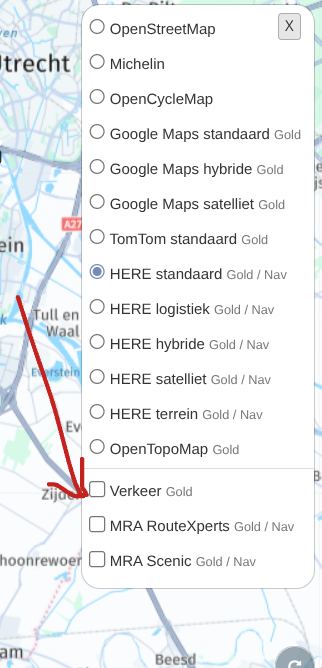
                          Screenshot 2026-10-09 09.19.21.png

                          (I use MRA Next only on Android Auto. Every comment, suggestion, etc will be based on my usage with Android Auto)

                          Christian Feurstein 1 Reply Last reply
                          0
                          • M. Schrijver M. Schrijver

                            Roadworks are always active when planning on the Here map. But not visible by default
                            Open the "layer" and at the bottom you'll find "Traffic"

                            Screenshot 2026-10-09 09.19.21.png

                            Christian Feurstein
                            Christian Feurstein
                            Christian Feurstein
                            wrote on last edited by
                            #17

                            @M.-Schrijver Yes, I'm familiar with that checkbox. However, I couldn't detect any change in route time between activated and deactivated. With the checkbox activated, the map simply displays the current traffic volume on the roads using corresponding colors. 🤷

                            1 Reply Last reply
                            0
                            • M. Schrijver
                              M. Schrijver
                              M. Schrijver
                              Valued contributor
                              wrote on last edited by
                              #18

                              It does not enable/disable it. Only the visible changes. If I'm correct you can enable/disable roadworks with the option "seasonal closure".

                              (I use MRA Next only on Android Auto. Every comment, suggestion, etc will be based on my usage with Android Auto)

                              1 Reply Last reply
                              0

                              Hello! It looks like you're interested in this conversation, but you don't have an account yet.

                              Getting fed up of having to scroll through the same posts each visit? When you register for an account, you'll always come back to exactly where you were before, and choose to be notified of new replies (either via email, or push notification). You'll also be able to save bookmarks and upvote posts to show your appreciation to other community members.

                              With your input, this post could be even better 💗

                              Register Login


                              Reply
                              • Reply as topic
                              Log in to reply
                              • Oldest to Newest
                              • Newest to Oldest
                              • Most Votes


                              ACTIVE USERS
                              Erdna
                              Erdna
                              Marinus van Deudekom
                              Marinus van Deudekom
                              RetiredWingMan
                              RetiredWingMan
                              M. Schrijver
                              M. Schrijver
                              BMcG
                              BMcG
                              Christian Feurstein
                              Christian Feurstein
                              POPULAR TOPICS
                              • Tankstellen entlang der Route
                                Erdna
                                Erdna
                                1
                                10
                                223

                              • Website update - Hide waypoints, one section at a time, e-mails to your tour group and more
                                Cleo
                                Cleo
                                10
                                9
                                137

                              • routes gemaakt in beta opslaan in oude MRA routes
                                Hubert Thoring
                                Hubert Thoring
                                0
                                5
                                46

                              • Minimap
                                LE DIZES Freddy
                                LE DIZES Freddy
                                0
                                3
                                35

                              • Can't retrieve club-event "meeting point" / "verzamelpunt" through API
                                Corjan Meijerink
                                Corjan Meijerink
                                0
                                6
                                70

                              • Bollard trouble
                                MotoCon
                                MotoCon
                                0
                                3
                                27

                              • F042 Is it possible to also display POIs on the library map?
                                Corjan Meijerink
                                Corjan Meijerink
                                0
                                2
                                12

                              • Map movement
                                Corjan Meijerink
                                Corjan Meijerink
                                0
                                2
                                28

                              MY GROUPS
                              • Login

                              • Login or register to search.
                              • First post
                                Last post
                              0
                              • Categories
                              • Recent
                              • Popular
                              • Support
                              • MyRoute-app