
Waypoint Ballons very Big and small Poi.
-

I have very big waypoint balloons and small Poi.
When i change the waypoint settings to smaller then the balloons and the Poi are smaller but that is not what i want.
I want the balloons smaller and the poi bigger.It Happens on a Motorola edge 60 fusion with Android 15 and also on Samsung Galaxy Tab Active 5 with Android 16.
I know this question has been asked before, but the solutions do not work and the topic is locked.Please help:
regards: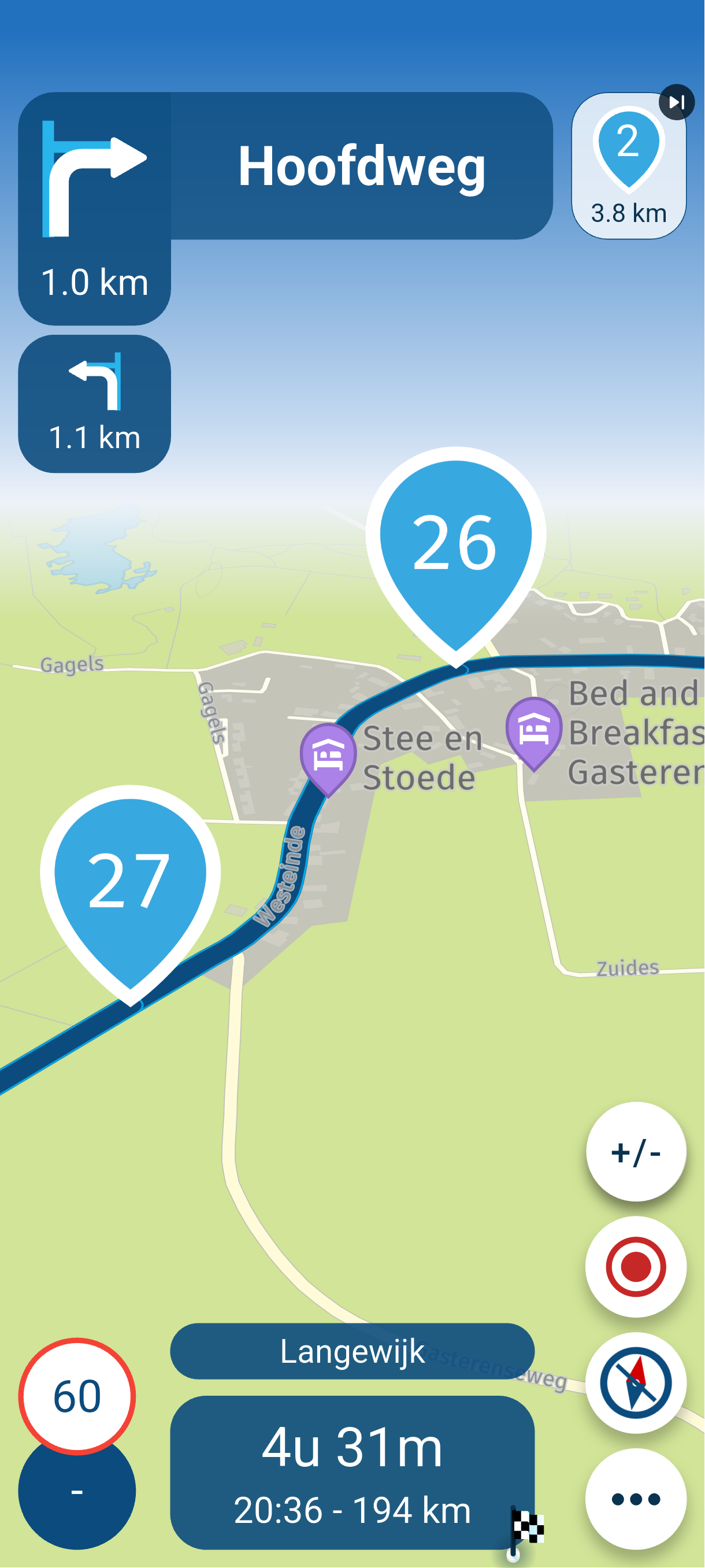 Henk
Henk -
I have very big waypoint balloons and small Poi.
When i change the waypoint settings to smaller then the balloons and the Poi are smaller but that is not what i want.
I want the balloons smaller and the poi bigger.It Happens on a Motorola edge 60 fusion with Android 15 and also on Samsung Galaxy Tab Active 5 with Android 16.
I know this question has been asked before, but the solutions do not work and the topic is locked.Please help:
regards: Henk
@Henk-de-Wit-1 See this topic for the answer: https://forum.myrouteapp.com/post/72833.
You can use the search option of this forum to find som answers

🏍️ BMW K1600GT-P (2013) | Nolan N100-5 with Sena 30K
📱 iOS on iPhone 13 & 16 (mounted on Quadlock or AliExpress extention on BMW-cradle)
🚙 Apple CarPlay in VW T-Roc
💻 Routelab on MacBook Air & iMac (Golden Gate & Ventura) -
@Henk-de-Wit-1 See this topic for the answer: https://forum.myrouteapp.com/post/72833.
You can use the search option of this forum to find som answers
@Rob-Verhoeff I know about this post and it does not work.
As i wrote in my own post when i use the slider to make the balloons smaller, my Poi shrink too.Any other solution? Thanks
-
@Rob-Verhoeff I know about this post and it does not work.
As i wrote in my own post when i use the slider to make the balloons smaller, my Poi shrink too.Any other solution? Thanks
@Henk-de-Wit-1 said in Waypoint Ballons very Big and small Poi.:
Any other solution?
Not in this version...
-
@Rob-Verhoeff I know about this post and it does not work.
As i wrote in my own post when i use the slider to make the balloons smaller, my Poi shrink too.Any other solution? Thanks

@Henk-de-Wit-1, Am I correct to assume that you have enabled some magnification or zoom factor in your Android settings? Usually in the accessibility settings. I get more or less the same effect when I up the magnification factor to the max.
-
With the default settings this how the waypoints are displayed compared to the most other POI. No magnification option, etc enabled. I mentioned this issue also a few months ago. I think it is introduced with version 4.xxxx
Hello! It looks like you're interested in this conversation, but you don't have an account yet.
Getting fed up of having to scroll through the same posts each visit? When you register for an account, you'll always come back to exactly where you were before, and choose to be notified of new replies (either via email, or push notification). You'll also be able to save bookmarks and upvote posts to show your appreciation to other community members.
With your input, this post could be even better 💗
Register Login-
 0745
0745
-
 1514
1514
-
0524
-
06243
-
 06231
06231
-
04133
-
 17197
17197
-
0355