Skip to content
  • Categories
  • Recent
  • Popular
  • Support
  • MyRoute-app
Collapse
Brand Logo

MRA Community Forum

  1. Home
  2. [Beta] The MyRoute-app
  3. [Beta] Problems, Bugs and other Issues
  4. Close menu with Barbutton/Keyboard not working

Close menu with Barbutton/Keyboard not working

Scheduled Pinned Locked Moved [Beta] Problems, Bugs and other Issues
9 Posts 3 Posters 95 Views 2 Watching
  • Oldest to Newest
  • Newest to Oldest
  • Most Votes
Reply
  • Reply as topic
Log in to reply
This topic has been deleted. Only users with topic management privileges can see it.
  • Jörgenundefined Online
    Jörgenundefined Online
    Jörgen
    Valued contributor
    wrote on last edited by
    #1

    Hi,

    I noticed today that I can not close the menu while navigating with the Barbuttons.
    Open is working, but not close.
    I tried at home with a Bluetooth keyboard and sent the letter "N". It opens the menu, but it does not close it.
    So if you change something (e.g. warnings) you need to tap the screen, remote does not work.

    Hardware
    iPhone 12 pro (iOS 26.2.1)
    iPad (7.Gen.) 18.7.3
    Oukitel RT3 Pro (Andr. 14)
    Wireless CarPlay mit (Elebest C650)
    Wired CarPlay (SEAT Arona - 2021)
    MRA Workshops in Deutsch sind hier zu finden

    Con Hennekensundefined 1 Reply Last reply
    0
    • Jörgenundefined Online
      Jörgenundefined Online
      Jörgen
      Valued contributor
      wrote on last edited by
      #2

      Hi, I tried the SilverFox setting, where the letter "B" is used to open/close menu.
      It works with a keyboard and here it is also not possible to close the menu with "B"

      Hardware
      iPhone 12 pro (iOS 26.2.1)
      iPad (7.Gen.) 18.7.3
      Oukitel RT3 Pro (Andr. 14)
      Wireless CarPlay mit (Elebest C650)
      Wired CarPlay (SEAT Arona - 2021)
      MRA Workshops in Deutsch sind hier zu finden

      1 Reply Last reply
      0
      • Jörgenundefined Jörgen

        Hi,

        I noticed today that I can not close the menu while navigating with the Barbuttons.
        Open is working, but not close.
        I tried at home with a Bluetooth keyboard and sent the letter "N". It opens the menu, but it does not close it.
        So if you change something (e.g. warnings) you need to tap the screen, remote does not work.

        Con Hennekensundefined Offline
        Con Hennekensundefined Offline
        Con Hennekens
        Alpha tester
        wrote on last edited by
        #3

        @Jörgen I guess you can move to the back arrow and activate it?

        I am just an enthusiastic MRA user, and hope you will be one too!

        Most motorcycle problems are caused by the nut that connects the handlebar to the saddle.

        Check out RideSleepRepeat.eu, a biker community for sharing stays across Europe

        1 Reply Last reply
        0
        • Jörgenundefined Online
          Jörgenundefined Online
          Jörgen
          Valued contributor
          wrote on last edited by
          #4

          Hi Con, yes this is maybe an option, but you need to hit at least 3 times the back arrow key to reach the correct position and then hit another key "C" to confirm it.
          And then the menu closes, but also changes the view into "Top Down". Because the "C" key was used. To get back to previous view, you need to hit "C" another 2 times.

          In the past, the letter "N" opened and closed the menu.
          Just one button 2 hits.
          I prefer the old version.

          Hardware
          iPhone 12 pro (iOS 26.2.1)
          iPad (7.Gen.) 18.7.3
          Oukitel RT3 Pro (Andr. 14)
          Wireless CarPlay mit (Elebest C650)
          Wired CarPlay (SEAT Arona - 2021)
          MRA Workshops in Deutsch sind hier zu finden

          1 Reply Last reply
          0
          • Jörgenundefined Online
            Jörgenundefined Online
            Jörgen
            Valued contributor
            wrote on last edited by
            #5

            How is this working with SilverFox? Is there a SilverFox user who can try this?

            Hardware
            iPhone 12 pro (iOS 26.2.1)
            iPad (7.Gen.) 18.7.3
            Oukitel RT3 Pro (Andr. 14)
            Wireless CarPlay mit (Elebest C650)
            Wired CarPlay (SEAT Arona - 2021)
            MRA Workshops in Deutsch sind hier zu finden

            1 Reply Last reply
            0
            • Stanisławundefined Offline
              Stanisławundefined Offline
              Stanisław
              Valued contributor
              wrote on last edited by
              #6

              I can not check now but, as I remember, + goes deepper into submenu, - goes back, so on the main level - should close menu - am I wrong?

              --
              Regards
              Staszek

              Jörgenundefined 1 Reply Last reply
              0
              • Stanisławundefined Stanisław

                I can not check now but, as I remember, + goes deepper into submenu, - goes back, so on the main level - should close menu - am I wrong?

                Jörgenundefined Online
                Jörgenundefined Online
                Jörgen
                Valued contributor
                wrote on last edited by
                #7

                @Stanisław said in Close menu with Barbutton/Keyboard not working:

                I can not check now but, as I remember, + goes deepper into submenu, - goes back, so on the main level - should close menu - am I wrong?

                • and - does not have any function in menu (at Barbuttons).
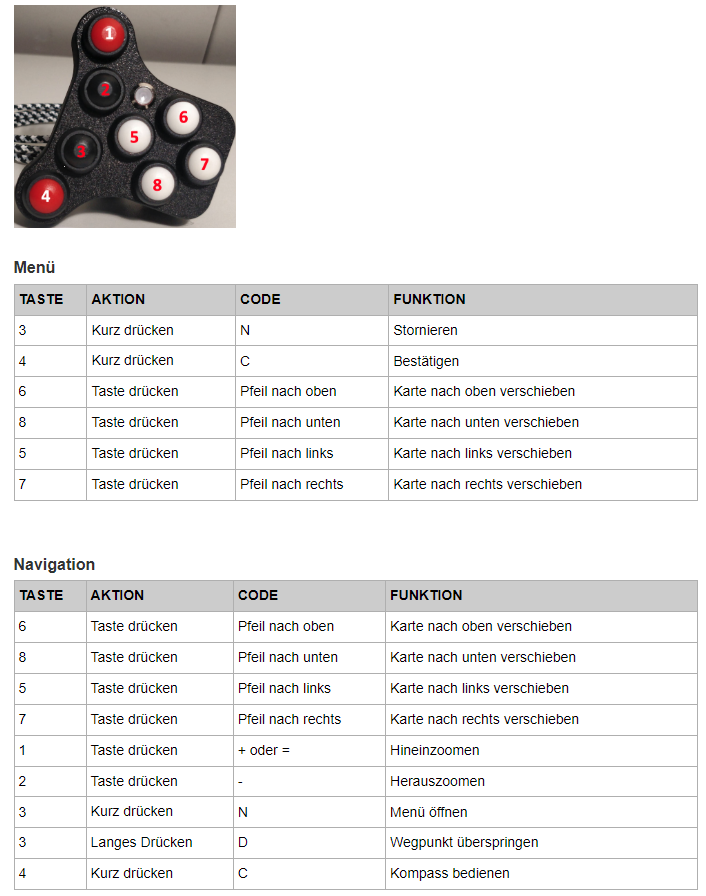
                0518cbdd-2220-4a13-a0bc-9d4ec3234a2a-image.png

                Hardware
                iPhone 12 pro (iOS 26.2.1)
                iPad (7.Gen.) 18.7.3
                Oukitel RT3 Pro (Andr. 14)
                Wireless CarPlay mit (Elebest C650)
                Wired CarPlay (SEAT Arona - 2021)
                MRA Workshops in Deutsch sind hier zu finden

                Stanisławundefined 1 Reply Last reply
                0
                • Jörgenundefined Online
                  Jörgenundefined Online
                  Jörgen
                  Valued contributor
                  wrote on last edited by Jörgen
                  #8

                  @Corjan-Meijerink is it possible to bring this back?

                  Drawer (menu):

                  • arrow keys move focus
                  • c selected focussed element
                  • n close drawer

                  You wrote this here:
                  https://forum.myrouteapp.com/post/21057

                  Hardware
                  iPhone 12 pro (iOS 26.2.1)
                  iPad (7.Gen.) 18.7.3
                  Oukitel RT3 Pro (Andr. 14)
                  Wireless CarPlay mit (Elebest C650)
                  Wired CarPlay (SEAT Arona - 2021)
                  MRA Workshops in Deutsch sind hier zu finden

                  1 Reply Last reply
                  0
                  • Jörgenundefined Jörgen

                    @Stanisław said in Close menu with Barbutton/Keyboard not working:

                    I can not check now but, as I remember, + goes deepper into submenu, - goes back, so on the main level - should close menu - am I wrong?

                    • and - does not have any function in menu (at Barbuttons).

                    0518cbdd-2220-4a13-a0bc-9d4ec3234a2a-image.png

                    Stanisławundefined Offline
                    Stanisławundefined Offline
                    Stanisław
                    Valued contributor
                    wrote on last edited by
                    #9

                    @Jörgen said in Close menu with Barbutton/Keyboard not working:

                    and - does not have any function in menu (at Barbuttons).

                    Sorry, I use Remotek-one a didnt'n know that.

                    --
                    Regards
                    Staszek

                    1 Reply Last reply
                    0

                    Hello! It looks like you're interested in this conversation, but you don't have an account yet.

                    Getting fed up of having to scroll through the same posts each visit? When you register for an account, you'll always come back to exactly where you were before, and choose to be notified of new replies (either via email, or push notification). You'll also be able to save bookmarks and upvote posts to show your appreciation to other community members.

                    With your input, this post could be even better 💗

                    Register Login
                    Reply
                    • Reply as topic
                    Log in to reply
                    • Oldest to Newest
                    • Newest to Oldest
                    • Most Votes


                    ACTIVE USERS
                    Con Hennekensundefined
                    Con Hennekens
                    Jörgenundefined
                    Jörgen
                    Stanisławundefined
                    Stanisław
                    POPULAR TOPICS
                    • MRA V5.2 (473) Topic new closures
                      Hubert Thoringundefined
                      Hubert Thoring
                      0
                      15
                      66

                    • GPX Versions 1.1 vs 1.2 for Garmin Visually Explained
                      Marinus van Deudekomundefined
                      Marinus van Deudekom
                      6
                      7
                      124

                    • Wonderwheel zoom function Chigee
                      Dae 0undefined
                      Dae 0
                      0
                      9
                      757

                    • Getting frequently "not respoding" message
                      Marinus van Deudekomundefined
                      Marinus van Deudekom
                      0
                      6
                      19

                    • Route Color line option?
                      Franxuundefined
                      Franxu
                      2
                      12
                      1.6k

                    • HERE Maps vs Other Map Providers
                      Con Hennekensundefined
                      Con Hennekens
                      0
                      5
                      31

                    • Ottocast 5.1 lite
                      Jack Jacobson 1 0undefined
                      Jack Jacobson 1 0
                      0
                      5
                      108

                    • Not all info shown on the screen !
                      Rob Verhoeffundefined
                      Rob Verhoeff
                      0
                      5
                      94

                    MY GROUPS
                    • Login

                    • Login or register to search.
                    • First post
                      Last post
                    0
                    • Categories
                    • Recent
                    • Popular
                    • Support
                    • MyRoute-app