Skip to content
  • Categories
  • Recent
  • Popular
  • Support
  • MyRoute-app
Collapse
Brand Logo

MRA Community Forum

  1. Home
  2. [Beta] The MyRoute-app
  3. [Beta] Problems, Bugs and other Issues
  4. Close menu with Barbutton/Keyboard not working

Close menu with Barbutton/Keyboard not working

Scheduled Pinned Locked Moved [Beta] Problems, Bugs and other Issues
7 Posts 3 Posters 60 Views 2 Watching
  • Oldest to Newest
  • Newest to Oldest
  • Most Votes
Reply
  • Reply as topic
Log in to reply
This topic has been deleted. Only users with topic management privileges can see it.
  • Jörgenundefined Offline
    Jörgenundefined Offline
    Jörgen
    Valued contributor
    wrote last edited by
    #1

    Hi,

    I noticed today that I can not close the menu while navigating with the Barbuttons.
    Open is working, but not close.
    I tried at home with a Bluetooth keyboard and sent the letter "N". It opens the menu, but it does not close it.
    So if you change something (e.g. warnings) you need to tap the screen, remote does not work.

    Hardware
    iPhone 12 pro (iOS 18.7.1)
    Oukitel RT3 pro (Andr. 14)
    Samsung XCover 4 (Andr. 9 Pie)
    Wireless CarPlay mit (Elebest C650)
    Wired CarPlay (SEAT Arona - 2021)
    More information about Workshops here

    Con Hennekensundefined 1 Reply Last reply
    0
    • Jörgenundefined Offline
      Jörgenundefined Offline
      Jörgen
      Valued contributor
      wrote last edited by
      #2

      Hi, I tried the SilverFox setting, where the letter "B" is used to open/close menu.
      It works with a keyboard and here it is also not possible to close the menu with "B"

      Hardware
      iPhone 12 pro (iOS 18.7.1)
      Oukitel RT3 pro (Andr. 14)
      Samsung XCover 4 (Andr. 9 Pie)
      Wireless CarPlay mit (Elebest C650)
      Wired CarPlay (SEAT Arona - 2021)
      More information about Workshops here

      1 Reply Last reply
      0
      • Jörgenundefined Jörgen

        Hi,

        I noticed today that I can not close the menu while navigating with the Barbuttons.
        Open is working, but not close.
        I tried at home with a Bluetooth keyboard and sent the letter "N". It opens the menu, but it does not close it.
        So if you change something (e.g. warnings) you need to tap the screen, remote does not work.

        Con Hennekensundefined Offline
        Con Hennekensundefined Offline
        Con Hennekens
        Alpha tester
        wrote last edited by
        #3

        @Jörgen I guess you can move to the back arrow and activate it?

        I am just an enthusiastic MRA user, and hope you will be one too!

        Most motorcycle problems are caused by the nut that connects the handlebar to the saddle.

        Streetpilot 2610 / Zumo 660 / Zumo 395 / Motorola Thinkphone + MRA app

        1 Reply Last reply
        0
        • Jörgenundefined Offline
          Jörgenundefined Offline
          Jörgen
          Valued contributor
          wrote last edited by
          #4

          Hi Con, yes this is maybe an option, but you need to hit at least 3 times the back arrow key to reach the correct position and then hit another key "C" to confirm it.
          And then the menu closes, but also changes the view into "Top Down". Because the "C" key was used. To get back to previous view, you need to hit "C" another 2 times.

          In the past, the letter "N" opened and closed the menu.
          Just one button 2 hits.
          I prefer the old version.

          Hardware
          iPhone 12 pro (iOS 18.7.1)
          Oukitel RT3 pro (Andr. 14)
          Samsung XCover 4 (Andr. 9 Pie)
          Wireless CarPlay mit (Elebest C650)
          Wired CarPlay (SEAT Arona - 2021)
          More information about Workshops here

          1 Reply Last reply
          0
          • Jörgenundefined Offline
            Jörgenundefined Offline
            Jörgen
            Valued contributor
            wrote last edited by
            #5

            How is this working with SilverFox? Is there a SilverFox user who can try this?

            Hardware
            iPhone 12 pro (iOS 18.7.1)
            Oukitel RT3 pro (Andr. 14)
            Samsung XCover 4 (Andr. 9 Pie)
            Wireless CarPlay mit (Elebest C650)
            Wired CarPlay (SEAT Arona - 2021)
            More information about Workshops here

            1 Reply Last reply
            0
            • Stanisławundefined Offline
              Stanisławundefined Offline
              Stanisław
              Valued contributor
              wrote last edited by
              #6

              I can not check now but, as I remember, + goes deepper into submenu, - goes back, so on the main level - should close menu - am I wrong?

              Jörgenundefined 1 Reply Last reply
              0
              • Stanisławundefined Stanisław

                I can not check now but, as I remember, + goes deepper into submenu, - goes back, so on the main level - should close menu - am I wrong?

                Jörgenundefined Offline
                Jörgenundefined Offline
                Jörgen
                Valued contributor
                wrote last edited by
                #7

                @Stanisław said in Close menu with Barbutton/Keyboard not working:

                I can not check now but, as I remember, + goes deepper into submenu, - goes back, so on the main level - should close menu - am I wrong?

                • and - does not have any function in menu (at Barbuttons).
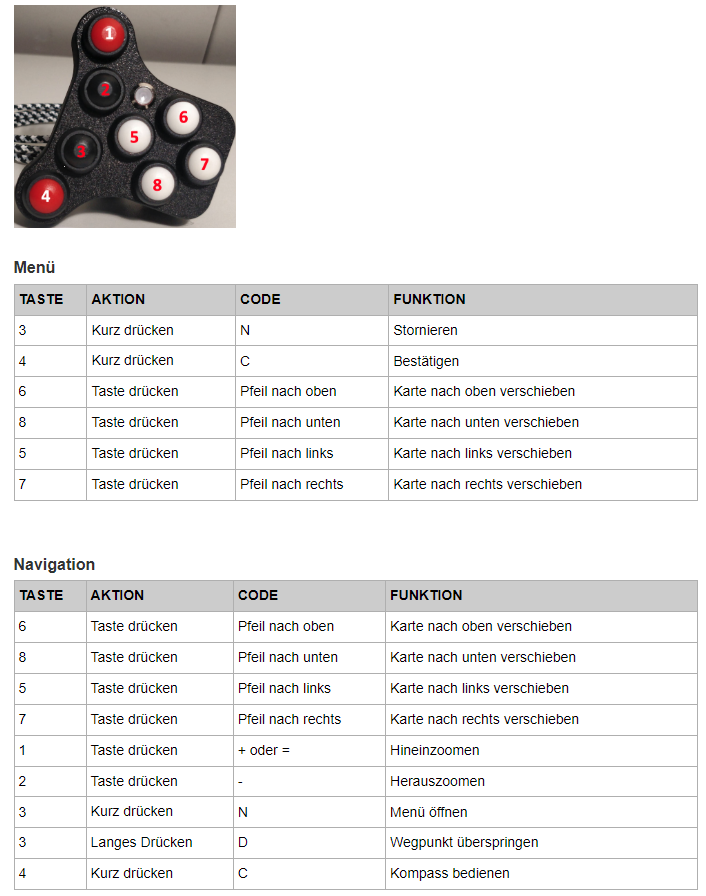
                0518cbdd-2220-4a13-a0bc-9d4ec3234a2a-image.png

                Hardware
                iPhone 12 pro (iOS 18.7.1)
                Oukitel RT3 pro (Andr. 14)
                Samsung XCover 4 (Andr. 9 Pie)
                Wireless CarPlay mit (Elebest C650)
                Wired CarPlay (SEAT Arona - 2021)
                More information about Workshops here

                1 Reply Last reply
                0
                Reply
                • Reply as topic
                Log in to reply
                • Oldest to Newest
                • Newest to Oldest
                • Most Votes


                ACTIVE USERS
                Jörgenundefined
                Jörgen
                Stanisławundefined
                Stanisław
                Con Hennekensundefined
                Con Hennekens
                POPULAR TOPICS
                • Close menu with Barbutton/Keyboard not working
                  Jörgenundefined
                  Jörgen
                  0
                  7
                  60

                • Bijna feilloos werken met MRA
                  Corjan Meijerinkundefined
                  Corjan Meijerink
                  3
                  42
                  9.6k

                • Picos de Europa draft route
                  Brian McGundefined
                  Brian McG
                  0
                  4
                  134

                • using GPS coordinates for planning not always correct
                  Brian McGundefined
                  Brian McG
                  0
                  2
                  20

                • (afwijkende) pauze tijd wordt niet meegenomen in de planner
                  CD130undefined
                  CD130
                  0
                  6
                  691

                • I don't need AA to run the app on a phone, right?
                  Brian McGundefined
                  Brian McG
                  0
                  2
                  41

                • MRA APP Carplay and Wonderweel
                  Hubert Thoringundefined
                  Hubert Thoring
                  0
                  2
                  80

                • Annoying "Can't calculate route"
                  Robert Laudensackundefined
                  Robert Laudensack
                  0
                  5
                  242
                MY GROUPS
                • Login

                • Login or register to search.
                • First post
                  Last post
                0
                • Categories
                • Recent
                • Popular
                • Support
                • MyRoute-app