Close menu with Barbutton/Keyboard not working
-

Hi,
I noticed today that I can not close the menu while navigating with the Barbuttons.
Open is working, but not close.
I tried at home with a Bluetooth keyboard and sent the letter "N". It opens the menu, but it does not close it.
So if you change something (e.g. warnings) you need to tap the screen, remote does not work.Hardware
iPhone 12 pro (iOS 26.2.1)
iPad (7.Gen.) 18.7.3
Oukitel RT3 Pro (Andr. 14)
Wireless CarPlay mit (Elebest C650)
Wired CarPlay (SEAT Arona - 2021)
MRA Workshops in Deutsch sind hier zu finden -
Hi, I tried the SilverFox setting, where the letter "B" is used to open/close menu.
It works with a keyboard and here it is also not possible to close the menu with "B" -
Hi,
I noticed today that I can not close the menu while navigating with the Barbuttons.
Open is working, but not close.
I tried at home with a Bluetooth keyboard and sent the letter "N". It opens the menu, but it does not close it.
So if you change something (e.g. warnings) you need to tap the screen, remote does not work.
@Jörgen I guess you can move to the back arrow and activate it?
-
Hi Con, yes this is maybe an option, but you need to hit at least 3 times the back arrow key to reach the correct position and then hit another key "C" to confirm it.
And then the menu closes, but also changes the view into "Top Down". Because the "C" key was used. To get back to previous view, you need to hit "C" another 2 times.In the past, the letter "N" opened and closed the menu.
Just one button 2 hits.
I prefer the old version. -
How is this working with SilverFox? Is there a SilverFox user who can try this?
-

I can not check now but, as I remember, + goes deepper into submenu, - goes back, so on the main level - should close menu - am I wrong?
--
Regards
Staszek -
I can not check now but, as I remember, + goes deepper into submenu, - goes back, so on the main level - should close menu - am I wrong?
@Stanisław said in Close menu with Barbutton/Keyboard not working:
I can not check now but, as I remember, + goes deepper into submenu, - goes back, so on the main level - should close menu - am I wrong?
- and - does not have any function in menu (at Barbuttons).
Hardware
iPhone 12 pro (iOS 26.2.1)
iPad (7.Gen.) 18.7.3
Oukitel RT3 Pro (Andr. 14)
Wireless CarPlay mit (Elebest C650)
Wired CarPlay (SEAT Arona - 2021)
MRA Workshops in Deutsch sind hier zu finden -
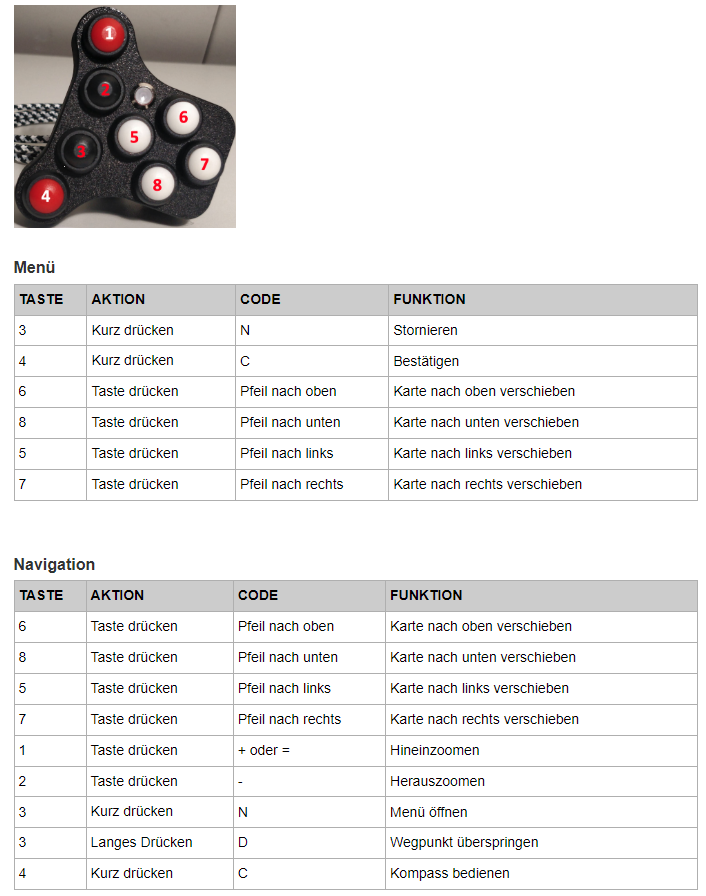
@Corjan-Meijerink is it possible to bring this back?
Drawer (menu):
- arrow keys move focus
- c selected focussed element
- n close drawer
You wrote this here:
https://forum.myrouteapp.com/post/21057 -
@Stanisław said in Close menu with Barbutton/Keyboard not working:
I can not check now but, as I remember, + goes deepper into submenu, - goes back, so on the main level - should close menu - am I wrong?
- and - does not have any function in menu (at Barbuttons).
@Jörgen said in Close menu with Barbutton/Keyboard not working:
and - does not have any function in menu (at Barbuttons).
Sorry, I use Remotek-one a didnt'n know that.
Hello! It looks like you're interested in this conversation, but you don't have an account yet.
Getting fed up of having to scroll through the same posts each visit? When you register for an account, you'll always come back to exactly where you were before, and choose to be notified of new replies (either via email, or push notification). You'll also be able to save bookmarks and upvote posts to show your appreciation to other community members.
With your input, this post could be even better 💗
Register Login-
08171
-
 1838
1838
-
 4261.9k
-
 042
042
-
0469
-
 0572
0572
-
 0435
0435
-
0933