
time and duration panel
-

Hello,
I searched for the time and duration pane while navigating as there are different tiny symbols appearing and I liked to know their meaning. However, I was not able to find the possible icons that can be displayed at the instructions. Is there a list of icons that indicate and describe their meaning?
I saw on my screen a yellowish circle for example with an arrow up/ arrow down or a finishing flag, but there were some others I can't recall right now. Is there a list of icons that I didn't find?Mit freundlichen Gruessen / Met vriendelijke groet / Best regards
Joerg
(Cookie-On-Tour.de)Duster Lauréate SCe 115 LPG 4x2 · Everest Minicamp by Niewiadow (B1300)
Carpuride W701 Pro · iPhone 15 Pro Max -
Hello,
I searched for the time and duration pane while navigating as there are different tiny symbols appearing and I liked to know their meaning. However, I was not able to find the possible icons that can be displayed at the instructions. Is there a list of icons that indicate and describe their meaning?
I saw on my screen a yellowish circle for example with an arrow up/ arrow down or a finishing flag, but there were some others I can't recall right now. Is there a list of icons that I didn't find?
@Cookie-On-Tour said in time and duration panel:
yellowish circle for example with an arrow up/ arrow down
This is the offline indicator icon. If this one appears, your're in offline mode. Either initiated by yourself with the "offline switch" in the settings, or by the app automatically when internet is lost. If you did not set the switch to offline yourself, the app should move back to online mode whenever it determines internet is back again. This may take a minute or so.
Can you recall which icons you additionally saw?
Perhaps some of the ones you saw are explained in the inbuilt "tutorial" you can activate. It guides you through a lot of the menus and their meaning.
Edit: after reading your post another time, the information below already discusses your seen icons.
There are no additional icons, except for the fuel icon that may appear on the left side of your screen, just below the navinstruction fields, which shows the next fuel station ON your route, not in the neighborhood of your location, but ON your route.Regarding the "finishing" flag, it is mentioned in the tutorial:
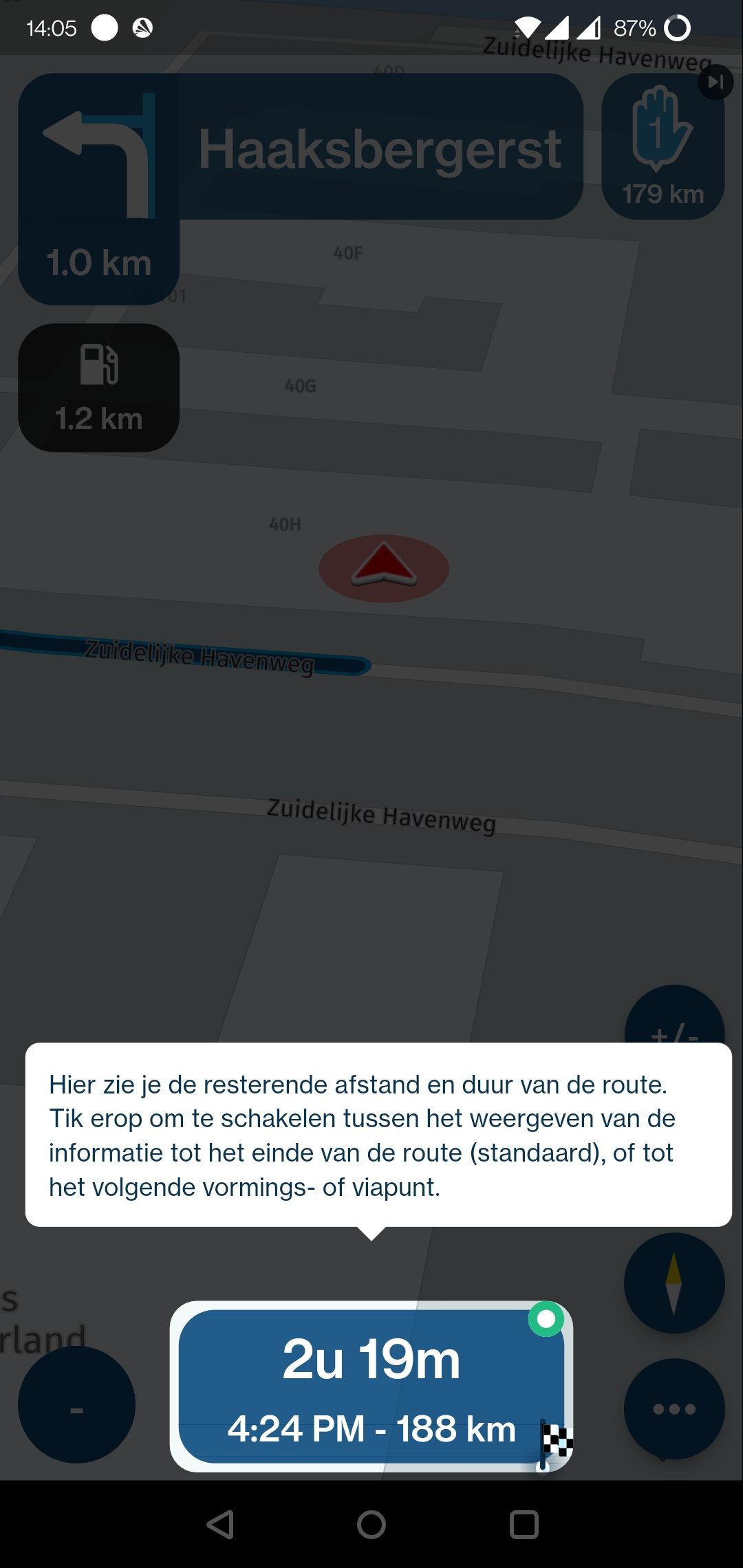
This field can either show the distance to the next waypoint (inverted icon), the next via point (
 icon) or the destination (
 icon) of the route. Tap the field to iterate through the options.
Manks bu'j te bange.
-
@Cookie-On-Tour said in time and duration panel:
yellowish circle for example with an arrow up/ arrow down
This is the offline indicator icon. If this one appears, your're in offline mode. Either initiated by yourself with the "offline switch" in the settings, or by the app automatically when internet is lost. If you did not set the switch to offline yourself, the app should move back to online mode whenever it determines internet is back again. This may take a minute or so.
Can you recall which icons you additionally saw?
Perhaps some of the ones you saw are explained in the inbuilt "tutorial" you can activate. It guides you through a lot of the menus and their meaning.
Edit: after reading your post another time, the information below already discusses your seen icons.
There are no additional icons, except for the fuel icon that may appear on the left side of your screen, just below the navinstruction fields, which shows the next fuel station ON your route, not in the neighborhood of your location, but ON your route.Regarding the "finishing" flag, it is mentioned in the tutorial:
This field can either show the distance to the next waypoint (inverted icon), the next via point ( icon) or the destination ( icon) of the route. Tap the field to iterate through the options.
@Stefan-Hummelink many thanks, you helped a lot. I think the green circle with the white dot did have different colours too, but I might be wrong.
Mit freundlichen Gruessen / Met vriendelijke groet / Best regards
Joerg
(Cookie-On-Tour.de)Duster Lauréate SCe 115 LPG 4x2 · Everest Minicamp by Niewiadow (B1300)
Carpuride W701 Pro · iPhone 15 Pro Max -
@Stefan-Hummelink many thanks, you helped a lot. I think the green circle with the white dot did have different colours too, but I might be wrong.
@Cookie-On-Tour That circle is the "track recording" icon! If it is red, you are not tracking your route, if it is green, it is tracking your route. Upon saving the track you get a tracklog in your account.
In the settings you'll find the option to Auto-Start a track when navigating a route. There is no Auto-Stop.
Hello! It looks like you're interested in this conversation, but you don't have an account yet.
Getting fed up of having to scroll through the same posts each visit? When you register for an account, you'll always come back to exactly where you were before, and choose to be notified of new replies (either via email, or push notification). You'll also be able to save bookmarks and upvote posts to show your appreciation to other community members.
With your input, this post could be even better 💗
Register Login-
 0742
0742
-
 0524
0524
-
 06221
06221
-
 06225
06225
-
04127
-
 81354.8k
-
 17190
17190
-
0349